Two keyboards, one computer?

labecs

New member
Local time
1:05 PM
Messages
51
It's the first time I've had to consider this, but I need to have two keyboards connected to the computer. I need one for certain jobs and another one for others. Is it possible? Does Win 7 have a setting that would allow 2 keyboards at the same time?
 

My Computer

Computer Manufacturer/Model Number
HP Pavillion
OS
Windows 7
CPU
Intel Core 2 Quad q6600 @2.40GHz
Memory
6.00 GB
Graphics Card(s)
Intel G33/G31 Express Chipset Family (???)
Sound Card
Realtek High Definition Audio
Monitor(s) Displays
HP w2207 Wide LCD Monitor
Screen Resolution
1680 x 1050
Keyboard
Logitech DiNovo Edge
Mouse
Logitech MX Revolution or Optical Trackman
Other Info
I'm not a gamer, I just run programs like Photoshop, SwishMax, Dreamweaver and Word 2007. I have the latest Kaspersky Internet Security (2010)
It's the first time I've had to consider this, but I need to have two keyboards connected to the computer. I need one for certain jobs and another one for others. Is it possible? Does Win 7 have a setting that would allow 2 keyboards at the same time?

doubt it could you tell us more about the apps you need to use different keyboards?

Thanks

Ken J
 

My Computer

Computer Manufacturer/Model Number
HP Pavillion dv-7 1005 Tx
OS
Win 8 Release candidate 8400
CPU
[email protected]
Memory
4 gigs
Graphics Card(s)
Nvidia 9600M
Sound Card
HD built-in
Monitor(s) Displays
17" Wxga
Screen Resolution
1440x900
Cooling
none
Internet Speed
45Mb down 5Mb up
I would of thought it's just like having a 2 mice (or mouses? I dunno :P) plugged in where you can use both at same time.
 

My Computer

Computer Manufacturer/Model Number
Custom Build
OS
Windows 7 x64 Ultimate
CPU
AMD Phenom II X4 955 @ 3.72GHz
Motherboard
Gigabyte GA-MA770T-UD3P
Memory
Patriot 8GB DDR3 1333MHz
Graphics Card(s)
NVIDIA GTX560
Sound Card
-
Monitor(s) Displays
LG 23" W2343T
Screen Resolution
1920 x 1080
Hard Drives
256GB Crucial M4 SSD - OS/program files
250GB - Internal HDD - User files
500GB - Internal HDD - Storage #1
1.5TB - Internal HDD - Storage #2
500GB - External HDD - Portable Storage #1
2TB - External HDD - Portable Storage #2
PSU
TT450W
Case
Thermaltake V3
Cooling
Blue Orb II
Keyboard
Compaq.
Mouse
Logitech MX518
Internet Speed
7Mbps.
Other Info
Cooling (couldn't fit it above).
2 x 120mm LED Blue Fan
1 x Blue Orb II [CPU Cooler]
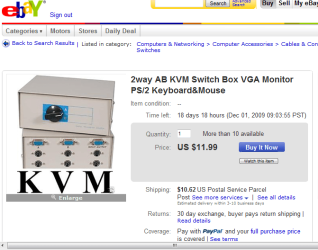
2 way Keyboard switch box :D
 

Attachments

  • Keyboard_Switch.PNG
    Keyboard_Switch.PNG
    39.7 KB · Views: 397

My Computer

Computer type
PC/Desktop
Computer Manufacturer/Model Number
Built them myself, Science Experiments !
OS
Win7 Enterprise, Win7 x86 (Ult 7600), Win7 x64 Ult 7600, TechNet RTM on AMD x64 (2.8Ghz)
CPU
AMD fx8350 4ghz, AMD-32 2400mhz, AMD-64 3200mhz, AMDx64 2.8G
Motherboard
SIS 755, ECS-K8M890M-M (Ult 7600), GigaByte & others
Memory
2gb, 4gb on the Ult 7600, 4gb on Technet RTM, 32gb on FX8350
Graphics Card(s)
Draw my own Graphics, several nVidia cards
Sound Card
on motherboard
Monitor(s) Displays
19" flat scr, 28" I-Inc widescr,22" Emprex Widescr, 23" Acer
Screen Resolution
1280 x 1024, 1440 x 900, 1920 x 1080
Hard Drives
6 pata Ide HD's & 2 Sata HD's
added 80gb external on Ult 7600 computer,
numerous extra 1tb, 2TB, 3Tb SATA HD's
A collection of ext HD Docks w/ HDs
PSU
430w, 550w, 600w, 700, 800, etc
Case
All Generic Full Towers
Cooling
Open Air & a few fans, some w/ colored LEDs
Keyboard
Compaq & Dell recycled from GoodWill
Mouse
Made in China Optical Wired Mouse
Internet Speed
Fast Cable InterNet
Antivirus
AVG Free on 24 different Desktops, NO Problems!
Browser
IE 8 is preferred, but use FireFox sometimes
Other Info
Linksys Routers, switches, & Hubs
Too Many USB Flash Drives to count, Biggest is 64GB !
Eight computers in my home network.
Sixteen computers at my business network.
Linked via TeamViewer !
Lots of old used spare computer parts everywhere!
I would of thought it's just like having a 2 mice (or mouses? I dunno :P) plugged in where you can use both at same time.

Parker you may be right. I was thinking about it after I posted. If there are two seperate drivers, keyboards, etc.

Might work I should have thought it thru.

Ken J
 

My Computer

Computer Manufacturer/Model Number
HP Pavillion dv-7 1005 Tx
OS
Win 8 Release candidate 8400
CPU
[email protected]
Memory
4 gigs
Graphics Card(s)
Nvidia 9600M
Sound Card
HD built-in
Monitor(s) Displays
17" Wxga
Screen Resolution
1440x900
Cooling
none
Internet Speed
45Mb down 5Mb up
I would say yes, but only one can be used at a time.

While I was struggling to fix my Saitek Gamers keyboard (USB) with Win 7, I also had a Logitech (PS2) plugged in. After fixing the Saitek one, I kept the other plugged in for just-in-case.
 

My Computer

Computer Manufacturer/Model Number
My Custom
OS
W7 x64 Ultimate
CPU
AMD Athlon 64 X2 6000+ @3100
Motherboard
Asus M2N32-SLI Deluxe BIOS Ver: 2209
Memory
Corsair XMS2 Xtreme [1GB x4]
Graphics Card(s)
2x 8600GTS 512MB SLI
Sound Card
X-Fi XtremeGamer Fatal1ty Pro
Monitor(s) Displays
Dell 2407WFP
Screen Resolution
1920x1200
Hard Drives
Primary - WD Raptor 150 SATA /
Data - WD 350 SATA, Hitachi 350 SATA
PSU
Corsair CMPSU-1000HX
Case
CoolerMaster CM 690
Cooling
Astek LCLC
Keyboard
Saitek Gamer's Keyboard Pro
Mouse
Logitech G5
Internet Speed
DL 7.89 Mb/s
Yeah, it sounds strange, but I need to us a keyboard with special characters for some jobs, but I didn't want to have to be switching all the time. I tried to plug them in together, but the new one won't work while the other one is plugged in. Oh, well, I'll work harder and switch them around I guess.
 

My Computer

Computer Manufacturer/Model Number
HP Pavillion
OS
Windows 7
CPU
Intel Core 2 Quad q6600 @2.40GHz
Memory
6.00 GB
Graphics Card(s)
Intel G33/G31 Express Chipset Family (???)
Sound Card
Realtek High Definition Audio
Monitor(s) Displays
HP w2207 Wide LCD Monitor
Screen Resolution
1680 x 1050
Keyboard
Logitech DiNovo Edge
Mouse
Logitech MX Revolution or Optical Trackman
Other Info
I'm not a gamer, I just run programs like Photoshop, SwishMax, Dreamweaver and Word 2007. I have the latest Kaspersky Internet Security (2010)
I found that two keyboards work just fine, and you can switch from one to the other at will!

This is how I found out: my Targus USB hub with all the Logitech kbd and mouse dongles failed the other day. I attached a PS2 keyboard and mouse to get the dual-boot PC start on the right foot, as it were... After finding what the problem was, I stuck thye Bluetooth/wireless dongles into the ports on the machine itself, and did not initially remove the PS/2 cables.

I was then able to use either keyboard and mouse at will, even to the point of using the PS/2 keyboard and the wireless mouse, and vice-versa... Obviously, they have different drivers!

Cheers,

LMH
 
Last edited:

My Computer

Computer Manufacturer/Model Number
2 x home-brew
OS
Win 7 Ultimate 64-bit, Win7 N 32-bit, WHS
CPU
AMD 64 X2 3600+, AMD Phenom II X3 720BE
Motherboard
Gigabyte MA770-UD3, Gigabyte MA790GP-4UDH4, GA-890GPA-UDH3
Memory
4GB DDR2 OCZ dual-channel, 6GB DDR2 Corsair
Graphics Card(s)
Gigabyte HD 4850 on the dual-booter, built-in on others
Sound Card
2 x onboard
Monitor(s) Displays
LG Flatron W2353V
Screen Resolution
1920 x 1080
Hard Drives
Seagates, Samsung, WD
PSU
Corsair HX 620, Corsair 450, Kamariki et al.
Case
Lian Li PC-7F, Antec Sonata, Macase
Keyboard
Logitech diNovo Edge
Mouse
Logitech MX Revolution
Internet Speed
1500kb/s
Other Info
There's a few other PCs in my 'office', all older machines, running Ubuntu 9.10, Vista Ultimate and one surviving Windows ME machine (due to some old programs that I haven't moved...). I believe another 'veteran' still runs OpenSuse...
2 keyboards, 1 computer?

Although the above posts were written 4 years ago, carioca's seems to be exactly what I was searching for. I have a wired keyboard and mouse connected to my desktop pc, and the pc connected (wired) to an HDTV about 20 feet away. The TV has inputs specifically to connect a pc and recognizes the PC in its menu of connected devices, essentially turning the HDTV into a second/clone monitor. However, it's inconvenient to have to go back to the keyboard to navigate using the pc monitor when viewing on the TV. I would like to connect a second wireless keyboard that could be used while sitting closer to the TV while the wired keyboard is also active/functional at the pc. I am looking closely at the SMK-Link Wireless Ultra-Mini Touchpad Keyboard (Wireless keyboard | Ultra-Mini Touchpad Keyboard | PC & Mac | SMK-Link). I've also researched full-size wireless keyboards with touchpads but have not found one that gets good reviews on distance/range like this one does.

Is carioca's experience the exception to the rule, or can I spend the money on this wireless keyboard with confidence that the setup should work? If there's anything in the Windows 7 programming that would cause the simultaneous connection of 2 keyboards to result in a hardware/device conflict I would think it wouldn't have worked for carioca...

If anyone has learned more about this in the last 4 years since the prevous posts, I'd very much appreciate hearing about it.
 

My Computer

Computer type
PC/Desktop
Computer Manufacturer/Model Number
custom build
OS
Windows 7 Professional 64-bit
CPU
3.40GHz AMD Phenom II X4 965
Motherboard
MSI 870A-G54
Memory
16GB
Graphics Card(s)
ATI Radeon HD 5450
Hard Drives
Maxtor 6 SCSI 250GB
MAXTOR DiamondMax 21 STM3320620AS ATA 320GB
Antivirus
Microsoft Security Essentials
Browser
Internet Explorer 9
Laptops all have fixed keyboards & adding a wireless keyboard works; both keyboards remain active. No different for a desktop.
 

My Computer

Computer type
PC/Desktop
Computer Manufacturer/Model Number
Dell Inspiron 660
OS
Windows 7 Home Premium 64bit
CPU
Intel Core i3-3240
Motherboard
Dell 084J0R
Memory
8GB DDR3 SDRAM
Graphics Card(s)
EVGA GeForce GT 620
Sound Card
Intel Panther Point PCH High Definition Audio
Monitor(s) Displays
Acer G205HV
Screen Resolution
1600 x 900
Hard Drives
Sandisk SSD 64GB SDSSDP064G
Seagate HDD 1TB ST1000DM003-1CH162
PSU
Dell 300W
Case
Dell Inspiron
Keyboard
Logitech Wireless K320/B350
Mouse
Microsoft
Internet Speed
25Mbps/4Mbps
Antivirus
Avast
Browser
Mozilla Firefox
2 keyboards, 1 computer?

I didn't think Windows would count an integrated latop keyboard as a separate device, as it does the keyboard and mouse on a desktop pc. I'm hoping this works, because I just gave in and ordered the SMK-Link. I'll post results when it arrives.
 

My Computer

Computer type
PC/Desktop
Computer Manufacturer/Model Number
custom build
OS
Windows 7 Professional 64-bit
CPU
3.40GHz AMD Phenom II X4 965
Motherboard
MSI 870A-G54
Memory
16GB
Graphics Card(s)
ATI Radeon HD 5450
Hard Drives
Maxtor 6 SCSI 250GB
MAXTOR DiamondMax 21 STM3320620AS ATA 320GB
Antivirus
Microsoft Security Essentials
Browser
Internet Explorer 9
A PS2 keyboard, a usb keyboard and a wireless usb keyboard all work on 1 pc.
 

My Computer

Computer type
PC/Desktop
Computer Manufacturer/Model Number
Skylake Special #666
OS
Windows 10 Pro x64
CPU
Intel Core i7 6700K
Motherboard
Asus Sabertooth Z170 Mark 1
Memory
GSkill TridentZ RGB 16GB 3600 16-16-16-36
Graphics Card(s)
EVGA GTX 980 Ti SC x2
Sound Card
Realtek High Definition
Monitor(s) Displays
AOC G2460PG
Screen Resolution
1920 x 1080 144Hz
Hard Drives
Samsung 860 Pro 256GB, Seagate Barracuda 4TB x2
PSU
EVGA 1000 P2, EVGA White Custom Braided Cables
Case
Corsair Vengeance C70 Gunmetal Black
Cooling
Corsair H100i v2, Corsair ML120 x2, Thermal Grizzly Kryonaut
Keyboard
Logitech G910 Orion Spectrum
Mouse
Logitech G700s
Internet Speed
Verizon Fios Quantum Gateway 75/75
Antivirus
Windows Defender, Malwarebytes Free 3.8.3
Browser
Chrome
Other Info
Corsair SP120 x4, LG Blu-ray Drive, Durabrand HT-395 100 Watt Dolby Digital Amp, Corsair H2100 Wireless 7.1 Headset
Well, I'm thrilled to confirm that everyone who said it would be no problem was correct. The little SMK-Link Wireless Ultra Mini Keyboard does exactly what I needed. I was a little thrown by how small it is (I know, with "ultra Mini" in the name...) - it looked larger in the photos where it's being held by adult hands, yet when I hold it, it does look the same as the photos. I guess I wish it was about 25-30% larger, but I have no complaints. It has a complete keyboard, the touchpad works, the mouse click buttons work, it just takes getting used to. Thank you to all for the input.
 

My Computer

Computer type
PC/Desktop
Computer Manufacturer/Model Number
custom build
OS
Windows 7 Professional 64-bit
CPU
3.40GHz AMD Phenom II X4 965
Motherboard
MSI 870A-G54
Memory
16GB
Graphics Card(s)
ATI Radeon HD 5450
Hard Drives
Maxtor 6 SCSI 250GB
MAXTOR DiamondMax 21 STM3320620AS ATA 320GB
Antivirus
Microsoft Security Essentials
Browser
Internet Explorer 9
Now that is one cute little keyboard. It looks like it would be ideal for when I'm reading e-books using my TV. I like that it uses AAs instead of having to recharge an internal battery (it only takes a few seconds to swap out AAs and charge the depleted ones at my convenience). I found it on Newegg but it's hard to tell some things from the picture and description. Are the keys backlit? Can one control audio volume with it (it looks like it can with the left round button thingy)? If so, I'll probably be all over it like stink on skunk.
 

My Computer

Computer type
PC/Desktop
Computer Manufacturer/Model Number
Custom Build
OS
Win 7 Ultimate 64 bit
CPU
Intel i7-3930K
Motherboard
ASUS P9X79 WS
Memory
Kingston HyperX Genesis 32GB Kit (8x4GB Modules) 1600MHz DDR
Graphics Card(s)
MSI R7850 Twin Frozr 2GD5/OC Radeon HD 7850 2GB 256-bit GDDR
Sound Card
Asus Xonar Essence STX
Monitor(s) Displays
3x Asus VG248QE 24", Vizio 32" TV
Screen Resolution
1920 x 1080, ?
Hard Drives
Samsung 128GB 840 Pro SSD (1),
Samsung 4TB 850 EVO SSDs (4)
Samsung 4TB 850 EVO SSDs (16) external backup drives used in 2.5" hot swap bays in the computer.
PSU
Corsair HX750w
Case
Antec Two Hundred v2 (modified)
Cooling
Cooler Master GeminII S524 120mm (fan replaced with a 140mm)
Keyboard
Logitech G510s
Mouse
Logitech M525 (two in use)
Internet Speed
=< 32Mbps down, 8Mbps up
Antivirus
AVAST!, MBAM, SAS, Spybot S&D (all but MBAM free) Glary Util
Browser
IE11
Other Info
LSI 9211-8i HBA card (8 SATA III ports), 2.5" & 3.5" Hot Swap Bays, HooToo HT-CR001 PCI-E to USB 3.0 Internal Hub + 6 Slot Card Reader, and LG Model CH12LS28 BD-ROM Optical Drive. Also, ScanSnap S1500 ADF duplexing scanner, Canon 9000F flat bed scanner, Corsair SP2500 2.1 speakers, Samsung CLP 415nw laser color printer, Cyberpower PP2200SW UPS
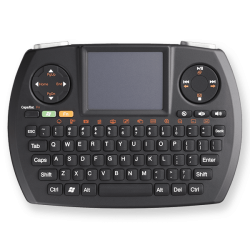
It does. I have attached the best-resolution pic I could find. Directly below the round control to the right of the touchpad are three buttons. The one on the left is the mute button (a tiny speaker in a circle with a diagonal line through it), the center one is volume- and the one on the right is volume+. IN addition to the batteries, what I find particularly helpful is that it works on radio frequency instead of infra-red, so line of sight from the keyboard to the transmitter (a little USB stick the size of a small flash drive that works when plugged into ANY available USB port) is not necessary. On the mfg website, it retails for $69.99. I bought it on amazon from a high-rated seller for $53.99 with free super-saver shipping because it was over $50. The most amazing thing was the free shipping. I purchased it on May 29th, and delivery was expected to be between June 4-8. It was on my doorstep the next morning.
 

Attachments

  • SMK-Link_Wireless_Ultra_Mini_Touchpad_Keyboard.png
    SMK-Link_Wireless_Ultra_Mini_Touchpad_Keyboard.png
    106.5 KB · Views: 10

My Computer

Computer type
PC/Desktop
Computer Manufacturer/Model Number
custom build
OS
Windows 7 Professional 64-bit
CPU
3.40GHz AMD Phenom II X4 965
Motherboard
MSI 870A-G54
Memory
16GB
Graphics Card(s)
ATI Radeon HD 5450
Hard Drives
Maxtor 6 SCSI 250GB
MAXTOR DiamondMax 21 STM3320620AS ATA 320GB
Antivirus
Microsoft Security Essentials
Browser
Internet Explorer 9
I just noticed something about the photo I should have seen before... the pic shows the volume buttons as speaker pictures, but I'm guessing that was an older model. The buttons on mine actually say Vol- and Vol+ so it couldn't be clearer. It comes with a little User's Manual booklet that identifies the picture on each button, much like an automobile owner's manual identifies all the little graphics that light up on the dashboard. For instance, on the control wheel to the right of the touchpad, the icon at the bottom of the ring is a little envelope. Its function is Email, and it launches the/your default email program. It appears to have all the functions of a full-sized digital media keyboard. You can see the booklet/guide at Wireless keyboard | Ultra-Mini Touchpad Keyboard | PC & Mac | SMK-Link - click on the Users Guide link under Support on the lower right side, and it will open the guide in PDF format. You can save it and study it if you like, to help in deciding if it's what you want.
 

My Computer

Computer type
PC/Desktop
Computer Manufacturer/Model Number
custom build
OS
Windows 7 Professional 64-bit
CPU
3.40GHz AMD Phenom II X4 965
Motherboard
MSI 870A-G54
Memory
16GB
Graphics Card(s)
ATI Radeon HD 5450
Hard Drives
Maxtor 6 SCSI 250GB
MAXTOR DiamondMax 21 STM3320620AS ATA 320GB
Antivirus
Microsoft Security Essentials
Browser
Internet Explorer 9
Thanks for the detailed info! The only thing I don't like about this keyboard is the keys aren't backlit (mutter, mutter, mumble, mumble) but the only other mini keyboards I could find that were backlit didn't get as good of reviews as this one and they used lithium-ion batteries that had to be charged in the keyboard with a USB cable. The LI batteries were also prone to failure and I couldn't find any replacement batteries listed. That's why I prefer devices using AAs (or AAAs). I use Sanyo Eneloops and just swap them out when they go dead, then recharge them at my convenience. The Eneloops hold most of their charge for a year, unlike the earlier NiMHs which would self discharge in a month. I've been using Eneloops for several years and have yet to have one go bad on me.

I'm going to sleep on this a bit but it looks like this little guy should pretty much meet my needs.
 

My Computer

Computer type
PC/Desktop
Computer Manufacturer/Model Number
Custom Build
OS
Win 7 Ultimate 64 bit
CPU
Intel i7-3930K
Motherboard
ASUS P9X79 WS
Memory
Kingston HyperX Genesis 32GB Kit (8x4GB Modules) 1600MHz DDR
Graphics Card(s)
MSI R7850 Twin Frozr 2GD5/OC Radeon HD 7850 2GB 256-bit GDDR
Sound Card
Asus Xonar Essence STX
Monitor(s) Displays
3x Asus VG248QE 24", Vizio 32" TV
Screen Resolution
1920 x 1080, ?
Hard Drives
Samsung 128GB 840 Pro SSD (1),
Samsung 4TB 850 EVO SSDs (4)
Samsung 4TB 850 EVO SSDs (16) external backup drives used in 2.5" hot swap bays in the computer.
PSU
Corsair HX750w
Case
Antec Two Hundred v2 (modified)
Cooling
Cooler Master GeminII S524 120mm (fan replaced with a 140mm)
Keyboard
Logitech G510s
Mouse
Logitech M525 (two in use)
Internet Speed
=< 32Mbps down, 8Mbps up
Antivirus
AVAST!, MBAM, SAS, Spybot S&D (all but MBAM free) Glary Util
Browser
IE11
Other Info
LSI 9211-8i HBA card (8 SATA III ports), 2.5" & 3.5" Hot Swap Bays, HooToo HT-CR001 PCI-E to USB 3.0 Internal Hub + 6 Slot Card Reader, and LG Model CH12LS28 BD-ROM Optical Drive. Also, ScanSnap S1500 ADF duplexing scanner, Canon 9000F flat bed scanner, Corsair SP2500 2.1 speakers, Samsung CLP 415nw laser color printer, Cyberpower PP2200SW UPS
Back
Top