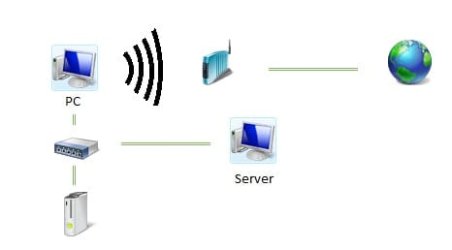
Two Networks, One with internet, one without.

needshelp

New member
Local time
3:38 AM
Messages
3
Hi, Im having a problem with my networks... i have 2 networks that i connect to, one that is wireless, and is connected to my internet connection, and another that is connected to an Xbox and a file server through a router.

My problem is that whenever i connect to them both, i cannot connect to the internet anymore, but as soon as i disconnect the router, i am able to access the internet again... My network center shows it as
*My-PC* -------- Multiple Networks-----x-----internet {when im connected to both}

and

*My-PC*---------*Wireless Network*---------Internet {when im connected to the wireless only}

Please help me.
 

My Computer

Computer Manufacturer/Model Number
Dell
OS
Window 7
CPU
Intel 2.6 Dual Core
Memory
4 GB
Graphics Card(s)
Nvidia 8100
Monitor(s) Displays
LG 32"
looks like the router needs some port-forwarding.. check your router setup ( access router from 127.0.0.1), and allow the stuff hanging on your outputs access to the port
 

My Computer

Computer Manufacturer/Model Number
Samsung Q70 Notebook
OS
Windows 7 7600 OEM
CPU
Intel Duo T7500
Motherboard
Samsung
Memory
2Gb
Graphics Card(s)
Nvidia 512Mb ram
Sound Card
Realtek HD
Monitor(s) Displays
Built in
Screen Resolution
1900x800
Hard Drives
Fujitsu 200Gb SATA x 2
No that didnt work... i dont care if my file server or xbox get internet access... (im not sure if thats what u were trying to accomplish) i just want to be able to access the internet through my wireless Nic and access files from server at the same time.
 

My Computer

Computer Manufacturer/Model Number
Dell
OS
Window 7
CPU
Intel 2.6 Dual Core
Memory
4 GB
Graphics Card(s)
Nvidia 8100
Monitor(s) Displays
LG 32"
No that didnt work... i dont care if my file server or xbox get internet access... (im not sure if thats what u were trying to accomplish) i just want to be able to access the internet through my wireless Nic and access files from server at the same time.

OK

m assuming your server is wired into your router, and your pc is wifi, correct? what are the two networks? are they both yours? are they both wifi networks? are you using a firewall, anti virus, encryption in router and pc's?

Ken
 

My Computer

Computer Manufacturer/Model Number
HP Pavillion dv-7 1005 Tx
OS
Win 8 Release candidate 8400
CPU
[email protected]
Memory
4 gigs
Graphics Card(s)
Nvidia 9600M
Sound Card
HD built-in
Monitor(s) Displays
17" Wxga
Screen Resolution
1440x900
Cooling
none
Internet Speed
45Mb down 5Mb up
My PC has a wifi and a wired nic, the two networks are, PC-Internet and PC-Router-Server/Xbox (see Untitled.jpg) no firewall, avast! antivirus, no encryptions in router, dont know about PCs
 

Attachments

  • Untitled.jpg
    Untitled.jpg
    6.8 KB · Views: 23

My Computer

Computer Manufacturer/Model Number
Dell
OS
Window 7
CPU
Intel 2.6 Dual Core
Memory
4 GB
Graphics Card(s)
Nvidia 8100
Monitor(s) Displays
LG 32"
i know nobody probably cares anymore but just in case

i realize this problem is OLD, but i was having the same issue and came across this, figured it may help someone like me if i post how to solve it

go into the network and sharing center
click change adapter settings
right click the connection that DOESNT have internet
go to properties
click Internet Protocol Version 4 (TCP/IPv4)
hit properties
hit the circle beside Use the following IP address:
manually set up your ip address and subnet mask
make sure nothing is in the gateway portion
if something is, or you want to double check
hit advanced
and delete everything from the Default Gateways section
the network will then be called Unidentified Network, but it will still function normally without trying to take over your internet

basically a "gateway" is a path to the internet, so if the router without internet access is set up to be used as a gateway it will mess with things. make sure that the only gateway set up on the computer is the one that actually has internet, every other connection should be manually set up without one or if you can find a way to do it on your routers dhcp server to set it up without a gateway that may work as well
 

My Computer

OS
Windows 7 Home Premium 64bit
Back
Top