
You are using an out of date browser. It may not display this or other websites correctly.
You should upgrade or use an alternative browser.
You should upgrade or use an alternative browser.
Two new locations showing in Network?
- Thread starter eknirb
- Start date
Do you have a WiFi NIC in your machine?
Looks like nearby wireless networks from neighbors that you're now picking up?
Looks like nearby wireless networks from neighbors that you're now picking up?
My Computer
- Computer type
- PC/Desktop
- Computer Manufacturer/Model Number
- Home-built, two systems (1) and (2)
- OS
- Windows 7 Pro x64 (1), Win7 Pro X64 (2)
- CPU
- i5-3350p 3.1Ghz/6MB-cache (1); E8400 3.0Ghz/6MB-cache (2)
- Motherboard
- ASUS P8Z77-V Pro (1); ASUS P5Q3 (2)
- Memory
- 8GB PC3-12800 DDR3 (1); 4GB PC3-10600 DDR3 (2)
- Graphics Card(s)
- ATI HD7750 (1), (see TV cards); ATI R7 250 (2)
- Sound Card
- Realtek ALC892 HD Audio (1); Realtek ALC1200 HD Audio (2)
- Monitor(s) Displays
- Eizo HD2441W LCD, Eizo S2433W (1); Eizo 24" S2433W (2)
- Screen Resolution
- 1920x1200, 1920x1200 (1); 1920x1200 (2)
- Hard Drives
- (1) 1TB SATA-II (7200RPM), 2x2TB SATA-III (7200RPM), 250GB SATA-III (10000RPM) for OS; 2x2TB external USB 3.0
(2) 320GB SATA-II (7200RPM), 750GB SATA-II (7200RPM), 150GB SATA-II (10000RPM) for OS; 2TB external USB 3.0
- PSU
- Nesteq ECS-6001 600W (1); Nesteq ECS-5001 500W (2)
- Case
- Acousti-Case 360 (1) and (2)
- Cooling
- Noctua NH-U12P SE2 for CPU, 2x120mm case fans (1) and (2)
- Keyboard
- IBM PS/2 (1) and (2)
- Mouse
- Logitech MX Revolution wireless (1); Microsoft wired (2)
- Internet Speed
- 100mbps down / 10mbps up
- Antivirus
- Microsoft Security Essentials; Malwarebyte Anti-Malware Pro
- Browser
- Firefox
- Other Info
- Ceton InfiniTV 4-tuner cablecard-enabled TV card as well as Hauppauge HVR-2250 OTA/ATSC 2-tuner TV card in (1), running under Win7 WMC
(1) NIC = network interface controller, or network interface card, or "network adapter".
Most desktop machines have at least ordinary "wired" ethernet ports, for a wired connection to your home wired/wireless router or cable modem, etc. These show up in Device Manager as part of the "network adapters" group.
Newer desktop machines can also have "wireless" adapters, to optionally connect wirelessly to your home wired/wireless router if you don't have ethernet cables running from your desktop machine location to where the router is. This is the same as your smart phone or other wireless device or gaming console does with its "WiFi" feature enabled, to freely connect to the Internet through your home (or restaurant, etc.) wireless router rather than say using 3G/4G connectivity (which might cost money for metered data usage, not to mention would possibly be slower than a high-speed home broadband ISP service available wirelessly through a router).
And of course, most modern laptops have both. You can thus use either (a) ethernet ports for a wired connection to a local router or switch, or (b) wireless (aka WiFi) capability for a wireless connection to a nearby "WiFi hotspot" (which could be your home wireless router, or outside public WiFi capability like in the airport or restaurants, etc.).
For example, I'm writing this right now while working on my W530 laptop, which is connected "wireless" to my home WiFi wireless network and then out to the Internet. Actually, because of distances, I'm actually connecting to a "wireless access point" in my kitchen (where I have a Netgear WN604 WAP connected "wired" to my Netgear WNDR4000 router in the back bedroom). Both of my two desktop machines are connected "wired" using their own gigabit NIC connectors to the gigabit router, through Cat6 ethernet cable running directly from the back bedroom to the locations in the house where the two desktop machines live.
So, if I look at Device Manager on my W530 laptop and expand "network adapters", I see the following:
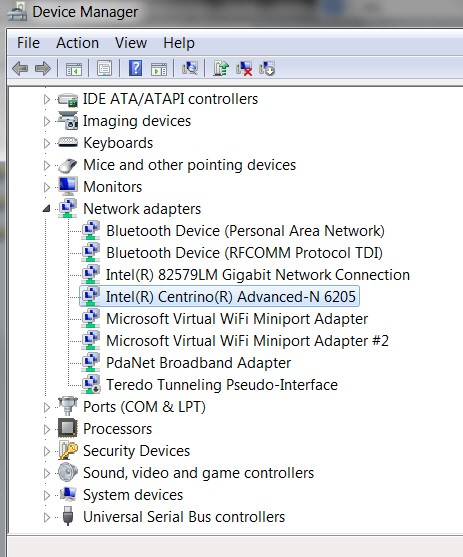
Note that my laptop also contains a wired NIC option (Intel 82579LM) but I'm not using it at the moment, but rather am operating wireless through the Intel Centrino 6205 wireless NIC.
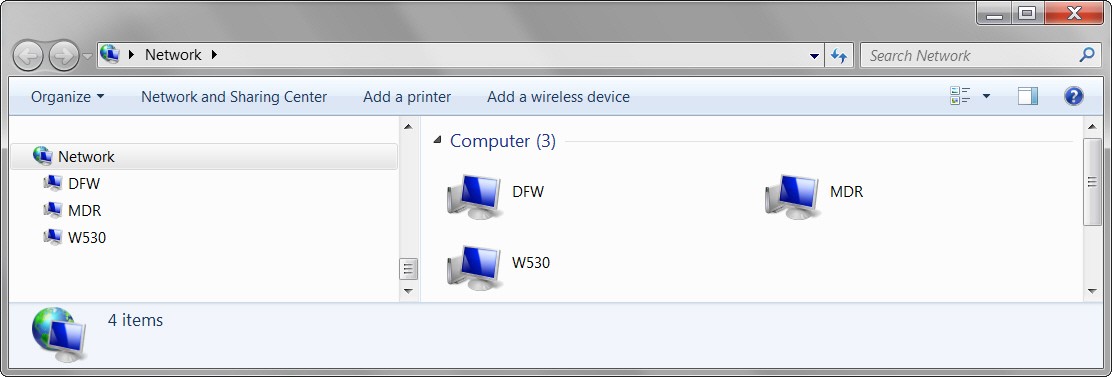
So, if I look at my own Network layout, I see the following (i.e. two desktops, MDR and DFW, and one laptop, W530):
(2) As far as your own mysterious two strange network items, can you please describe your own equipment and home LAN networking configuration, wired vs. wireless, brand/model of routers, etc.
If you go to Control Panel -> Network and Internet -> Network and Sharing Center, you should see a basic diagram of how your computer gets to the Internet, like the following:

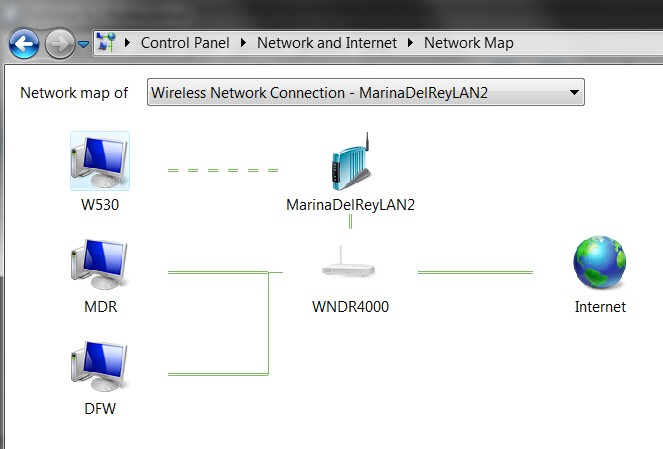
If you then click on the "see full map" link (upper-right corner), you will see a more detailed layout of how all the current members of your home network are configured together. This should provide some information that might help us figure out what/where those two mysterious items are coming from. Might be a smart phone with "hot spot" turned on, or who knows what.
For example, in my own network case, the detailed full map looks as follows:
I don't know what those two objects are on your home network, but if you can provide some additional info as I've requested above, maybe we can figure it out.
Most desktop machines have at least ordinary "wired" ethernet ports, for a wired connection to your home wired/wireless router or cable modem, etc. These show up in Device Manager as part of the "network adapters" group.
Newer desktop machines can also have "wireless" adapters, to optionally connect wirelessly to your home wired/wireless router if you don't have ethernet cables running from your desktop machine location to where the router is. This is the same as your smart phone or other wireless device or gaming console does with its "WiFi" feature enabled, to freely connect to the Internet through your home (or restaurant, etc.) wireless router rather than say using 3G/4G connectivity (which might cost money for metered data usage, not to mention would possibly be slower than a high-speed home broadband ISP service available wirelessly through a router).
And of course, most modern laptops have both. You can thus use either (a) ethernet ports for a wired connection to a local router or switch, or (b) wireless (aka WiFi) capability for a wireless connection to a nearby "WiFi hotspot" (which could be your home wireless router, or outside public WiFi capability like in the airport or restaurants, etc.).
For example, I'm writing this right now while working on my W530 laptop, which is connected "wireless" to my home WiFi wireless network and then out to the Internet. Actually, because of distances, I'm actually connecting to a "wireless access point" in my kitchen (where I have a Netgear WN604 WAP connected "wired" to my Netgear WNDR4000 router in the back bedroom). Both of my two desktop machines are connected "wired" using their own gigabit NIC connectors to the gigabit router, through Cat6 ethernet cable running directly from the back bedroom to the locations in the house where the two desktop machines live.
So, if I look at Device Manager on my W530 laptop and expand "network adapters", I see the following:
Note that my laptop also contains a wired NIC option (Intel 82579LM) but I'm not using it at the moment, but rather am operating wireless through the Intel Centrino 6205 wireless NIC.
So, if I look at my own Network layout, I see the following (i.e. two desktops, MDR and DFW, and one laptop, W530):
(2) As far as your own mysterious two strange network items, can you please describe your own equipment and home LAN networking configuration, wired vs. wireless, brand/model of routers, etc.
If you go to Control Panel -> Network and Internet -> Network and Sharing Center, you should see a basic diagram of how your computer gets to the Internet, like the following:
If you then click on the "see full map" link (upper-right corner), you will see a more detailed layout of how all the current members of your home network are configured together. This should provide some information that might help us figure out what/where those two mysterious items are coming from. Might be a smart phone with "hot spot" turned on, or who knows what.
For example, in my own network case, the detailed full map looks as follows:
I don't know what those two objects are on your home network, but if you can provide some additional info as I've requested above, maybe we can figure it out.
My Computer
- Computer type
- PC/Desktop
- Computer Manufacturer/Model Number
- Home-built, two systems (1) and (2)
- OS
- Windows 7 Pro x64 (1), Win7 Pro X64 (2)
- CPU
- i5-3350p 3.1Ghz/6MB-cache (1); E8400 3.0Ghz/6MB-cache (2)
- Motherboard
- ASUS P8Z77-V Pro (1); ASUS P5Q3 (2)
- Memory
- 8GB PC3-12800 DDR3 (1); 4GB PC3-10600 DDR3 (2)
- Graphics Card(s)
- ATI HD7750 (1), (see TV cards); ATI R7 250 (2)
- Sound Card
- Realtek ALC892 HD Audio (1); Realtek ALC1200 HD Audio (2)
- Monitor(s) Displays
- Eizo HD2441W LCD, Eizo S2433W (1); Eizo 24" S2433W (2)
- Screen Resolution
- 1920x1200, 1920x1200 (1); 1920x1200 (2)
- Hard Drives
- (1) 1TB SATA-II (7200RPM), 2x2TB SATA-III (7200RPM), 250GB SATA-III (10000RPM) for OS; 2x2TB external USB 3.0
(2) 320GB SATA-II (7200RPM), 750GB SATA-II (7200RPM), 150GB SATA-II (10000RPM) for OS; 2TB external USB 3.0
- PSU
- Nesteq ECS-6001 600W (1); Nesteq ECS-5001 500W (2)
- Case
- Acousti-Case 360 (1) and (2)
- Cooling
- Noctua NH-U12P SE2 for CPU, 2x120mm case fans (1) and (2)
- Keyboard
- IBM PS/2 (1) and (2)
- Mouse
- Logitech MX Revolution wireless (1); Microsoft wired (2)
- Internet Speed
- 100mbps down / 10mbps up
- Antivirus
- Microsoft Security Essentials; Malwarebyte Anti-Malware Pro
- Browser
- Firefox
- Other Info
- Ceton InfiniTV 4-tuner cablecard-enabled TV card as well as Hauppauge HVR-2250 OTA/ATSC 2-tuner TV card in (1), running under Win7 WMC

Those are PCs connected to your network. If you share files, "they" probably have a copy of everything you share. :shock:Those last two--where could they have come from?

My Computer
- Computer type
- PC/Desktop
- Computer Manufacturer/Model Number
- Built 2/11/2011
- OS
- Windows 7 Pro-x64
- CPU
- i7-2600 3.4GHz - 3.8GHz Turbo
- Motherboard
- Intel DH67BL-B3
- Memory
- 8Gb - 2x4GB, Muskin 991770 PC3-1333
- Graphics Card(s)
- Integrated Intel HD 2000
- Sound Card
- Integrated Intel 10.1 HD, RealTek ALC892
- Monitor(s) Displays
- Asus LCD VH222H, Haier HL24XSL2a
- Screen Resolution
- 1920x1080, 1920x1080
- Hard Drives
- Crucial SSD C300-128Gb,
Western Digital WD5002AALX - 500Gb,
Western Digital WD7501AALS - 750Gb
- PSU
- Seasonic 650W 80+ Gold Modular
- Case
- Rosewill Defender
- Cooling
- Stock CPU, Four 120mm case fans, PCH fan added
- Keyboard
- Logitech EX100 Y-RBH94 Wireless
- Mouse
- Logitech EX100 M-RCE95 Wireless
- Internet Speed
- 3.0/1.5 Mbs
- Antivirus
- Microsoft Security Essentials
- Browser
- Microsoft Internet Explorer 11
- Other Info
- Antec Veris Premier-Multimedia IR Station,
Cyber Accoustics-3602 Speakers,
AFT XM-5U Card Reader,
Hauppauge TV-HVR-2250,
Sony LX300 USB Turntable

- Local time
- 10:40 PM
- Messages
- 242
we have two PCs connected to a router. how could this happen? U mean those two PCs copied everything in my PC? I also don't think that our router is "locked down" or whatever it is called.
My Computer
- OS
- Windows 7 Home Premium 64bit.
Very suspicious. Somehow they "got onto your network", behind the firewall of your router. I suspect they were "wireless".well, I'd like to be able to do that---but now that I go back to look again----they are both gone!
Do you have security disabled?? No passwords needed for wired or wireless connections? Do you have Windows password enabled for the users on your two desktops?
For example, in my Netgear WNDR4000 wired/wireless router there is a way that you can disable security although that is definitely NOT the default. And with security enabled there is also a "passphrase" (password) that you can specify.
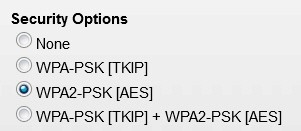
Please provide LOTS of detail, with brand/model of your router. Also please say what your wireless -> security settings are.
I'd suggest you CHANGE the wireless password on your router immediately.
My Computer
- Computer type
- PC/Desktop
- Computer Manufacturer/Model Number
- Home-built, two systems (1) and (2)
- OS
- Windows 7 Pro x64 (1), Win7 Pro X64 (2)
- CPU
- i5-3350p 3.1Ghz/6MB-cache (1); E8400 3.0Ghz/6MB-cache (2)
- Motherboard
- ASUS P8Z77-V Pro (1); ASUS P5Q3 (2)
- Memory
- 8GB PC3-12800 DDR3 (1); 4GB PC3-10600 DDR3 (2)
- Graphics Card(s)
- ATI HD7750 (1), (see TV cards); ATI R7 250 (2)
- Sound Card
- Realtek ALC892 HD Audio (1); Realtek ALC1200 HD Audio (2)
- Monitor(s) Displays
- Eizo HD2441W LCD, Eizo S2433W (1); Eizo 24" S2433W (2)
- Screen Resolution
- 1920x1200, 1920x1200 (1); 1920x1200 (2)
- Hard Drives
- (1) 1TB SATA-II (7200RPM), 2x2TB SATA-III (7200RPM), 250GB SATA-III (10000RPM) for OS; 2x2TB external USB 3.0
(2) 320GB SATA-II (7200RPM), 750GB SATA-II (7200RPM), 150GB SATA-II (10000RPM) for OS; 2TB external USB 3.0
- PSU
- Nesteq ECS-6001 600W (1); Nesteq ECS-5001 500W (2)
- Case
- Acousti-Case 360 (1) and (2)
- Cooling
- Noctua NH-U12P SE2 for CPU, 2x120mm case fans (1) and (2)
- Keyboard
- IBM PS/2 (1) and (2)
- Mouse
- Logitech MX Revolution wireless (1); Microsoft wired (2)
- Internet Speed
- 100mbps down / 10mbps up
- Antivirus
- Microsoft Security Essentials; Malwarebyte Anti-Malware Pro
- Browser
- Firefox
- Other Info
- Ceton InfiniTV 4-tuner cablecard-enabled TV card as well as Hauppauge HVR-2250 OTA/ATSC 2-tuner TV card in (1), running under Win7 WMC
So your desktop PC's are connected to WHAT router? Who is your ISP? What is the equipment (brand/model)?we have two PCs connected to a router. how could this happen?
And are your two desktops connected via ethernet cable to the router, or wirelessly?
Not necessarily. But they were obviously present on your network, and thus COULD have had access to the contents of your two desktops.U mean those two PCs copied everything in my PC?
But this would only have been "possibly easy" if you don't use Windows passwords for the "user" on your desktop PC's. You should ALWAYS have a password required at the Windows "Welcome" screen to log in as a user. This is just one more level of protection making it more difficult (if not impossible) for someone to gain unrestricted access to your computer. If they can't get past that "Windows front door password" then they are certainly stymied.
In addition to the Windows password which would be required for any remote PC (wired or wireless) to be able to gain generic access to one of your desktops, you can also further allow or restrict access to the contents of specific drives/folders/files on those machines. So you can construct a combination of security for your "home network" to whatever degree of free-access or restrictions that you desire.
But for absolute sure, you SHOULD be using Windows password to sign on to Windows at the Welcome screen for any user(s) defined on that machine. Then any other machine on the network (authorized or "rogue") couldn't get past that front door without at least providing the proper Windows password to even just connect.
You absolutely should NOT have "none" specified for wireless security.I also don't think that our router is "locked down" or whatever it is called.
As I showed in my latest screenshot, you should specify WPA2-PSK security to gain wireless access through your wireless router, and you then must provide a passphrase (i.e. password). Your own wireless devices or laptop/phone would then require that you enter that password in order to "connect" wirelessly.
My Computer
- Computer type
- PC/Desktop
- Computer Manufacturer/Model Number
- Home-built, two systems (1) and (2)
- OS
- Windows 7 Pro x64 (1), Win7 Pro X64 (2)
- CPU
- i5-3350p 3.1Ghz/6MB-cache (1); E8400 3.0Ghz/6MB-cache (2)
- Motherboard
- ASUS P8Z77-V Pro (1); ASUS P5Q3 (2)
- Memory
- 8GB PC3-12800 DDR3 (1); 4GB PC3-10600 DDR3 (2)
- Graphics Card(s)
- ATI HD7750 (1), (see TV cards); ATI R7 250 (2)
- Sound Card
- Realtek ALC892 HD Audio (1); Realtek ALC1200 HD Audio (2)
- Monitor(s) Displays
- Eizo HD2441W LCD, Eizo S2433W (1); Eizo 24" S2433W (2)
- Screen Resolution
- 1920x1200, 1920x1200 (1); 1920x1200 (2)
- Hard Drives
- (1) 1TB SATA-II (7200RPM), 2x2TB SATA-III (7200RPM), 250GB SATA-III (10000RPM) for OS; 2x2TB external USB 3.0
(2) 320GB SATA-II (7200RPM), 750GB SATA-II (7200RPM), 150GB SATA-II (10000RPM) for OS; 2TB external USB 3.0
- PSU
- Nesteq ECS-6001 600W (1); Nesteq ECS-5001 500W (2)
- Case
- Acousti-Case 360 (1) and (2)
- Cooling
- Noctua NH-U12P SE2 for CPU, 2x120mm case fans (1) and (2)
- Keyboard
- IBM PS/2 (1) and (2)
- Mouse
- Logitech MX Revolution wireless (1); Microsoft wired (2)
- Internet Speed
- 100mbps down / 10mbps up
- Antivirus
- Microsoft Security Essentials; Malwarebyte Anti-Malware Pro
- Browser
- Firefox
- Other Info
- Ceton InfiniTV 4-tuner cablecard-enabled TV card as well as Hauppauge HVR-2250 OTA/ATSC 2-tuner TV card in (1), running under Win7 WMC

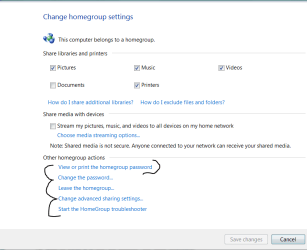
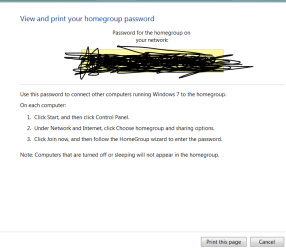
Who ever set up your network set Network sharing for many machines or someone got the Network sharing Key and PW and took it upon themselves to connect
You can always change the PW on the Network sharing which will kick them off but the pc you need to use with Sharing needs to have that code again
By the way if your main PC could be the one people are using and getting your PW it's easy to get and no way to hide it if you let people use your machine
It's easy to view anyone can do it so..... someone in or out of your home has connected to everything and can manipulate your system
You can always change the PW on the Network sharing which will kick them off but the pc you need to use with Sharing needs to have that code again
By the way if your main PC could be the one people are using and getting your PW it's easy to get and no way to hide it if you let people use your machine
It's easy to view anyone can do it so..... someone in or out of your home has connected to everything and can manipulate your system
Attachments
My Computer
- Computer type
- PC/Desktop
- Computer Manufacturer/Model Number
- CoreI7-6700K MrFingerIII Special Builds
- OS
- Windows 10 Home Premium 64bit sp1
- CPU
- Intel I7-6700K @ 4.6 Ghz 1.344 volts everyday OC
- Motherboard
- Asrock Fatality K6 Z170 Socket 1151
- Memory
- 32GB G-Skill TridentZ 3200mhz 16-18-18-38 DDR4
- Graphics Card(s)
- Sli Gigabyte Windforce GTX 980 G1
- Sound Card
- AC97 Creative Rage Tactic 3D Headphones Bluetooth
- Monitor(s) Displays
- 27" Asus ROG Swift PG278Q G-Sync 48" Vizio Smart HD TV
- Screen Resolution
- 2560x1440p 27"- 48" Currently Gaming at 2560x1440p Res 2K
- Hard Drives
- 250GB Samsung Evo840SSD Seagate baracuda 500 GB WD Mybook 500Gb 1TB Seagate Barracuda
- PSU
- HX1050w Corsair Silver 80plus certified crosfire/sli
- Case
- Enthod Pro Full Tower
- Cooling
- Corsair H110i GT 280 mm High Performance WaterBlock
- Keyboard
- Logitech wireless keyboard
- Mouse
- Logitech wireless mouse
- Internet Speed
- Cox Cable 100+ mb
- Antivirus
- WebRoot Spysweeper with Antivirus
- Browser
- IE-10, Chrome, Opera
- Other Info
- My Other Rig is a AMD FX8320E @4.6Ghz 16GB Ballistic Sport Ram
Mobo Asrock Fatality 990FX 120GB OCZ SSD 1TB Seagate Barracuda Corsair H75 Cooling PSU Corsair CX750
GPU GTX Gigabyte 970G1
This is an older Netgear wired/wireless router.It is a 824WPN v3 Netgear Rangemax Wireless Router. I don't know much about the router- it's my wife's area of expertise.
Does not support more current 802.11n wireless speed. But it does support the older 802.11b/g speeds.
And it also contains four wired ports, of the 10/100 "fast ethernet" speeds. This is not a "gigabit" router providing 10/100/1000 speeds.
Anyway, there is still some configuration and setup possible with the router, and it's certainly possible (although not recommended, as I've tried to emphasize) to TURN OFF WIRELESS SECURITY.
You (or your wife) should get into the router (default IP address is 192.168.1.1, from a browser like Firefox, IE, Chrome, etc.). Default Netgear userid is "admin", and default password is "password".
Here is the user manual PDF for the router.
Looks like from page 3-3 of the manual that the DEFAULT setting for wireless "WEP Security" is "DISABLED"!! Shame on Netgear for that. But also "shame on your wife" for allowing this to be how your home network was configured.
Anyway, you obviously need to reconfigure to activate wireless security. Refer to the manual.
My Computer
- Computer type
- PC/Desktop
- Computer Manufacturer/Model Number
- Home-built, two systems (1) and (2)
- OS
- Windows 7 Pro x64 (1), Win7 Pro X64 (2)
- CPU
- i5-3350p 3.1Ghz/6MB-cache (1); E8400 3.0Ghz/6MB-cache (2)
- Motherboard
- ASUS P8Z77-V Pro (1); ASUS P5Q3 (2)
- Memory
- 8GB PC3-12800 DDR3 (1); 4GB PC3-10600 DDR3 (2)
- Graphics Card(s)
- ATI HD7750 (1), (see TV cards); ATI R7 250 (2)
- Sound Card
- Realtek ALC892 HD Audio (1); Realtek ALC1200 HD Audio (2)
- Monitor(s) Displays
- Eizo HD2441W LCD, Eizo S2433W (1); Eizo 24" S2433W (2)
- Screen Resolution
- 1920x1200, 1920x1200 (1); 1920x1200 (2)
- Hard Drives
- (1) 1TB SATA-II (7200RPM), 2x2TB SATA-III (7200RPM), 250GB SATA-III (10000RPM) for OS; 2x2TB external USB 3.0
(2) 320GB SATA-II (7200RPM), 750GB SATA-II (7200RPM), 150GB SATA-II (10000RPM) for OS; 2TB external USB 3.0
- PSU
- Nesteq ECS-6001 600W (1); Nesteq ECS-5001 500W (2)
- Case
- Acousti-Case 360 (1) and (2)
- Cooling
- Noctua NH-U12P SE2 for CPU, 2x120mm case fans (1) and (2)
- Keyboard
- IBM PS/2 (1) and (2)
- Mouse
- Logitech MX Revolution wireless (1); Microsoft wired (2)
- Internet Speed
- 100mbps down / 10mbps up
- Antivirus
- Microsoft Security Essentials; Malwarebyte Anti-Malware Pro
- Browser
- Firefox
- Other Info
- Ceton InfiniTV 4-tuner cablecard-enabled TV card as well as Hauppauge HVR-2250 OTA/ATSC 2-tuner TV card in (1), running under Win7 WMC

- Local time
- 1:40 AM
- Messages
- 1,379
Don't know what others would recommend, but as for me, I use Who's on my WiFI.
The great thing about this app is that when you first install it, you scan your network. It finds all assigned IP addresses and creates a table of them, to which you can add your own descriptions for each item.
Thereafter, it runs in the background and whenever a new IP gets assigned, it pops up, telling you about it, giving you the chance to disconnect that device.
Not only that, but it retains each of the old entries. Mine has a half dozen entries of devices that I no longer use, that I keep around just to have a record of the Mac Addresses of those devices.
There are likely to be many other apps like this, but I stumbled across this one and liked it.
The great thing about this app is that when you first install it, you scan your network. It finds all assigned IP addresses and creates a table of them, to which you can add your own descriptions for each item.
Thereafter, it runs in the background and whenever a new IP gets assigned, it pops up, telling you about it, giving you the chance to disconnect that device.
Not only that, but it retains each of the old entries. Mine has a half dozen entries of devices that I no longer use, that I keep around just to have a record of the Mac Addresses of those devices.
There are likely to be many other apps like this, but I stumbled across this one and liked it.
My Computer
- Computer type
- PC/Desktop
- Computer Manufacturer/Model Number
- Custom
- OS
- Win7 Pro 32-bit, Win8 Pro 32-bit
- CPU
- AMD Phenom II X6 1090T
- Motherboard
- Gigabyte
- Memory
- 4GB ddr3 1300
- Graphics Card(s)
- AMD HD 4290 onboard
- Sound Card
- Builtin Realtek HD Audio
- Monitor(s) Displays
- Samsung 24" widescreen, LG 23" widescreen
- Screen Resolution
- 1920x1200/1920x1080
- Hard Drives
- Kingston 256GB SSD
- Keyboard
- Logitech Illuminated Keyboard
- Mouse
- Logitech M705 wireless mouse
- Antivirus
- Norton Av 2013
- Browser
- IE v10
The password is required when another PC wants to get to the folders/files on your primary PC. It's just like the other PC has to go through the "Welcome" screen Windows signon.Our two PCs are connected to a Netgear Rangemax router, and our ISP is AT&T/Yahoo DSL. My PC is always on- what good would the password at welcome do?
Installing a password for the user(s) defined on each Windows PC (which is then required to be entered any time you re-boot the machine, at the Welcome screen), is the absolute minimum requirement for Windows to then be able to provide further higher levels of security to allow or prevent access. You might have "top secret" files on your PC that you don't want to allow anybody else to access (even with READ) from a "remotely connected computer" on your home LAN network, even though other folders/files might be viewed as "general purpose" and "fully available for read/write/delete/rename/update".
This is only possible if you use passwords.
But this discussion is about Windows passwords. What seems to be the case for you regarding those two "network visitors" was that they appear to have gotten onto your home network wirelessly via the 824WPN router because the router did not have wireless security properly configured, but rather had it DISABLED (so that no password was required).
It is the router configuration and wireless security that MUST be fixed right now. This will prevent any wireless intruders in the future from gaining access to your home LAN and its two desktop machines.
My Computer
- Computer type
- PC/Desktop
- Computer Manufacturer/Model Number
- Home-built, two systems (1) and (2)
- OS
- Windows 7 Pro x64 (1), Win7 Pro X64 (2)
- CPU
- i5-3350p 3.1Ghz/6MB-cache (1); E8400 3.0Ghz/6MB-cache (2)
- Motherboard
- ASUS P8Z77-V Pro (1); ASUS P5Q3 (2)
- Memory
- 8GB PC3-12800 DDR3 (1); 4GB PC3-10600 DDR3 (2)
- Graphics Card(s)
- ATI HD7750 (1), (see TV cards); ATI R7 250 (2)
- Sound Card
- Realtek ALC892 HD Audio (1); Realtek ALC1200 HD Audio (2)
- Monitor(s) Displays
- Eizo HD2441W LCD, Eizo S2433W (1); Eizo 24" S2433W (2)
- Screen Resolution
- 1920x1200, 1920x1200 (1); 1920x1200 (2)
- Hard Drives
- (1) 1TB SATA-II (7200RPM), 2x2TB SATA-III (7200RPM), 250GB SATA-III (10000RPM) for OS; 2x2TB external USB 3.0
(2) 320GB SATA-II (7200RPM), 750GB SATA-II (7200RPM), 150GB SATA-II (10000RPM) for OS; 2TB external USB 3.0
- PSU
- Nesteq ECS-6001 600W (1); Nesteq ECS-5001 500W (2)
- Case
- Acousti-Case 360 (1) and (2)
- Cooling
- Noctua NH-U12P SE2 for CPU, 2x120mm case fans (1) and (2)
- Keyboard
- IBM PS/2 (1) and (2)
- Mouse
- Logitech MX Revolution wireless (1); Microsoft wired (2)
- Internet Speed
- 100mbps down / 10mbps up
- Antivirus
- Microsoft Security Essentials; Malwarebyte Anti-Malware Pro
- Browser
- Firefox
- Other Info
- Ceton InfiniTV 4-tuner cablecard-enabled TV card as well as Hauppauge HVR-2250 OTA/ATSC 2-tuner TV card in (1), running under Win7 WMC
Could be. They might be carrying wireless laptops and other devices. But the fact that they were actually ON YOUR NETWORK says they weren't just "detected" for allowing possible wireless connection from your PC to them. They had actually GOTTEN ONTO YOUR NETWORK. Takes a conscious action by the "intruder" to make that happen.Could the AT&T guy next door have anything to do with it? Working on Internet or something?
So again, the point is you MUST look inside your router, to see what the current wireless security configuration is. If it's currently DISABLED then you must ENABLE it (WPA2-PSK), and set a password.
And if wireless security is already currently ENABLED, then you have to assume the password was "guessed at" or hacked, and you absolutely MUST CHANGE THE WIRELESS PASSPHRASE!
If your wife is home and is "in charge of the router", please drag her over to the computer. The default address of the router should be 192.168.1.1, but it might have gotten changed by the ATT installers. If you go into a DOS command prompt and enter IPCONFIG, you will be able to see the router's address as the "default gateway" as well as your own PC's DHCP-assigned address (i.e. assigned by the router).
My Computer
- Computer type
- PC/Desktop
- Computer Manufacturer/Model Number
- Home-built, two systems (1) and (2)
- OS
- Windows 7 Pro x64 (1), Win7 Pro X64 (2)
- CPU
- i5-3350p 3.1Ghz/6MB-cache (1); E8400 3.0Ghz/6MB-cache (2)
- Motherboard
- ASUS P8Z77-V Pro (1); ASUS P5Q3 (2)
- Memory
- 8GB PC3-12800 DDR3 (1); 4GB PC3-10600 DDR3 (2)
- Graphics Card(s)
- ATI HD7750 (1), (see TV cards); ATI R7 250 (2)
- Sound Card
- Realtek ALC892 HD Audio (1); Realtek ALC1200 HD Audio (2)
- Monitor(s) Displays
- Eizo HD2441W LCD, Eizo S2433W (1); Eizo 24" S2433W (2)
- Screen Resolution
- 1920x1200, 1920x1200 (1); 1920x1200 (2)
- Hard Drives
- (1) 1TB SATA-II (7200RPM), 2x2TB SATA-III (7200RPM), 250GB SATA-III (10000RPM) for OS; 2x2TB external USB 3.0
(2) 320GB SATA-II (7200RPM), 750GB SATA-II (7200RPM), 150GB SATA-II (10000RPM) for OS; 2TB external USB 3.0
- PSU
- Nesteq ECS-6001 600W (1); Nesteq ECS-5001 500W (2)
- Case
- Acousti-Case 360 (1) and (2)
- Cooling
- Noctua NH-U12P SE2 for CPU, 2x120mm case fans (1) and (2)
- Keyboard
- IBM PS/2 (1) and (2)
- Mouse
- Logitech MX Revolution wireless (1); Microsoft wired (2)
- Internet Speed
- 100mbps down / 10mbps up
- Antivirus
- Microsoft Security Essentials; Malwarebyte Anti-Malware Pro
- Browser
- Firefox
- Other Info
- Ceton InfiniTV 4-tuner cablecard-enabled TV card as well as Hauppauge HVR-2250 OTA/ATSC 2-tuner TV card in (1), running under Win7 WMC