Two OS in one drive,,?

for a start, easybcd will not let you point to two OSes on one drive partition.

your xp install will not work, and your windows 7 may be broken and crash all the time.

if you have plenty of time to waste, you can try it and let us know what happens. :)

why do you not want to partition your drive?
 

My Computer My Computer

Computer Manufacturer/Model Number
mickey megabyte 1234
OS
ultimate 64 sp1
CPU
i5 2500K [email protected]
Motherboard
MSI P67A-GD53
Memory
8 gigs GSkill Ripjaws 1600
Graphics Card(s)
amd hd6950
Sound Card
creative x-fi gamer
Monitor(s) Displays
samsung 24"
Screen Resolution
1920x1080
Hard Drives
ocz vertex 2e 60 gig, samsung f3 1tb, buffalo 2tb ext
PSU
antec 550
Case
antec three hundred
Cooling
i'm a cooling fan
Keyboard
saitek eclipse ii
Mouse
logitech g3
Internet Speed
about 4 Mbps
Other Info
i love win7
for a start, easybcd will not let you point to two OSes on one drive.
This is simply and absolutely NOT TRUE! Absolutely false (unless by "one drive" you really mean "one drive letter", i.e. "partition").

There is zero consideration for both Windows and EasyBCD regarding the bootable Windows OS partitions and whether they are on a single hard drive or multiple hard drives.


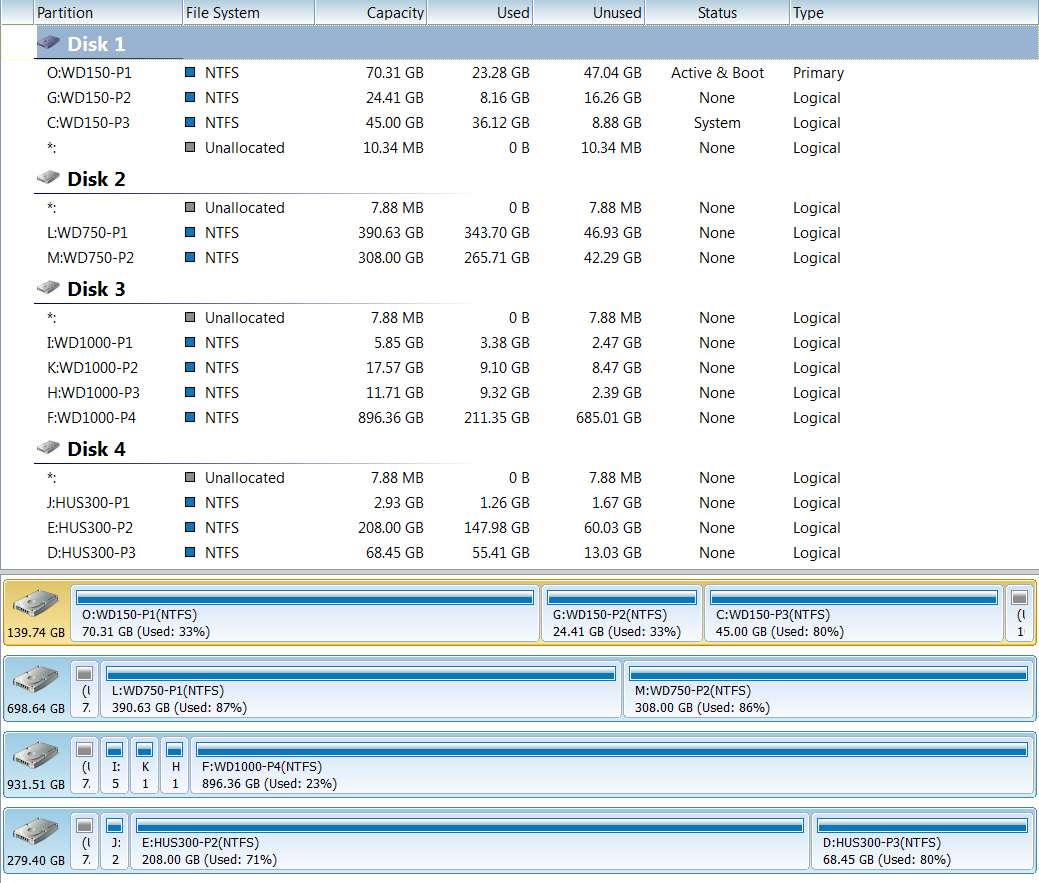
I have both WinXP and Win7 partitions on the same single hard drive:

drivespw.jpg


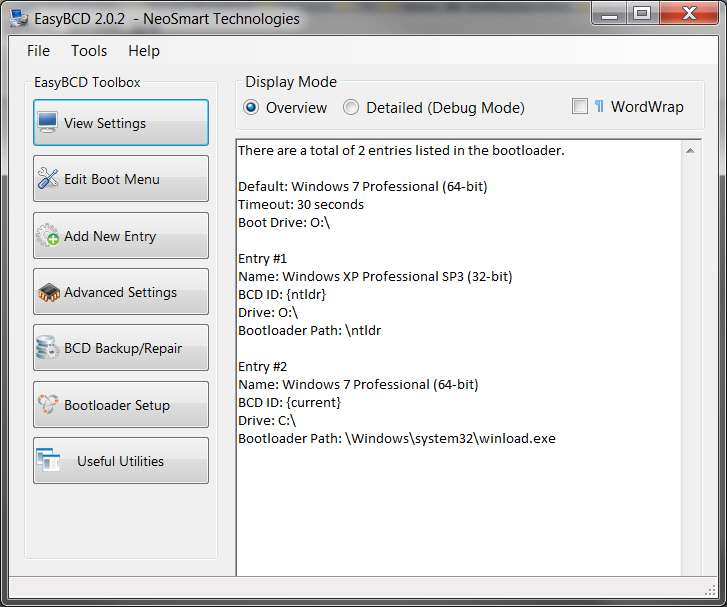
And, the boot manager menu is handled perfectly by EasyBCD:

driveseasybcd.jpg


Nevertheless, we both agree that it is 100% absolutely true that you simply CANNOT install two versions of Windows into the same single physical partition.

The installers simply will not allow that. That's just not how it works. Two physical partitions are required, coupled by a boot manager menu.
 

My Computer My Computer

Computer type
PC/Desktop
Computer Manufacturer/Model Number
Home-built, two systems (1) and (2)
OS
Windows 7 Pro x64 (1), Win7 Pro X64 (2)
CPU
i5-3350p 3.1Ghz/6MB-cache (1); E8400 3.0Ghz/6MB-cache (2)
Motherboard
ASUS P8Z77-V Pro (1); ASUS P5Q3 (2)
Memory
8GB PC3-12800 DDR3 (1); 4GB PC3-10600 DDR3 (2)
Graphics Card(s)
ATI HD7750 (1), (see TV cards); ATI R7 250 (2)
Sound Card
Realtek ALC892 HD Audio (1); Realtek ALC1200 HD Audio (2)
Monitor(s) Displays
Eizo HD2441W LCD, Eizo S2433W (1); Eizo 24" S2433W (2)
Screen Resolution
1920x1200, 1920x1200 (1); 1920x1200 (2)
Hard Drives
(1) 1TB SATA-II (7200RPM), 2x2TB SATA-III (7200RPM), 250GB SATA-III (10000RPM) for OS; 2x2TB external USB 3.0

(2) 320GB SATA-II (7200RPM), 750GB SATA-II (7200RPM), 150GB SATA-II (10000RPM) for OS; 2TB external USB 3.0
PSU
Nesteq ECS-6001 600W (1); Nesteq ECS-5001 500W (2)
Case
Acousti-Case 360 (1) and (2)
Cooling
Noctua NH-U12P SE2 for CPU, 2x120mm case fans (1) and (2)
Keyboard
IBM PS/2 (1) and (2)
Mouse
Logitech MX Revolution wireless (1); Microsoft wired (2)
Internet Speed
100mbps down / 10mbps up
Antivirus
Microsoft Security Essentials; Malwarebyte Anti-Malware Pro
Browser
Firefox
Other Info
Ceton InfiniTV 4-tuner cablecard-enabled TV card as well as Hauppauge HVR-2250 OTA/ATSC 2-tuner TV card in (1), running under Win7 WMC
sorry, i meant partition! :o

oops
 

My Computer My Computer

Computer Manufacturer/Model Number
mickey megabyte 1234
OS
ultimate 64 sp1
CPU
i5 2500K [email protected]
Motherboard
MSI P67A-GD53
Memory
8 gigs GSkill Ripjaws 1600
Graphics Card(s)
amd hd6950
Sound Card
creative x-fi gamer
Monitor(s) Displays
samsung 24"
Screen Resolution
1920x1080
Hard Drives
ocz vertex 2e 60 gig, samsung f3 1tb, buffalo 2tb ext
PSU
antec 550
Case
antec three hundred
Cooling
i'm a cooling fan
Keyboard
saitek eclipse ii
Mouse
logitech g3
Internet Speed
about 4 Mbps
Other Info
i love win7
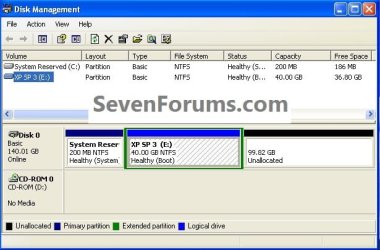
To clarify... when you install XP, the partition it is installed to names itself C when you boot to it. It's a particular physical partition on some drive, but when WinXP comes up that partition is lettered C.

When you install Win7 on a second partition, and then you boot to Win7, once again THAT particular physical partition is lettered C. It's a physically different partition than the WinXP partition, but they both are logically named C from their own perspective.

To clarify, you need to revisit and regroup on the miss-information you are telling people around here.

When Windows XP is not installed to the first physical partition of a HDD it will not be C: at all.


click to enlarge
XP.jpg
 

My Computer My Computer

Computer Manufacturer/Model Number
* BFK Customs *
OS
W 7 64-bit Ultimate
CPU
Intel Q9550 Yorkfield
Motherboard
ASUS P5Q Pro
Memory
8GB Dominator 8500C5D
Graphics Card(s)
ATI : XFX 5870
Sound Card
Realtek HD Audio 7-1
Monitor(s) Displays
1x 47" LCD HDMI & 3x 26" LCD HDMI
Screen Resolution
1920x1080P & 1920x1200
Hard Drives
1x 80GB Intel X25-M G2 SSD : 1x 500GB & 1x 640GB WD Caviar Black(s)
PSU
Corsair 620HX
Case
Cooler Master RC-690
Cooling
Tuniq Tower 120, 2x 140mm and 3x 120mm case fans
Keyboard
Microsoft 500
Mouse
Razer Diamondback 3G
Internet Speed
14 Mb/s
Other Info
1x Koutech 3Gb/s SATA HDD Hot Swap Rack
To clarify... when you install XP, the partition it is installed to names itself C when you boot to it. It's a particular physical partition on some drive, but when WinXP comes up that partition is lettered C.

When you install Win7 on a second partition, and then you boot to Win7, once again THAT particular physical partition is lettered C. It's a physically different partition than the WinXP partition, but they both are logically named C from their own perspective.

To clarify, you need to revisit and regroup on the miss-information you are telling people around here.

When Windows XP is not installed to the first physical partition of a HDD it will not be C: at all.
click to enlarge
View attachment 159257
To clarify... (so that there is no MIS-information spread, and I agree with that)

You have a very unusual "system reserved" partition lettered C in that WinXP setup. This is essentially unheard of in my own experience, when installing WinXP onto a brand new hard drive which is what I was describing as the way he could add WinXP as a second OS to an existing Win7 environment.

In fact, a separate "system reserved" partition on a WinXP disk in a WinXP-only environment is just not going to happen as a result of a "stock" WinXP install to that disk booting directly from the Microsoft WinXP installation CD. It is a construct from Win7, not WinXP. It gets no drive letter in Win7, but gets a drive letter in WinXP. That's why it forces WinXP to get a letter other than C on that hard drive... but this is in my opinion a "should not occur" situation. If WinXP is installed first and Win7 installed as the second OS, this would never happen.

With a brand new drive, and BIOS set that drive to "hard disk #1", and no pre-existing "system reserved" partition marked as "active" and "primary" as would be the case on a brand new second hard drive, then WinXP absolutely WILL install itself as the one and only "active" and "primary" partition on that brand new drive. And it WILL be lettered as C to itself, when you boot to WinXP.


Hey... if you have a running Win98 partition, and you decide to install 32-bit WinXP as a second OS by running the WinXP installer (i.e. running SETUP.EXE from the WinXP installation CD) under Win98, then whatever Win98 drive letter you select for the target partition of that WinXP will actually be the drive letter the installed WinXP sees itself as when you boot to WinXP!

So yes, I agree with you that in very unusual installation situations, drive letters other than C are possible for an installed WinXP.

But not if you have a brand new empty hard drive, and boot from the CD to run the installer (rather than from a pre-existing installed Windows)... then the resulting WinXP will get a drive letter of C to itself when booted. And that's what I was describing to him.

I was trying NOT to talk about the more esoteric and exotic advanced installation setups, which I agree with you can result in drive letters other than C for WinXP as seen from itself. I was trying to "keep it simple", which seemed appropriate at the time.
 

My Computer My Computer

Computer type
PC/Desktop
Computer Manufacturer/Model Number
Home-built, two systems (1) and (2)
OS
Windows 7 Pro x64 (1), Win7 Pro X64 (2)
CPU
i5-3350p 3.1Ghz/6MB-cache (1); E8400 3.0Ghz/6MB-cache (2)
Motherboard
ASUS P8Z77-V Pro (1); ASUS P5Q3 (2)
Memory
8GB PC3-12800 DDR3 (1); 4GB PC3-10600 DDR3 (2)
Graphics Card(s)
ATI HD7750 (1), (see TV cards); ATI R7 250 (2)
Sound Card
Realtek ALC892 HD Audio (1); Realtek ALC1200 HD Audio (2)
Monitor(s) Displays
Eizo HD2441W LCD, Eizo S2433W (1); Eizo 24" S2433W (2)
Screen Resolution
1920x1200, 1920x1200 (1); 1920x1200 (2)
Hard Drives
(1) 1TB SATA-II (7200RPM), 2x2TB SATA-III (7200RPM), 250GB SATA-III (10000RPM) for OS; 2x2TB external USB 3.0

(2) 320GB SATA-II (7200RPM), 750GB SATA-II (7200RPM), 150GB SATA-II (10000RPM) for OS; 2TB external USB 3.0
PSU
Nesteq ECS-6001 600W (1); Nesteq ECS-5001 500W (2)
Case
Acousti-Case 360 (1) and (2)
Cooling
Noctua NH-U12P SE2 for CPU, 2x120mm case fans (1) and (2)
Keyboard
IBM PS/2 (1) and (2)
Mouse
Logitech MX Revolution wireless (1); Microsoft wired (2)
Internet Speed
100mbps down / 10mbps up
Antivirus
Microsoft Security Essentials; Malwarebyte Anti-Malware Pro
Browser
Firefox
Other Info
Ceton InfiniTV 4-tuner cablecard-enabled TV card as well as Hauppauge HVR-2250 OTA/ATSC 2-tuner TV card in (1), running under Win7 WMC
Actually, when you install Win7 into an environment in which WinXP already exists, you have two options:

(a) upgrade your WinXP partition to now be Win7. Existing programs and settings are migrated to the new Win7 environment, etc., and you no longer have WinXP when the installation process completes. You will simply end up with just Win7 in the same physical partition in which WinXP previously existed, replacing that old WinXP. There will be no more WinXP.

(b) ADD a Win7 system into a SECOND PARTITION, producing a multi-boot two-Windows setup. That's where boot manager comes into play, and you will be able to choose either your old untouched existing WinXP, or your newly installed "virgin" Win7 system with none of your WinXP programs or settings at all. Pure Microsoft vanilla starter Win7... from scratch, out of the box.

very well done dear dsperber,, appearing these two option of windows seven setup (on an existing xp os already installed on a partition) I did never know before,,,
thanks a lot, nice work,,,:)
now I m done...
 

My Computer My Computer

Computer type
PC/Desktop
Computer Manufacturer/Model Number
Acer Veriton S670/G M670/G
OS
Windows 7 SP1 Ultimate x64
CPU
Intel(R) Core(TM) 2 Due cpu E8400 @ 3.0ghz
Motherboard
Acer EQ45M
Memory
3x2gb DDR3 PC3-10600
Graphics Card(s)
NVIDIA GeForce 9800 GT
Sound Card
Digital Audio (S/PDIF) (High Definition Audio Device)
Monitor(s) Displays
Asus VK222H 22" lcd HDMI wide.
Screen Resolution
1680x1050 @ 60 Hz
Hard Drives
2x1TB WD 10EAR
Internet Speed
4mbps
Browser
FireFox v27.01
Quote from dsperber
(a) upgrade your WinXP partition to now be Windows 7. Existing programs and settings are migrated to the new Windows 7 environment, etc., and you no longer have WinXP when the installation process completes. You will simply end up with just Windows 7 in the same physical partition in which WinXP previously existed, replacing that old WinXP. There will be no more WinXP.
You would need to upgrade to Vista first, than Windows 7.
 

My Computer My Computer

OS
ME/XP/Vista/Win7
Quote from dsperber
(a) upgrade your WinXP partition to now be Windows 7. Existing programs and settings are migrated to the new Windows 7 environment, etc., and you no longer have WinXP when the installation process completes. You will simply end up with just Windows 7 in the same physical partition in which WinXP previously existed, replacing that old WinXP. There will be no more WinXP.

You would need to upgrade to Vista first, than Windows 7.
I didn't know that.

I've never done anything but a "cold" Win7 install (either standalone, or added to an existing WinXP environment as a second OS). Never had any desire to upgrade my WinXP... to either Vista or Win7. I much prefer to start from a vanilla pure OS and install everything from scratch.

Nor have I ever used Vista. Skipped that entirely.

I just assumed you could upgrade directly from WinXP to Win7, but I stand corrected.

Thanks.
 

My Computer My Computer

Computer type
PC/Desktop
Computer Manufacturer/Model Number
Home-built, two systems (1) and (2)
OS
Windows 7 Pro x64 (1), Win7 Pro X64 (2)
CPU
i5-3350p 3.1Ghz/6MB-cache (1); E8400 3.0Ghz/6MB-cache (2)
Motherboard
ASUS P8Z77-V Pro (1); ASUS P5Q3 (2)
Memory
8GB PC3-12800 DDR3 (1); 4GB PC3-10600 DDR3 (2)
Graphics Card(s)
ATI HD7750 (1), (see TV cards); ATI R7 250 (2)
Sound Card
Realtek ALC892 HD Audio (1); Realtek ALC1200 HD Audio (2)
Monitor(s) Displays
Eizo HD2441W LCD, Eizo S2433W (1); Eizo 24" S2433W (2)
Screen Resolution
1920x1200, 1920x1200 (1); 1920x1200 (2)
Hard Drives
(1) 1TB SATA-II (7200RPM), 2x2TB SATA-III (7200RPM), 250GB SATA-III (10000RPM) for OS; 2x2TB external USB 3.0

(2) 320GB SATA-II (7200RPM), 750GB SATA-II (7200RPM), 150GB SATA-II (10000RPM) for OS; 2TB external USB 3.0
PSU
Nesteq ECS-6001 600W (1); Nesteq ECS-5001 500W (2)
Case
Acousti-Case 360 (1) and (2)
Cooling
Noctua NH-U12P SE2 for CPU, 2x120mm case fans (1) and (2)
Keyboard
IBM PS/2 (1) and (2)
Mouse
Logitech MX Revolution wireless (1); Microsoft wired (2)
Internet Speed
100mbps down / 10mbps up
Antivirus
Microsoft Security Essentials; Malwarebyte Anti-Malware Pro
Browser
Firefox
Other Info
Ceton InfiniTV 4-tuner cablecard-enabled TV card as well as Hauppauge HVR-2250 OTA/ATSC 2-tuner TV card in (1), running under Win7 WMC
You have a very unusual "system reserved" partition lettered C in that WinXP setup. This is essentially unheard of in my own experience, when installing WinXP onto a brand new hard drive which is what I was describing as the way he could add WinXP as a second OS to an existing Win7 environment.


That was a clean install of XP to a HDD that was set up with the SysResv and an Extended in advance, after I booted to diskpart and ran the clean command, I set up the partitions and then booted the XP installer.

I've been trying to get through to you but you're so long-winded that you just disregard what others are trying to say and that makes it very confusing for the OPs, slow down and please pay attention, you are not the only person here with a lot of experience trying to help others.
 

My Computer My Computer

Computer Manufacturer/Model Number
* BFK Customs *
OS
W 7 64-bit Ultimate
CPU
Intel Q9550 Yorkfield
Motherboard
ASUS P5Q Pro
Memory
8GB Dominator 8500C5D
Graphics Card(s)
ATI : XFX 5870
Sound Card
Realtek HD Audio 7-1
Monitor(s) Displays
1x 47" LCD HDMI & 3x 26" LCD HDMI
Screen Resolution
1920x1080P & 1920x1200
Hard Drives
1x 80GB Intel X25-M G2 SSD : 1x 500GB & 1x 640GB WD Caviar Black(s)
PSU
Corsair 620HX
Case
Cooler Master RC-690
Cooling
Tuniq Tower 120, 2x 140mm and 3x 120mm case fans
Keyboard
Microsoft 500
Mouse
Razer Diamondback 3G
Internet Speed
14 Mb/s
Other Info
1x Koutech 3Gb/s SATA HDD Hot Swap Rack
That was a clean install of XP to a HDD that was set up with the SysResv and an Extended in advance
If I might ask, what is the purpose of having an extra "system reserved" partition when you are installing XP?? Yes, it's "primary" and "active" and would normally be where boot manager files would go for Win7. But for what purpose would it have benefit in an XP-only environment.

And besides, without your pre-preparing of the drive in this way, an XP install would simply create one partition on the drive, which would be both "primary" and "active" and also contain XP itself. No boot manager at the moment. And it would then be C, to itself.

And if you then were to add Win7 to this environment, the Win7 installer would place the boot manager files in that WinXP partition, which was already both "active" and "primary" on "hard disk #1". No need to create a "system reserved" partition.

None of this affects the rest of the hard drive, where you could have any other partitions you want. But I'm asking for what reason you would create the "system reserved" partition, which is (a) unneeded for a pure WinXP setup, and (b) unneeded for a dual XP/Win7 setup when Win7 is added second?

I'm not trying to be argumentative. I just don't see what purpose that extra partition serves in either a single-XP or dual-XP/7 environment. Why have it at all?
 

My Computer My Computer

Computer type
PC/Desktop
Computer Manufacturer/Model Number
Home-built, two systems (1) and (2)
OS
Windows 7 Pro x64 (1), Win7 Pro X64 (2)
CPU
i5-3350p 3.1Ghz/6MB-cache (1); E8400 3.0Ghz/6MB-cache (2)
Motherboard
ASUS P8Z77-V Pro (1); ASUS P5Q3 (2)
Memory
8GB PC3-12800 DDR3 (1); 4GB PC3-10600 DDR3 (2)
Graphics Card(s)
ATI HD7750 (1), (see TV cards); ATI R7 250 (2)
Sound Card
Realtek ALC892 HD Audio (1); Realtek ALC1200 HD Audio (2)
Monitor(s) Displays
Eizo HD2441W LCD, Eizo S2433W (1); Eizo 24" S2433W (2)
Screen Resolution
1920x1200, 1920x1200 (1); 1920x1200 (2)
Hard Drives
(1) 1TB SATA-II (7200RPM), 2x2TB SATA-III (7200RPM), 250GB SATA-III (10000RPM) for OS; 2x2TB external USB 3.0

(2) 320GB SATA-II (7200RPM), 750GB SATA-II (7200RPM), 150GB SATA-II (10000RPM) for OS; 2TB external USB 3.0
PSU
Nesteq ECS-6001 600W (1); Nesteq ECS-5001 500W (2)
Case
Acousti-Case 360 (1) and (2)
Cooling
Noctua NH-U12P SE2 for CPU, 2x120mm case fans (1) and (2)
Keyboard
IBM PS/2 (1) and (2)
Mouse
Logitech MX Revolution wireless (1); Microsoft wired (2)
Internet Speed
100mbps down / 10mbps up
Antivirus
Microsoft Security Essentials; Malwarebyte Anti-Malware Pro
Browser
Firefox
Other Info
Ceton InfiniTV 4-tuner cablecard-enabled TV card as well as Hauppauge HVR-2250 OTA/ATSC 2-tuner TV card in (1), running under Win7 WMC
Quote from dsperber
(a) upgrade your WinXP partition to now be Windows 7. Existing programs and settings are migrated to the new Windows 7 environment, etc., and you no longer have WinXP when the installation process completes. You will simply end up with just Windows 7 in the same physical partition in which WinXP previously existed, replacing that old WinXP. There will be no more WinXP.

You would need to upgrade to Vista first, than Windows 7.
I didn't know that.

I've never done anything but a "cold" Win7 install (either standalone, or added to an existing WinXP environment as a second OS). Never had any desire to upgrade my WinXP... to either Vista or Win7. I much prefer to start from a vanilla pure OS and install everything from scratch.

Nor have I ever used Vista. Skipped that entirely.

I just assumed you could upgrade directly from WinXP to Win7, but I stand corrected.

Thanks.

Have a read:
http://www.sevenforums.com/tutorials/131041-upgrade-install-xp-windows-7-a.html
 

My Computer My Computer

OS
ME/XP/Vista/Win7
That was a clean install of XP to a HDD that was set up with the SysResv and an Extended in advance
If I might ask, what is the purpose of having an extra "system reserved" partition when you are installing XP?? Yes, it's "primary" and "active" and would normally be where boot manager files would go for Win7. But for what purpose would it have benefit in an XP-only environment.

You can add a WINpe.
 

My Computer My Computer

OS
ME/XP/Vista/Win7
I see.

My own personal habits are to always install or re-install a new OS version from scratch, and never to upgrade an existing OS in-place, migrating to the new OS all my programs and settings. Never have, never will. Much prefer to re-customize and re-install all my 3rd-party software from scratch, though it might take several days to complete.

I also don't buy the "upgrade versions" of a new Windows OS, that depend on a previously installed existing system (or perhaps at least the CD/DVD media from that previous full version, if it's not currently installed).

Now the "system image" of Win7 has certainly simplified this process (assuming no significant hardware changes so that it's still usable), so that a "gold" starter version of the system at a final installed plateau can be copied off. And then even if I wanted to "start over" then restoring this "gold" system image could be the real starting point, and save LOTS of time on the way to finishing a complete reinstall.
 

My Computer My Computer

Computer type
PC/Desktop
Computer Manufacturer/Model Number
Home-built, two systems (1) and (2)
OS
Windows 7 Pro x64 (1), Win7 Pro X64 (2)
CPU
i5-3350p 3.1Ghz/6MB-cache (1); E8400 3.0Ghz/6MB-cache (2)
Motherboard
ASUS P8Z77-V Pro (1); ASUS P5Q3 (2)
Memory
8GB PC3-12800 DDR3 (1); 4GB PC3-10600 DDR3 (2)
Graphics Card(s)
ATI HD7750 (1), (see TV cards); ATI R7 250 (2)
Sound Card
Realtek ALC892 HD Audio (1); Realtek ALC1200 HD Audio (2)
Monitor(s) Displays
Eizo HD2441W LCD, Eizo S2433W (1); Eizo 24" S2433W (2)
Screen Resolution
1920x1200, 1920x1200 (1); 1920x1200 (2)
Hard Drives
(1) 1TB SATA-II (7200RPM), 2x2TB SATA-III (7200RPM), 250GB SATA-III (10000RPM) for OS; 2x2TB external USB 3.0

(2) 320GB SATA-II (7200RPM), 750GB SATA-II (7200RPM), 150GB SATA-II (10000RPM) for OS; 2TB external USB 3.0
PSU
Nesteq ECS-6001 600W (1); Nesteq ECS-5001 500W (2)
Case
Acousti-Case 360 (1) and (2)
Cooling
Noctua NH-U12P SE2 for CPU, 2x120mm case fans (1) and (2)
Keyboard
IBM PS/2 (1) and (2)
Mouse
Logitech MX Revolution wireless (1); Microsoft wired (2)
Internet Speed
100mbps down / 10mbps up
Antivirus
Microsoft Security Essentials; Malwarebyte Anti-Malware Pro
Browser
Firefox
Other Info
Ceton InfiniTV 4-tuner cablecard-enabled TV card as well as Hauppauge HVR-2250 OTA/ATSC 2-tuner TV card in (1), running under Win7 WMC
And if you then were to add Win7 to this environment, the Win7 installer would place the boot manager files in that WinXP partition, which was already both "active" and "primary" on "hard disk #1". No need to create a "system reserved" partition.


See here you go again, this is not correct.


If XP is installed and then Windows 7 is added to a second partition, Windows 7 will become both "System Active" during the installation process and the XP boot files will be added to the Windows 7 partition.
 

My Computer My Computer

Computer Manufacturer/Model Number
* BFK Customs *
OS
W 7 64-bit Ultimate
CPU
Intel Q9550 Yorkfield
Motherboard
ASUS P5Q Pro
Memory
8GB Dominator 8500C5D
Graphics Card(s)
ATI : XFX 5870
Sound Card
Realtek HD Audio 7-1
Monitor(s) Displays
1x 47" LCD HDMI & 3x 26" LCD HDMI
Screen Resolution
1920x1080P & 1920x1200
Hard Drives
1x 80GB Intel X25-M G2 SSD : 1x 500GB & 1x 640GB WD Caviar Black(s)
PSU
Corsair 620HX
Case
Cooler Master RC-690
Cooling
Tuniq Tower 120, 2x 140mm and 3x 120mm case fans
Keyboard
Microsoft 500
Mouse
Razer Diamondback 3G
Internet Speed
14 Mb/s
Other Info
1x Koutech 3Gb/s SATA HDD Hot Swap Rack
You clean install a Windows OS from a Upgrade disk.
Win 95
Win98
Win ME
Win 2000
Win XP
Win Vista
Windows 7
 

My Computer My Computer

OS
ME/XP/Vista/Win7
And if you then were to add Win7 to this environment, the Win7 installer would place the boot manager files in that WinXP partition, which was already both "active" and "primary" on "hard disk #1". No need to create a "system reserved" partition.


See here you go again, this is not correct.


If XP is installed and then Windows 7 is added to a second partition, Windows 7 will become both "System Active" during the installation process and the XP boot files will be added to the Windows 7 partition.
Again... I disagree.

First, it depends on where "hard disk #1" is located per the BIOS. If you install Win7 onto a partition of a second hard drive and don't change the BIOS which is therefore still pointing to the WinXP drive as "hard disk #1", then the existing WinXP "active" and "primary" partition is exactly where the Win7 boot manager files will be placed... as that is the partition to which the BIOS will boot.

This is precisely how one of my two systems is set up... with my WinXP partition on one drive ("active" on that drive, which is "hard disk #1" to the BIOS) and Win7 on a partition of a second drive. Win7's boot manager lives in the WinXP partition. In fact, my Win7 partition is "logical", which would make it unsuitable for the BIOS to boot to anyway! Only the "primary" WinXP partition is suitable for that purpose.

Or, as it is on my second system (hard drive picture shown up in post #22), I have both WinXP and Win7 on two different partitions of one hard drive. And again, WinXP went in first, and is the "active" and "primary" partition on that drive which is "hard disk #1" to the BIOS. And again, the WinXP partition is where boot manager lives, not the Win7 partition. It is not the Win7 partition on this drive which is "active"... it is the WinXP partition which is "active + boot".

And again, on that second system my Win7 partition is "logical", again making it unusable for the boot manager location which must be in an "active" and "primary" partition on "hard disk #1". That's why the WinXP partition on that same drive is where Win7's boot manager lives.

No "system reserved" partition on either system.
 

My Computer My Computer

Computer type
PC/Desktop
Computer Manufacturer/Model Number
Home-built, two systems (1) and (2)
OS
Windows 7 Pro x64 (1), Win7 Pro X64 (2)
CPU
i5-3350p 3.1Ghz/6MB-cache (1); E8400 3.0Ghz/6MB-cache (2)
Motherboard
ASUS P8Z77-V Pro (1); ASUS P5Q3 (2)
Memory
8GB PC3-12800 DDR3 (1); 4GB PC3-10600 DDR3 (2)
Graphics Card(s)
ATI HD7750 (1), (see TV cards); ATI R7 250 (2)
Sound Card
Realtek ALC892 HD Audio (1); Realtek ALC1200 HD Audio (2)
Monitor(s) Displays
Eizo HD2441W LCD, Eizo S2433W (1); Eizo 24" S2433W (2)
Screen Resolution
1920x1200, 1920x1200 (1); 1920x1200 (2)
Hard Drives
(1) 1TB SATA-II (7200RPM), 2x2TB SATA-III (7200RPM), 250GB SATA-III (10000RPM) for OS; 2x2TB external USB 3.0

(2) 320GB SATA-II (7200RPM), 750GB SATA-II (7200RPM), 150GB SATA-II (10000RPM) for OS; 2TB external USB 3.0
PSU
Nesteq ECS-6001 600W (1); Nesteq ECS-5001 500W (2)
Case
Acousti-Case 360 (1) and (2)
Cooling
Noctua NH-U12P SE2 for CPU, 2x120mm case fans (1) and (2)
Keyboard
IBM PS/2 (1) and (2)
Mouse
Logitech MX Revolution wireless (1); Microsoft wired (2)
Internet Speed
100mbps down / 10mbps up
Antivirus
Microsoft Security Essentials; Malwarebyte Anti-Malware Pro
Browser
Firefox
Other Info
Ceton InfiniTV 4-tuner cablecard-enabled TV card as well as Hauppauge HVR-2250 OTA/ATSC 2-tuner TV card in (1), running under Win7 WMC
If you install any Windows on Disk 1, the boot file will install to Disk 0.
 

My Computer My Computer

OS
ME/XP/Vista/Win7
I give up, you have no idea at what you are talking about, this is the last post I will reply to you.


Of course XP is "System" in your systems, a Windows OS will not / is not able to boot independently from an Extended partition / Logical drive, so as a matter-of-course the boot files will remain on the Primary when Windows is installed to a Logical.

Why do you think the SysResv was made the "System" partition instead of XP when I did this.


My Computer My Computer

Computer Manufacturer/Model Number
* BFK Customs *
OS
W 7 64-bit Ultimate
CPU
Intel Q9550 Yorkfield
Motherboard
ASUS P5Q Pro
Memory
8GB Dominator 8500C5D
Graphics Card(s)
ATI : XFX 5870
Sound Card
Realtek HD Audio 7-1
Monitor(s) Displays
1x 47" LCD HDMI & 3x 26" LCD HDMI
Screen Resolution
1920x1080P & 1920x1200
Hard Drives
1x 80GB Intel X25-M G2 SSD : 1x 500GB & 1x 640GB WD Caviar Black(s)
PSU
Corsair 620HX
Case
Cooler Master RC-690
Cooling
Tuniq Tower 120, 2x 140mm and 3x 120mm case fans
Keyboard
Microsoft 500
Mouse
Razer Diamondback 3G
Internet Speed
14 Mb/s
Other Info
1x Koutech 3Gb/s SATA HDD Hot Swap Rack
Of course XP is "System" in your systems, a Windows OS will not / is not able to boot independently from an Extended partition / Logical drive, so as a matter-of-course the boot files will remain on the Primary when Windows is installed to a Logical.
Ergo, your statement:
"If XP is installed and then Windows 7 is added to a second partition, Windows 7 will become both "System Active" during the installation process and the XP boot files will be added to the Windows 7 partition."
is not true on its face, but is obviously subject to qualification. I only have one primary partition on my systems, and it is the WinXP partition... which in my world is a "primary" partition, and also "active". Period.

And thus that's where an install of Win7 as a second OS will put its boot manager files. Period.

You have done something very different, and decided to install your first WinXP OS into a logical partition, and thus have created a system reserved partition for the reason we both know is required... namely "active" and "primary", so that WinXP can be targeted to the logical partition as you desire.

My arrangement is just different, simply working from the standard default results if you install WinXP onto a brand new drive without any pre-preparing of the partitions on that drive. The WinXP installer will create one "active" and "primary" partition, for WinXP.

Add Win7 as a second OS, and don't change "hard disk #1" in the BIOS, and the Win7 boot manager files will be placed into that WinXP partition. That's how it works by default.


Why do you think the SysResv was made the "System" partition instead of XP when I did this.
Because you wanted XP to end up in a logical partition to begin with, hence you needed a true "primary" and "active" partition. We both know that was necessary.

I had no such desire.

There are simply lots of ways to do these installs, and I would submit that your approach to an XP install is "exotic and sophisticated" (but that's how you want to do it)... definitely not how things would work as "Microsoft standard default to an empty hard drive".

However to flat out say that "if XP is installed and then Windows 7 is added to a second partition, Windows 7 will become both "System Active" during the installation process and the XP boot files will be added to the Windows 7 partition" without considerable qualification, well I feel this is a misleading and inaccurate statement.

 

My Computer My Computer

Computer type
PC/Desktop
Computer Manufacturer/Model Number
Home-built, two systems (1) and (2)
OS
Windows 7 Pro x64 (1), Win7 Pro X64 (2)
CPU
i5-3350p 3.1Ghz/6MB-cache (1); E8400 3.0Ghz/6MB-cache (2)
Motherboard
ASUS P8Z77-V Pro (1); ASUS P5Q3 (2)
Memory
8GB PC3-12800 DDR3 (1); 4GB PC3-10600 DDR3 (2)
Graphics Card(s)
ATI HD7750 (1), (see TV cards); ATI R7 250 (2)
Sound Card
Realtek ALC892 HD Audio (1); Realtek ALC1200 HD Audio (2)
Monitor(s) Displays
Eizo HD2441W LCD, Eizo S2433W (1); Eizo 24" S2433W (2)
Screen Resolution
1920x1200, 1920x1200 (1); 1920x1200 (2)
Hard Drives
(1) 1TB SATA-II (7200RPM), 2x2TB SATA-III (7200RPM), 250GB SATA-III (10000RPM) for OS; 2x2TB external USB 3.0

(2) 320GB SATA-II (7200RPM), 750GB SATA-II (7200RPM), 150GB SATA-II (10000RPM) for OS; 2TB external USB 3.0
PSU
Nesteq ECS-6001 600W (1); Nesteq ECS-5001 500W (2)
Case
Acousti-Case 360 (1) and (2)
Cooling
Noctua NH-U12P SE2 for CPU, 2x120mm case fans (1) and (2)
Keyboard
IBM PS/2 (1) and (2)
Mouse
Logitech MX Revolution wireless (1); Microsoft wired (2)
Internet Speed
100mbps down / 10mbps up
Antivirus
Microsoft Security Essentials; Malwarebyte Anti-Malware Pro
Browser
Firefox
Other Info
Ceton InfiniTV 4-tuner cablecard-enabled TV card as well as Hauppauge HVR-2250 OTA/ATSC 2-tuner TV card in (1), running under Win7 WMC
If you install any Windows on Disk 1, the boot file will install to Disk 0.
I don't understand what you're saying here.
 

My Computer My Computer

Computer type
PC/Desktop
Computer Manufacturer/Model Number
Home-built, two systems (1) and (2)
OS
Windows 7 Pro x64 (1), Win7 Pro X64 (2)
CPU
i5-3350p 3.1Ghz/6MB-cache (1); E8400 3.0Ghz/6MB-cache (2)
Motherboard
ASUS P8Z77-V Pro (1); ASUS P5Q3 (2)
Memory
8GB PC3-12800 DDR3 (1); 4GB PC3-10600 DDR3 (2)
Graphics Card(s)
ATI HD7750 (1), (see TV cards); ATI R7 250 (2)
Sound Card
Realtek ALC892 HD Audio (1); Realtek ALC1200 HD Audio (2)
Monitor(s) Displays
Eizo HD2441W LCD, Eizo S2433W (1); Eizo 24" S2433W (2)
Screen Resolution
1920x1200, 1920x1200 (1); 1920x1200 (2)
Hard Drives
(1) 1TB SATA-II (7200RPM), 2x2TB SATA-III (7200RPM), 250GB SATA-III (10000RPM) for OS; 2x2TB external USB 3.0

(2) 320GB SATA-II (7200RPM), 750GB SATA-II (7200RPM), 150GB SATA-II (10000RPM) for OS; 2TB external USB 3.0
PSU
Nesteq ECS-6001 600W (1); Nesteq ECS-5001 500W (2)
Case
Acousti-Case 360 (1) and (2)
Cooling
Noctua NH-U12P SE2 for CPU, 2x120mm case fans (1) and (2)
Keyboard
IBM PS/2 (1) and (2)
Mouse
Logitech MX Revolution wireless (1); Microsoft wired (2)
Internet Speed
100mbps down / 10mbps up
Antivirus
Microsoft Security Essentials; Malwarebyte Anti-Malware Pro
Browser
Firefox
Other Info
Ceton InfiniTV 4-tuner cablecard-enabled TV card as well as Hauppauge HVR-2250 OTA/ATSC 2-tuner TV card in (1), running under Win7 WMC
Back
Top