Two partition of Win7 install but dual boot can only reach one of them

tonycheung

New member
Local time
4:54 PM
Messages
7
Dear all,
I have installed Window 7 in two partitions (on two SSDs), both using UEFI
The first installation is working properly (bootable, got the 100Mb and 128MB partitions etc.)
After I installed the second partition, I saw the boot menu displaying two entries.
But when I hit to boot on the second partition, nothing happened.

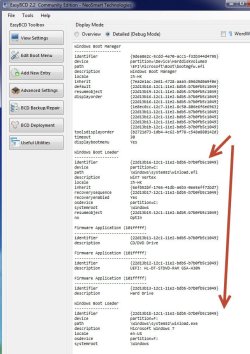
I attached a listing of EasyBCD for your reference.

Can anybody tell me what's wrong and how can I correct it?

TOny
 

Attachments
  • dual boot problem.jpg
    dual boot problem.jpg
    92.8 KB · Views: 20

My Computer My Computer

At a glance

windows 7 ultimate x64
OS
windows 7 ultimate x64
Does EasyBCD support UEFI ?
Which version ?

You can correct very easy the second non working loader entry using Visual BCD Editor.

Just change the path from
\windows\system32\winload.exe
to
\windows\system32\winload.efi

You can later add recovery to second entry using steps outlined in help for "Dual-boot Repair" utility
 
Last edited:

My Computer My Computer

At a glance

Win 8 RP, Win 7, XPIntel
Computer Manufacturer/Model Number
Acer Notebook
OS
Win 8 RP, Win 7, XP
CPU
Intel
I don't think EasyBCD support UEFI.
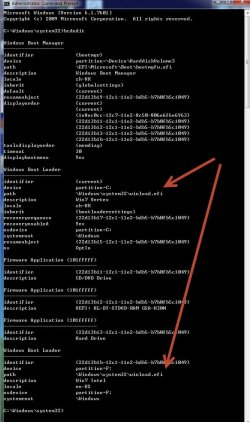
I have used bcdedit to modify the path.
However it still won't work: when I choose the 2nd partition (with description Win7 Intel), I was returned to the boot manager screen rather than calling up the window 7 in the Win7 Intel Partition.

I attach the latest bcdedit display for your information.

Any further clue to help get the problem resolved will be most appreciated.

Tony
 

Attachments

  • bcdedit output.jpg
    bcdedit output.jpg
    82.9 KB · Views: 13

My Computer My Computer

At a glance

windows 7 ultimate x64
OS
windows 7 ultimate x64
A screenshot of disk management would be useful.
Were both installations to ssd made by using the same procedure ?

DisplayOrder shows 7 entries ???
How many entries are visible in boot-menu ?
 
Last edited:

My Computer My Computer

At a glance

Win 8 RP, Win 7, XPIntel
Computer Manufacturer/Model Number
Acer Notebook
OS
Win 8 RP, Win 7, XP
CPU
Intel
help please

sorry dont know how to start a new therd but maybe you guys can send me in the right path or even help


windows 7 disc will not boot...
hello guys and ladies, i am trying to fix my mothers laptop its a toshiba satellite c655. i tryed everything first it would boot up so i installed the windows 7 the first time and it work. it had some updates so i updated it and never got pass update one over night, i unplug the computer and went to trun it back on no its not getting pass the boot up of windows,. so i try to reinstall windows 7 again and now its not even passing the setup is starting page.....

i tryed everything i read online from f8 to f2 to f12 and tryed holding down zero
tryed system repair that also gets stuck at a black screen.

if anyone can help me please let me know thanks
 

My Computer My Computer

At a glance

window 7 64
OS
window 7 64
Attached is a copy of disk management.

At boot time, 3 entries displayed:
Win7 Vertex
Win7 Vertex
Win7 Intel

The Adaptec and Second Raid are logical partition on Raid controlled by an Adaptec controller.

Appreciate any help.

Tony
 

Attachments

  • disk mgmt.jpg
    disk mgmt.jpg
    120.3 KB · Views: 20

My Computer My Computer

At a glance

windows 7 ultimate x64
OS
windows 7 ultimate x64
1. There is something wrong with BCD.
In DisplayOrder there are 7 entries but only 3 are displayed and only two loaders present ???
I suspect some playing with BCD with the wrong tools.

2. Was the installation to second SSD made while first was attached ?
3. I assume the same Windows 7 64-bit was installed to both SSD's.
4. Was second installation made by booting installation DVD and following onscreen instructions ?
5. Was the second SSD formated before the installation procedure or during installation procedure ?
6. Is "Intel 180" a MBR or a GPT disk ?
 

My Computer My Computer

At a glance

Win 8 RP, Win 7, XPIntel
Computer Manufacturer/Model Number
Acer Notebook
OS
Win 8 RP, Win 7, XP
CPU
Intel
1. yes.. there are 2 entries with bootloaders (C: and F:, which correspond to the 2 instances of win7 installation). The others are DVD drives etc. The only two tools I used are BCDEDIT and EasyBCD.

2. Yes. 2nd SSD (Intel) installation done with first attached. Indeed the boot menu can display the two. Problem come when I try to boot the 2nd entry (i.e. Intel) in the menu.

3. Yes. BOth installation are WIn7 64bit

4. Yes. 2nd installation done with exactly the same procedure as the first one (i.e. booting UEFI: DVD drive)

5. No. Installation done with the 2nd SSD afresh (i.e. no allocation, which mean not formatted)

6. "Intel 180" is a 180GB SSD from Intel, while "Vertex 4" is an OCZ Vertex 4 120GB SSD.

Hope these help...

Tony
 

My Computer My Computer

At a glance

windows 7 ultimate x64
OS
windows 7 ultimate x64
Did you activate both copies of Win 7 with different Product Keys?
 

My Computer My Computer

At a glance

Windows 7 Home Premium 32-Bit - Build 7600 SP1Intel Core i3-2120 3.30GhzKingston 4 GB DDR3 1333 mhzAMD Radeon HD6670
Computer type
PC/Desktop
Computer Manufacturer/Model Number
Custom Build
OS
Windows 7 Home Premium 32-Bit - Build 7600 SP1
CPU
Intel Core i3-2120 3.30Ghz
Motherboard
Asus P8Z68-V LX Intel Z68 Socket H2 ATX
Memory
Kingston 4 GB DDR3 1333 mhz
Graphics Card(s)
AMD Radeon HD6670
Sound Card
Sound Blaster Audigy SE 24-Bit
Monitor(s) Displays
Asus VE228
Screen Resolution
1440 X 900
Hard Drives
OCZ Vertex 3 120 GB Sata 3 SSD ==
Kingston SH103/S3 120 G Hyper X 120 GB SSD ==
Western Digital 500 GB Caviar Green 7200 RPM ==
PSU
Corsair CX600M == 600 Watt
Case
NZXT Apollo - Silver with Clear Side Panel
Cooling
Three 120 mm Fans
Keyboard
Microsoft Natural 4000
Mouse
Microsoft Custom Optical 3000
Internet Speed
AT&T Fiber Optic Wireless Network
Antivirus
Microsoft Security Essentials
Browser
Chrome
Other Info
120 mm Blue LED Fan -- Three Blue LED Lazer Light Sticks
6. Is "Intel 180" a MBR or a GPT disk ?

You can use diskpart.exe
list disk

and attach printout.
 

My Computer My Computer

At a glance

Win 8 RP, Win 7, XPIntel
Computer Manufacturer/Model Number
Acer Notebook
OS
Win 8 RP, Win 7, XP
CPU
Intel
Nop... both are not yet activated...
Intel 180 and Vertex are both GPT disk, as seen from Diskpart..

I finally got the dual boot working with UEFI (I've even fall back to test the same thing in MBR)... and find that I've committed at least a double fault during the process:

1. I installed the INTEL rapid storage manager software (come with the Asus driver disk) on the Intel 520 SSD..this will result in the hardware marker of the disk changed to SCSI...making the disk sometime not assessible for reading.. I skipped installing this software later on, which changed the HW marker to IDE

2. The boot sequence in the BIOS should always start with a DVD drive, and not the Window Boot manager.. I don't know the reason why... If I choose window boot manager as the first to boot, then only the 1st drive installed can work, and the 2nd drive install will always have the error "bootosmissing"..

BTW thanks for all suggestions which did help me to learn and come up with the final solution..

TOny
 

My Computer My Computer

At a glance

windows 7 ultimate x64
OS
windows 7 ultimate x64
Thank you everybody... I finally got it works...the problem is due to a double fault:

1. I installed the Intel Rapid Storage Manager which is on my ASUS driver disk..Unfortunately, this will turn my Intel 520 SSD into a SCSI rather than an IDE disk... that make the disk sometimes 'not readable' (found by running the Intel Toolbox for SSD).. and

2. I set the first boot disk to Window Boot Manager..which is incorrect... I should have set it to a DVD drive..

I solve the problem when 1+2 is corrected..

Thanks..

Tony
 

My Computer My Computer

At a glance

windows 7 ultimate x64
OS
windows 7 ultimate x64
Back
Top