Two Questions

LemonWarlord

New member
I have two questions regarding customization :O

One is regarding My Computer. Formerly, My Computer used to have a menu to the right, allowing you to select which drive to open. Now it seemingly disappeared. How can I get this menu back?

Second is adding a folder, or some place holder to achieve the same purpose to the left side. Is it possible to pin a folder or something like an icon with user made Tasks (similar to programs like Steam, CCleaner, etc.) so I can do multiple similar tasks with only one thing on the start menu? Thanks.
 

My Computer

OS
Windows 7
In regard to the first question:
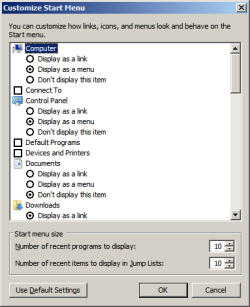
Right Click Taskbar > Properties > Start Menu Tab > Customize (See Below for Beyond That)

customizestart.png

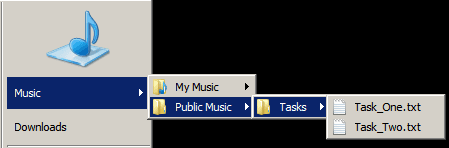
I don't think that the other question is possible with a folder in the left hand side of the start menu. However, you could do it by placing a folder within your user folder or documents folder and then displaying that folder as a menu using the same method as computer. In other words, place your scripts in a folder named "Tasks" within your user folder and display your user folder as a menu.

tasksmenu.png

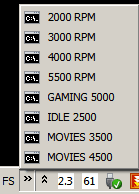
You can also do it using a toolbar via the taskbar. I use a toolbar to launch speed settings for my fans. In order to do this, create a folder and place whatever tasks you wish to execute in it. I use command prompts to launch a program with settings, but you could use anything that can be executed. Now right click on the taskbar, go to toolbars and create a new toolbar. Navigate to your folder and choose it. You can place it wherever you want on the taskbar, use icons, or a label, use a pop up or just a string of icons.

fstasks.png
 

My Computer

Computer Manufacturer/Model Number
Apple Macbook Pro (April 2009)
OS
W7 Ult. x64 | OS X
CPU
Intel Mobile Core 2 Duo 2.93Ghz [T9800 Penryn]
Motherboard
NVIDIA nForce 730i Rev. B1 [Mac-F2268EC8 (U2E1)]
Memory
4096MB Samsung DDR3 Dual Channel [PC3-8500F 1066Mhz]
Graphics Card(s)
NVIDIA GeForce 9600M GT 512MB [G96M Rev. C1]
Sound Card
SB X-Fi Surround 5.1 USB | Onboard Realtek (Disabled)
Monitor(s) Displays
Acer x223wbd 22" | Apple Anti-Glare 17" (Disabled)
Screen Resolution
{Current} 1440x900 {Acer} 1680x1050 {Apple} 1920x1200
Hard Drives
{Internal}
Seagate Momentus 320GB 2.5" 7200RPM [ST9320421AS]

{Externals}
LaCie 320GB USB 2.0 HDD [301284UR]
LaCie 750GB USB 2.0 FW400 eSATA HDD [301314U]
LaCie 1TB USB 2.0 HDD [301304UR]
PSU
Magsafe
Case
Aluminum/Unibody (MBP52)
Cooling
2 x 6000 RPM Fans
Keyboard
Logitech G-15v2 [PN 920-000379]
Mouse
Logitech G-9 [PN 910-000338]
Internet Speed
12Mbps/2.5Mbps w/ 24Mbps Speed Boost [Comcast]
Other Info
Logitech X-540 Speakers [PN 970223-0122]
Sennheiser PC-151 Headset
Thank you very much on the first one. I knew it was somewhere, I just couldn't google it anywhere.


As for the second, I don't really like how either resolves the problem.

The first doesn't seem reasonable due to the amount of folders I have, and the second just doesn't match how my system is set up (I use the Windows 7 grouping).

The way I would like it is either like a item/folder that could have tasks on the left (which you say can't happen)

Or perhaps reusing something like this.
Use Transparent Shortcuts to Separate and Organize Your Windows 7 Taskbar Icons - windows 7 - Lifehacker
With the ability to pin shortcuts (or for future reference, tasks)

I am not sure how I would go about this as I would like to pin shortcuts to a Games-esque kind of folder. I also dislike how the built in games system works, and its unintuitiveness.

(Also, thank you for the very quick reply!)
 

My Computer

OS
Windows 7
Use rocket dock and put all of your tasks on it
 

My Computer

Computer type
PC/Desktop
Computer Manufacturer/Model Number
Custom Build
OS
Windows 7 Pro 64bit
CPU
Intel Core i7 2600K @ 3.40GHz
Motherboard
ASUSTeK Computer INC. P8P67 PRO (LGA1155)
Memory
16.0GB Dual-Channel DDR3 @ 799MHz
Graphics Card(s)
Dual GTX 560TI
Sound Card
Realtek High Definition Audio
Monitor(s) Displays
23" and 24" monitor
Screen Resolution
1920-1080
Hard Drives
128GB SSD

2TB HD
Internet Speed
100MB
In order to keep the forums running well and to prevent problems, please follow these simple rules for the forums here. If you have any questions or problems, please feel free to contact one of the Staff Members.

General Rules:
1. While debating and discussion is fine, we will not tolerate rudeness, insulting posts, personal attacks or purposeless inflammatory posts. Our decision is final in these matters.
2. No purposely posting or asking to be posted, any malicious content (any content or links containing malware).
3. No useless posts. This includes: Thread bumping, multi or cross posting the same question in different forums, useless one liners, flaming, and Trolling.

http://www.sevenforums.com/general-discussion/8-forum-rules.html

Just sayin...
 

My Computer

OS
Home Premium x64
CPU
Intel e7400 2.8GHz Dual Core, OC @ 3.36GHz
Motherboard
Gigabyte GA-EP43-DS3L/S3L
Memory
4GB DDR2 1066
Graphics Card(s)
Nvidia GeForce 9800 GT
Sound Card
Realtek Surround Onboard.
Monitor(s) Displays
ASUS VW224, 22 Inch and Samsung SyncMaster 713v
Screen Resolution
Main Screen @1680x1050, Secondary @ 1280x1024
Hard Drives
Western Digital WD3200AAKS 320GB 7200 RPM SATA 3.0Gb/s
PSU
Thermaltake Purepower W0100RU 500W
Case
Rosewill R5601-BK Screw-less
Cooling
Two 120mm fans and Stock CPU fans
Keyboard
Old Dell Keyboard my neighbor gave me.
Mouse
Logitech MX518
Internet Speed
6Kbps
Other Info
Logitech X-540 70 watts 5.1 Speakers
I don't really like RocketDock as compared to the Windows 7 version. The Windows 7 dock feels like its much better.

Also, sorry for the bumps, but nobody responded to it for a while and I wanted it answered. Is there anything I should do in that case?
 

My Computer

OS
Windows 7
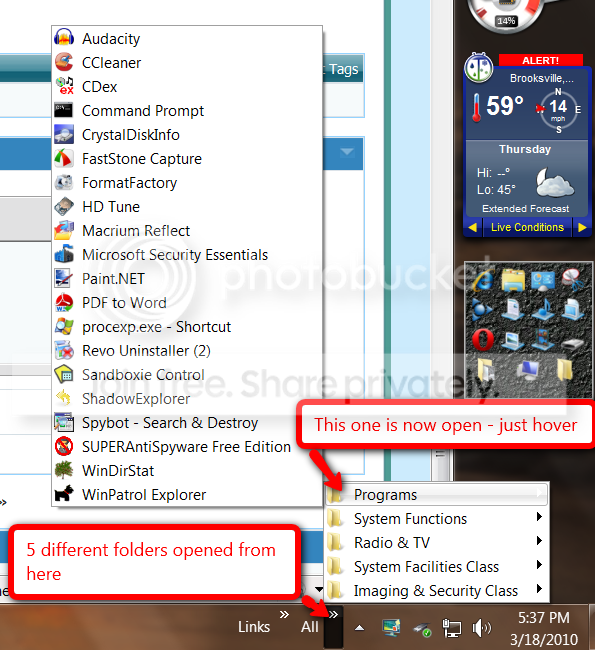
I still think the toolbars (as previously suggested) offer the best solution to your problem. Maybe you did not quite fathom the concept. The big advantage is that you can put an unlimited amount of folders and shortcuts into it. I also use Rocket Dock for the frequently used shortcuts. Problem there is that you have a limited amount of shortcuts it will hold. Below is an example of a set-up. Here is a little video tutorial I made about toolbars: http://www.sevenforums.com/tutorials/72092-toolbars-how-use-windows-7-vista.html

toolbar.png
 

My Computer

Computer Manufacturer/Model Number
HP, Dell, Gateway, Toshiba - 4 laptops and 2 desktops
OS
Vista, Windows7, Mint Mate, Zorin, Windows 8
CPU
from 1.6GHz Duo to i7
Monitor(s) Displays
2x HP w2207
Hard Drives
5x HDD, 7x SSD, 12x Externals
Keyboard
with trackball - no mices
Mouse
Trackball mice
Internet Speed
DSL 6000
I guess I'll take a look at it.
I just tend to like it either a smoother look (like the Windows 7 dock), or keep it in the start menu as a folder (as the shortcuts exist in there already).
I personally am a person who likes to keep the taskbar clean, so I'm not a terribly big fan of toolbars.
 

My Computer

OS
Windows 7

My Computer

Computer Manufacturer/Model Number
HP, Dell, Gateway, Toshiba - 4 laptops and 2 desktops
OS
Vista, Windows7, Mint Mate, Zorin, Windows 8
CPU
from 1.6GHz Duo to i7
Monitor(s) Displays
2x HP w2207
Hard Drives
5x HDD, 7x SSD, 12x Externals
Keyboard
with trackball - no mices
Mouse
Trackball mice
Internet Speed
DSL 6000
Could make a new library and pin that to start menu or task bar?
Then just point that to all your folders you need...

I've disabled libraries, so cant test it out myself...
 

My Computer

OS
Windows 7 Enterprise
CPU
Intel Pentium Dual E2200 @2.2GHz
Motherboard
Gigabyte II-G31
Memory
4GB
Graphics Card(s)
Palit GForce 9500GT 1GB
Sound Card
onBoard
Hard Drives
WesternDigital: 250GB + 1TB + 1TB + 2TB
PSU
450W
Case
CoolerMaster CM690
Cooling
Corsair H50
Mouse
Logitech MX518
Back
Top