
Two Realplayer Icons ??

guitarfiend

Banned
VIP
Local time
2:03 PM
Messages
114
Why are there TWO icons for realplayer available when I open my user folder (or,right click on a video file) to play a video ? I've tried them both & they both open the player.Does it mean that there are 2 realplayers on my pc taking up that much extra space on my hdd ? Control panel only shows one. Also,anybody know anything about why Realplayers reaction time would seem to lag ? I't's not the video itself.It's the player.Once the video starts playing it seems to be fine.But,before it starts Realplayer seems to "choke" or "sputter" a lot.
 

My Computer

Computer type
Laptop
Computer Manufacturer/Model Number
Hewlet Packard Compaq Presario cq 57-229wm
OS
windows 7 home premium 64 64 bit
Antivirus
avast
Browser
Firefox,Internet Explorer,Google Chrome,Palemoon
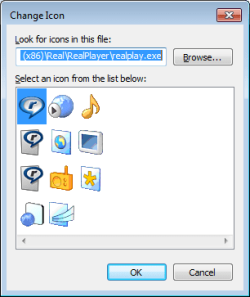
It has been a long time since I've used RealPlayer, but my guess is that it uses different icons for different file types. In other words, an MP3 audio file might have a different icon than an MP4 movie file. (I'm not even sure RealPlayer will play MP4 files). Anyway, these are some of the icons available in version 16.0.2.32:

RP.png

I really hope that you did not buy RealPlayer - there are too many better and free options available. My preference is to use the K-Lite codec pack with Media Player Classic as the player. That player lets me step thru video files frame by frame - if need be.
 

My Computer

Computer type
Laptop
Computer Manufacturer/Model Number
Employer provided Dell Latitude
OS
W7 Pro SP1 64bit
CPU
i7
Memory
8GB
Graphics Card(s)
Intel HD Graphics
Hard Drives
crappy SSD
Antivirus
Employer mandated Symantec Endpoint Protection
Browser
Pale Moon 64bit, IE11 64bit & Chrome 64bit
Already gave a title not giving another how's that for a title ?? ha h

Nope.Didn't pay.And,RP does indeed play mp4.AND...apparently,you are not understanding....the icons that I'm speaking of are the exact same icons and they do the exact same thing.They open RP.When I right click on a video file and the right click menu opens there are 2 RP icons (one right underneath the other).....WHY ? WHY are there 2 icons in that menu when they both do the exact same thing ?? They open RP. HOW did 2 shortcuts to RP end up in the right click menu ???
 

My Computer

Computer type
Laptop
Computer Manufacturer/Model Number
Hewlet Packard Compaq Presario cq 57-229wm
OS
windows 7 home premium 64 64 bit
Antivirus
avast
Browser
Firefox,Internet Explorer,Google Chrome,Palemoon
This is the only place that I see the RP icon on a context menu:

RP.png

Can you post a screenshot of what you see?
 

My Computer

Computer type
Laptop
Computer Manufacturer/Model Number
Employer provided Dell Latitude
OS
W7 Pro SP1 64bit
CPU
i7
Memory
8GB
Graphics Card(s)
Intel HD Graphics
Hard Drives
crappy SSD
Antivirus
Employer mandated Symantec Endpoint Protection
Browser
Pale Moon 64bit, IE11 64bit & Chrome 64bit
Usr...THAT is EXACTLY what I'm talking about !! But,I have TWO icons/shortcuts ( one under the other) that look exactly the same adn DO the same thing ! They opne RP
 

My Computer

Computer type
Laptop
Computer Manufacturer/Model Number
Hewlet Packard Compaq Presario cq 57-229wm
OS
windows 7 home premium 64 64 bit
Antivirus
avast
Browser
Firefox,Internet Explorer,Google Chrome,Palemoon
My Computer

Computer type
PC/Desktop
Computer Manufacturer/Model Number
Self Built
OS
Win 10 Pro x64
CPU
Intel I5-2500K @3.3GHz
Motherboard
Asrock P67 Extreme4
Memory
16GB G.Skill Ripjaws X (4x4GB)
Graphics Card(s)
EVGA GeForce 750 Ti SC 2GB
Sound Card
ASUS Xonar DG 5.1 Channels 24-bit 96KHz PCI Interface Sound
Monitor(s) Displays
auria eq2367
Screen Resolution
1920 x 1080
Hard Drives
250GB Samsung 850 EVO SSD
1TB WD Blue
1TB Hitachi
PSU
SeaSonic X 650W 80 Plus Gold
Case
Corsair Obsidian 750D
Cooling
Corsair H60, Three 140mm case fans
Keyboard
Logitech Wireless Keyboard K520
Mouse
Logitech Wireless Mouse M310
Internet Speed
Wave Broadband ~ 100 dn 5 up
Antivirus
Windows Defender, Malwarebytes Premium
Browser
Edge, IE11, Chrome
Other Info
Laptop specs: HP g7-1365dx /
CPU: AMD A6-3420M APU with Radeon(tm) HD Graphics /
RAM: Crucial 8Gb (2x4Gb) /
SSD: Crucial M4-CT128M4SSD2 ATA Device/ FW 000F /
GFX: AMD Radeon HD 6520G /
OS: Windows 10 Pro x64
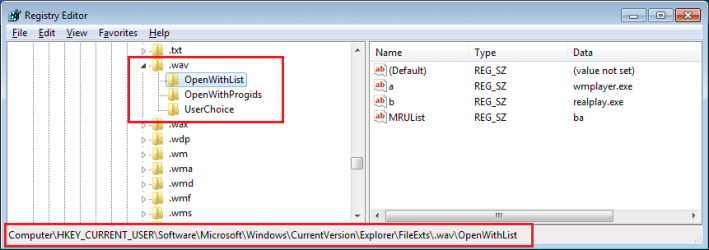
If you feel comfortable looking in the registry, then post a screenshot of what you have here for the WAV file extension:

RP.png

If you don't want to to mess with the registry, then use CCleaner's registry cleanup to remove only the RP crap.
 

My Computer

Computer type
Laptop
Computer Manufacturer/Model Number
Employer provided Dell Latitude
OS
W7 Pro SP1 64bit
CPU
i7
Memory
8GB
Graphics Card(s)
Intel HD Graphics
Hard Drives
crappy SSD
Antivirus
Employer mandated Symantec Endpoint Protection
Browser
Pale Moon 64bit, IE11 64bit & Chrome 64bit

My Computer

Computer type
Laptop
Computer Manufacturer/Model Number
Employer provided Dell Latitude
OS
W7 Pro SP1 64bit
CPU
i7
Memory
8GB
Graphics Card(s)
Intel HD Graphics
Hard Drives
crappy SSD
Antivirus
Employer mandated Symantec Endpoint Protection
Browser
Pale Moon 64bit, IE11 64bit & Chrome 64bit
If the previous suggestions don't fix your issue, here's some other things you can try.

You can try ShellExView to see if you can find and disable one of the RP entries:
ShellExView - Shell Extension Manager For Windows

You could also use Regedit and see if 2 RP entries are listed under ContextMenuHandlers at:
HKEY_CLASSES_ROOT\*\shellex\ContextMenuHandlers
You should create a Restore Point and backup the registry before making changes.

Maybe a RealPlayer program update caused the duplicate entry?
Look in Control Panel > Programs and Features to see if there are 2 RP programs listed.
 

My Computer

Computer type
PC/Desktop
Computer Manufacturer/Model Number
home built
OS
Multi-Boot W7_Pro_x64 W8.1_Pro_x64 W10_Pro_x64 +Linux_VMs +Chromium_VM
CPU
AMD Athlon II x4 620
Motherboard
Gigabyte GA-MA785G-UD3H
Memory
6GB GSkill DDR2 800
Graphics Card(s)
AMD 4670 GPU + AMD 4200 IGP
Sound Card
on board Realtek ALC889A
Monitor(s) Displays
RCA 40" LCD TV, Insignia 32" LCD TV, HP 15" LCD monitor
Screen Resolution
1680 x 1050
Hard Drives
OCZ Vertex 3 120GB,
Samsung F3 1TB (3),
Several others - WD, Seagate, Hitachi, ...
PSU
Corsair 500 W
Case
Rosewill mid tower
Cooling
CM 90mm rifle
Keyboard
Gyration wireless, Logitech wireless, Dell USB wired
Mouse
Gyration wireless, Logitech wireless, V7 USB wired
Internet Speed
Spectrum - 100Mbps D / 10Mbps U
Antivirus
Avast, MBAM3, EMET, WinPatrol
Browser
Pale Moon, Firefox, IE
Other Info
2 multi-boot PC's
Mainly HTPC/Office/Gen purpose (no gaming).
Trendnet USB KVM.
LG DVD burner/Blue Ray Player.
Tray system for removable SATA backup drives.

Not currently OCd, under-volted.
I use Hybrid sleep, rarely re-boot or shutdown.

Hauppauge HD-PVR, Avermedia PCIe TV Tuner, Hauppauge PCI TV Tuner.
Back
Top