
- Local time
- 2:15 AM
- Messages
- 106
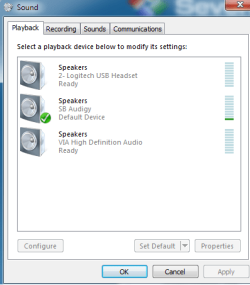
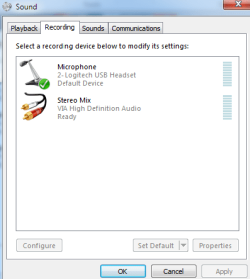
so i have two sound cards installed, one is my onboard card and the other is my installed PCI sound card
On-board:
Newegg.com - ASUS M4A79XTD EVO AM3 AMD 790X ATX AMD Motherboard
PCI:
Newegg.com - Creative Sound Blaster Audigy SE 7.1 Channels 24-bit 96KHz PCI Interface Sound Card - Sound Cards
i want to be able to listen to music through my sound blaster card and use the stereo mix from my onboard to record what i hear. any way to either link them to make this possible, or have sound go through both without having to plug in speakers into my onboard?
the stereo mix works fine with my onboard, the problem is that it requires speakers pluged in to work. any way to bypass this?
On-board:
Newegg.com - ASUS M4A79XTD EVO AM3 AMD 790X ATX AMD Motherboard
PCI:
Newegg.com - Creative Sound Blaster Audigy SE 7.1 Channels 24-bit 96KHz PCI Interface Sound Card - Sound Cards
i want to be able to listen to music through my sound blaster card and use the stereo mix from my onboard to record what i hear. any way to either link them to make this possible, or have sound go through both without having to plug in speakers into my onboard?
the stereo mix works fine with my onboard, the problem is that it requires speakers pluged in to work. any way to bypass this?
Attachments
My Computer
- Computer type
- PC/Desktop
- OS
- Windows 7 64 Bit
- CPU
- Intel Core i5 4670K 3.4GHz Socket LGA 1150
- Motherboard
- MSI Z87-G41 PC Mate Socket LGA 1150 ATX Intel Motherboard
- Memory
- 8GB
- Graphics Card(s)
- ATI HD 6950
- Sound Card
- ASUS GTX760-DC2OC-2GD5
- Hard Drives
- 1TB


