Two System32 Folder

svc

New member
Local time
11:15 AM
Messages
3
Hello all, a newbie here :)

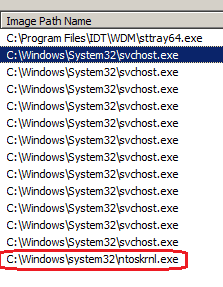
I just download and run Svchost Analyzer from Neuber, and saw that some of the processes come from 2 kinds of System32, first is C:\Windows\System32 and the other is C:\Windows\system32 (notice the capital "S" on the first one).

Is this normal?

On the "Display Name" Svchost Analyzer puts a check sign and said that a certain process is from Windows or not. Is it possible for malware files to disguise itself as Windows' (Microsoft) file?

Thanks in advance :)

Oh, just in case it doesn't show, I am using Windows 7 Ultimate.
 

My Computer My Computer

At a glance

Windows 7 ultimate 32bit
OS
Windows 7 ultimate 32bit
I have checked my computer and when using Windows Explore Search using upper case or lower case doesn't mater. I end up in the same place.
To answer your question; yes a infection can get into your C:\Windows\System32 and C:\Windows\system 32 and many do like to hide there.
Is their any thing that is not working correctly?
 
Last edited:

My Computer My Computer

At a glance

Windows 10 Pro. 64/ version 1709 Windows 7 Pr...Intel i7-6800K @ 4.3Corsair Platinum 16 gig @2400EVGA GTX 1070 OC
Computer type
PC/Desktop
Computer Manufacturer/Model Number
Home made Desktop
OS
Windows 10 Pro. 64/ version 1709 Windows 7 Pro/64
CPU
Intel i7-6800K @ 4.3
Motherboard
ASUS X-99 Deluxe II
Memory
Corsair Platinum 16 gig @2400
Graphics Card(s)
EVGA GTX 1070 OC
Monitor(s) Displays
Asus 27" LED LCD/VE278Q
Screen Resolution
1920-1080 or 1280-720 HDMI
Hard Drives
INTEL SSD 730-240 Gb Sata 3.0/
PSU
EVGA Platium 1200W
Case
Phanteks Luxe Tempered Glass 8 fans/ one radiator
Cooling
XSPC/ Water Cooled CPU
Keyboard
Das 4 Professional
Mouse
Logitech M705/MX Anywhere 2-S
Internet Speed
100 mbits
Antivirus
Microsoft Security Essentials/ Malwarebytes Premium 3.0/ SAS
Browser
I.E. 11 default/Firefox/ ISP Time Warner Cable/Spectrum
Other Info
LG BluRay Burner/
Sound system-KLipsch-THX/
Icy Dock ssd Hot Swap bays.
Hello, thanks for your answer. I'm not sure.. but all of my applications and Windows features works normally. I just downloaded the new Gmer (used it before when it was not compatible with Windows 7 -I know :P) and 1-2 minutes after scanning I got blue sceen and restarted. A scan after that did not revealing anything suspicious though (I am not an expert but no warning whatsoever). Probably just me being paranoid.
 

My Computer My Computer

At a glance

Windows 7 ultimate 32bit
OS
Windows 7 ultimate 32bit

My Computer My Computer

At a glance

Windows 10 Pro. 64/ version 1709 Windows 7 Pr...Intel i7-6800K @ 4.3Corsair Platinum 16 gig @2400EVGA GTX 1070 OC
Computer type
PC/Desktop
Computer Manufacturer/Model Number
Home made Desktop
OS
Windows 10 Pro. 64/ version 1709 Windows 7 Pro/64
CPU
Intel i7-6800K @ 4.3
Motherboard
ASUS X-99 Deluxe II
Memory
Corsair Platinum 16 gig @2400
Graphics Card(s)
EVGA GTX 1070 OC
Monitor(s) Displays
Asus 27" LED LCD/VE278Q
Screen Resolution
1920-1080 or 1280-720 HDMI
Hard Drives
INTEL SSD 730-240 Gb Sata 3.0/
PSU
EVGA Platium 1200W
Case
Phanteks Luxe Tempered Glass 8 fans/ one radiator
Cooling
XSPC/ Water Cooled CPU
Keyboard
Das 4 Professional
Mouse
Logitech M705/MX Anywhere 2-S
Internet Speed
100 mbits
Antivirus
Microsoft Security Essentials/ Malwarebytes Premium 3.0/ SAS
Browser
I.E. 11 default/Firefox/ ISP Time Warner Cable/Spectrum
Other Info
LG BluRay Burner/
Sound system-KLipsch-THX/
Icy Dock ssd Hot Swap bays.
I do not think that you have anything to worry about. The program is doing just what I suspected it would do. It queries the registry for the info being displayed and that info varies depending on who typed the code for the service that Svchost launched.

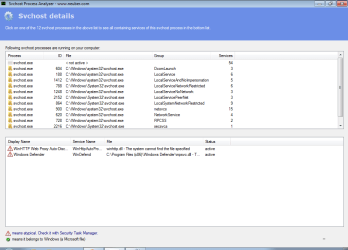
Here is the output of the software tool that you mentioned when run on a clean W7 Pro SP1 64bit virtual machine.
details.png

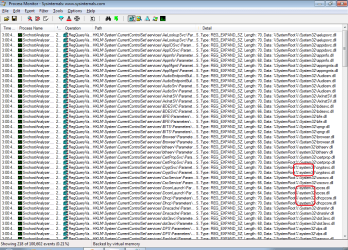
Here is Process Monitor watching what that software is doing during a scan:
process-mon.png

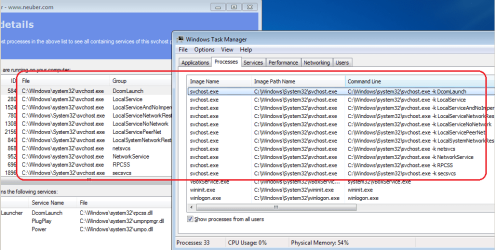
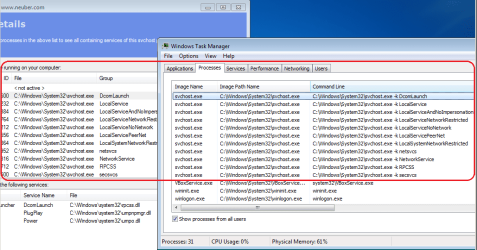
Even Windows' own Task Manager gets different info for stuff like this:
taskmanager.png
 

My Computer My Computer

At a glance

W7 Pro SP1 64biti78GBIntel HD Graphics
Computer type
Laptop
Computer Manufacturer/Model Number
Employer provided Dell Latitude
OS
W7 Pro SP1 64bit
CPU
i7
Memory
8GB
Graphics Card(s)
Intel HD Graphics
Hard Drives
crappy SSD
Antivirus
Employer mandated Symantec Endpoint Protection
Browser
Pale Moon 64bit, IE11 64bit & Chrome 64bit
I agree, as long as you only have 1 system32 in C:windows, you have nothing to worry about.
 

My Computer My Computer

At a glance

Windows 10 Pro x64Intel Core i7 6700KGSkill TridentZ RGB 16GB 3600 16-16-16-36EVGA GTX 980 Ti SC x2
Computer type
PC/Desktop
Computer Manufacturer/Model Number
Skylake Special #666
OS
Windows 10 Pro x64
CPU
Intel Core i7 6700K
Motherboard
Asus Sabertooth Z170 Mark 1
Memory
GSkill TridentZ RGB 16GB 3600 16-16-16-36
Graphics Card(s)
EVGA GTX 980 Ti SC x2
Sound Card
Realtek High Definition
Monitor(s) Displays
AOC G2460PG
Screen Resolution
1920 x 1080 144Hz
Hard Drives
Samsung 860 Pro 256GB, Seagate Barracuda 4TB x2
PSU
EVGA 1000 P2, EVGA White Custom Braided Cables
Case
Corsair Vengeance C70 Gunmetal Black
Cooling
Corsair H100i v2, Corsair ML120 x2, Thermal Grizzly Kryonaut
Keyboard
Logitech G910 Orion Spectrum
Mouse
Logitech G700s
Internet Speed
Verizon Fios Quantum Gateway 75/75
Antivirus
Windows Defender, Malwarebytes Free 3.8.3
Browser
Chrome
Other Info
Corsair SP120 x4, LG Blu-ray Drive, Durabrand HT-395 100 Watt Dolby Digital Amp, Corsair H2100 Wireless 7.1 Headset
...and to be more specific:

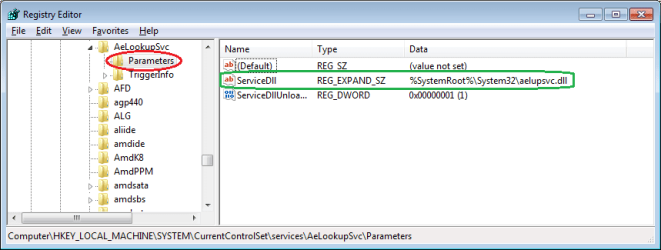
Here is the path to Svchost as typed by some programmer
reg1.png

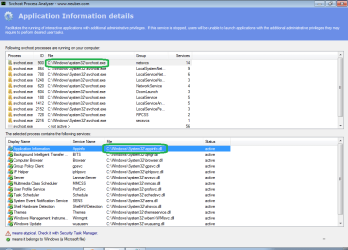
The scanner looks for the DLL or EXE for a service associated with Svchost...
reg2.png

...and then looks to see where the Svchost path image is
details2.png

Edit: actually, the scanner does not just look at the image path info to determine where Svchost is running from for a give set of services... it looks elsewhere (I'm not sure where) but I think that the premise is sound: the upper and lowercase is just differences in a human's typing/coding somewhere. I was able to test this by changing the path in 3 places in the registry for the service shown/highlighted in the lower pane of the 1st screenshot in this post of the scanner. Then I restarted the computer (VM) and repeated the scan. The path to the appinfo DLL was still correct. And I could not find any logic that held true for the upper/lower case S in the path to the Scvhost.exe. I thought maybe the scanner just used the path as identified by the first or last service scanned for a given group of services - but that did not pan out. Oh well, maybe the folks at Neuber can stop by and tell us :-)

If I knew more about how Svchost launches services, I might be able to tell you if that "security scanner" is doing anything worth while. Just reading what is written in the registry might not be all that smart... I wonder if a black hat could just write any path image that they wished.

Hmmm, I have a frozen virtual machine...
...time to mess up a few path images in the registry.
Do not try this at home. :-)
 
Last edited:

My Computer My Computer

At a glance

W7 Pro SP1 64biti78GBIntel HD Graphics
Computer type
Laptop
Computer Manufacturer/Model Number
Employer provided Dell Latitude
OS
W7 Pro SP1 64bit
CPU
i7
Memory
8GB
Graphics Card(s)
Intel HD Graphics
Hard Drives
crappy SSD
Antivirus
Employer mandated Symantec Endpoint Protection
Browser
Pale Moon 64bit, IE11 64bit & Chrome 64bit
Type C:/Windows/System32 in search and you will see, only 1 result will come up. And notice it does have a capitol S, just like it should.
 

My Computer My Computer

At a glance

Windows 10 Pro x64Intel Core i7 6700KGSkill TridentZ RGB 16GB 3600 16-16-16-36EVGA GTX 980 Ti SC x2
Computer type
PC/Desktop
Computer Manufacturer/Model Number
Skylake Special #666
OS
Windows 10 Pro x64
CPU
Intel Core i7 6700K
Motherboard
Asus Sabertooth Z170 Mark 1
Memory
GSkill TridentZ RGB 16GB 3600 16-16-16-36
Graphics Card(s)
EVGA GTX 980 Ti SC x2
Sound Card
Realtek High Definition
Monitor(s) Displays
AOC G2460PG
Screen Resolution
1920 x 1080 144Hz
Hard Drives
Samsung 860 Pro 256GB, Seagate Barracuda 4TB x2
PSU
EVGA 1000 P2, EVGA White Custom Braided Cables
Case
Corsair Vengeance C70 Gunmetal Black
Cooling
Corsair H100i v2, Corsair ML120 x2, Thermal Grizzly Kryonaut
Keyboard
Logitech G910 Orion Spectrum
Mouse
Logitech G700s
Internet Speed
Verizon Fios Quantum Gateway 75/75
Antivirus
Windows Defender, Malwarebytes Free 3.8.3
Browser
Chrome
Other Info
Corsair SP120 x4, LG Blu-ray Drive, Durabrand HT-395 100 Watt Dolby Digital Amp, Corsair H2100 Wireless 7.1 Headset
@AddRAM - I'm just digging into how that scanner works to see what value it is. I understand that the file system uses an uppercase S. The scanner does not seem to provide much more info than Task Manager (if you turn on certain columns).

@OP, My apologies for filling your thread with so much stuff as I think out loud (so to speak). Task Manager shows the same upper and lowercase S in the Command Line column. Sort the Processes tab by the Command Line column and then sort the scan results upper pane by the Group column and the info should match.

taskmanager2.png

I was able to change some entries in the registry to get them all show an uppercase S... however, the scanner uses a slightly different spot in the registry than Task Manager does. In other words, I was able to get all uppercase Ss in Task Manager and I still had some lowercase Ss in the scanner. Eventually, I found all of the places to change stuff. Again, do not mess with the registry on a live system. I did this in a virtual machine.

taskmanager3.png
 

My Computer My Computer

At a glance

W7 Pro SP1 64biti78GBIntel HD Graphics
Computer type
Laptop
Computer Manufacturer/Model Number
Employer provided Dell Latitude
OS
W7 Pro SP1 64bit
CPU
i7
Memory
8GB
Graphics Card(s)
Intel HD Graphics
Hard Drives
crappy SSD
Antivirus
Employer mandated Symantec Endpoint Protection
Browser
Pale Moon 64bit, IE11 64bit & Chrome 64bit

My Computer My Computer

At a glance

Windows 10 Pro. 64/ version 1709 Windows 7 Pr...Intel i7-6800K @ 4.3Corsair Platinum 16 gig @2400EVGA GTX 1070 OC
Computer type
PC/Desktop
Computer Manufacturer/Model Number
Home made Desktop
OS
Windows 10 Pro. 64/ version 1709 Windows 7 Pro/64
CPU
Intel i7-6800K @ 4.3
Motherboard
ASUS X-99 Deluxe II
Memory
Corsair Platinum 16 gig @2400
Graphics Card(s)
EVGA GTX 1070 OC
Monitor(s) Displays
Asus 27" LED LCD/VE278Q
Screen Resolution
1920-1080 or 1280-720 HDMI
Hard Drives
INTEL SSD 730-240 Gb Sata 3.0/
PSU
EVGA Platium 1200W
Case
Phanteks Luxe Tempered Glass 8 fans/ one radiator
Cooling
XSPC/ Water Cooled CPU
Keyboard
Das 4 Professional
Mouse
Logitech M705/MX Anywhere 2-S
Internet Speed
100 mbits
Antivirus
Microsoft Security Essentials/ Malwarebytes Premium 3.0/ SAS
Browser
I.E. 11 default/Firefox/ ISP Time Warner Cable/Spectrum
Other Info
LG BluRay Burner/
Sound system-KLipsch-THX/
Icy Dock ssd Hot Swap bays.
Hi guys, wow.. thank you all for your replies and information, I appreciate your times and efforts! I probably a little confuse of who said what so.. my apologize if I did.

@Layback Bear: I agree, being paranoid is another layer of security protection. While I think I am OK from random attack / virus but after reading / hearing a lot about security.. well, there are always something to be afraid of. Every time we can hear about new malwares, zero days vulnerabilities, new way to exploit etc etc. Can't help but thinking (and agree) that (online) security is just illusion. Thanks for the scanners, just spent a lot of times with Eset's.

@UserNameIssues: No need to apologize, I'm glad you did and I like your methodologies. I am not trying them (definitely beyond my capability) but I think there is something we (I) can learn from them. I know a little programming and I'm a little surprised that it is not case sensitive.

@AddRam: Yes, I only have 1 System32 folder in C ("Show hidden file and folder" option is checked)

Well, glad that it was nothing to be aware of.
 

My Computer My Computer

At a glance

Windows 7 ultimate 32bit
OS
Windows 7 ultimate 32bit
Back
Top