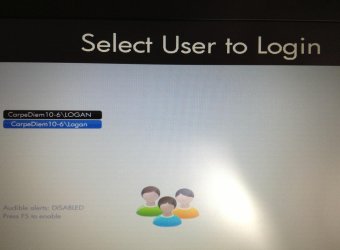
Two users on logon screen

BattyVamp36

New member
Local time
8:06 PM
Messages
6
Hello,

I have two user names on my log on screen and I don't know why. The only accounts on my user accounts in the control panel is the administrator and the guest. I want to know how to fix this problem it's very annoying :cry: I will attach a picture of what the screen displays. If someone can help that would be great :party:
 

Attachments

  • screen shot.jpg
    screen shot.jpg
    420.5 KB · Views: 25

My Computer

Computer type
PC/Desktop
Computer Manufacturer/Model Number
HP
OS
Windows 7 Home Premium 64bit
CPU
@2.30GHz
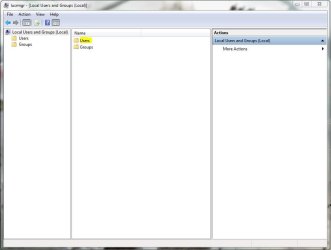
you can go to control panel-computer management-users and groups. then on the users list there should be all the users available. now, you need to make sure which one you are using right now to access the pc, then you can just delete the one's not needed. careful not to delete the active user or administrator.
 

My Computer

Computer type
PC/Desktop
OS
Windows 7 Ultimate x86
Ok I went to control panel but I didn't see the computer management feature :confused: However, I clicked on start ---> right-clicked on computer --->properties and computer management came up but I didn't see users and groups :huh:
 

My Computer

Computer type
PC/Desktop
Computer Manufacturer/Model Number
HP
OS
Windows 7 Home Premium 64bit
CPU
@2.30GHz
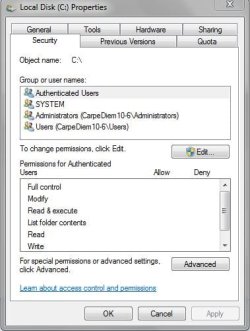
By the way I took a picture of the local disk I think it might help :thumbsup:
 

Attachments

  • Local Disk Pic.JPG
    Local Disk Pic.JPG
    36.3 KB · Views: 7

My Computer

Computer type
PC/Desktop
Computer Manufacturer/Model Number
HP
OS
Windows 7 Home Premium 64bit
CPU
@2.30GHz
ow i forgot sorry, in the contol panel before disk management, you should go to administrative tools first. the disk management is inside administrative tools. i'll look into the attached picture now.
 

My Computer

Computer type
PC/Desktop
OS
Windows 7 Ultimate x86
from the picture, i guess the lowest in the list, users refer to standard user group that doesn't have full control over the pc. you may not be using this profile right now. what you need is the users in the administrators group which, consist of the administrator himself and some other users who are granted full control just like the administrator. in the computer management page, there are descriptions of every groups and users of the pc. when you click on the administrators group it will show all members of this group, this is what you need to keep. because other users, though they have same names, they belong to groups other than administrators.
 

My Computer

Computer type
PC/Desktop
OS
Windows 7 Ultimate x86
Ok ok soo what do I do?? O.O I'm like totally lost :o Do I delete the last option in the local disk picture?? :confused:
 

My Computer

Computer type
PC/Desktop
Computer Manufacturer/Model Number
HP
OS
Windows 7 Home Premium 64bit
CPU
@2.30GHz
Before you do anything we need to see a screenshot of all the local users on the machine. To do this press Start and then in the search bar enter the following exactly:

Code:
lusrmgr.msc

   Note
You will need administrative privileges to be able to complete this action


Upon launch you should find a windows like the one below, here can you open the users folder and then upload a screenshot by following this tutorial:

How to Use the Snipping Tool in Vista

local users.JPG

Many Thanks,
Josh
 

My Computer

Computer type
PC/Desktop
Computer Manufacturer/Model Number
Custom Built
OS
Windows 7 Professional x64 SP1 ; Windows Server 2012 R2 Standard
CPU
Intel Core i5 2400 @ 3.10GHz
Motherboard
Foxconn H67MP-S/-V/H67MP
Memory
8.0GB DDR3 @ 665MHz (2GBx4)
Graphics Card(s)
AMD Radeon HD 6870
Sound Card
Realtek High Definition Audio
Monitor(s) Displays
AOC 2243W & SMB1930NW
Screen Resolution
1440x900 & 1920x1080
Hard Drives
977GB Seagate ST31000524AS ATA Drive (SATA)
250GB WD iSCSI attached Drive
PSU
750W Gaming PSU
Case
Novatech Night
Cooling
Fan
Keyboard
Dell Standard PS/2 Keyboard
Mouse
R.A.T 07 Gaming Mouse
Internet Speed
Download: 10 Mbps Ping: 30ms Upload: 0.81 Mbps
Browser
Google Chrome
Other Info
Optiarc DVD RW AD-5260S ATA Device
Josh I don't believe that command will work on Windows 7 Home Premium. At least it won't work on mine.
 

My Computer

Computer type
PC/Desktop
Computer Manufacturer/Model Number
Home made Desktop
OS
Windows 10 Pro. 64/ version 1709 Windows 7 Pro/64
CPU
Intel i7-6800K @ 4.3
Motherboard
ASUS X-99 Deluxe II
Memory
Corsair Platinum 16 gig @2400
Graphics Card(s)
EVGA GTX 1070 OC
Monitor(s) Displays
Asus 27" LED LCD/VE278Q
Screen Resolution
1920-1080 or 1280-720 HDMI
Hard Drives
INTEL SSD 730-240 Gb Sata 3.0/
PSU
EVGA Platium 1200W
Case
Phanteks Luxe Tempered Glass 8 fans/ one radiator
Cooling
XSPC/ Water Cooled CPU
Keyboard
Das 4 Professional
Mouse
Logitech M705/MX Anywhere 2-S
Internet Speed
100 mbits
Antivirus
Microsoft Security Essentials/ Malwarebytes Premium 3.0/ SAS
Browser
I.E. 11 default/Firefox/ ISP Time Warner Cable/Spectrum
Other Info
LG BluRay Burner/
Sound system-KLipsch-THX/
Icy Dock ssd Hot Swap bays.
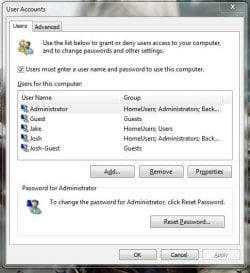
My apologies, I had forgotten about the restrictions. In that case follow the same steps but instead search for the following command:

Code:
netplwiz.exe

From here you will be shown all of the users on the machine and then be able to delete the replicated user

(Option Four)
http://www.sevenforums.com/tutorials/181036-user-account-delete.html

local users.JPG

Hope This Helps,
Josh! :)
 
Last edited by a moderator:

My Computer

Computer type
PC/Desktop
Computer Manufacturer/Model Number
Custom Built
OS
Windows 7 Professional x64 SP1 ; Windows Server 2012 R2 Standard
CPU
Intel Core i5 2400 @ 3.10GHz
Motherboard
Foxconn H67MP-S/-V/H67MP
Memory
8.0GB DDR3 @ 665MHz (2GBx4)
Graphics Card(s)
AMD Radeon HD 6870
Sound Card
Realtek High Definition Audio
Monitor(s) Displays
AOC 2243W & SMB1930NW
Screen Resolution
1440x900 & 1920x1080
Hard Drives
977GB Seagate ST31000524AS ATA Drive (SATA)
250GB WD iSCSI attached Drive
PSU
750W Gaming PSU
Case
Novatech Night
Cooling
Fan
Keyboard
Dell Standard PS/2 Keyboard
Mouse
R.A.T 07 Gaming Mouse
Internet Speed
Download: 10 Mbps Ping: 30ms Upload: 0.81 Mbps
Browser
Google Chrome
Other Info
Optiarc DVD RW AD-5260S ATA Device
Works for me using Windows 7/64 Home Premium.
 

My Computer

Computer type
PC/Desktop
Computer Manufacturer/Model Number
Home made Desktop
OS
Windows 10 Pro. 64/ version 1709 Windows 7 Pro/64
CPU
Intel i7-6800K @ 4.3
Motherboard
ASUS X-99 Deluxe II
Memory
Corsair Platinum 16 gig @2400
Graphics Card(s)
EVGA GTX 1070 OC
Monitor(s) Displays
Asus 27" LED LCD/VE278Q
Screen Resolution
1920-1080 or 1280-720 HDMI
Hard Drives
INTEL SSD 730-240 Gb Sata 3.0/
PSU
EVGA Platium 1200W
Case
Phanteks Luxe Tempered Glass 8 fans/ one radiator
Cooling
XSPC/ Water Cooled CPU
Keyboard
Das 4 Professional
Mouse
Logitech M705/MX Anywhere 2-S
Internet Speed
100 mbits
Antivirus
Microsoft Security Essentials/ Malwarebytes Premium 3.0/ SAS
Browser
I.E. 11 default/Firefox/ ISP Time Warner Cable/Spectrum
Other Info
LG BluRay Burner/
Sound system-KLipsch-THX/
Icy Dock ssd Hot Swap bays.
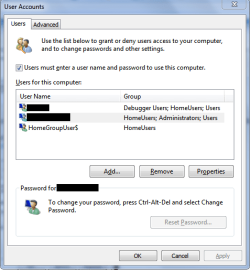
Ok I did exactly what you wrote and I posted a screen shot of what I got. I'm thinking I have to delete the first one but I don't want to do anything hasty since I'm not sure O.O
 

Attachments

  • User Accounts.JPG
    User Accounts.JPG
    38.6 KB · Views: 3

My Computer

Computer type
PC/Desktop
Computer Manufacturer/Model Number
HP
OS
Windows 7 Home Premium 64bit
CPU
@2.30GHz
It appears as though you have a home group system user on the system which may be why the second account is showing. Do you use homegroup on your network? When sharing files via homegroup the system will use an internal account called homegroupuser$ instead of your account to avoid security issues as well as allow other users access to the public folder even if there are no local users on the machine. If you don't use homegroup then I would delete that account and then see if the replicated account on log on has disappeared

Hope this helps,
Josh! :)
 

My Computer

Computer type
PC/Desktop
Computer Manufacturer/Model Number
Custom Built
OS
Windows 7 Professional x64 SP1 ; Windows Server 2012 R2 Standard
CPU
Intel Core i5 2400 @ 3.10GHz
Motherboard
Foxconn H67MP-S/-V/H67MP
Memory
8.0GB DDR3 @ 665MHz (2GBx4)
Graphics Card(s)
AMD Radeon HD 6870
Sound Card
Realtek High Definition Audio
Monitor(s) Displays
AOC 2243W & SMB1930NW
Screen Resolution
1440x900 & 1920x1080
Hard Drives
977GB Seagate ST31000524AS ATA Drive (SATA)
250GB WD iSCSI attached Drive
PSU
750W Gaming PSU
Case
Novatech Night
Cooling
Fan
Keyboard
Dell Standard PS/2 Keyboard
Mouse
R.A.T 07 Gaming Mouse
Internet Speed
Download: 10 Mbps Ping: 30ms Upload: 0.81 Mbps
Browser
Google Chrome
Other Info
Optiarc DVD RW AD-5260S ATA Device
Hi there
Why not log straight on to the machine bypassing the Welcome screen in the first place.

Do this
In command mode enter : control userpasswords2

then in the popup click the box User must enter a password to use this computer against the user you want to automatically start the computer with. I.e Uncheck it.

Then the computer will prompt you for the user and password for the user you automatically want to start the computer with.

At next W7 boot you'll get straight into the start screen. -- Job done. !!

(Note though this can be insecure if other users share this machine so once you've finished your session just LOGOUT rather than shut down -- but you would have to be the FIRST user of the machine if you didn't want other users being able to use your user account).

I use this method on a machine that has a local SAP (ERP) test system running -- the SAP software creates 3 or 4 "phantom DB users / accounts" which appear on the login screen such as the DBA - Data base administrator - for the SAP DB system -- but as I'm the only user of the machine I just use the above procedure so I get logged on straight away not having to even see these other "accounts".

Cheers
jimbo
 

My Computer

Computer type
PC/Desktop
Computer Manufacturer/Model Number
Custom built, several laptops HP/ASUS
OS
Linux CENTOS 7 / various Windows OS'es and servers
CPU
Intel i7 Intel i5
Memory
8GB, 16GB
Graphics Card(s)
On Motherboard
Sound Card
Realtek HD audio
Monitor(s) Displays
Apple Cinema display, Samsung LCD
Screen Resolution
1920 X 1080
Hard Drives
4 X 1TB SATA
Mouse
Toshiba wireless laser
Internet Speed
> 20MB up
In the OP screen print it shows users named LOGAN and Logan.
Did you rename your account from LOGAN to Logan so it is not all uppercase?
Can you select either name and log in to Windows, or does only one of them work?
 

My Computer

Computer type
PC/Desktop
Computer Manufacturer/Model Number
home built
OS
Multi-Boot W7_Pro_x64 W8.1_Pro_x64 W10_Pro_x64 +Linux_VMs +Chromium_VM
CPU
AMD Athlon II x4 620
Motherboard
Gigabyte GA-MA785G-UD3H
Memory
6GB GSkill DDR2 800
Graphics Card(s)
AMD 4670 GPU + AMD 4200 IGP
Sound Card
on board Realtek ALC889A
Monitor(s) Displays
RCA 40" LCD TV, Insignia 32" LCD TV, HP 15" LCD monitor
Screen Resolution
1680 x 1050
Hard Drives
OCZ Vertex 3 120GB,
Samsung F3 1TB (3),
Several others - WD, Seagate, Hitachi, ...
PSU
Corsair 500 W
Case
Rosewill mid tower
Cooling
CM 90mm rifle
Keyboard
Gyration wireless, Logitech wireless, Dell USB wired
Mouse
Gyration wireless, Logitech wireless, V7 USB wired
Internet Speed
Spectrum - 100Mbps D / 10Mbps U
Antivirus
Avast, MBAM3, EMET, WinPatrol
Browser
Pale Moon, Firefox, IE
Other Info
2 multi-boot PC's
Mainly HTPC/Office/Gen purpose (no gaming).
Trendnet USB KVM.
LG DVD burner/Blue Ray Player.
Tray system for removable SATA backup drives.

Not currently OCd, under-volted.
I use Hybrid sleep, rarely re-boot or shutdown.

Hauppauge HD-PVR, Avermedia PCIe TV Tuner, Hauppauge PCI TV Tuner.
In the OP screen print it shows users named LOGAN and Logan.
Did you rename your account from LOGAN to Logan so it is not all uppercase?
Can you select either name and log in to Windows, or does only one of them work?

I have a feeling that LOGAN may be the homegroupuser$ account since the '$' represents a variable. Just a thought that is all :)
 

My Computer

Computer type
PC/Desktop
Computer Manufacturer/Model Number
Custom Built
OS
Windows 7 Professional x64 SP1 ; Windows Server 2012 R2 Standard
CPU
Intel Core i5 2400 @ 3.10GHz
Motherboard
Foxconn H67MP-S/-V/H67MP
Memory
8.0GB DDR3 @ 665MHz (2GBx4)
Graphics Card(s)
AMD Radeon HD 6870
Sound Card
Realtek High Definition Audio
Monitor(s) Displays
AOC 2243W & SMB1930NW
Screen Resolution
1440x900 & 1920x1080
Hard Drives
977GB Seagate ST31000524AS ATA Drive (SATA)
250GB WD iSCSI attached Drive
PSU
750W Gaming PSU
Case
Novatech Night
Cooling
Fan
Keyboard
Dell Standard PS/2 Keyboard
Mouse
R.A.T 07 Gaming Mouse
Internet Speed
Download: 10 Mbps Ping: 30ms Upload: 0.81 Mbps
Browser
Google Chrome
Other Info
Optiarc DVD RW AD-5260S ATA Device
You could be right...
I do use HomeGroup and have 2 User accounts on this system, 1 Admin and 1 Standard.
For me homegroupuser$ is listed in netplwiz.exe, but is not displaying an additional name on the Windows Log In window.
I'm wondering if a rename from uppercase to mixed case caused an additional entry in the registry for Current Profiles...Just guessing...
WUSSP02.png
 

My Computer

Computer type
PC/Desktop
Computer Manufacturer/Model Number
home built
OS
Multi-Boot W7_Pro_x64 W8.1_Pro_x64 W10_Pro_x64 +Linux_VMs +Chromium_VM
CPU
AMD Athlon II x4 620
Motherboard
Gigabyte GA-MA785G-UD3H
Memory
6GB GSkill DDR2 800
Graphics Card(s)
AMD 4670 GPU + AMD 4200 IGP
Sound Card
on board Realtek ALC889A
Monitor(s) Displays
RCA 40" LCD TV, Insignia 32" LCD TV, HP 15" LCD monitor
Screen Resolution
1680 x 1050
Hard Drives
OCZ Vertex 3 120GB,
Samsung F3 1TB (3),
Several others - WD, Seagate, Hitachi, ...
PSU
Corsair 500 W
Case
Rosewill mid tower
Cooling
CM 90mm rifle
Keyboard
Gyration wireless, Logitech wireless, Dell USB wired
Mouse
Gyration wireless, Logitech wireless, V7 USB wired
Internet Speed
Spectrum - 100Mbps D / 10Mbps U
Antivirus
Avast, MBAM3, EMET, WinPatrol
Browser
Pale Moon, Firefox, IE
Other Info
2 multi-boot PC's
Mainly HTPC/Office/Gen purpose (no gaming).
Trendnet USB KVM.
LG DVD burner/Blue Ray Player.
Tray system for removable SATA backup drives.

Not currently OCd, under-volted.
I use Hybrid sleep, rarely re-boot or shutdown.

Hauppauge HD-PVR, Avermedia PCIe TV Tuner, Hauppauge PCI TV Tuner.
Jimbo45: I don't know how to access command mode. I don't really understand what I'm supposed to do :o
DavidW7ncus: They both work I think they're the same :confused: I think the problem was the backup. I had a problem with the computer so I reinstalled the operating system. I restored my files from an external hard drive and soon after that this problem started happening :cry: Maybe because I had a different name in the computer when I did a backup...I don't know :(
Shadowjk: I don't really understand the whole Homegroup thing it's not something I really pay attention to :huh: I could try deleting the one that says homegroup
 

My Computer

Computer type
PC/Desktop
Computer Manufacturer/Model Number
HP
OS
Windows 7 Home Premium 64bit
CPU
@2.30GHz
If you do not wish to or do not use homegroup at all then yes please delete that account and report if the duplicated account disappears

Many Thanks,
Josh
 

My Computer

Computer type
PC/Desktop
Computer Manufacturer/Model Number
Custom Built
OS
Windows 7 Professional x64 SP1 ; Windows Server 2012 R2 Standard
CPU
Intel Core i5 2400 @ 3.10GHz
Motherboard
Foxconn H67MP-S/-V/H67MP
Memory
8.0GB DDR3 @ 665MHz (2GBx4)
Graphics Card(s)
AMD Radeon HD 6870
Sound Card
Realtek High Definition Audio
Monitor(s) Displays
AOC 2243W & SMB1930NW
Screen Resolution
1440x900 & 1920x1080
Hard Drives
977GB Seagate ST31000524AS ATA Drive (SATA)
250GB WD iSCSI attached Drive
PSU
750W Gaming PSU
Case
Novatech Night
Cooling
Fan
Keyboard
Dell Standard PS/2 Keyboard
Mouse
R.A.T 07 Gaming Mouse
Internet Speed
Download: 10 Mbps Ping: 30ms Upload: 0.81 Mbps
Browser
Google Chrome
Other Info
Optiarc DVD RW AD-5260S ATA Device
first, like what shadowjk has said, the pc is using windows networking called 'home group'. let's turn off this first, just follow this guide here :
How To Disable or Enable the Homegroup Feature in Windows 7

hopefully after disabling home group, the user profile will be gone automatically. if not, you can manually delete the unneeded user profile, which is the one that doesn't belong to administrators group. if you're still unsure, just make a system restore checkpoint first or make a backup of the suspected user profile to flash drive or external hd. the profile should be located inside the folder users in the root directory of windows 7. this link is a simple and clear way of doing this :
How do I delete a user profile on a Windows 7 machine that is part of a domain? - Super User
 

My Computer

Computer type
PC/Desktop
OS
Windows 7 Ultimate x86
Back
Top