

Microsoft has become aware of limited targeted Windows 7 based attacks that could leverage un-patched vulnerabilities in the Adobe Type Manager Library, and is providing the following guidance to help reduce customer risk until the security update is released. We appreciate the efforts of our industry partners and are complying with a 7-day timeline for disclosing information regarding these limited attacks.
Two remote code execution vulnerabilities exist in Microsoft Windows when the Windows Adobe Type Manager Library improperly handles a specially-crafted multi-master font - Adobe Type 1 PostScript format.
There are multiple ways an attacker could exploit the vulnerability, such as convincing a user to open a specially crafted document or viewing it in the Windows Preview pane.
Microsoft is aware of this vulnerability and working on a fix. Updates that address security vulnerabilities in Microsoft software are typically released on Update Tuesday, the second Tuesday of each month. This predictable schedule allows for partner quality assurance and IT planning, which helps maintain the Windows ecosystem as a reliable, secure choice for our customers. The operating system versions that are affected by this vulnerability are listed below. Please see the mitigation and workarounds for guidance on how to reduce the risk.
Please Note: The threat is low for those systems running Windows 10 due to mitigations that were put in place with the first version released in 2015. Please see the mitigation section for details. Microsoft is not aware of any attacks against the Windows 10 platform. The possibility of remote code execution is negligible and elevation of privilege is not possible. We do not recommend that IT administrators running Windows 10 implement the workarounds described below.
Microsoft recommends upgrading to the Windows 10 family of clients and servers.
Security Updates
To determine the support life cycle for your software version or edition, see the Microsoft Support Lifecycle.
<see source>
Mitigations
For systems running supported versions of Windows 10 a successful attack could only result in code execution within an AppContainer sandbox context with limited privileges and capabilities.
For more information, see Mitigating font exploits with AppContainer.
Workarounds
Disabling the Preview and Details panes in Windows Explorer prevents the automatic display of OTF fonts in Windows Explorer. While this prevents malicious files from being viewed in Windows Explorer, it does not prevent a local, authenticated user from running a specially crafted program to exploit this vulnerability. To disable these panes in Windows Server 2008, Windows 7, Windows Server 2008 R2, Windows Server 2012, Windows Server 2012 R2, and Windows 8.1, perform the following steps:
- Disable the Preview Pane and Details Pane in Windows Explorer
For Windows Server 2016, Windows 10, and Windows Server 2019, perform the following steps:
- Open Windows Explorer, click Organize, and then click Layout.
- Clear both the Details pane and Preview pane menu options.
- Click Organize, and then click Folder and search options.
- Click the View tab.
- Under Advanced settings, check the Always show icons, never thumbnails box.
- Close all open instances of Windows Explorer for the change to take effect.
Impact of workaround.
- Open Windows Explorer, click the View tab.
- Clear both the Details pane and Preview pane menu options.
- Click Options, and then click Change folder and search options.
- Click the View tab.
- Under Advanced settings, check the Always show icons, never thumbnails box.
- Close all open instances of Windows Explorer for the change to take effect.
Windows Explorer will not automatically display OTF fonts.
How to undo the workaround.
To re-enable the Preview and Details panes in Windows Explorer for Windows Server 2008, Windows 7, Windows Server 2008 R2, Windows Server 2012, Windows Server 2012 R2, and Windows 8.1:
For Windows Server 2016, Windows 10, and Windows Server 2019:
- Open Windows Explorer, click Organize, and then click Layout.
- Select both the Details pane and Preview pane menu options.
- Click Organize, and then click Folder and search options.
- Click the View tab.
- Under Advanced settings, clear the Always show icons, never thumbnails box.
- Close all open instances of Windows Explorer for the change to take effect.
Disable the WebClient service
- Open Windows Explorer, click the View tab.
- Select both the Details pane and Preview pane menu options.
- Click Options, and then click Change folder and search options.
- Click the View tab.
- Under Advanced settings, clear the Always show icons, never thumbnails box.
- Close all open instances of Windows Explorer for the change to take effect.
Disabling the WebClient service helps protect affected systems from attempts to exploit this vulnerability by blocking the most likely remote attack vector through the Web Distributed Authoring and Versioning (WebDAV) client service. After applying this workaround it is still possible for remote attackers who successfully exploit this vulnerability to cause the system to run programs located on the targeted user's computer or the Local Area Network (LAN), but users will be prompted for confirmation before opening arbitrary programs from the Internet.
To disable the WebClient Service, perform the following steps:
Impact of workaround.
- Click Start, click Run (or press the Windows Key and R on the keyboard), type Services.msc and then click OK.
- Right-click WebClient service and select Properties.
- Change the Startup type to Disabled. If the service is running, click Stop.
- Click OK and exit the management application.
When the WebClient service is disabled, Web Distributed Authoring and Versioning (WebDAV) requests are not transmitted. In addition, any services that explicitly depend on the WebClient service will not start, and an error message will be logged in the System log. For example, WebDAV shares will be inaccessible from the client computer.
How to undo the workaround.
To re-enable the WebClient Service, perform the following steps:
Rename ATMFD.DLL
- Click Start, click Run (or press the Windows Key and R on the keyboard), type Services.msc and then click OK.
- Right-click WebClient service and select Properties.
- Change the Startup type to Automatic. If the service is not running, click Start.
- Click OK and exit the management application.
For 32-bit systems:
1. Enter the following commands at an administrative command prompt:
View attachment 32-bit_Rename_ATMFD.DLL.bat
Download
Code:cd "%windir%\system32" takeown.exe /f atmfd.dll icacls.exe atmfd.dll /save atmfd.dll.acl icacls.exe atmfd.dll /grant Administrators:(F) rename atmfd.dll x-atmfd.dll
2. Restart the system.
For 64-bit systems:
1. Enter the following commands at an administrative command prompt:
View attachment 64-bit_Rename_ATMFD.DLL.bat
Download
Code:cd "%windir%\system32" takeown.exe /f atmfd.dll icacls.exe atmfd.dll /save atmfd.dll.acl icacls.exe atmfd.dll /grant Administrators:(F) rename atmfd.dll x-atmfd.dll cd "%windir%\syswow64" takeown.exe /f atmfd.dll icacls.exe atmfd.dll /save atmfd.dll.acl icacls.exe atmfd.dll /grant Administrators:(F) rename atmfd.dll x-atmfd.dll
2. Restart the system.
Optional procedure for Windows 8.1 operating systems and below (disable ATMFD):
Note Using Registry Editor incorrectly can cause serious problems that may require you to reinstall your operating system. Microsoft cannot guarantee that problems resulting from the incorrect use of Registry Editor can be solved. Use Registry Editor at your own risk. For information about how to edit the registry, view the "Changing Keys And Values" Help topic in Registry Editor (Regedit.exe) or view the "Add and Delete Information in the Registry" and "Edit Registry Data" Help topics in Regedt32.exe.
Method 1 (manually edit the system registry):
Method 2 (use a managed deployment script):
- Run regedit.exe as Administrator.
- In Registry Editor, navigate to the following sub key (or create it) and set its DWORD value to 1: HKLM\Software\Microsoft\Windows NT\CurrentVersion\Windows\DisableATMFD, DWORD = 1
- Close Registry Editor and restart the system.
Impact of workaround
- Create a text file named ATMFD-disable.reg that contains the following text:
View attachment ATMFD-disable.reg
Download
Code:Windows Registry Editor Version 5.00 [HKEY_LOCAL_MACHINE\SOFTWARE\Microsoft\Windows NT\CurrentVersion\Windows] "DisableATMFD"=dword:00000001- Run regedit.exe.
- In Registry Editor, click the File menu and then click Import.
- Navigate to and select the ATMFD-disable.reg file that you created in the first step. (Note If your file is not listed where you expect it to be, ensure that it has not been automatically given a .txt file extension, or change the dialog’s file extension parameters to All Files).
- Click Open and then click OK to close Registry Editor.
Applications that rely on embedded font technology will not display properly. Disabling ATMFD.DLL could cause certain applications to stop working properly if they use OpenType fonts. Microsoft Windows does not release any OpenType fonts natively. However, third-party applications could install them and they could be affected by this change.
How to undo the workaround
For 32-bit systems:
1. Enter the following commands at an administrative command prompt:
View attachment 32-bit_Undo.bat
Download
Code:cd "%windir%\system32" rename x-atmfd.dll atmfd.dll icacls.exe atmfd.dll /setowner "NT SERVICE\TrustedInstaller" icacls.exe . /restore atmfd.dll.acl
2. Restart the system.
For 64-bit systems:
1. Enter the following commands at an administrative command prompt:
View attachment 64-bit_Undo.bat
Download
Code:cd "%windir%\system32" rename x-atmfd.dll atmfd.dll icacls.exe atmfd.dll /setowner "NT SERVICE\TrustedInstaller" icacls.exe . /restore atmfd.dll.acl cd "%windir%\syswow64" rename x-atmfd.dll atmfd.dll icacls.exe atmfd.dll /setowner "NT SERVICE\TrustedInstaller" icacls.exe . /restore atmfd.dll.acl
2. Restart the system.
Optional procedure for Windows 8.1 operating systems and below (enable ATMFD):
Note Using Registry Editor incorrectly can cause serious problems that may require you to reinstall your operating system. Microsoft cannot guarantee that problems resulting from the incorrect use of Registry Editor can be solved. Use Registry Editor at your own risk. For information about how to edit the registry, view the "Changing Keys And Values" Help topic in Registry Editor (Regedit.exe) or view the "Add and Delete Information in the Registry" and "Edit Registry Data" Help topics in Regedt32.exe.
Method 1 (manually edit the system registry):
Method 2 (use a managed deployment script):
- Run regedit.exe as Administrator.
- In Registry Editor, navigate to the following sub key and set its DWORD value to 0: HKLM\Software\Microsoft\Windows NT\CurrentVersion\Windows\DisableATMFD, DWORD = 0
- Close Registry Editor and restart the system.
FAQ
- Create a text file named ATMFD-enable.reg that contains the following text:
View attachment ATMFD-enable.reg
Download
Code:Windows Registry Editor Version 5.00 [HKEY_LOCAL_MACHINE\SOFTWARE\Microsoft\Windows NT\CurrentVersion\Windows] "DisableATMFD"=dword:00000000- Run regedit.exe.
- In Registry Editor, click the File menu and then click Import.
- Navigate to and select the ATMFD-enable.reg file that you created in the first step. (Note If your file is not listed where you expect it to be, ensure that it has not been automatically given a .txt file extension, or change the dialog’s file extension parameters to All Files).
- Click Open and then click OK to close Registry Editor.
Is there an update to address this vulnerability?
No, Microsoft is aware of this vulnerability and working on a fix. Updates that address security vulnerabilities in Microsoft software are typically released on Update Tuesday, the second Tuesday of each month. This predictable schedule allows for partner quality assurance and IT planning, which helps maintain the Windows ecosystem as a reliable, secure choice for our customers.
Is Microsoft aware of attacks that attempt to leverage this vulnerability?
Yes, Microsoft is aware of limited, targeted attacks that attempt to leverage this vulnerability.
How would customers receive notification about this issue and updated information from Microsoft when published?
Customers who subscribe to Microsoft Technical Security Notifications will receive a notifications whenever new content is published in Microsoft’s Security Update Guide. Find more information about these notifications here: Technical Security Notifications.
Do I need an ESU license to receive the update for Windows 7, Windows Server 2008 and Windows Server 2008 R2 for this vulnerability?
Yes, to receive the security update for this vulnerability for Windows 7, Windows Server 2008, or Windows Server 2008 R2 you must have an ESU licence. See 4522133 for more information.
Why is this update not being released for all Windows 7 customers?
Windows 7 reached end of support on January 14, 2020. For more information on Microsoft lifecycle policies, please visit Life Cycle.
Is the Outlook Preview Pane an attack vector for this vulnerability?
No, the Outlook Preview Pane is NOT an attack vector for this vulnerability
Is the Windows Explorer Preview Pane an attack vector for this vulnerability?
Yes, the Windows Preview Pane is an attack vector for this vulnerability
Is Enhanced Security Configuration, which is on by default on Windows Servers, a mitigation for this vulnerability?
No, Enhanced Security Configuration does not mitigate this vulnerability.
Acknowledgements
Microsoft recognizes the efforts of those in the security community who help us protect customers through coordinated vulnerability disclosure.
See acknowledgements for more information.
Disclaimer
The information provided in the Microsoft Knowledge Base is provided "as is" without warranty of any kind. Microsoft disclaims all warranties, either express or implied, including the warranties of merchantability and fitness for a particular purpose. In no event shall Microsoft Corporation or its suppliers be liable for any damages whatsoever including direct, indirect, incidental, consequential, loss of business profits or special damages, even if Microsoft Corporation or its suppliers have been advised of the possibility of such damages. Some states do not allow the exclusion or limitation of liability for consequential or incidental damages so the foregoing limitation may not apply.
Revisions

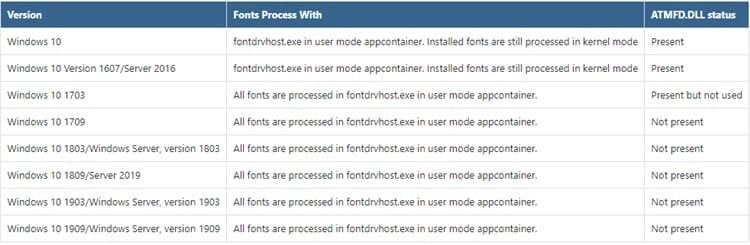
Source: https://portal.msrc.microsoft.com/en-us/security-guidance/advisory/ADV200006
Last edited:
My Computer
At a glance
64-bit Windows 11 Pro for WorkstationsIntel i7-8700K OC'd to 5 GHz64 GB (4x16GB) G.SKILL TridentZ RGB DDR4 3600...ASUS ROG-STRIX-GTX1080TI-O11G-GAMING
- Computer type
- PC/Desktop
- Computer Manufacturer/Model Number
- Self built custom
- OS
- 64-bit Windows 11 Pro for Workstations
- CPU
- Intel i7-8700K OC'd to 5 GHz
- Motherboard
- ASUS ROG Maximus XI Formula Z390
- Memory
- 64 GB (4x16GB) G.SKILL TridentZ RGB DDR4 3600 MHz
- Graphics Card(s)
- ASUS ROG-STRIX-GTX1080TI-O11G-GAMING
- Sound Card
- Integrated
- Monitor(s) Displays
- 2 x Samsung Odyssey G7 27"
- Screen Resolution
- 2560x1440
- Hard Drives
- 1TB Samsung 990 PRO M.2,
4TB Samsung 990 PRO PRO M.2,
TerraMaster F8 SSD Plus NAS
- PSU
- Seasonic Prime Titanium 850W
- Case
- Thermaltake Core P3
- Cooling
- Corsair Hydro H115i
- Keyboard
- Logitech wireless K800
- Mouse
- Logitech MX Master 4
- Internet Speed
- 2 Gb/s Download and 100 Mb/s Upload
- Antivirus
- Malwarebyte Anti-Malware Premium
- Browser
- Google Chrome
- Other Info
- Logitech Z625 speaker system,
Logitech BRIO 4K Pro webcam,
HP Color LaserJet Pro MFP M477fdn,
APC SMART-UPS RT 1000 XL - SURT1000XLI,
Galaxy S23 Plus phone


