Windows Client Guidance for IT Pros to protect against speculative execution side-channel vulnerabilities
Summary
Microsoft is aware of a new publicly disclosed class of vulnerabilities that are called “speculative execution side-channel attacks” that affect many modern processors and operating systems, including Intel, AMD, and ARM.
Note This issue also affects other operating systems, such as Android, Chrome, iOS, and MacOS, so we advise customers to seek guidance from those vendors.
Microsoft has released several updates to help mitigate these vulnerabilities. We have also taken action to secure our cloud services. See the following sections for more details.
Microsoft has yet not received any information to indicate that these vulnerabilities have been used to attack customers. Microsoft is working closely with industry partners including chip makers, hardware OEMs, and app vendors to protect customers. To get all available protections, hardware/firmware and software updates are required. This includes microcode from device OEMs and, in some cases, updates to antivirus software as well.
The following sections will help you identify and mitigate client environments that are affected by the vulnerabilities that are identified in Microsoft Security Advisory ADV180002.
Windows Update will also provide Internet Explorer and Edge mitigations. And we will continue to improve these mitigations against this class of vulnerabilities.
Recommended actions
Customers must take the following actions to help protect against the vulnerabilities.
Windows-based machines (physical or virtual) should install the Microsoft security updates that were released on January 3, 2018. See Microsoft Security Advisory ADV180002 for updates for the following versions of Windows.
- Verify that you are running a supported antivirus application before you install OS or firmware updates. Contact the antivirus software vendor for compatibility information.
- Apply all available Windows operating system updates, including the January 2018 Windows security updates.
- Apply the applicable firmware update that is provided by the device manufacturer.
Operating System Version
- Windows 10 (RTM, 1511, 1607, 1703, 1709)
- Windows 8.1
- Windows 7 SP1
WarningCustomers who only install the Windows January 2018 security updates will not receive the benefit of all known protections against the vulnerabilities. In addition to installing the January security updates, a processor microcode, or firmware, update is required. This should be available through your device manufacturer.
Note Surface customers will receive a microcode update via Windows update.
:ar: Surface updates for recent chip-related security vulnerability Surface - Windows 10 Forums
Verifying protections are enabled
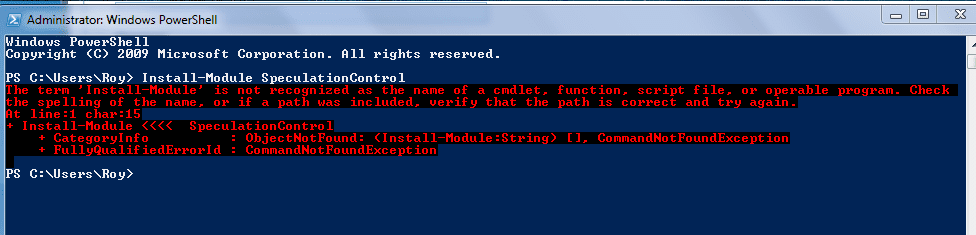
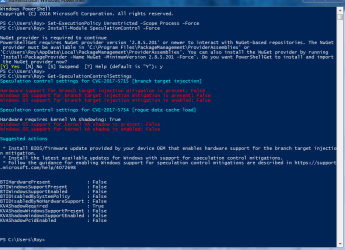
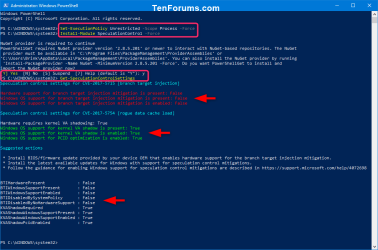
To help customers confirm whether protections have been enabled, Microsoft has published a PowerShell script that customers can run on their systems. Install and run the script by running the following commands:
NotePowerShell Verification using the PowerShell Gallery
1) Open elevated PowerShell.
2) Temporarily set PowerShell script execution policy
PS> Set-ExecutionPolicy Unrestricted -Scope Process -Force
3) Install the PowerShell module
PS > Install-Module SpeculationControl -Force
Type Y and press Enter if prompted to install and import NuGet.
4) Run the PowerShell module to validate protections are enabled
PS > Get-SpeculationControlSettings
OR
NotePowerShell Verification using download from Technet
1) Install PowerShell Module from Technet ScriptCenter
Go to Speculation Control Validation PowerShell Script
Download SpeculationControl.zip to a local folder.
Extract the contents to a local folder, for example C:\ADV180002
2) Open elevated PowerShell.
3) Switch to directory of extracted contents
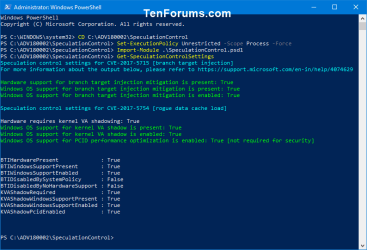
PS> CD C:\ADV180002\SpeculationControl
4) Temporarily set PowerShell script execution policy
PS> Set-ExecutionPolicy Unrestricted -Scope Process -Force
5) Install the downloaded PowerShell module
PS > Import-Module .\SpeculationControl.psd1
6) Run the PowerShell module to validate protections are enabled
PS > Get-SpeculationControlSettings
The output of this PowerShell script will look like the following. Enabled protections will show in the output as “True”.
Code:PS C:\> Get-SpeculationControlSettings Speculation control settings for CVE-2017-5715 [branch target injection] Hardware support for branch target injection mitigation is present: True Windows OS support for branch target injection mitigation is present: True Windows OS support for branch target injection mitigation is enabled: True Speculation control settings for CVE-2017-5754 [rogue data cache load] Hardware requires kernel VA shadowing: True Windows OS support for kernel VA shadow is present: True Windows OS support for kernel VA shadow is enabled: True Windows OS support for PCID optimization is enabled: True
Frequently asked questions
1. How can I tell if I have the right version of the CPU microcode?
The microcode is delivered through a firmware update. Consult with the device manufacturer about the firmware version that has the appropriate update for your CPU.
2. My operating system (OS) is not listed. When can I expect a fix to be released?
Addressing a hardware vulnerability through a software update presents significant challenges, and mitigations for older operating systems require extensive architectural changes. Microsoft is working with affected chip manufacturers to determine the best way to provide mitigations, which may be delivered in future updates.
3. Where can I find Surface firmware/hardware updates?
Updates for Microsoft Surface devices will be delivered to customers through Windows Update along with the updates for the Windows operating system. For more information, see KB 4073065.
If your device is not from Microsoft, apply firmware from the device manufacturer. Contact the manufacturer for more information.
4. I have an x86 architecture but don’t see an update. Will I get one?
Addressing a hardware vulnerability through a software update presents significant challenges, and mitigations for older operating systems require extensive architectural changes. We are working with affected chip manufacturers to determine the best way to provide mitigations for x86 customers, which may be delivered in a future update.
RSource: https://support.microsoft.com/en-us...or-it-pros-to-protect-against-speculative-exe
Last edited:
My Computer
- Computer type
- PC/Desktop
- Computer Manufacturer/Model Number
- Self built custom
- OS
- 64-bit Windows 11 Pro for Workstations
- CPU
- Intel i7-8700K OC'd to 5 GHz
- Motherboard
- ASUS ROG Maximus XI Formula Z390
- Memory
- 64 GB (4x16GB) G.SKILL TridentZ RGB DDR4 3600 MHz
- Graphics Card(s)
- ASUS ROG-STRIX-GTX1080TI-O11G-GAMING
- Sound Card
- Integrated
- Monitor(s) Displays
- 2 x Samsung Odyssey G7 27"
- Screen Resolution
- 2560x1440
- Hard Drives
- 1TB Samsung 990 PRO M.2,
4TB Samsung 990 PRO PRO M.2,
TerraMaster F8 SSD Plus NAS
- PSU
- Seasonic Prime Titanium 850W
- Case
- Thermaltake Core P3
- Cooling
- Corsair Hydro H115i
- Keyboard
- Logitech wireless K800
- Mouse
- Logitech MX Master 4
- Internet Speed
- 2 Gb/s Download and 100 Mb/s Upload
- Antivirus
- Malwarebyte Anti-Malware Premium
- Browser
- Google Chrome
- Other Info
- Logitech Z625 speaker system,
Logitech BRIO 4K Pro webcam,
HP Color LaserJet Pro MFP M477fdn,
APC SMART-UPS RT 1000 XL - SURT1000XLI,
Galaxy S23 Plus phone