Solved Typing Problems

awgar

New member
Local time
3:12 AM
Messages
8
Location
Clearwater, FL
In the last week or so, perhaps since installing the update for Windows 7, 64 bit systems, I have had a problem with an over-sensitive touchpad. I'll be typing away and the cursor will suddenly move back into the body of text that I have previously typed, causing the typing to start in the midst of an earlier sentence. I have to stop, go back and cut out the erroniously inserted words and letters and move them back to where they belong. Apparently, I'm hitting the touchpad and causing this, but it seems to happen even when I'm consciously trying to avoid the touchpad.

I'm running a Dell Inspiron 1420, Windows 7 Home Premium, 64 bit with 1 gb of RAM. The processor is an Intel Duo Core 1.5 GHz.

Is there a way to reduce the sensitivity of the touchpad? I see older posts on this same topic but no solutions posted.
 

My Computer

Computer Manufacturer/Model Number
Dell
OS
Windows Home Premium, 32bit
CPU
Intel Core 2 Duo CPU; T5250 @ 1.5 GHz
Memory
1 Gb
Mouse
Touchpad
Awgar,

Welcome to Seven Forums.

right-click on the touchpad icon in the system tray |
Pointing device properties | Device Settings tab | Settings button | Sensitivity item
 

My Computer

Computer Manufacturer/Model Number
Toshiba Satellite S875D-S7239 laptop
OS
MS Windows 7 Ultimate SP1 64-bit
CPU
AMD A10-4600M
Motherboard
AMD Pumori (Socket FT1)
Memory
6.00 GB Dual-Channel DDR3 @ 798MHz (11-11-12-28)
Graphics Card(s)
AMD Radeon HD 7660G
Sound Card
High Definition Audio Device
Monitor(s) Displays
Generic PnP Monitor (1600x900@60Hz)
Screen Resolution
1600x900@60Hz
Hard Drives
SSD 119GB Corsair CSSD-V128GB2 ATA Device
Keyboard
Standard PS/2 Keyboard
Mouse
HP Wireless Optical Mobile Mouse Model FHA-3410
Internet Speed
What the local pub, local coffee shop offers.
Other Info
Optical Drive:MATSHITA BD-CMB UJ160B ATA Device


Also have an Asus ha1002xp netbook with Win 7 Ultimate installed.
Thanks for the welcome, karlsnooks.

Well, my original hard drive crashed on this Dell, and I installed Windows 7 Home Premium on the new one. So, I have no software from Dell (nor from Alps, the touchpad software people).

My driver is the one used for a standard PS/2 Compatible Mouse; thus, I have no Touchpad Icon to right-click on.

As I typed this, my cursor jumped back twice into earlier text. Maybe I should get something to cover the touchpad while I'm typing.
 

My Computer

Computer Manufacturer/Model Number
Dell
OS
Windows Home Premium, 32bit
CPU
Intel Core 2 Duo CPU; T5250 @ 1.5 GHz
Memory
1 Gb
Mouse
Touchpad
All drivers should still available with latest updates via Dell's support website referencing your machine for free. Worth a look around as you may find other valuable updates to load?
 

My Computer

Computer type
PC/Desktop
Computer Manufacturer/Model Number
A blend of brains, brawn and dumb luck.
OS
Windows 7 Ultimate 64
CPU
i7 3770k OC'd 4.6 @ 1.17v, also FX 8120 & i5 miniITX
Motherboard
MSI P67A-GD80 b3
Memory
32 gb G.Skill Sniper DDR3 10-12-12-31 @ 2133
Graphics Card(s)
XFX Radeon 7870 2GB DDR5
Sound Card
Sound Blaster Z Series Card
Monitor(s) Displays
(2) LG LED 23" 1920 x 1080 2ms Monitors via mini d-port
Screen Resolution
1680 X 1050 p
Hard Drives
Samsung 256 gb 830 SSD sata III
(1) 1 tb WD Black
(2) 1 tb Hitachi deskmates/sata II
(2) 1 tb WD green/sata II
(2) 3 tb Seagate Barracuda
(1) 120 gb OCZ Vertex SS
(1) Drobo 5N w/5 Seagate 3tb
PSU
EVGA modular 1000G2 80% gold rating & APC 1200 RS
Case
CoolerMaster Storm Styker
Cooling
7 case fans 140mm & 120mm, NZXT Kraken X60
Keyboard
(2) Logitech Illuminated Keyboards (1) usb (1) wireless
Mouse
Logitech G700 & T-BC21 - nano nx for the laptop
Internet Speed
Basic 120mbps down
Antivirus
Trend Micro Titanium Max Security & Malwarebytes Premium
Browser
Chrome and IE 10
Other Info
5 Noctua case fans + 3 Noctua in p/p on NZXT cooler
Integrated hot swap drive bays for 2.5" Drives
(2) Lite-on dvd/cd/Blu Ray optical 22X
Integrated fan controller and led on/off
HP Officejet Pro 8630 all-n-one
Hot-swappable 3.5" hard drive bay
Netgear Nighthawk router
Asus USB 3 & sata 6 PCIe card
Vantec IDE to sata adptr./Ultra sata adptr
Lenovo L420 i5 lappy with m sata
Drobo 5N advanced NAS
Thanks, I'll check
 

My Computer

Computer Manufacturer/Model Number
Dell
OS
Windows Home Premium, 32bit
CPU
Intel Core 2 Duo CPU; T5250 @ 1.5 GHz
Memory
1 Gb
Mouse
Touchpad
Typing problems

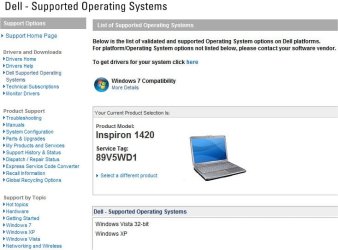
No joy. This Inspiron model 1420 is not on Dell's Windows 7 compatibility list. See jaypeg below where it appears that Dell is saying they support Vista and XP but not Win 7 when installed on the 1420.

Should I try Vista drivers for the touchpad?
 

Attachments

  • DellSupportedSystems.jpg
    DellSupportedSystems.jpg
    50.1 KB · Views: 5

My Computer

Computer Manufacturer/Model Number
Dell
OS
Windows Home Premium, 32bit
CPU
Intel Core 2 Duo CPU; T5250 @ 1.5 GHz
Memory
1 Gb
Mouse
Touchpad
Maybe you want to switch the touchpad off completely and use a mouse.
 

My Computer

Computer Manufacturer/Model Number
HP, Dell, Gateway, Toshiba - 4 laptops and 2 desktops
OS
Vista, Windows7, Mint Mate, Zorin, Windows 8
CPU
from 1.6GHz Duo to i7
Monitor(s) Displays
2x HP w2207
Hard Drives
5x HDD, 7x SSD, 12x Externals
Keyboard
with trackball - no mices
Mouse
Trackball mice
Internet Speed
DSL 6000
I suppose. But I spend a lot of time in my recliner which would be somewhat awkward - wireless mouse on my armrest.

I'd prefer to use the touchpad, so I'll check a Dell forum to see if anyone knows if the Vista drivers will work.

Thanks.
 

My Computer

Computer Manufacturer/Model Number
Dell
OS
Windows Home Premium, 32bit
CPU
Intel Core 2 Duo CPU; T5250 @ 1.5 GHz
Memory
1 Gb
Mouse
Touchpad
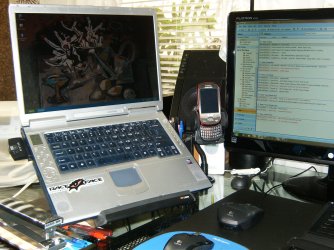
You may find that the Vista driver will work but I agree that a nice wireless or wired keyboard and mouse could be a great aid at your desk and then just back up the mouse to go. Then look into one of these badboys and it's like a total make over.
Amazon.com: 3M Vertical Notebook Riser (LX550): Office Products
HPIM1319.JPG
 

My Computer

Computer type
PC/Desktop
Computer Manufacturer/Model Number
A blend of brains, brawn and dumb luck.
OS
Windows 7 Ultimate 64
CPU
i7 3770k OC'd 4.6 @ 1.17v, also FX 8120 & i5 miniITX
Motherboard
MSI P67A-GD80 b3
Memory
32 gb G.Skill Sniper DDR3 10-12-12-31 @ 2133
Graphics Card(s)
XFX Radeon 7870 2GB DDR5
Sound Card
Sound Blaster Z Series Card
Monitor(s) Displays
(2) LG LED 23" 1920 x 1080 2ms Monitors via mini d-port
Screen Resolution
1680 X 1050 p
Hard Drives
Samsung 256 gb 830 SSD sata III
(1) 1 tb WD Black
(2) 1 tb Hitachi deskmates/sata II
(2) 1 tb WD green/sata II
(2) 3 tb Seagate Barracuda
(1) 120 gb OCZ Vertex SS
(1) Drobo 5N w/5 Seagate 3tb
PSU
EVGA modular 1000G2 80% gold rating & APC 1200 RS
Case
CoolerMaster Storm Styker
Cooling
7 case fans 140mm & 120mm, NZXT Kraken X60
Keyboard
(2) Logitech Illuminated Keyboards (1) usb (1) wireless
Mouse
Logitech G700 & T-BC21 - nano nx for the laptop
Internet Speed
Basic 120mbps down
Antivirus
Trend Micro Titanium Max Security & Malwarebytes Premium
Browser
Chrome and IE 10
Other Info
5 Noctua case fans + 3 Noctua in p/p on NZXT cooler
Integrated hot swap drive bays for 2.5" Drives
(2) Lite-on dvd/cd/Blu Ray optical 22X
Integrated fan controller and led on/off
HP Officejet Pro 8630 all-n-one
Hot-swappable 3.5" hard drive bay
Netgear Nighthawk router
Asus USB 3 & sata 6 PCIe card
Vantec IDE to sata adptr./Ultra sata adptr
Lenovo L420 i5 lappy with m sata
Drobo 5N advanced NAS
Well, I would try installing the Vista drivers. If that doesn't work, buy yourself like a nice Kensington SlimBlade. They're pricey, but really good on batteries (mine goes months between changes).
 

My Computer

Computer Manufacturer/Model Number
HP 6000 Pro Micro Tower
OS
W7 Professional x64
CPU
Core 2 Duo 2.93
Memory
2 GB
Graphics Card(s)
ATI Radeon 4695
Monitor(s) Displays
Two HP 17's
Hard Drives
150GB Sata Drive
Case
Tiny. Kinda cute.
Keyboard
HP Supplied. Surprisingly nice.
Mouse
Gateway Mouse from an E2610D
Internet Speed
45 mbps
Thanks for the welcome, karlsnooks.

Well, my original hard drive crashed on this Dell, and I installed Windows 7 Home Premium on the new one. So, I have no software from Dell (nor from Alps, the touchpad software people).

My driver is the one used for a standard PS/2 Compatible Mouse; thus, I have no Touchpad Icon to right-click on.

As I typed this, my cursor jumped back twice into earlier text. Maybe I should get something to cover the touchpad while I'm typing.

possible learn not to rest the hands on the keyboard.

However, as pointed out, Dell will have the latest drivers for your touchpad for your model.

As a question, did you enable Windows Update to also fetch updates for other MS software and for drivers? If you haven't then please do so.

Install all Critical updates. Run Windows Update again. Install all Important updates. Run Windows update again. Install all Optional updates. Run Windows Update again. Did it finally come up empty?

Win 7 is not XP. Install all updates offered by Microsoft. Do not try to 2nd guess Microsoft or listen to some charlatan on the web saying anything less than what I've advised.
 

My Computer

Computer Manufacturer/Model Number
Toshiba Satellite S875D-S7239 laptop
OS
MS Windows 7 Ultimate SP1 64-bit
CPU
AMD A10-4600M
Motherboard
AMD Pumori (Socket FT1)
Memory
6.00 GB Dual-Channel DDR3 @ 798MHz (11-11-12-28)
Graphics Card(s)
AMD Radeon HD 7660G
Sound Card
High Definition Audio Device
Monitor(s) Displays
Generic PnP Monitor (1600x900@60Hz)
Screen Resolution
1600x900@60Hz
Hard Drives
SSD 119GB Corsair CSSD-V128GB2 ATA Device
Keyboard
Standard PS/2 Keyboard
Mouse
HP Wireless Optical Mobile Mouse Model FHA-3410
Internet Speed
What the local pub, local coffee shop offers.
Other Info
Optical Drive:MATSHITA BD-CMB UJ160B ATA Device


Also have an Asus ha1002xp netbook with Win 7 Ultimate installed.
Typing Problems - Solution

OK, this driver worked:
Drivers and Downloads

I'm running Windows 7 Home Premium 64bit on a Dell Inspiron 1420. The Alps Touchpad icon reappeared, after a reboot, and I moved the slider to require a "Heavy (ier) Touch and, Voila!, problem solved. No cursor jumpback. :D
 

My Computer

Computer Manufacturer/Model Number
Dell
OS
Windows Home Premium, 32bit
CPU
Intel Core 2 Duo CPU; T5250 @ 1.5 GHz
Memory
1 Gb
Mouse
Touchpad
Back
Top