Typing several characters with one keystroke

ACA

New member
Member
Local time
12:53 PM
Messages
27
Can we customize a key so that when pressed it will type several characters?
I would use that function to quickly enter my “user name” or email address when accessing internet pages that require filling such fields plus the Password.

Thank you for any help.
ACA
 

My Computer

OS
Windows 7
Most browsers have the ability to remember or in some cases predict the username and password of a site you are trying to log in to.

If you tell me which browser you are using will point you to the relevant tutorial on how to set it up.

Also having your password mapped to a key on your keyboard is not a good idea in terms of security.

If you are still interested in mapping multiple letters or words to a single key it may be worth looking at Keyboard Layout Manager - Keyboard Editor Window (I'm not 100% sure it will let you assign multiple characters to one key but I think it can)

Oli
 

My Computer

Computer Manufacturer/Model Number
Apple MacBook 5,1
OS
Windows 7 Profesional x86, Mac OS X 10.6 Snow Leopard
CPU
Intel Core 2 Duo 2.4Ghz
Memory
4GB DDR3
Graphics Card(s)
Nvidia 9400m
Monitor(s) Displays
13.3" Internal + 22" DVI + 21.5" USB
Screen Resolution
1280x800 + 1920x1080 + 1920x1080
Hard Drives
Internal SATA 2.5" 500GB (395GB Mac HFS+, 105GB Windows NTFS)
2.48TB RAID consisting of 5 disks (HFS+)
Case
Aluminium Unibody
Keyboard
Apple Late 2009 Wireless Keyboard (US)
Mouse
Apple Magic Mouse
Internet Speed
6.33Mb/s up. 0.36Mb/s down.
Other Info
Harman Kardon Soundsticks II Speakers
Later on, I'll make a script for you to do this, if you want, but using the browser password manager is always the best solution. :p
 

My Computer

Computer type
PC/Desktop
Computer Manufacturer/Model Number
Custom built
OS
Windows 8 Pro 64-bit
CPU
Intel Core i7 950 @4.4GHz
Motherboard
EVGA 131-GT-E767
Memory
12GB DDR3 1333MHz @1400 (9-9-9-24)
Graphics Card(s)
2x AMD Radeon HD 6770
Sound Card
Sound Blaster Audigy
Monitor(s) Displays
Acer S231HL + Acer E19T5W
Screen Resolution
1920x1080 + 1440x900
Hard Drives
128GB Samsung 840 Pro
1TB Seagate Barracuda 7200RPM 64mb
500GB Seagate Barracuda 7200RPM 16mb
PSU
Corsair GS800
Case
Custom-made
Cooling
CM Hyper212+, lots of fans
Keyboard
NMB RT8255C+
Mouse
Func MS-3
Internet Speed
30/1.5
Antivirus
Microsoft Security Essentials/Spybot SD/Malwarebytes
Browser
Google Chrome
Other Info
Onkyo TX-27 receiver & two Realistic Optimus T100s.
There are several computer programs that can accomplish that. They'll allow you to set a short[phrase when typed will write a long phrase.

Like for instance writing "?Q" can be "let me know if you have any questions about this" or whatever.

You can check out:
Fingertips or QuickPhrase.
 

My Computer

Computer Manufacturer/Model Number
Asus EEE PC 1000HE
OS
Windows 7
CPU
1.66 Ghz Intel Atom N280
Motherboard
Asus
Memory
1 GB (upgrading to 2GB)
Hard Drives
140 GB
ST9160310AS ATA
Thank you, Osholt. My browser is iExplorer. I'll try your tip. And, of course, not for the password ifself: olny for the 'user', email address and such.

Prisoner, thank you for that script you promise.

And, JamesR404, Thank you for your suggestion: I'll immediately look at Fingertips and and at QuickPhrase.

ACA
 

My Computer

OS
Windows 7
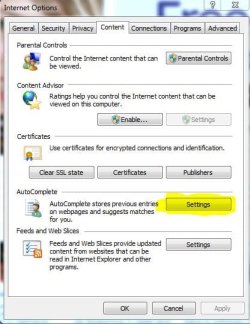
Hi, here's how to turn on auto complete in Internet Explorer:

Go to the start menu and type 'Internet Options' without the quotes and hit enter.

In the window that opens go to the content tab and click on 'Settings' under the AutoComplete heading (the yellow highlighted button in the attachment).

Make sure 'User names and passwords on forms is ticked' and then press enter twice.

Oli
 

Attachments

  • Capture.JPG
    Capture.JPG
    47.2 KB · Views: 26

My Computer

Computer Manufacturer/Model Number
Apple MacBook 5,1
OS
Windows 7 Profesional x86, Mac OS X 10.6 Snow Leopard
CPU
Intel Core 2 Duo 2.4Ghz
Memory
4GB DDR3
Graphics Card(s)
Nvidia 9400m
Monitor(s) Displays
13.3" Internal + 22" DVI + 21.5" USB
Screen Resolution
1280x800 + 1920x1080 + 1920x1080
Hard Drives
Internal SATA 2.5" 500GB (395GB Mac HFS+, 105GB Windows NTFS)
2.48TB RAID consisting of 5 disks (HFS+)
Case
Aluminium Unibody
Keyboard
Apple Late 2009 Wireless Keyboard (US)
Mouse
Apple Magic Mouse
Internet Speed
6.33Mb/s up. 0.36Mb/s down.
Other Info
Harman Kardon Soundsticks II Speakers
Back
Top