UAC Confusion

awrightUK

New member
Local time
12:53 AM
Messages
23
Location
Essex, UK
Our household has 3 new laptops. On each there is just one user account, and these are administrator accounts. I have tested each laptop and the same problem described below occurs:

  • Photos on the laptop, loaded into Windows Live Photo Gallery
  • Photo Gallery tells me that the files cannot be edited as they are read only. They are not read only!
  • Photo Gallery lets me do nothing other than rename the files but only after the following:
a) A message telling me I need to have admin privileges to carry out the action
b) When I say "OK" to the first dialogue as described in a) I then get a blasted UAC message confirming that I can let the program alter the file.
I know why b) occurs and I know how to turn this off but why is a) occurring? Even if I run the application as administrator, the same happens. That has really confused me.

On one laptop we have Photoshop Elements (and another HP editing application which was pre-installed) and neither allows editing of any kind... it does not even ask about needing admin privileges, it just assumes the files are non editable. All a bit of an issue as one of the laptops was bought specifically for image editing etc..

I never had this problem with Vista but given that all 3 Win7 laptops exhibit the same issue, is there something fundamental I am missing or need to change? I have tested turning off UAC completely which cures the problem but it makes no sense as the files I am trying to edit/rename are not system files, just photo files.

Any ideas as I am stumped?
 

My Computer

Computer Manufacturer/Model Number
Acer 1810TZ
OS
Windows 7 Home Premium x64
CPU
Intel® Pentium® Dual Core ULV SU4100, 1.3Ghz
Motherboard
Mobile Intel GS45 Express
Memory
3GB
Graphics Card(s)
Intel® GMA X4500MHD
Monitor(s) Displays
11.6" (WXGA LED)
Screen Resolution
1366 x 768
This appears to be a basic permissions issue

In order to suggest a solution I need some further information.

Where are the files currently located?

Have these files been transferred from another Windows version that used the NTFS file system?
 

My Computers

System One System Two

  • Computer type
    PC/Desktop
    Computer Manufacturer/Model Number
    ChillBlast - Custom to my design
    OS
    Windows 11 Pro x64 [Latest Release and Release Preview]
    CPU
    Ryzen 9 5950X, 3.8 - 5.2 MHz
    Motherboard
    Asus Prime X570-Pro
    Memory
    64GB [2 x 32GB] DDR4 3200MHz
    Graphics Card(s)
    4GB NVIDIA GEFORCE GTX 1650 Ti
    Sound Card
    On-board SPDIF to 5.1 System + HDMI [5.1 system]
    Monitor(s) Displays
    32" UHD 32 Bit HDR Monitor + 43" UHD 4K 32Bit HDR TV
    Screen Resolution
    2 x 3840 x 2160 @60Hz
    Hard Drives
    1TB M2 SSD OS, 500GB Fast Access SSD, 2 x 8TB Data + Various Externals from 1TB to 4TB, 10TB NAS
    PSU
    NZXT C750 80 PLUS Gold 750W Modular PSU
    Case
    Workstation Case [Matt Black]
    Cooling
    NZXT Kraken X63 280mm CPU Cooler +2x Quiet Case fans
    Keyboard
    Logitech Wireless MX Keys & K400 + others
    Mouse
    Logitech Wireless MX Master 3S
    Internet Speed
    920 MB Down 50 MB Up
    Antivirus
    BitDefender Total Security Pro
    Browser
    Chrome (always run latest Non-Beta)
    Other Info
    Also run ...
    Laptop - Quad 8GB - Windows 10 Pro x64
    Nexus 7 Android tablet x2
    Samsung 10.2" tablet
    Blackview TAB 8 4G Android Tablet c/w Keyboard
    Wacom Intuos Pro Medium Pen Pad
    Wacom Intuos Pro Small Pen Pad
    Wacom Expresskeys Remote
    Loopdeck+ Graphics Controller
    Shuttle Pro v2 Control
  • Computer type
    Laptop
    System Manufacturer/Model Number
    Dell XPS 17 10750H
    OS
    Windows 11 Pro x64 Latest RP
    CPU
    Intel I7 10750H 5.0GHz
    Motherboard
    Dell XPS
    Memory
    32GB [2x16GB] DDR4 2933 MHz
    Graphics Card(s)
    nVidia GTX1650Ti 4 GB GDDR6
    Sound Card
    Stock [Realtek] 4 Speaker
    Monitor(s) Displays
    17" IPS UHD+ Infinity Edge Touchscreen
    Screen Resolution
    3840 x 2400
    Hard Drives
    2TB M2 NVMe, 4TB External + various 500GB & 1TB External NVMe (also have access to spinner HDD from
    PSU
    Stock
    Case
    Stock XPS Aluminium & Carbon Fibre
    Cooling
    Stock - Active Fan Control
    Keyboard
    Backlit + Various Logitech
    Mouse
    Stock Track Pad + Logitech MX Trackball
    Internet Speed
    72 MB Down 18MB Up
    Browser
    Chrome
    Other Info
    Also run ...
    Laptop - Quad 8GB - Windows 10 Pro x64
    Nexus 7 Android tablet x2
    10.2" tablet
    Sony Z3 Android Smartphone
    Wacom Intuos Pro Medium Pen Pad
    Wacom Intuos Pro Small Pen Pad
    Wacom Expresskeys Remote
    Loopdeck+ Graphics Controller
    Shuttle Pro v2 Control Pad
    10TB NAS
This appears to be a basic permissions issue

In order to suggest a solution I need some further information.

Where are the files currently located?

Have these files been transferred from another Windows version that used the NTFS file system?
  • Located on a second "data" partition
  • And yes, the photos were taken from camera memory cards, saved to an XP machine (NTFS), tranferred to a portable HD (NTFS) and then onto the Win7 laptops from the portable HD.
 

My Computer

Computer Manufacturer/Model Number
Acer 1810TZ
OS
Windows 7 Home Premium x64
CPU
Intel® Pentium® Dual Core ULV SU4100, 1.3Ghz
Motherboard
Mobile Intel GS45 Express
Memory
3GB
Graphics Card(s)
Intel® GMA X4500MHD
Monitor(s) Displays
11.6" (WXGA LED)
Screen Resolution
1366 x 768
OK

It is likely that with all the moving about the file permissions have become a little confused :D. NTFS file permissions will survive a change of operating system and although the user names assigned may be the same to us, the security ID for the users that is actually used by windows is different.

To reset these permissions you first need to take ownership of the remote drive, and then set the permissions to give the access for your users that you require.

To take ownership right click on the drive in explorer select properties, security and then advanced.

On the ownership tab set the owner to your user name and Ok out of the dialogue and allow the system to propagate the changes. you may see some errors on system areas or where the permissions are especially confused and may need to perform this take ownership on the individual sub folders with issues.

Once you have ownership of the drive you can use the security permissions tab to add Administrators, your user name and "everyone" to the list of users and give them required permissions. I would suggest the "Everyone" group is included and the permissions are set to full control as these are shared data files.

At this point you should find that all your users have access to the files without any prompts and those programs which are not set-up to use UAC will also work.

If you wish to fully tidy the permissions at this stage you can delete any users other than the one mentioned and then in advanced options choose to set these permissions for the whole tree.

The S xxxxxxxxxxxxx numbers you see are the previous os users that cause a lot of confusion, and I suggest these are removed
 

My Computers

System One System Two

  • Computer type
    PC/Desktop
    Computer Manufacturer/Model Number
    ChillBlast - Custom to my design
    OS
    Windows 11 Pro x64 [Latest Release and Release Preview]
    CPU
    Ryzen 9 5950X, 3.8 - 5.2 MHz
    Motherboard
    Asus Prime X570-Pro
    Memory
    64GB [2 x 32GB] DDR4 3200MHz
    Graphics Card(s)
    4GB NVIDIA GEFORCE GTX 1650 Ti
    Sound Card
    On-board SPDIF to 5.1 System + HDMI [5.1 system]
    Monitor(s) Displays
    32" UHD 32 Bit HDR Monitor + 43" UHD 4K 32Bit HDR TV
    Screen Resolution
    2 x 3840 x 2160 @60Hz
    Hard Drives
    1TB M2 SSD OS, 500GB Fast Access SSD, 2 x 8TB Data + Various Externals from 1TB to 4TB, 10TB NAS
    PSU
    NZXT C750 80 PLUS Gold 750W Modular PSU
    Case
    Workstation Case [Matt Black]
    Cooling
    NZXT Kraken X63 280mm CPU Cooler +2x Quiet Case fans
    Keyboard
    Logitech Wireless MX Keys & K400 + others
    Mouse
    Logitech Wireless MX Master 3S
    Internet Speed
    920 MB Down 50 MB Up
    Antivirus
    BitDefender Total Security Pro
    Browser
    Chrome (always run latest Non-Beta)
    Other Info
    Also run ...
    Laptop - Quad 8GB - Windows 10 Pro x64
    Nexus 7 Android tablet x2
    Samsung 10.2" tablet
    Blackview TAB 8 4G Android Tablet c/w Keyboard
    Wacom Intuos Pro Medium Pen Pad
    Wacom Intuos Pro Small Pen Pad
    Wacom Expresskeys Remote
    Loopdeck+ Graphics Controller
    Shuttle Pro v2 Control
  • Computer type
    Laptop
    System Manufacturer/Model Number
    Dell XPS 17 10750H
    OS
    Windows 11 Pro x64 Latest RP
    CPU
    Intel I7 10750H 5.0GHz
    Motherboard
    Dell XPS
    Memory
    32GB [2x16GB] DDR4 2933 MHz
    Graphics Card(s)
    nVidia GTX1650Ti 4 GB GDDR6
    Sound Card
    Stock [Realtek] 4 Speaker
    Monitor(s) Displays
    17" IPS UHD+ Infinity Edge Touchscreen
    Screen Resolution
    3840 x 2400
    Hard Drives
    2TB M2 NVMe, 4TB External + various 500GB & 1TB External NVMe (also have access to spinner HDD from
    PSU
    Stock
    Case
    Stock XPS Aluminium & Carbon Fibre
    Cooling
    Stock - Active Fan Control
    Keyboard
    Backlit + Various Logitech
    Mouse
    Stock Track Pad + Logitech MX Trackball
    Internet Speed
    72 MB Down 18MB Up
    Browser
    Chrome
    Other Info
    Also run ...
    Laptop - Quad 8GB - Windows 10 Pro x64
    Nexus 7 Android tablet x2
    10.2" tablet
    Sony Z3 Android Smartphone
    Wacom Intuos Pro Medium Pen Pad
    Wacom Intuos Pro Small Pen Pad
    Wacom Expresskeys Remote
    Loopdeck+ Graphics Controller
    Shuttle Pro v2 Control Pad
    10TB NAS
I have been transferring files between OS for years (2000, XP, Vista) and this is the first time ever to encounter this issue. I'll have a go at what you have suggested though.

However, I thought I would test transferring photo files directly from the camera memory card to one of the laptops (via built in media card reader) which is something that users must do regularly. Same problem.

Is it possible that something odd occurred when I partitioned the drive? I used partition wizard 4 and encountered no unusual problems...
 

My Computer

Computer Manufacturer/Model Number
Acer 1810TZ
OS
Windows 7 Home Premium x64
CPU
Intel® Pentium® Dual Core ULV SU4100, 1.3Ghz
Motherboard
Mobile Intel GS45 Express
Memory
3GB
Graphics Card(s)
Intel® GMA X4500MHD
Monitor(s) Displays
11.6" (WXGA LED)
Screen Resolution
1366 x 768
the reason that this issue is evident in win7 is that win7 is the first Microsoft desktop operating system to actually respect the permissions rules that have been in place since NT 3.5.

As an administrator in win7 you are actually running as a normal user with the UAC to elevate to admin rights when needed. In previous OS's you basically overrode the rights assigned by running as an administrator at all times - not a good thing from a security standpoint

It's strange that you are having issues with files transferred from the camera within win7 - I do this on a daily basis and never have issues.

Can I assume that the files were transferred to one of the standard user folders EG. pictures, and that these are as installed and not folders which have been copied to the laptops from the external drive
 

My Computers

System One System Two

  • Computer type
    PC/Desktop
    Computer Manufacturer/Model Number
    ChillBlast - Custom to my design
    OS
    Windows 11 Pro x64 [Latest Release and Release Preview]
    CPU
    Ryzen 9 5950X, 3.8 - 5.2 MHz
    Motherboard
    Asus Prime X570-Pro
    Memory
    64GB [2 x 32GB] DDR4 3200MHz
    Graphics Card(s)
    4GB NVIDIA GEFORCE GTX 1650 Ti
    Sound Card
    On-board SPDIF to 5.1 System + HDMI [5.1 system]
    Monitor(s) Displays
    32" UHD 32 Bit HDR Monitor + 43" UHD 4K 32Bit HDR TV
    Screen Resolution
    2 x 3840 x 2160 @60Hz
    Hard Drives
    1TB M2 SSD OS, 500GB Fast Access SSD, 2 x 8TB Data + Various Externals from 1TB to 4TB, 10TB NAS
    PSU
    NZXT C750 80 PLUS Gold 750W Modular PSU
    Case
    Workstation Case [Matt Black]
    Cooling
    NZXT Kraken X63 280mm CPU Cooler +2x Quiet Case fans
    Keyboard
    Logitech Wireless MX Keys & K400 + others
    Mouse
    Logitech Wireless MX Master 3S
    Internet Speed
    920 MB Down 50 MB Up
    Antivirus
    BitDefender Total Security Pro
    Browser
    Chrome (always run latest Non-Beta)
    Other Info
    Also run ...
    Laptop - Quad 8GB - Windows 10 Pro x64
    Nexus 7 Android tablet x2
    Samsung 10.2" tablet
    Blackview TAB 8 4G Android Tablet c/w Keyboard
    Wacom Intuos Pro Medium Pen Pad
    Wacom Intuos Pro Small Pen Pad
    Wacom Expresskeys Remote
    Loopdeck+ Graphics Controller
    Shuttle Pro v2 Control
  • Computer type
    Laptop
    System Manufacturer/Model Number
    Dell XPS 17 10750H
    OS
    Windows 11 Pro x64 Latest RP
    CPU
    Intel I7 10750H 5.0GHz
    Motherboard
    Dell XPS
    Memory
    32GB [2x16GB] DDR4 2933 MHz
    Graphics Card(s)
    nVidia GTX1650Ti 4 GB GDDR6
    Sound Card
    Stock [Realtek] 4 Speaker
    Monitor(s) Displays
    17" IPS UHD+ Infinity Edge Touchscreen
    Screen Resolution
    3840 x 2400
    Hard Drives
    2TB M2 NVMe, 4TB External + various 500GB & 1TB External NVMe (also have access to spinner HDD from
    PSU
    Stock
    Case
    Stock XPS Aluminium & Carbon Fibre
    Cooling
    Stock - Active Fan Control
    Keyboard
    Backlit + Various Logitech
    Mouse
    Stock Track Pad + Logitech MX Trackball
    Internet Speed
    72 MB Down 18MB Up
    Browser
    Chrome
    Other Info
    Also run ...
    Laptop - Quad 8GB - Windows 10 Pro x64
    Nexus 7 Android tablet x2
    10.2" tablet
    Sony Z3 Android Smartphone
    Wacom Intuos Pro Medium Pen Pad
    Wacom Intuos Pro Small Pen Pad
    Wacom Expresskeys Remote
    Loopdeck+ Graphics Controller
    Shuttle Pro v2 Control Pad
    10TB NAS
Can I assume that the files were transferred to one of the standard user folders EG. pictures, and that these are as installed and not folders which have been copied to the laptops from the external drive
Yes but... I moved some of the standard user folders from the default place on the OS partition onto the "data" partition. However I did this in the usual way, as I am sure many others have done.

So, yes my photos are effectively in the standard user "pictures" folder, albeit in a different location from the default installation.
 

My Computer

Computer Manufacturer/Model Number
Acer 1810TZ
OS
Windows 7 Home Premium x64
CPU
Intel® Pentium® Dual Core ULV SU4100, 1.3Ghz
Motherboard
Mobile Intel GS45 Express
Memory
3GB
Graphics Card(s)
Intel® GMA X4500MHD
Monitor(s) Displays
11.6" (WXGA LED)
Screen Resolution
1366 x 768
It may be interesting to check the permissions & owner on these folders / files - by the "normal" method I assume that you used the location tab to re-direct the user folders to the new location.

If this is the case then the existing permissions and ownership would not be changed, but remain those of the original location on the data drive.

The reason for this is that the user folders are actually pointers, (a sort of super shortcut), so rather than point to the c:\users\username ... tree they actually point to the data drive location.
 

My Computers

System One System Two

  • Computer type
    PC/Desktop
    Computer Manufacturer/Model Number
    ChillBlast - Custom to my design
    OS
    Windows 11 Pro x64 [Latest Release and Release Preview]
    CPU
    Ryzen 9 5950X, 3.8 - 5.2 MHz
    Motherboard
    Asus Prime X570-Pro
    Memory
    64GB [2 x 32GB] DDR4 3200MHz
    Graphics Card(s)
    4GB NVIDIA GEFORCE GTX 1650 Ti
    Sound Card
    On-board SPDIF to 5.1 System + HDMI [5.1 system]
    Monitor(s) Displays
    32" UHD 32 Bit HDR Monitor + 43" UHD 4K 32Bit HDR TV
    Screen Resolution
    2 x 3840 x 2160 @60Hz
    Hard Drives
    1TB M2 SSD OS, 500GB Fast Access SSD, 2 x 8TB Data + Various Externals from 1TB to 4TB, 10TB NAS
    PSU
    NZXT C750 80 PLUS Gold 750W Modular PSU
    Case
    Workstation Case [Matt Black]
    Cooling
    NZXT Kraken X63 280mm CPU Cooler +2x Quiet Case fans
    Keyboard
    Logitech Wireless MX Keys & K400 + others
    Mouse
    Logitech Wireless MX Master 3S
    Internet Speed
    920 MB Down 50 MB Up
    Antivirus
    BitDefender Total Security Pro
    Browser
    Chrome (always run latest Non-Beta)
    Other Info
    Also run ...
    Laptop - Quad 8GB - Windows 10 Pro x64
    Nexus 7 Android tablet x2
    Samsung 10.2" tablet
    Blackview TAB 8 4G Android Tablet c/w Keyboard
    Wacom Intuos Pro Medium Pen Pad
    Wacom Intuos Pro Small Pen Pad
    Wacom Expresskeys Remote
    Loopdeck+ Graphics Controller
    Shuttle Pro v2 Control
  • Computer type
    Laptop
    System Manufacturer/Model Number
    Dell XPS 17 10750H
    OS
    Windows 11 Pro x64 Latest RP
    CPU
    Intel I7 10750H 5.0GHz
    Motherboard
    Dell XPS
    Memory
    32GB [2x16GB] DDR4 2933 MHz
    Graphics Card(s)
    nVidia GTX1650Ti 4 GB GDDR6
    Sound Card
    Stock [Realtek] 4 Speaker
    Monitor(s) Displays
    17" IPS UHD+ Infinity Edge Touchscreen
    Screen Resolution
    3840 x 2400
    Hard Drives
    2TB M2 NVMe, 4TB External + various 500GB & 1TB External NVMe (also have access to spinner HDD from
    PSU
    Stock
    Case
    Stock XPS Aluminium & Carbon Fibre
    Cooling
    Stock - Active Fan Control
    Keyboard
    Backlit + Various Logitech
    Mouse
    Stock Track Pad + Logitech MX Trackball
    Internet Speed
    72 MB Down 18MB Up
    Browser
    Chrome
    Other Info
    Also run ...
    Laptop - Quad 8GB - Windows 10 Pro x64
    Nexus 7 Android tablet x2
    10.2" tablet
    Sony Z3 Android Smartphone
    Wacom Intuos Pro Medium Pen Pad
    Wacom Intuos Pro Small Pen Pad
    Wacom Expresskeys Remote
    Loopdeck+ Graphics Controller
    Shuttle Pro v2 Control Pad
    10TB NAS
It may be interesting to check the permissions & owner on these folders / files
Sorry if it's a daft question, but what should I be seeing when I check the permissions & owner? It appears to list the name of the machine, not a specific user account :o
 

My Computer

Computer Manufacturer/Model Number
Acer 1810TZ
OS
Windows 7 Home Premium x64
CPU
Intel® Pentium® Dual Core ULV SU4100, 1.3Ghz
Motherboard
Mobile Intel GS45 Express
Memory
3GB
Graphics Card(s)
Intel® GMA X4500MHD
Monitor(s) Displays
11.6" (WXGA LED)
Screen Resolution
1366 x 768
OK the following images should illustrate things a little better - I hope :)

permissions.PNG

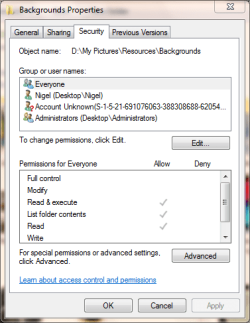
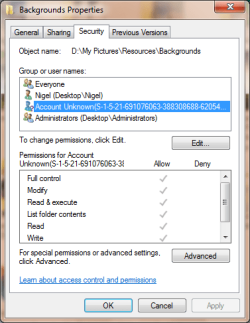
This image shows the permissions on the folder backgrounds, with the highlighted permission being from another windows version (actually a copy of Vista running on the same system - the name is actually shown as Nigel in the vista system but as can be seen this is treated as a different user from the Nigel shown)

The entries you can see are sometimes tied to a machine (\desktop) but user group everyone is not so will be the same group on all Windows machines, (this is a useful thing in your case where you need to access the data from multiple machines).

permissions-data.PNG

Clicking the edit button enables the ability to adjust the permissions on the folder.

Force Prop Permissions.PNG

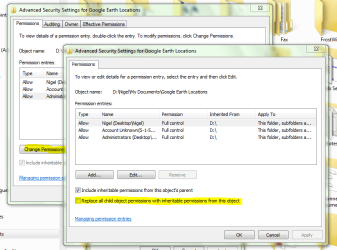
Once you have the correct permissions set on the top level folder you can use this screen (advanced permissions to force the setting of permissions to all the folders on the actual drive.

Hope this clarifies things a little :)
 

My Computers

System One System Two

  • Computer type
    PC/Desktop
    Computer Manufacturer/Model Number
    ChillBlast - Custom to my design
    OS
    Windows 11 Pro x64 [Latest Release and Release Preview]
    CPU
    Ryzen 9 5950X, 3.8 - 5.2 MHz
    Motherboard
    Asus Prime X570-Pro
    Memory
    64GB [2 x 32GB] DDR4 3200MHz
    Graphics Card(s)
    4GB NVIDIA GEFORCE GTX 1650 Ti
    Sound Card
    On-board SPDIF to 5.1 System + HDMI [5.1 system]
    Monitor(s) Displays
    32" UHD 32 Bit HDR Monitor + 43" UHD 4K 32Bit HDR TV
    Screen Resolution
    2 x 3840 x 2160 @60Hz
    Hard Drives
    1TB M2 SSD OS, 500GB Fast Access SSD, 2 x 8TB Data + Various Externals from 1TB to 4TB, 10TB NAS
    PSU
    NZXT C750 80 PLUS Gold 750W Modular PSU
    Case
    Workstation Case [Matt Black]
    Cooling
    NZXT Kraken X63 280mm CPU Cooler +2x Quiet Case fans
    Keyboard
    Logitech Wireless MX Keys & K400 + others
    Mouse
    Logitech Wireless MX Master 3S
    Internet Speed
    920 MB Down 50 MB Up
    Antivirus
    BitDefender Total Security Pro
    Browser
    Chrome (always run latest Non-Beta)
    Other Info
    Also run ...
    Laptop - Quad 8GB - Windows 10 Pro x64
    Nexus 7 Android tablet x2
    Samsung 10.2" tablet
    Blackview TAB 8 4G Android Tablet c/w Keyboard
    Wacom Intuos Pro Medium Pen Pad
    Wacom Intuos Pro Small Pen Pad
    Wacom Expresskeys Remote
    Loopdeck+ Graphics Controller
    Shuttle Pro v2 Control
  • Computer type
    Laptop
    System Manufacturer/Model Number
    Dell XPS 17 10750H
    OS
    Windows 11 Pro x64 Latest RP
    CPU
    Intel I7 10750H 5.0GHz
    Motherboard
    Dell XPS
    Memory
    32GB [2x16GB] DDR4 2933 MHz
    Graphics Card(s)
    nVidia GTX1650Ti 4 GB GDDR6
    Sound Card
    Stock [Realtek] 4 Speaker
    Monitor(s) Displays
    17" IPS UHD+ Infinity Edge Touchscreen
    Screen Resolution
    3840 x 2400
    Hard Drives
    2TB M2 NVMe, 4TB External + various 500GB & 1TB External NVMe (also have access to spinner HDD from
    PSU
    Stock
    Case
    Stock XPS Aluminium & Carbon Fibre
    Cooling
    Stock - Active Fan Control
    Keyboard
    Backlit + Various Logitech
    Mouse
    Stock Track Pad + Logitech MX Trackball
    Internet Speed
    72 MB Down 18MB Up
    Browser
    Chrome
    Other Info
    Also run ...
    Laptop - Quad 8GB - Windows 10 Pro x64
    Nexus 7 Android tablet x2
    10.2" tablet
    Sony Z3 Android Smartphone
    Wacom Intuos Pro Medium Pen Pad
    Wacom Intuos Pro Small Pen Pad
    Wacom Expresskeys Remote
    Loopdeck+ Graphics Controller
    Shuttle Pro v2 Control Pad
    10TB NAS
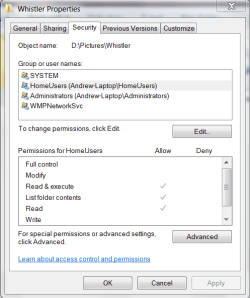
Below are the permissions for a folder "Whistler" which contains photos:

Whistler.PNG

The entry for "HomeUsers" had a long SId reference for a split second before it switched to what is shown on the image snip.

Does this shed any light? Surely I should be able to copy and move files to/from portable drives/flash drives etc without all this hassle!? It just seems odd that each of the 3 new laptops exhibits the same issue and I can't believe this is really how things are supposed to be!

Thanks for all your assistance so far, it is very much appreciated.

Andrew
 

My Computer

Computer Manufacturer/Model Number
Acer 1810TZ
OS
Windows 7 Home Premium x64
CPU
Intel® Pentium® Dual Core ULV SU4100, 1.3Ghz
Motherboard
Mobile Intel GS45 Express
Memory
3GB
Graphics Card(s)
Intel® GMA X4500MHD
Monitor(s) Displays
11.6" (WXGA LED)
Screen Resolution
1366 x 768
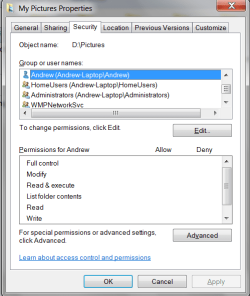
And the properties for "My Pictures":

My Pictures.PNG

Same thing happened with the "Homeusers" account and the "Andrew" user has no permissions at all!?
 

My Computer

Computer Manufacturer/Model Number
Acer 1810TZ
OS
Windows 7 Home Premium x64
CPU
Intel® Pentium® Dual Core ULV SU4100, 1.3Ghz
Motherboard
Mobile Intel GS45 Express
Memory
3GB
Graphics Card(s)
Intel® GMA X4500MHD
Monitor(s) Displays
11.6" (WXGA LED)
Screen Resolution
1366 x 768
The homeusers group is a variation of the Everyone group that relates to win7 specific sharing - looking at the image there you homeusers group only has limited rights to the folder - namely read access to the folders and files and the right to run programs in the folder, to change things in the folder you would need modify rights and to write new items (copy or move into the folder), you would need "write" rights.

If you give your homeusers group full rights to the folder (Read/Write/Modify), this should allow you to work with the folder without issue.

I assume you are using homegroup sharing here - the default sharing for homegroup is read only sharing so the above rights make some sense.

I think that you should be able to (from the machine that originated the homegroup (1st machine set-up)), use the right click , Share with ... option to give full read/write access to the homegroup which should also cure your issues
 

My Computers

System One System Two

  • Computer type
    PC/Desktop
    Computer Manufacturer/Model Number
    ChillBlast - Custom to my design
    OS
    Windows 11 Pro x64 [Latest Release and Release Preview]
    CPU
    Ryzen 9 5950X, 3.8 - 5.2 MHz
    Motherboard
    Asus Prime X570-Pro
    Memory
    64GB [2 x 32GB] DDR4 3200MHz
    Graphics Card(s)
    4GB NVIDIA GEFORCE GTX 1650 Ti
    Sound Card
    On-board SPDIF to 5.1 System + HDMI [5.1 system]
    Monitor(s) Displays
    32" UHD 32 Bit HDR Monitor + 43" UHD 4K 32Bit HDR TV
    Screen Resolution
    2 x 3840 x 2160 @60Hz
    Hard Drives
    1TB M2 SSD OS, 500GB Fast Access SSD, 2 x 8TB Data + Various Externals from 1TB to 4TB, 10TB NAS
    PSU
    NZXT C750 80 PLUS Gold 750W Modular PSU
    Case
    Workstation Case [Matt Black]
    Cooling
    NZXT Kraken X63 280mm CPU Cooler +2x Quiet Case fans
    Keyboard
    Logitech Wireless MX Keys & K400 + others
    Mouse
    Logitech Wireless MX Master 3S
    Internet Speed
    920 MB Down 50 MB Up
    Antivirus
    BitDefender Total Security Pro
    Browser
    Chrome (always run latest Non-Beta)
    Other Info
    Also run ...
    Laptop - Quad 8GB - Windows 10 Pro x64
    Nexus 7 Android tablet x2
    Samsung 10.2" tablet
    Blackview TAB 8 4G Android Tablet c/w Keyboard
    Wacom Intuos Pro Medium Pen Pad
    Wacom Intuos Pro Small Pen Pad
    Wacom Expresskeys Remote
    Loopdeck+ Graphics Controller
    Shuttle Pro v2 Control
  • Computer type
    Laptop
    System Manufacturer/Model Number
    Dell XPS 17 10750H
    OS
    Windows 11 Pro x64 Latest RP
    CPU
    Intel I7 10750H 5.0GHz
    Motherboard
    Dell XPS
    Memory
    32GB [2x16GB] DDR4 2933 MHz
    Graphics Card(s)
    nVidia GTX1650Ti 4 GB GDDR6
    Sound Card
    Stock [Realtek] 4 Speaker
    Monitor(s) Displays
    17" IPS UHD+ Infinity Edge Touchscreen
    Screen Resolution
    3840 x 2400
    Hard Drives
    2TB M2 NVMe, 4TB External + various 500GB & 1TB External NVMe (also have access to spinner HDD from
    PSU
    Stock
    Case
    Stock XPS Aluminium & Carbon Fibre
    Cooling
    Stock - Active Fan Control
    Keyboard
    Backlit + Various Logitech
    Mouse
    Stock Track Pad + Logitech MX Trackball
    Internet Speed
    72 MB Down 18MB Up
    Browser
    Chrome
    Other Info
    Also run ...
    Laptop - Quad 8GB - Windows 10 Pro x64
    Nexus 7 Android tablet x2
    10.2" tablet
    Sony Z3 Android Smartphone
    Wacom Intuos Pro Medium Pen Pad
    Wacom Intuos Pro Small Pen Pad
    Wacom Expresskeys Remote
    Loopdeck+ Graphics Controller
    Shuttle Pro v2 Control Pad
    10TB NAS
Ok, so the HomeUser bit makes sense as I have indeed got that set up. Has the "Andrew" user got anything to do with it i.e no permissions? Is that not my main user account, according to the details in control panel it is?

It's almost as if my main user account has not got full permissions for everything on my system but I don't know why this would have occurred as I have not messed with anything.
 

My Computer

Computer Manufacturer/Model Number
Acer 1810TZ
OS
Windows 7 Home Premium x64
CPU
Intel® Pentium® Dual Core ULV SU4100, 1.3Ghz
Motherboard
Mobile Intel GS45 Express
Memory
3GB
Graphics Card(s)
Intel® GMA X4500MHD
Monitor(s) Displays
11.6" (WXGA LED)
Screen Resolution
1366 x 768
Ok the Andrew account is indeed your main user account and would normally have rights to at least your actual personal folders, something appears to have happened with the sharing via homegroup, either by design or accident, that has replaced these rights with those in the homeusers group - Your user should automatically be a member of homeusers.

-------

I, personally, always give my actual user full control of all my data folders as even when they are not shared it prevents any UAC prompts when I want to access them ;).

-------

I was brought up with the old school workgroup sharing routine so my way of setting up sharing on a three system network would be as follows ....

Each machine would have a main account which would have ownership of all data folders on the machine. This user would also have full control rights to all data.

On each machine I would create two other users with identical names to the Main users on the other machines.

All data folders would be shared using advanced sharing

I would use the main user on each machine to allocate rights to the machines data folders to the other two main users. These rights could be full for general items and either None or read only for more sensitive data.

Of course it may be that the main user on all machines will be the same user and the other users may or may not be administrative users as you deem fit

This setup will also work with homegroup sharing as the actual permissions used are the same with both workgroup and homegroup sharing
 

My Computers

System One System Two

  • Computer type
    PC/Desktop
    Computer Manufacturer/Model Number
    ChillBlast - Custom to my design
    OS
    Windows 11 Pro x64 [Latest Release and Release Preview]
    CPU
    Ryzen 9 5950X, 3.8 - 5.2 MHz
    Motherboard
    Asus Prime X570-Pro
    Memory
    64GB [2 x 32GB] DDR4 3200MHz
    Graphics Card(s)
    4GB NVIDIA GEFORCE GTX 1650 Ti
    Sound Card
    On-board SPDIF to 5.1 System + HDMI [5.1 system]
    Monitor(s) Displays
    32" UHD 32 Bit HDR Monitor + 43" UHD 4K 32Bit HDR TV
    Screen Resolution
    2 x 3840 x 2160 @60Hz
    Hard Drives
    1TB M2 SSD OS, 500GB Fast Access SSD, 2 x 8TB Data + Various Externals from 1TB to 4TB, 10TB NAS
    PSU
    NZXT C750 80 PLUS Gold 750W Modular PSU
    Case
    Workstation Case [Matt Black]
    Cooling
    NZXT Kraken X63 280mm CPU Cooler +2x Quiet Case fans
    Keyboard
    Logitech Wireless MX Keys & K400 + others
    Mouse
    Logitech Wireless MX Master 3S
    Internet Speed
    920 MB Down 50 MB Up
    Antivirus
    BitDefender Total Security Pro
    Browser
    Chrome (always run latest Non-Beta)
    Other Info
    Also run ...
    Laptop - Quad 8GB - Windows 10 Pro x64
    Nexus 7 Android tablet x2
    Samsung 10.2" tablet
    Blackview TAB 8 4G Android Tablet c/w Keyboard
    Wacom Intuos Pro Medium Pen Pad
    Wacom Intuos Pro Small Pen Pad
    Wacom Expresskeys Remote
    Loopdeck+ Graphics Controller
    Shuttle Pro v2 Control
  • Computer type
    Laptop
    System Manufacturer/Model Number
    Dell XPS 17 10750H
    OS
    Windows 11 Pro x64 Latest RP
    CPU
    Intel I7 10750H 5.0GHz
    Motherboard
    Dell XPS
    Memory
    32GB [2x16GB] DDR4 2933 MHz
    Graphics Card(s)
    nVidia GTX1650Ti 4 GB GDDR6
    Sound Card
    Stock [Realtek] 4 Speaker
    Monitor(s) Displays
    17" IPS UHD+ Infinity Edge Touchscreen
    Screen Resolution
    3840 x 2400
    Hard Drives
    2TB M2 NVMe, 4TB External + various 500GB & 1TB External NVMe (also have access to spinner HDD from
    PSU
    Stock
    Case
    Stock XPS Aluminium & Carbon Fibre
    Cooling
    Stock - Active Fan Control
    Keyboard
    Backlit + Various Logitech
    Mouse
    Stock Track Pad + Logitech MX Trackball
    Internet Speed
    72 MB Down 18MB Up
    Browser
    Chrome
    Other Info
    Also run ...
    Laptop - Quad 8GB - Windows 10 Pro x64
    Nexus 7 Android tablet x2
    10.2" tablet
    Sony Z3 Android Smartphone
    Wacom Intuos Pro Medium Pen Pad
    Wacom Intuos Pro Small Pen Pad
    Wacom Expresskeys Remote
    Loopdeck+ Graphics Controller
    Shuttle Pro v2 Control Pad
    10TB NAS
Thanks, your description makes total sense... and I have just made a discovery. For reasons unknown some of the other user folders seem to have lost all their permissions for the main user too, presumably when I re-pointed them to the data partition. But some of them (videos & music are fine).

I am going to reset all the permissions for these folders, turn on UAC control again and see what happens. I'll post back to confirm success (or not)...

Could this be a Win7 "undocumented feature"? I used to mess with XP alot but apart from partitioning and re-pointing the user files to the data partition I have not messed with anything at all on the pre-installed Win7 machines.

Update: So far so good. 1 laptop seems to be sorted, UAC back on to the previous level and all permissions restored to the main user. I'll go through the same process with the other laptops tomorrow.

Andrew
 
Last edited:

My Computer

Computer Manufacturer/Model Number
Acer 1810TZ
OS
Windows 7 Home Premium x64
CPU
Intel® Pentium® Dual Core ULV SU4100, 1.3Ghz
Motherboard
Mobile Intel GS45 Express
Memory
3GB
Graphics Card(s)
Intel® GMA X4500MHD
Monitor(s) Displays
11.6" (WXGA LED)
Screen Resolution
1366 x 768
The thing with XP was that the security was almost totally lacking as all users by default ran as full administrators, (as did any virus running under their account ;) ),

The permissions and user controls introduced with Vista and refined with win7 bring the security to the "average" systems that have been in use in more secure environments for many years. UAC ties all this together and reduces what used to be a "log out/log-in as someone else" scenario to a simple click :)
 

My Computers

System One System Two

  • Computer type
    PC/Desktop
    Computer Manufacturer/Model Number
    ChillBlast - Custom to my design
    OS
    Windows 11 Pro x64 [Latest Release and Release Preview]
    CPU
    Ryzen 9 5950X, 3.8 - 5.2 MHz
    Motherboard
    Asus Prime X570-Pro
    Memory
    64GB [2 x 32GB] DDR4 3200MHz
    Graphics Card(s)
    4GB NVIDIA GEFORCE GTX 1650 Ti
    Sound Card
    On-board SPDIF to 5.1 System + HDMI [5.1 system]
    Monitor(s) Displays
    32" UHD 32 Bit HDR Monitor + 43" UHD 4K 32Bit HDR TV
    Screen Resolution
    2 x 3840 x 2160 @60Hz
    Hard Drives
    1TB M2 SSD OS, 500GB Fast Access SSD, 2 x 8TB Data + Various Externals from 1TB to 4TB, 10TB NAS
    PSU
    NZXT C750 80 PLUS Gold 750W Modular PSU
    Case
    Workstation Case [Matt Black]
    Cooling
    NZXT Kraken X63 280mm CPU Cooler +2x Quiet Case fans
    Keyboard
    Logitech Wireless MX Keys & K400 + others
    Mouse
    Logitech Wireless MX Master 3S
    Internet Speed
    920 MB Down 50 MB Up
    Antivirus
    BitDefender Total Security Pro
    Browser
    Chrome (always run latest Non-Beta)
    Other Info
    Also run ...
    Laptop - Quad 8GB - Windows 10 Pro x64
    Nexus 7 Android tablet x2
    Samsung 10.2" tablet
    Blackview TAB 8 4G Android Tablet c/w Keyboard
    Wacom Intuos Pro Medium Pen Pad
    Wacom Intuos Pro Small Pen Pad
    Wacom Expresskeys Remote
    Loopdeck+ Graphics Controller
    Shuttle Pro v2 Control
  • Computer type
    Laptop
    System Manufacturer/Model Number
    Dell XPS 17 10750H
    OS
    Windows 11 Pro x64 Latest RP
    CPU
    Intel I7 10750H 5.0GHz
    Motherboard
    Dell XPS
    Memory
    32GB [2x16GB] DDR4 2933 MHz
    Graphics Card(s)
    nVidia GTX1650Ti 4 GB GDDR6
    Sound Card
    Stock [Realtek] 4 Speaker
    Monitor(s) Displays
    17" IPS UHD+ Infinity Edge Touchscreen
    Screen Resolution
    3840 x 2400
    Hard Drives
    2TB M2 NVMe, 4TB External + various 500GB & 1TB External NVMe (also have access to spinner HDD from
    PSU
    Stock
    Case
    Stock XPS Aluminium & Carbon Fibre
    Cooling
    Stock - Active Fan Control
    Keyboard
    Backlit + Various Logitech
    Mouse
    Stock Track Pad + Logitech MX Trackball
    Internet Speed
    72 MB Down 18MB Up
    Browser
    Chrome
    Other Info
    Also run ...
    Laptop - Quad 8GB - Windows 10 Pro x64
    Nexus 7 Android tablet x2
    10.2" tablet
    Sony Z3 Android Smartphone
    Wacom Intuos Pro Medium Pen Pad
    Wacom Intuos Pro Small Pen Pad
    Wacom Expresskeys Remote
    Loopdeck+ Graphics Controller
    Shuttle Pro v2 Control Pad
    10TB NAS
Everything seems to be fine now. I had to turn UAC off to reset all the permissions on one of the laptops but it is now back on on all of them with everything as it should be. Hopefully by granting the permissions to the user folders anything placed within them should work...

Thanks for all the advice & help

Andrew
 

My Computer

Computer Manufacturer/Model Number
Acer 1810TZ
OS
Windows 7 Home Premium x64
CPU
Intel® Pentium® Dual Core ULV SU4100, 1.3Ghz
Motherboard
Mobile Intel GS45 Express
Memory
3GB
Graphics Card(s)
Intel® GMA X4500MHD
Monitor(s) Displays
11.6" (WXGA LED)
Screen Resolution
1366 x 768
Glad to hear you have things sorted :)
 

My Computers

System One System Two

  • Computer type
    PC/Desktop
    Computer Manufacturer/Model Number
    ChillBlast - Custom to my design
    OS
    Windows 11 Pro x64 [Latest Release and Release Preview]
    CPU
    Ryzen 9 5950X, 3.8 - 5.2 MHz
    Motherboard
    Asus Prime X570-Pro
    Memory
    64GB [2 x 32GB] DDR4 3200MHz
    Graphics Card(s)
    4GB NVIDIA GEFORCE GTX 1650 Ti
    Sound Card
    On-board SPDIF to 5.1 System + HDMI [5.1 system]
    Monitor(s) Displays
    32" UHD 32 Bit HDR Monitor + 43" UHD 4K 32Bit HDR TV
    Screen Resolution
    2 x 3840 x 2160 @60Hz
    Hard Drives
    1TB M2 SSD OS, 500GB Fast Access SSD, 2 x 8TB Data + Various Externals from 1TB to 4TB, 10TB NAS
    PSU
    NZXT C750 80 PLUS Gold 750W Modular PSU
    Case
    Workstation Case [Matt Black]
    Cooling
    NZXT Kraken X63 280mm CPU Cooler +2x Quiet Case fans
    Keyboard
    Logitech Wireless MX Keys & K400 + others
    Mouse
    Logitech Wireless MX Master 3S
    Internet Speed
    920 MB Down 50 MB Up
    Antivirus
    BitDefender Total Security Pro
    Browser
    Chrome (always run latest Non-Beta)
    Other Info
    Also run ...
    Laptop - Quad 8GB - Windows 10 Pro x64
    Nexus 7 Android tablet x2
    Samsung 10.2" tablet
    Blackview TAB 8 4G Android Tablet c/w Keyboard
    Wacom Intuos Pro Medium Pen Pad
    Wacom Intuos Pro Small Pen Pad
    Wacom Expresskeys Remote
    Loopdeck+ Graphics Controller
    Shuttle Pro v2 Control
  • Computer type
    Laptop
    System Manufacturer/Model Number
    Dell XPS 17 10750H
    OS
    Windows 11 Pro x64 Latest RP
    CPU
    Intel I7 10750H 5.0GHz
    Motherboard
    Dell XPS
    Memory
    32GB [2x16GB] DDR4 2933 MHz
    Graphics Card(s)
    nVidia GTX1650Ti 4 GB GDDR6
    Sound Card
    Stock [Realtek] 4 Speaker
    Monitor(s) Displays
    17" IPS UHD+ Infinity Edge Touchscreen
    Screen Resolution
    3840 x 2400
    Hard Drives
    2TB M2 NVMe, 4TB External + various 500GB & 1TB External NVMe (also have access to spinner HDD from
    PSU
    Stock
    Case
    Stock XPS Aluminium & Carbon Fibre
    Cooling
    Stock - Active Fan Control
    Keyboard
    Backlit + Various Logitech
    Mouse
    Stock Track Pad + Logitech MX Trackball
    Internet Speed
    72 MB Down 18MB Up
    Browser
    Chrome
    Other Info
    Also run ...
    Laptop - Quad 8GB - Windows 10 Pro x64
    Nexus 7 Android tablet x2
    10.2" tablet
    Sony Z3 Android Smartphone
    Wacom Intuos Pro Medium Pen Pad
    Wacom Intuos Pro Small Pen Pad
    Wacom Expresskeys Remote
    Loopdeck+ Graphics Controller
    Shuttle Pro v2 Control Pad
    10TB NAS
Back
Top