UAC -> Desktop panel (gadgets)

anders22

New member
Local time
12:32 AM
Messages
5

Hello lads, so ive been playing around on me laptop lately, trying to improve things, make it run smoother and such. So I disabled the UAC (User Account Control) to get rid of them annoying pop-ups everytime install something, or download something etc.
Now before I explain my problem u should know that before i disabled it I turned of my desktop panel.

Now, when i disabled the UAC it all worked out well, pops went away etc. However, so did my Desktop panel, sort of. When i try to enable it, it says I need administrator privileges. (I do get the same message after I enabled UAC again btw, its not just when its turned off)
I do find this to be somewhat strange, as I only have one user on this computer.


Any suggestions?


My Computer

OS
Windows 7 Home Premium x64

My Computer

Computer Manufacturer/Model Number
HP M9077c
OS
Windows 7 Home Premium 64bit
CPU
Intel(R)Core(TM)2 quad [email protected] 2.39GHz
Motherboard
ASUSeK
Memory
6GB DDR2 6400
Graphics Card(s)
GeForce 8500/512MB
Sound Card
Realtek High Def Audio
Monitor(s) Displays
HP w2408 LCD 24" widescreen
Screen Resolution
1920x1200
Cooling
6 pack of Bud
Keyboard
MS wireless Inteli
Mouse
MS wireless Inteli
Hello anders22 and welcome to the Forums!

I assume that by Desktop panel you mean the sidebar. To enable the sidebar you need elevated privileges. In Windows 7 this is always the case, even if you are the only user on the machine, you still need to elevate your privileges when installing something or changing something around the OS, and turning on the sidebar is included in this. This is normal behavior, nothing to worry about.

However, if your problem is that you cannot turn the sidebar on as the system does not offer you to elevate your privilege, then you need to either correct the UAC settings or turn on the built-in administrator account and use that account to make changes to the OS.
 

My Computer

Computer Manufacturer/Model Number
Dell Inspiron 530
OS
Windows 7 Ultimate (x64)
CPU
Q6600
Memory
8 GB
Graphics Card(s)
ATI Radeon HD 2600 XT
Monitor(s) Displays
Samsung Syncmaster P2450
Screen Resolution
1920x1080
Hard Drives
Samsung HD103UJ
Samsung HD501LJ
Internet Speed
25 Mb/s
Hello anders22 and welcome to the Forums!

I assume that by Desktop panel you mean the sidebar. To enable the sidebar you need elevated privileges. In Windows 7 this is always the case, even if you are the only user on the machine, you still need to elevate your privileges when installing something or changing something around the OS, and turning on the sidebar is included in this. This is normal behavior, nothing to worry about.

However, if your problem is that you cannot turn the sidebar on as the system does not offer you to elevate your privilege, then you need to either correct the UAC settings or turn on the built-in administrator account and use that account to make changes to the OS.

Thank you, and thanks for getting back to me so soon.
I do mean the Sidebar yes. I did try to change the setting for my UAC, tried every level, though still did not work.
You mentioned built-in administrator account. How do I access this?
 

My Computer

OS
Windows 7 Home Premium x64
Try this tutorial right here in the Forums.
 

My Computer

Computer Manufacturer/Model Number
Dell Inspiron 530
OS
Windows 7 Ultimate (x64)
CPU
Q6600
Memory
8 GB
Graphics Card(s)
ATI Radeon HD 2600 XT
Monitor(s) Displays
Samsung Syncmaster P2450
Screen Resolution
1920x1080
Hard Drives
Samsung HD103UJ
Samsung HD501LJ
Internet Speed
25 Mb/s
Try this tutorial right here in the Forums.


I tried that tutorial earlier, or tried to try it if that makes any sence.

I had to go to the tutorial showing how to enter Local Users and Groups. When I got into the LUC section I found a red/white X and the message:

"This computer is running Windows 7 Home Premium. This snapin may not be used with this version of Windows. To manage user accounts for this computer, use the User Accounts tool in the Control Panel.

So I clicked my way to the Users Account section, but found nothing that would allow me to enable the Built-in Administrator account. So I am back where I started
 

My Computer

OS
Windows 7 Home Premium x64
Anders22,
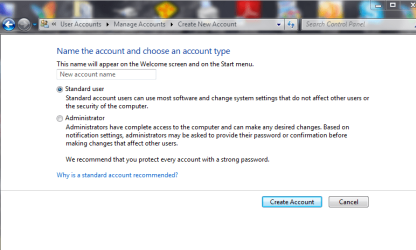
Why not try creating a new account in....
account new.PNG

and see what happens.
 

My Computer

Computer Manufacturer/Model Number
HP M9077c
OS
Windows 7 Home Premium 64bit
CPU
Intel(R)Core(TM)2 quad [email protected] 2.39GHz
Motherboard
ASUSeK
Memory
6GB DDR2 6400
Graphics Card(s)
GeForce 8500/512MB
Sound Card
Realtek High Def Audio
Monitor(s) Displays
HP w2408 LCD 24" widescreen
Screen Resolution
1920x1200
Cooling
6 pack of Bud
Keyboard
MS wireless Inteli
Mouse
MS wireless Inteli
OK, I am not that familiar with Home Premium (never understood the need for it either), but you can try the method 2 from the following (off-site) tutorial.

Let us know if that works. The tutorial itself does not mention whether it's applicable to Home Premium, but since I have Ultimate, I can't test it for you.
 

My Computer

Computer Manufacturer/Model Number
Dell Inspiron 530
OS
Windows 7 Ultimate (x64)
CPU
Q6600
Memory
8 GB
Graphics Card(s)
ATI Radeon HD 2600 XT
Monitor(s) Displays
Samsung Syncmaster P2450
Screen Resolution
1920x1080
Hard Drives
Samsung HD103UJ
Samsung HD501LJ
Internet Speed
25 Mb/s

My Computer

Computer type
PC/Desktop
Computer Manufacturer/Model Number
Home Built - Jan 2013
OS
Windows 7 64 Bit Home Premium SP1
CPU
i7-3820
Motherboard
Asus P9X79-PRO - Bios 4608
Memory
GSkill F3-14900CL9Q - 16GB
Graphics Card(s)
EVGA GeForce GTX660 - Driver 352.86
Sound Card
On board Realtek ALC898
Monitor(s) Displays
Acer S271HL
Screen Resolution
1920 x 1080
Hard Drives
#1- Samsung 840 Pro Series
#2- Western Digital WD1002FAEX Sata3 Black
#3- Western Digital WD1002FAEX Sata3 Black
PSU
Corsair CMPSU-850TX-V2 - 850 watt (by Seasonic)
Case
Corsair Obsidian 550D
Cooling
Standard 3 120mm case fans, Cooler Master Hyper 212 EVO
Keyboard
MS KC-0405
Mouse
Intellimouse 5-button
Internet Speed
56 Mbits/Sec (on a good day)
Antivirus
Avast & Malwarebytes
Browser
Firefox
Other Info
Asus DVD - DRW-24B1ST 24X
Back
Top