UAC doesn't work after trying to intall custom theme

kackiz

New member
Local time
3:00 PM
Messages
25
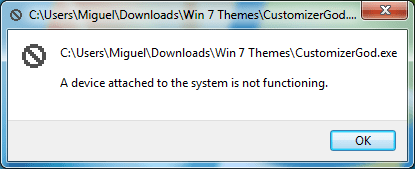
Every action that requires user account control now shows the following message, and I don't know how to fix this problem.
 

Attachments

  • Device Attached UAC error.png
    Device Attached UAC error.png
    9.2 KB · Views: 11

My Computer My Computer

Computer type
PC/Desktop
Computer Manufacturer/Model Number
Custom Build
OS
Windows 7 Ultimate x64; Ubuntu 18.04
CPU
AMD FX-8350
Motherboard
ASUS ROG Crosshair IV Formula
Memory
16 GB DDR3 RAM
Graphics Card(s)
Nvidia GTX 1660ti
Sound Card
Internal Creative Soundblaster
Monitor(s) Displays
ASUS VS247
Screen Resolution
1920x1080 at 60Hz
Hard Drives
1 TB Seagate Hard drive formatted with standard Windows partitions; NTFS. 1 TB Western Digital Hard drive formatted for Ubuntu with a ext4 partition and a SWAP partition.
PSU
Thermaltake Smart Series 700W
Case
Thermaltake Level 20 GT
Cooling
3x Thermaltake fans; Proper AMD Wraith Cooler
Keyboard
Razor Ornata Chroma
Mouse
Generic Wireless mouse with 5 buttons
Internet Speed
100 Mbps LAN
Antivirus
None
Browser
Waterfox
Other Info
some parts of this build (Motherboard, GPU and CPU) are used, and will need an upgrade soon.
Hi kackiz,

Every action that requires user account control now shows the following message, and I don't know how to fix this problem.

I suggest that you try to uninstall the custom theme! Where did you download it from?

[1] Have you tried a System Restore point prior to installing the custom theme?
[2] To uninstall the custom theme, download and run Revo Uninstaller [FREE] from here => Revo Uninstaller. When you run scan for leftover items make sure that you use the Advanced Scan option, then tick everything and delete it.

I hope this helps!
 

My Computer My Computer

Computer type
Laptop
Computer Manufacturer/Model Number
Fujitsu LIFEBOOK
OS
Win 7 HP SP1 64-bit Vista HB SP2 32-bit Linux Mint 18.3
CPU
Intel(R) Pentium(R) CPU P6200 @ 2.13GHz
Motherboard
FUJITSU FJNBB06
Memory
4.00 GB
Graphics Card(s)
Intel(R) Graphics Media Accelerator HD
Sound Card
[1] Realtek High Definition Audio [2] Intel(R) Display Audio
Screen Resolution
1366 x 768 x 32 bits (4294967296 colors) @ 59 Hz
Hard Drives
TOSHIBA MK5076GSX
Antivirus
AVG FREE
Thank you for the reply. I directly replaced core .dll files from the Windows so I doubt Revo Uninstaller would help. A system restore is also impossible for my computer nor I created any restore points. Luckily, I backed up all of the files so now all I have to do is manually put them back. However, this process would be much easier with the sfc /scannow command, which is admin only. Maybe I can run it on startup repair or safe mode.

I downloaded the theme from deviantart. The theme itself didn't give me any problems, but its icon theme did, which displays correctly, just gives me this problem. If you know a better place to download themes than deviantart (and I mean visual styles, not just a different desktop picture and a recolour).
 

My Computer My Computer

Computer type
PC/Desktop
Computer Manufacturer/Model Number
Custom Build
OS
Windows 7 Ultimate x64; Ubuntu 18.04
CPU
AMD FX-8350
Motherboard
ASUS ROG Crosshair IV Formula
Memory
16 GB DDR3 RAM
Graphics Card(s)
Nvidia GTX 1660ti
Sound Card
Internal Creative Soundblaster
Monitor(s) Displays
ASUS VS247
Screen Resolution
1920x1080 at 60Hz
Hard Drives
1 TB Seagate Hard drive formatted with standard Windows partitions; NTFS. 1 TB Western Digital Hard drive formatted for Ubuntu with a ext4 partition and a SWAP partition.
PSU
Thermaltake Smart Series 700W
Case
Thermaltake Level 20 GT
Cooling
3x Thermaltake fans; Proper AMD Wraith Cooler
Keyboard
Razor Ornata Chroma
Mouse
Generic Wireless mouse with 5 buttons
Internet Speed
100 Mbps LAN
Antivirus
None
Browser
Waterfox
Other Info
some parts of this build (Motherboard, GPU and CPU) are used, and will need an upgrade soon.
Hi kackiz,

I directly replaced core .dll files from the Windows so I doubt Revo Uninstaller would help. A system restore is also impossible for my computer nor I created any restore points. Luckily, I backed up all of the files so now all I have to do is manually put them back. However, this process would be much easier with the sfc /scannow command, which is admin only. Maybe I can run it on startup repair or safe mode.

Yes you can boot into Safe Mode and run sfc /scannow from the cmd prompt.
 

My Computer My Computer

Computer type
Laptop
Computer Manufacturer/Model Number
Fujitsu LIFEBOOK
OS
Win 7 HP SP1 64-bit Vista HB SP2 32-bit Linux Mint 18.3
CPU
Intel(R) Pentium(R) CPU P6200 @ 2.13GHz
Motherboard
FUJITSU FJNBB06
Memory
4.00 GB
Graphics Card(s)
Intel(R) Graphics Media Accelerator HD
Sound Card
[1] Realtek High Definition Audio [2] Intel(R) Display Audio
Screen Resolution
1366 x 768 x 32 bits (4294967296 colors) @ 59 Hz
Hard Drives
TOSHIBA MK5076GSX
Antivirus
AVG FREE
Hi kackiz,

I assume that you don't have a System Image that you could use that was created prior to this problem?

If you don't have any success, another option is to perform a repair install.

Repair Install - Overview

A repair install differs from a clean install in the fact that it ONLY replaces the corrupted OS with a new fresh copy. This means that ALL your User Accounts, Folders, Files, Documents, Pictures, Music, Videos, Data Files, Icons, and any installed programs are left intact. It does however, delete ALL the Window updates, and can affect, sounds, services, visual effect settings and device drivers by re-setting them to default. You cannot do a repair install at boot, in Safe Mode, using a system repair disk, or using an integrated Windows update disk. Basically, this process can ONLY be performed from within the LIVE OS.

Then you can either use DISM++ or SIMPLIX to get the OS upto date with regard to WU’s [Windows Updates].

I hope this helps!

 

My Computer My Computer

Computer type
Laptop
Computer Manufacturer/Model Number
Fujitsu LIFEBOOK
OS
Win 7 HP SP1 64-bit Vista HB SP2 32-bit Linux Mint 18.3
CPU
Intel(R) Pentium(R) CPU P6200 @ 2.13GHz
Motherboard
FUJITSU FJNBB06
Memory
4.00 GB
Graphics Card(s)
Intel(R) Graphics Media Accelerator HD
Sound Card
[1] Realtek High Definition Audio [2] Intel(R) Display Audio
Screen Resolution
1366 x 768 x 32 bits (4294967296 colors) @ 59 Hz
Hard Drives
TOSHIBA MK5076GSX
Antivirus
AVG FREE
Back
Top