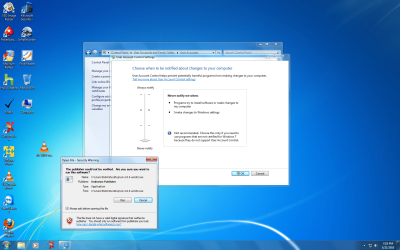
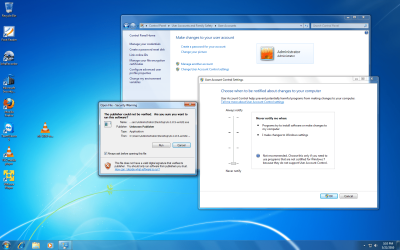
UAC is off and still get security warnings!!

Are logging in as a user account or an administrator account. Keep in mind that the administrator account in Win7 is not wide open like the admin account in XP. Sometimes you have to right click and select "Run as administrator" to load or install programs.

I have enabled the built-in Administrator account.


what does this mean if you do a clean install of windows 7, your automatically the administrator unless you then create another user?
Yes, when you do a clean install, an admin account is automatically created. This is not the hidden administrator account. To run as a user, you must create an additional user account. Be sure that you keep at least one admin account active.
 

My Computer My Computer

At a glance

Windows 7 Ultimate 32 bitIntel(R) Pentium(R) 4 CPU 3.00GHz2.50 GB RAMNVIDIA GeForce 7600 GS
Computer Manufacturer/Model Number
Home built
OS
Windows 7 Ultimate 32 bit
CPU
Intel(R) Pentium(R) 4 CPU 3.00GHz
Motherboard
ASUS P4P800-VM Motherboard Chipset: Intel 865G + ICH5
Memory
2.50 GB RAM
Graphics Card(s)
NVIDIA GeForce 7600 GS
Sound Card
SoundMax Integrated Digital Audio (Chip)
Monitor(s) Displays
ViewSonic VX 1962 wm
Screen Resolution
1680 X 1050
Hard Drives
Seagate Barracuda 7200.10 80 GB
ST380215A ATA Device 18.6 GB
Western Digital "My Book" external hard drive 750 GB
Cooling
Fan based
Keyboard
Microsoft Comfort Curve Keyboard 2000 v10 USB
Mouse
Logitec optic USB
Internet Speed
3.01 Mb/s download 0.64 Mb/s upload
I have enabled the built-in Administrator account.


what does this mean if you do a clean install of windows 7, your automatically the administrator unless you then create another user?
Yes, when you do a clean install, an admin account is automatically created. This is not the hidden administrator account. To run as a user, you must create an additional user account. Be sure that you keep at least one admin account active.


i still dont know what that means and maybe this is why he is having problems, during the installation it does ask you to enter a user name and password, this is ADMIN! there might be something "hidden administrator" but that user that you create during the installation is all you need to make changes and control your system..

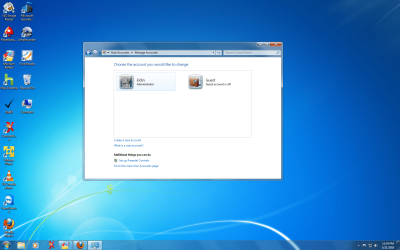
picture below shows only two accounts the one create during the installation and the guest account which is turn off by default. i suggest to original poster to make sure you are under the Admin and show us a screen shot. i never create secondary users for a PC used by one person.

i did some research and this hidden administrator, really isnt much different then the automatic administrator created during installation. if you are a Guest you cant even access this hidden account.

poster, check to see if you can access this hidden administrator, but if you disable those things on your regular administrator, they change in the hidden administrator also, its just about the same thing, dont even know the point of it, so far.
 

Attachments

  • user accounts.png
    user accounts.png
    386.1 KB · Views: 8

My Computers My Computers

  • At a glance

    WIN10AMD Ryzen 5 3600 6-Core Processor 3.59 GHz16.0 GB
    Computer type
    PC/Desktop
    Computer Manufacturer/Model Number
    PowerSpec G164
    OS
    WIN10
    CPU
    AMD Ryzen 5 3600 6-Core Processor 3.59 GHz
    Memory
    16.0 GB
    Internet Speed
    VERY FAST>>>!!!
  • Antivirus
    ESET Security Premium
what does this mean if you do a clean install of windows 7, your automatically the administrator unless you then create another user?
Yes, when you do a clean install, an admin account is automatically created. This is not the hidden administrator account. To run as a user, you must create an additional user account. Be sure that you keep at least one admin account active.


i still dont know what that means and maybe this is why he is having problems, during the installation it does ask you to enter a user name and password, this is ADMIN! there might be something "hidden administrator" but that user that you create during the installation is all you need to make changes and control your system..

picture below shows only two accounts the one create during the installation and the guest account which is turn off by default. i suggest to original poster to make sure you are under the Admin and show us a screen shot. i never create secondary users for a PC used by one person.

i did some research and this hidden administrator, really isnt much different then the automatic administrator created during installation. if you are a Guest you cant even access this hidden account.

poster, check to see if you can access this hidden administrator, but if you disable those things on your regular administrator, they change in the hidden administrator also, its just about the same thing, dont even know the point of it, so far.

You are correct, the initial account created is an administrator account - a limited (by design) administrator account. My purporse in memntioning this was to make sure the poster understood that the initial account was an administrator account; but that it was not the hidden administrator account.

There are some differences between the limited admin account and the hidden admin account. Neither are wide open admin accounts such as we had with XP.

The guest account cannot create nor modify an account of any kind.
 

My Computer My Computer

At a glance

Windows 7 Ultimate 32 bitIntel(R) Pentium(R) 4 CPU 3.00GHz2.50 GB RAMNVIDIA GeForce 7600 GS
Computer Manufacturer/Model Number
Home built
OS
Windows 7 Ultimate 32 bit
CPU
Intel(R) Pentium(R) 4 CPU 3.00GHz
Motherboard
ASUS P4P800-VM Motherboard Chipset: Intel 865G + ICH5
Memory
2.50 GB RAM
Graphics Card(s)
NVIDIA GeForce 7600 GS
Sound Card
SoundMax Integrated Digital Audio (Chip)
Monitor(s) Displays
ViewSonic VX 1962 wm
Screen Resolution
1680 X 1050
Hard Drives
Seagate Barracuda 7200.10 80 GB
ST380215A ATA Device 18.6 GB
Western Digital "My Book" external hard drive 750 GB
Cooling
Fan based
Keyboard
Microsoft Comfort Curve Keyboard 2000 v10 USB
Mouse
Logitec optic USB
Internet Speed
3.01 Mb/s download 0.64 Mb/s upload
Yes, when you do a clean install, an admin account is automatically created. This is not the hidden administrator account. To run as a user, you must create an additional user account. Be sure that you keep at least one admin account active.


i still dont know what that means and maybe this is why he is having problems, during the installation it does ask you to enter a user name and password, this is ADMIN! there might be something "hidden administrator" but that user that you create during the installation is all you need to make changes and control your system..

picture below shows only two accounts the one create during the installation and the guest account which is turn off by default. i suggest to original poster to make sure you are under the Admin and show us a screen shot. i never create secondary users for a PC used by one person.

i did some research and this hidden administrator, really isnt much different then the automatic administrator created during installation. if you are a Guest you cant even access this hidden account.

poster, check to see if you can access this hidden administrator, but if you disable those things on your regular administrator, they change in the hidden administrator also, its just about the same thing, dont even know the point of it, so far.

You are correct, the initial account created is an administrator account - a limited (by design) administrator account. My purporse in memntioning this was to make sure the poster understood that the initial account was an administrator account; but that it was not the hidden administrator account.

There are some differences between the limited admin account and the hidden admin account. Neither are wide open admin accounts such as we had with XP.

The guest account cannot create nor modify an account of any kind.


back to his problems and messages, if he is in the admin the one created by windows installation he should be able to modify changes like UAC and removing of security warnings by the action center. no need for a user to go into this hidden account, mostly if not everything can be done by the regular admin, until today i didnt notice that hidden account and probably will never have to log back into it.. admin are administrators and have all the power needed for installation of programs and removal. so until we hear more from the poster, i dont know how else we can support him.
 

My Computers My Computers

  • At a glance

    WIN10AMD Ryzen 5 3600 6-Core Processor 3.59 GHz16.0 GB
    Computer type
    PC/Desktop
    Computer Manufacturer/Model Number
    PowerSpec G164
    OS
    WIN10
    CPU
    AMD Ryzen 5 3600 6-Core Processor 3.59 GHz
    Memory
    16.0 GB
    Internet Speed
    VERY FAST>>>!!!
  • Antivirus
    ESET Security Premium
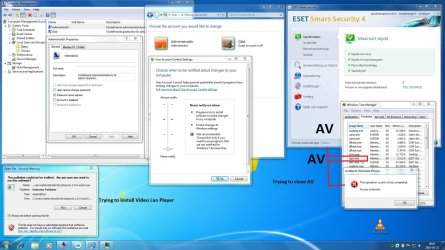
Here comes some info about my settings. Some programs are in swedish, sorry about that :p
 

Attachments

  • Windows 7.jpg
    Windows 7.jpg
    235.3 KB · Views: 13

My Computer My Computer

At a glance

Windows 7 Ultimate
OS
Windows 7 Ultimate
those screen shots are normal and everything looks fine. like i said that security warning popup is normal when running an application and UAC disable. tested it myself with UAC disable and trying to run VLC and Malwarebytes.

the NOD32 problem is something totally different and sounds like a bug on there side. sorry for asking but do you have a legal copy of that program (ESET) there are lots of different versions out there "with keys, and cracks", although the program appears working sometimes these programs become unstable because of the cracks or keys.

what other problems are you having besides the ESET thing and the warning when running an installation of VLC.

look at my screen shot same thing happens:mad:

take a look here if you want some more aggressive changes.
http://blogs.msdn.com/askie/archive...kbox-always-ask-before-opening-this-file.aspx
 

Attachments

  • Untitled.png
    Untitled.png
    375.3 KB · Views: 9

My Computers My Computers

  • At a glance

    WIN10AMD Ryzen 5 3600 6-Core Processor 3.59 GHz16.0 GB
    Computer type
    PC/Desktop
    Computer Manufacturer/Model Number
    PowerSpec G164
    OS
    WIN10
    CPU
    AMD Ryzen 5 3600 6-Core Processor 3.59 GHz
    Memory
    16.0 GB
    Internet Speed
    VERY FAST>>>!!!
  • Antivirus
    ESET Security Premium
I have installed Win7 on two other computer with exactly same setting and dont get any warnings and can shut down ESET. I run a legal copy of ESET.
 

My Computer My Computer

At a glance

Windows 7 Ultimate
OS
Windows 7 Ultimate
I have installed Win7 on two other computer with exactly same setting and dont get any warnings and can shut down ESET. I run a legal copy of ESET.


well my monitor must be broken, cause i swore i see the same message and have the same UAC setting.. i will run my copy of windows again inside VMware to see, but i dont think its that..

only strange thing here is ESET, you have three licenses for ESET, more than not i believe this to be the problem, ESET has tech support ask them to see if something could be wrong. did you try uninstalling and reinstalling that program
 
Last edited:

My Computers My Computers

  • At a glance

    WIN10AMD Ryzen 5 3600 6-Core Processor 3.59 GHz16.0 GB
    Computer type
    PC/Desktop
    Computer Manufacturer/Model Number
    PowerSpec G164
    OS
    WIN10
    CPU
    AMD Ryzen 5 3600 6-Core Processor 3.59 GHz
    Memory
    16.0 GB
    Internet Speed
    VERY FAST>>>!!!
  • Antivirus
    ESET Security Premium
I have installed Win7 on two other computer with exactly same setting and dont get any warnings and can shut down ESET. I run a legal copy of ESET.


well my monitor must be broken, cause i swore i see the same message and have the same UAC setting.. i will run my copy of windows again inside VMware to see, but i dont think its that..

only strange thing here is ESET, you have three licenses for ESET, more than not i believe this to be the problem, ESET has tech support ask them to see if something could be wrong. did you try uninstalling and reinstalling that program

The other two ESET are not installed on my own PC. Its installed on two friends computer. I installed it myself with the same setting I use and they are legit.

Are you logged in the built-in Administrator account ? If not activated it, turn off UAC and you will see that you will never get warnings.
 

My Computer My Computer

At a glance

Windows 7 Ultimate
OS
Windows 7 Ultimate
i still get those messages using the built-in administrator, which i dont even know why you are using. those messages are NORMAL so just leave it alone. the other ESET problem is your real problem, what version are you running.

"Don’t Use It Seriously. You should never log on with the built-in administrator account. Use your own administrative account instead. If things get so bad that you need the built-in administrator account, flatten the system and rebuild it. It’s generally quicker and less painful than ensuring nothing was compromised. If you need to get data off of it first, stick the hard drive in another system and get it that way, or use that carefully thought-out disaster recovery plan you have in place."

source: http://technet.microsoft.com/en-us/magazine/2006.01.securitywatch.aspx
 

Attachments

  • test.png
    test.png
    323 KB · Views: 3

My Computers My Computers

  • At a glance

    WIN10AMD Ryzen 5 3600 6-Core Processor 3.59 GHz16.0 GB
    Computer type
    PC/Desktop
    Computer Manufacturer/Model Number
    PowerSpec G164
    OS
    WIN10
    CPU
    AMD Ryzen 5 3600 6-Core Processor 3.59 GHz
    Memory
    16.0 GB
    Internet Speed
    VERY FAST>>>!!!
  • Antivirus
    ESET Security Premium
Back
Top