UAC is off and still get security warnings!!

well i'm no expert this is where i bow out. unless you want me to panic you with thoughts of the delusional variety :)
 

My Computer My Computer

At a glance

Ubuntu
OS
Ubuntu
Please feel free to make suggestions. :)
 

My Computer My Computer

At a glance

Windows 7 Ultimate
OS
Windows 7 Ultimate
Disable notification of security in Action center -> User Account Control Settings
 

My Computer My Computer

At a glance

Windows 7 Ultimate x32
OS
Windows 7 Ultimate x32

My Computer My Computer

At a glance

Windows 7 Ultimate
OS
Windows 7 Ultimate
Type secpol.msc into Start-Run to open the Local Security Policy snap-in.
Expand the Local PolicesSecurity Options folder.
Scroll down to
"User Account Control: Behaviour of the elevation prompt for administrator"
Double click and set to: "Elevate without prompting".
Then Restart the computer.Alternatively this can be set in the registry (then reboot to apply)

http://ss64.com/nt/regedit.htmlRegedit script:
Windows Registry Editor Version 5.00
[HKEY_LOCAL_MACHINE\SOFTWARE\Microsoft\Windows\CurrentVersion\Policies\System]
"ConsentPromptBehaviorAdmin"=dword:00000000
 

My Computer My Computer

At a glance

Windows 7 Ultimate x32
OS
Windows 7 Ultimate x32
This doesn't have anything to do with UAC, keeping track of files downloaded from the Internet is the job of the Firewall service in Windows 7 and Vista.

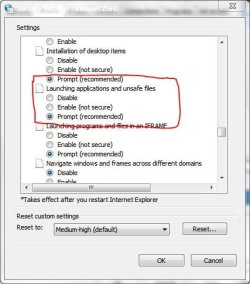
There was some advice on the previous pages on not keeping the internet zones information. I might add changing this setting in Internet options>Security tab>Internet zone
 

Attachments

  • settings.JPG
    settings.JPG
    40 KB · Views: 4

My Computer My Computer

At a glance

Windows 7 x64 Ultimate SP1Core i7-2630QM6 GB DDR3Nvidia GT 540M / Intel HD 3000 - Optimus swit...
Computer Manufacturer/Model Number
Asus N73SV
OS
Windows 7 x64 Ultimate SP1
CPU
Core i7-2630QM
Motherboard
Intel HM 65
Memory
6 GB DDR3
Graphics Card(s)
Nvidia GT 540M / Intel HD 3000 - Optimus switching
Sound Card
HD Audio (Intel Azalia/Realtek) ALC269
Monitor(s) Displays
LED flat panel
Screen Resolution
1920 x 1080
Hard Drives
2x Seagate Momentus 640 GB - 1,28 TB in total
Internet Speed
4 MB/256 kbps
Other Info
External HDs

WD Elements 1,5 TB
WD MyBook 500 GB
Type secpol.msc into Start-Run to open the Local Security Policy snap-in.
Expand the Local PolicesSecurity Options folder.
Scroll down to
"User Account Control: Behaviour of the elevation prompt for administrator"
Double click and set to: "Elevate without prompting".
Then Restart the computer.Alternatively this can be set in the registry (then reboot to apply)

Regedit script:
Windows Registry Editor Version 5.00
[HKEY_LOCAL_MACHINE\SOFTWARE\Microsoft\Windows\CurrentVersion\Policies\System]
"ConsentPromptBehaviorAdmin"=dword:00000000

Done that and still not working.:mad:
 

My Computer My Computer

At a glance

Windows 7 Ultimate
OS
Windows 7 Ultimate
I think the problem is that I do not have administrator privileges. I logged into the built-in administrator account and yet I do not have administrator privileges.

I dont know if I mentioned this before, but this problem started after I took out all components to clean the chassis. After that I did a clean install of Windows 7 Ultimate x64. Since then the computer has acted strange.
 

My Computer My Computer

At a glance

Windows 7 Ultimate
OS
Windows 7 Ultimate
Sweet Jesus, Tech, it's not the bloody UAC. Security warnings you posted are not related to it, I assure you. And although I have Norton Internet Security and I'm not familiar with ESET, I can tell you that administrator privileges are NOT ENOUGH to kill Norton's processes if Tamper Protection is on. I suspect ESET utilizes similar technology.

Stop repeating yourself and try my suggestion or this one.
 

My Computer My Computer

At a glance

Windows 7 x64 Ultimate SP1Core i7-2630QM6 GB DDR3Nvidia GT 540M / Intel HD 3000 - Optimus swit...
Computer Manufacturer/Model Number
Asus N73SV
OS
Windows 7 x64 Ultimate SP1
CPU
Core i7-2630QM
Motherboard
Intel HM 65
Memory
6 GB DDR3
Graphics Card(s)
Nvidia GT 540M / Intel HD 3000 - Optimus switching
Sound Card
HD Audio (Intel Azalia/Realtek) ALC269
Monitor(s) Displays
LED flat panel
Screen Resolution
1920 x 1080
Hard Drives
2x Seagate Momentus 640 GB - 1,28 TB in total
Internet Speed
4 MB/256 kbps
Other Info
External HDs

WD Elements 1,5 TB
WD MyBook 500 GB
I've always been able to shut down the program I wanted. I never got security warnings when I would install a new program. That is why I created a thread. It is not the first time I run Windows 7.
 

My Computer My Computer

At a glance

Windows 7 Ultimate
OS
Windows 7 Ultimate
I see that, I'm asking you again - have you tried his suggestion or setting the thing I circled to Enable (not secure)? This should take care of the 'security warning' thing. I won't get into the ESET stuff, I'm not familiar with it.
 

My Computer My Computer

At a glance

Windows 7 x64 Ultimate SP1Core i7-2630QM6 GB DDR3Nvidia GT 540M / Intel HD 3000 - Optimus swit...
Computer Manufacturer/Model Number
Asus N73SV
OS
Windows 7 x64 Ultimate SP1
CPU
Core i7-2630QM
Motherboard
Intel HM 65
Memory
6 GB DDR3
Graphics Card(s)
Nvidia GT 540M / Intel HD 3000 - Optimus switching
Sound Card
HD Audio (Intel Azalia/Realtek) ALC269
Monitor(s) Displays
LED flat panel
Screen Resolution
1920 x 1080
Hard Drives
2x Seagate Momentus 640 GB - 1,28 TB in total
Internet Speed
4 MB/256 kbps
Other Info
External HDs

WD Elements 1,5 TB
WD MyBook 500 GB
THe warnings you get from running (install packages) that you DLed from the web have to do with the level of internet security you have set as Teerex said above.

The /default/ behavior is to warn you every time you first run any downloaded program. UAC or not and probably admin or not.

If it never did that before it's because you used some other method of DLing that bypassed that system or you set your internet security options to low or off.

As for the other thing, that's probably something else entirely, I don't know what.
 

My Computer My Computer

At a glance

Windows 7 x64 Ultimatei7 96012 Gig Corsair DominatorNvidia 480
Computer Manufacturer/Model Number
Scratch built
OS
Windows 7 x64 Ultimate
CPU
i7 960
Motherboard
Asus P6X58D
Memory
12 Gig Corsair Dominator
Graphics Card(s)
Nvidia 480
Sound Card
Maudio Delta 44 + breakout box
Monitor(s) Displays
Dell UltraSharp U2410 24in and Samsung 21 dual monitors
Screen Resolution
1920x1200 and 1280x1024
Hard Drives
Primary: Intel X-25M G2 160G SSD
Secondary: Segate baracuda 1.0 TB
HDs in AHCI mode.
PSU
Corasair TX850
Case
Cooler Master HAF
Cooling
Corsair H50
Keyboard
Logitech G15 + N52 game pad
Mouse
Logitech MX518
Internet Speed
15kbs down 4.5kbps up
Other Info
WEI 7.6
CPU & RAM 7.6
Graphics 7.9
Hard disk 7.7
THe warnings you get from running (install packages) that you DLed from the web have to do with the level of internet security you have set as Teerex said above.

The /default/ behavior is to warn you every time you first run any downloaded program. UAC or not and probably admin or not.

If it never did that before it's because you used some other method of DLing that bypassed that system or you set your internet security options to low or off.

As for the other thing, that's probably something else entirely, I don't know what.

You are probably right about downloads. But I am running Windows 7 on two different computers with the same settings everywhere and I never get warnings and can shut down any programs I want. I recently installed Windows 7 on another computer and it worked smoothly. I understand if this sounds totally weird, but imagine turning off all security settings everywhere and still get security warnings. The error is special.
 

My Computer My Computer

At a glance

Windows 7 Ultimate
OS
Windows 7 Ultimate
Well tech, we're too far removed from your machine to get to the bottom of that weirdness, we can just help get it rid of some symptoms (hopefully). :D
 

My Computer My Computer

At a glance

Windows 7 x64 Ultimate SP1Core i7-2630QM6 GB DDR3Nvidia GT 540M / Intel HD 3000 - Optimus swit...
Computer Manufacturer/Model Number
Asus N73SV
OS
Windows 7 x64 Ultimate SP1
CPU
Core i7-2630QM
Motherboard
Intel HM 65
Memory
6 GB DDR3
Graphics Card(s)
Nvidia GT 540M / Intel HD 3000 - Optimus switching
Sound Card
HD Audio (Intel Azalia/Realtek) ALC269
Monitor(s) Displays
LED flat panel
Screen Resolution
1920 x 1080
Hard Drives
2x Seagate Momentus 640 GB - 1,28 TB in total
Internet Speed
4 MB/256 kbps
Other Info
External HDs

WD Elements 1,5 TB
WD MyBook 500 GB
Well tech, we're too far removed from your machine to get to the bottom of that weirdness, we can just help get it rid of some symptoms (hopefully). :D


Thank you. I appreciate that.:D
 

My Computer My Computer

At a glance

Windows 7 Ultimate
OS
Windows 7 Ultimate
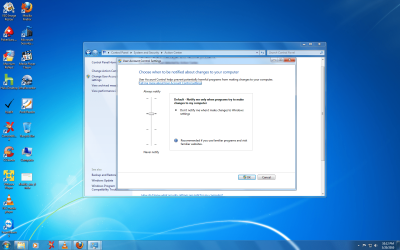
what do you mean by turning UAC off and on. its different in windows 7 than in Vista. in vista you get to a screen where you would have to remove the check inside the box.. and in windows 7 theres a slider you move to never notify.. both require a restart..
 

Attachments

Last edited:

My Computers My Computers

  • At a glance

    WIN10AMD Ryzen 5 3600 6-Core Processor 3.59 GHz16.0 GB
    Computer type
    PC/Desktop
    Computer Manufacturer/Model Number
    PowerSpec G164
    OS
    WIN10
    CPU
    AMD Ryzen 5 3600 6-Core Processor 3.59 GHz
    Memory
    16.0 GB
    Internet Speed
    VERY FAST>>>!!!
  • Antivirus
    ESET Security Premium
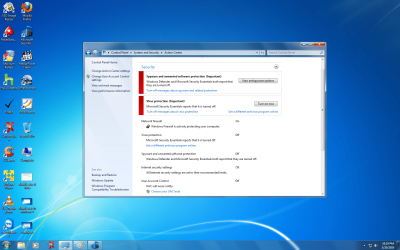
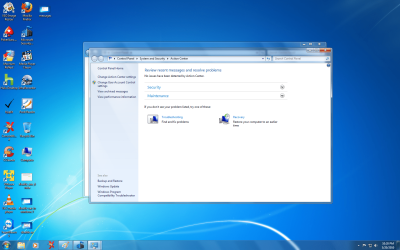
when i disable the UAC by sliding the slider to "never notify" i still get messages if i turn off Antivirus program, see pictures. in order for the messages to go away go to the action center, "turn off messages about virus protection" and "turn off messages about spyware and related protection".

is that the issue your having?
 

Attachments

  • messages.png
    messages.png
    357.7 KB · Views: 5
  • remove messages.png
    remove messages.png
    358.1 KB · Views: 3

My Computers My Computers

  • At a glance

    WIN10AMD Ryzen 5 3600 6-Core Processor 3.59 GHz16.0 GB
    Computer type
    PC/Desktop
    Computer Manufacturer/Model Number
    PowerSpec G164
    OS
    WIN10
    CPU
    AMD Ryzen 5 3600 6-Core Processor 3.59 GHz
    Memory
    16.0 GB
    Internet Speed
    VERY FAST>>>!!!
  • Antivirus
    ESET Security Premium
Are logging in as a user account or an administrator account. Keep in mind that the administrator account in Win7 is not wide open like the admin account in XP. Sometimes you have to right click and select "Run as administrator" to load or install programs.

I have enabled the built-in Administrator account.


what does this mean if you do a clean install of windows 7, your automatically the administrator unless you then create another user?
 

My Computers My Computers

  • At a glance

    WIN10AMD Ryzen 5 3600 6-Core Processor 3.59 GHz16.0 GB
    Computer type
    PC/Desktop
    Computer Manufacturer/Model Number
    PowerSpec G164
    OS
    WIN10
    CPU
    AMD Ryzen 5 3600 6-Core Processor 3.59 GHz
    Memory
    16.0 GB
    Internet Speed
    VERY FAST>>>!!!
  • Antivirus
    ESET Security Premium
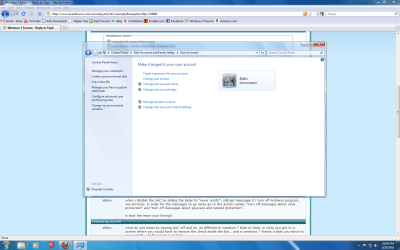
what antivirus program you are running and firewall. im trying to recreate your problems, also can you do a screen shot of the user account, like mine and of the slider, "user account control settings".
 

Attachments

  • user accounts.png
    user accounts.png
    106.8 KB · Views: 2

My Computers My Computers

  • At a glance

    WIN10AMD Ryzen 5 3600 6-Core Processor 3.59 GHz16.0 GB
    Computer type
    PC/Desktop
    Computer Manufacturer/Model Number
    PowerSpec G164
    OS
    WIN10
    CPU
    AMD Ryzen 5 3600 6-Core Processor 3.59 GHz
    Memory
    16.0 GB
    Internet Speed
    VERY FAST>>>!!!
  • Antivirus
    ESET Security Premium
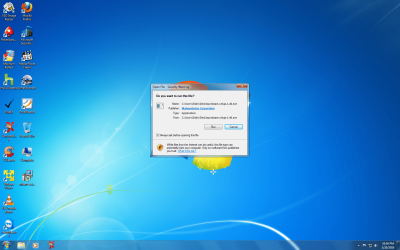
even with the "UAC disable", slider turned to never notify, i got a security warning when i tried to install malwarebytes, are these the screens your talking about?

seems like there an extra level of protection that even with UAC disable you can still get messages like these, dont know i always figured that was normal like in XP when it would always ask you first if you want to run the file that you just double clicked on, lol

and you can see at the bottom right side theres a flag "action center says i have two issues to resolve with UAC disable. those messages are normal you have to tell action center not to notify you, as far as the other security warning when you try and install a program, i dont know why that happens but appears to be normal.
 

Attachments

  • security warning.png
    security warning.png
    484 KB · Views: 7

My Computers My Computers

  • At a glance

    WIN10AMD Ryzen 5 3600 6-Core Processor 3.59 GHz16.0 GB
    Computer type
    PC/Desktop
    Computer Manufacturer/Model Number
    PowerSpec G164
    OS
    WIN10
    CPU
    AMD Ryzen 5 3600 6-Core Processor 3.59 GHz
    Memory
    16.0 GB
    Internet Speed
    VERY FAST>>>!!!
  • Antivirus
    ESET Security Premium
Back
Top