UAC - (palm face)

bleeb

New member
Local time
5:32 AM
Messages
12
SOLVED - UAC - (palm face)

First of all let me say that I love Windows 7 and I'm not here to bash the OS by any means, but the UAC has got me wanting to shoot myself as of right now. It's quite ridiculous that I have to run EVERY application as an "admin."

This pretty much means that I can't have 1 single startup program or else it will not work correctly with the applications that I run as an administrator, which include just about everything on my system. From WoW to XFire they all have to be ran as an admin or they simply just won't start.

This boggles my brain that I have to manually start all my programs on startup because windows simply can't let me freely explore whatever software I want. If I wanted a babysitter to hold my hand as I consulted with every application I come in contact with I wouldn't be an admin, would I?

I guess my question is, is there a way around this? Perhaps just simply shutting it all off so I can have a normal computer experience?

Thanks for the replies in advance.
 
Last edited:

My Computer

OS
Windows 7 32-bit Build 7100
if it bothers you then turn it off.
open the control panel, then type "uac" in the search box at the top
just move the slider to change the setting.
 

My Computer

Computer Manufacturer/Model Number
Black_Box (homebuilt)
OS
windows 7 RTM x64
CPU
Phenom II 965 Quad Core 3.4Ghz
Motherboard
Asus M4A79T Deluxe
Memory
Mushkin Blackline 8GB (4x2gb)
Graphics Card(s)
XFX Radeon 5970 Black Edition
Sound Card
onboard
Monitor(s) Displays
Dell 2408WPF-main Dell E248WFP-secondary
Screen Resolution
1920x1200-main 1920x1200-secondary
Hard Drives
OCZ Vertex Limited Edition 100GB (OS)
x1 WD Black Edition 500GB drive (Storage)
PSU
XFX 850w Black Edition (Modular)
Case
Mountian Mods H2go
Cooling
CoolITSystems ECO A.L.C.
Keyboard
Logitech MX 5500 wireless keyboard
Mouse
Razor Copperhead
Internet Speed
16Mb down/2Mb up Wowway Cable Internet
See I've done this, but it still won't start my applications.. the ONLY way it starts my program up is if I run it as an administrator, so I find it kind of weird that it won't start unless I run it as an admin.
 

My Computer

OS
Windows 7 32-bit Build 7100
See I've done this, but it still won't start my applications.. the ONLY way it starts my program up is if I run it as an administrator, so I find it kind of weird that it won't start unless I run it as an admin.

Hi Bleeb,

You need to restart after disabling UAC ;)

Steven
 
I will give the restart a try thank you.
 

My Computer

OS
Windows 7 32-bit Build 7100
Didn't work, UAC is off, but WoW still will not start without being ran as admin. (I'm just using WoW as my demo program, many others require the same action)

Now with UAC off also, WoW won't start even if I choose, "Run as Administrator" I'm guessing this is because UAC is completely off and admin option doesn't exist.
 
Last edited by a moderator:

My Computer

OS
Windows 7 32-bit Build 7100
Sorry Bleeb, but you don't mention which programs it is you are trying to have startup with Windows whenever you login, except for WoW. The only help I can give to try prevent it from having to need "Run as Administrator" is for you to un-install WoW. then re-install it to some other folder other than "C:\Program Files (x86)" or "C:\Program Files".

When you get to the part of the installer that ask for the destination folder, set it to some user-created folder such as "C:\Games\World of Warcraft". This helps with most games.

Failing that, have you checked Blizzard's website for updates to WoW that may resolve this issue? Checking for updates for your other programs may also solve the problem for the others.
 

My Computer

Computer type
PC/Desktop
Computer Manufacturer/Model Number
Virtual Machine
OS
Windows 7 Professional 32-bit SP1
CPU
AMD A4/A6
Motherboard
Intel Corporation 440BX Desktop Reference Platform
Memory
3.00GB EDO
Graphics Card(s)
VMware SVGA 3D
Sound Card
High Definition Audio Device
Monitor(s) Displays
Generic Non-PnP Monitor on VMware SVGA 3D
Screen Resolution
1440x900
Hard Drives
1 x 60GB VMware Virtual SATA Hard Drive ATA Device
Antivirus
Kaspersky Total Security
Now with UAC off also, WoW won't start even if I choose, "Run as Administrator" I'm guessing this is because UAC is completely off and admin option doesn't exist.

It still exists when UAC is disabled but doesn't really do anything...

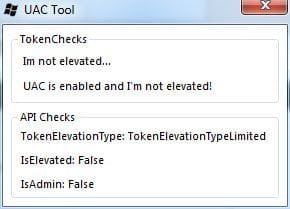
I just wrote this tool for checking a fair few elevation types using a mix of C#/VB since Im a bit stretched for time... so if you want the source just drop me a PM ;) (GetTokenInformation Function (Windows) // IsUserAnAdmin Function () // OpenProcessToken Function (Windows) ) plus a few more built into .Net.

Just upload a screenshot of the main window ;)

Elevated:
Elevated.JPG

Non-Elevated:
NonElevated.JPG

I didn't include a manifest so it doesn't auto-elevate, if its showing limited then try right-clicking and running as administrator.

The return values from these tests will help isolate the cause, being it either an API, GroupPolicy setting or the UAC driver itself causing the issues ;)

Steven
 

Attachments

Now with UAC off also, WoW won't start even if I choose, "Run as Administrator" I'm guessing this is because UAC is completely off and admin option doesn't exist.

one thing that prevents a lot of hassle is to always right after a clean install take ownership,remove the permissions from Windows, Users and the Program Files folders and then add as sole permission either Admin, Username or Everyone.

This effectively negates all security features, but since they're crap anyway you're better off with topgrade heuristic anti-virus/invasion program.
 

My Computer

Computer Manufacturer/Model Number
me and myself
OS
vista x64/ win 7 x64
CPU
phenom 9950 BE
Motherboard
ASUS M2A-VM HDMI
Memory
8 gb
Graphics Card(s)
nvidia gts 250
Sound Card
realtek HD onboard
Monitor(s) Displays
dual hd 19" tft
Screen Resolution
1440x900
Hard Drives
2 x 500 gb WDC
1 x 500 gb Seagate
1 x 1000 gb Seagate
1 80 gb raptor
1 usb 160 gb
Cooling
standard issue
Keyboard
logitech g11
Mouse
usb wireless MS laser 6000
Internet Speed
18 mb (according to my provider :)
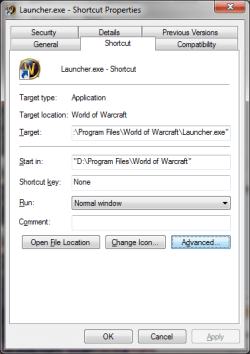
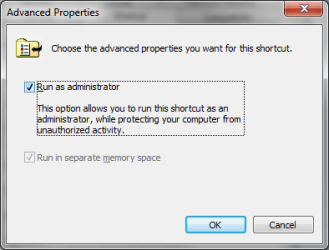
Create Shortcut, Properties, Advanced.. Run as administrator
 

Attachments

  • launcher-01.png
    launcher-01.png
    15.6 KB · Views: 82
  • launcher-02.png
    launcher-02.png
    9.5 KB · Views: 220

My Computer

Computer Manufacturer/Model Number
Asus V2-M3M8200 Barebones
OS
Windows 7 Professional x64
CPU
AMD Phenom II X4 925
Motherboard
V2-M3M8200 (basically a M3N78-VM)
Memory
4x1024mb Kingston HyperX DDR2-1066 KHX8500D2/1G
Graphics Card(s)
Asus GTS 450 OC
Sound Card
Creative Sound Blaster X-Fi Titanium PCIe
Monitor(s) Displays
Asus 24" LCD VH242H
Screen Resolution
1920x1080
Hard Drives
WDC WD5000AAKS
WDC WD5002ABYS
Seagate ST325062 USB-to-IDE
Fujitsu 160GB Pocket USB HDD
PSU
Antec Earthwatts EA-430D
Case
Asus V2-M3M8200
Cooling
120mm side fan & 80mm front & 92mm rear fan
Keyboard
Dell USB mini Multimedia
Mouse
Logitech MX518
Internet Speed
Comcast Xfinity
Other Info
Logitech Webcam Pro 9000
Accurian 40-1462 Speakers
little dot MKII Headphone Amp
Ok I used the UAC tool you gave me. Here is the screenshot, it looks as though I'm not elevated.

UACtool.png

I understand I can go under the advanced menu to Run as Admin, that's not my problem. I have to start Logitech SetPoint everytime I start up my computer since I have to run it as admin, or else it will not function with ANY program I'm not running as an admin, such as WoW. Like I said WoW is just the demo program I'm using as part of the problem.

If I try to load Xfire as non admin, the program "stops working," however if I load it as an admin, it magically works.

As for ownership, that's a good idea I suppose.. but how would one simply take ownership of every file and folder? From my understanding I already am lol. What you said struck me though, because the install I had before this never did any of this at all, but I made a clean install (deleted the partition and completely reinstalled the OS) and now I get this happening all the time lol.

As for putting the game in a different folder, I told WoW to install in C:\Users\Public\Games\World of Warcraft so I can pretty much outrule that since I've tried moving the folder to several different locations.
 

My Computer

OS
Windows 7 32-bit Build 7100
As for ownership, that's a good idea I suppose.. but how would one simply take ownership of every file and folder?

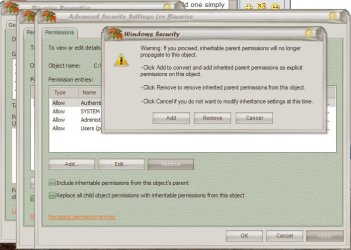
Taking ownership alone is not enough. You also have to set the permissions. Certain permissions surpass all others. Trusted Installer for example. That's why you need to delete ALL permissions in the permissions tab as soon as you've taken ownership.

You do that by unticking the inheritable permissions box. After you've done that, you need to add Everyone as sole permission and give it full control.

WARNING! doing this negates all security features based on elevation rights.
GOOD THING! you aren't driven bonkers by the 'security' 'features'
 

Attachments

  • permission.JPG
    permission.JPG
    60.8 KB · Views: 66
  • permisisons.JPG
    permisisons.JPG
    63.3 KB · Views: 42

My Computer

Computer Manufacturer/Model Number
me and myself
OS
vista x64/ win 7 x64
CPU
phenom 9950 BE
Motherboard
ASUS M2A-VM HDMI
Memory
8 gb
Graphics Card(s)
nvidia gts 250
Sound Card
realtek HD onboard
Monitor(s) Displays
dual hd 19" tft
Screen Resolution
1440x900
Hard Drives
2 x 500 gb WDC
1 x 500 gb Seagate
1 x 1000 gb Seagate
1 80 gb raptor
1 usb 160 gb
Cooling
standard issue
Keyboard
logitech g11
Mouse
usb wireless MS laser 6000
Internet Speed
18 mb (according to my provider :)
If what dmex has me do doesnt' work I'll go with your method petrossa, otherwise I'd like to wait for a reply from him :]

Thank you though, that would probably solve the problem, but I just want to see what he has to say.
 

My Computer

OS
Windows 7 32-bit Build 7100
What im having is using only built in admin account, all UAC problems GONE! :D well i hate UAC as well :(
 

My Computer

Computer Manufacturer/Model Number
Custom
OS
Windows 7 SP1 x64 build 7601.21701
CPU
Intel Q9450 @3608mhz (8x451)
Motherboard
Asus Rampage Formula
Memory
6GB - 2x Corsair CM2X1024-8500C5D and 2x CM2X2048-8500C5D
Graphics Card(s)
Zotac nVidia GTX295
Sound Card
SoundMAX ADI1988B (X-FI MB)
Monitor(s) Displays
LG L227WTP & Samsung LE26R71B LCD TV
Screen Resolution
1680x1050 & 1360x768
Hard Drives
2x Seagate ST3500630NS in RAID0
PSU
Thermaltake Toughpower 750W
Case
Thermaltake
Cooling
Thermalright Ultra-120 Extreme and couple of fans
Keyboard
Logitech G15 v2
Mouse
Razer DeathAdder
Internet Speed
FTTH 50/50 (dualstack IPv4 & native IPv6)
I guess that either my problem was not so severe, or I've applied the fix differently, but since I found the "Take Ownership" script, right here on this forum, I've had no more problems running anything I want.

Now as to the question concerning "How to take ownership of an entire folder",,,,
After installing T.O. and rebooting, I opened windows explorer and then opened the "Program Files" folder,,,,
and then I did a Ctrl+A to select everything in that folder,,,,
then I right-clicked on the selected group and then clicked on "Take Ownership".

Then the program scrolled through the entire folder, taking ownership of every file.

I repeated this scenerio for every folder in the PC that I wanted to be sure that I was the owner of. Now I never get any more of those obnoxious "You don't have permission to .........." messages.

Oh yes,,,, I permanently turned OFF UAC using a registry script.

Cheers Mates,
The Doctor :cool:
 

My Computer

Computer Manufacturer/Model Number
Home Made
OS
Windows XP-Pro-SP3, Windows 7
CPU
AMD, 2X, Dual Core 5200+
Motherboard
MSI K9N Platinum
Memory
6 gig DDR2, Super Talent
Graphics Card(s)
Winfast
Sound Card
On Board AC97
Monitor(s) Displays
19" Envision LCD
Screen Resolution
1024x768
Hard Drives
3x , Maxtor/Seagate SATA2 (160, 160, 200gig)
PSU
Antec Earthwatts 650
Case
Pac Man Mid-Tower
Cooling
11 fans
Keyboard
Generic
Mouse
MS digital
Internet Speed
5 Meg Cable
If what dmex has me do doesnt' work I'll go with your method petrossa, otherwise I'd like to wait for a reply from him :]

Thank you though, that would probably solve the problem, but I just want to see what he has to say.

i bow to DMEX's superior knowledge with grace :D
 

My Computer

Computer Manufacturer/Model Number
me and myself
OS
vista x64/ win 7 x64
CPU
phenom 9950 BE
Motherboard
ASUS M2A-VM HDMI
Memory
8 gb
Graphics Card(s)
nvidia gts 250
Sound Card
realtek HD onboard
Monitor(s) Displays
dual hd 19" tft
Screen Resolution
1440x900
Hard Drives
2 x 500 gb WDC
1 x 500 gb Seagate
1 x 1000 gb Seagate
1 80 gb raptor
1 usb 160 gb
Cooling
standard issue
Keyboard
logitech g11
Mouse
usb wireless MS laser 6000
Internet Speed
18 mb (according to my provider :)
What im having is using only built in admin account, all UAC problems GONE! :D well i hate UAC as well :(

Trusted Installer > admin, at least the last time i looked but admittedly that has been a while. Got rid of UAC about 5 minutes after installing Vista for the first time.
 

My Computer

Computer Manufacturer/Model Number
me and myself
OS
vista x64/ win 7 x64
CPU
phenom 9950 BE
Motherboard
ASUS M2A-VM HDMI
Memory
8 gb
Graphics Card(s)
nvidia gts 250
Sound Card
realtek HD onboard
Monitor(s) Displays
dual hd 19" tft
Screen Resolution
1440x900
Hard Drives
2 x 500 gb WDC
1 x 500 gb Seagate
1 x 1000 gb Seagate
1 80 gb raptor
1 usb 160 gb
Cooling
standard issue
Keyboard
logitech g11
Mouse
usb wireless MS laser 6000
Internet Speed
18 mb (according to my provider :)
Trusted Installer > admin

yep thats sadly true as well :( always bothers me when some registry keys for zipfolder are owned by this **** installer and erasing them takes way to long :D
 

My Computer

Computer Manufacturer/Model Number
Custom
OS
Windows 7 SP1 x64 build 7601.21701
CPU
Intel Q9450 @3608mhz (8x451)
Motherboard
Asus Rampage Formula
Memory
6GB - 2x Corsair CM2X1024-8500C5D and 2x CM2X2048-8500C5D
Graphics Card(s)
Zotac nVidia GTX295
Sound Card
SoundMAX ADI1988B (X-FI MB)
Monitor(s) Displays
LG L227WTP & Samsung LE26R71B LCD TV
Screen Resolution
1680x1050 & 1360x768
Hard Drives
2x Seagate ST3500630NS in RAID0
PSU
Thermaltake Toughpower 750W
Case
Thermaltake
Cooling
Thermalright Ultra-120 Extreme and couple of fans
Keyboard
Logitech G15 v2
Mouse
Razer DeathAdder
Internet Speed
FTTH 50/50 (dualstack IPv4 & native IPv6)
yep thats sadly true as well :( always bothers me when some registry keys for zipfolder are owned by this **** installer and erasing them takes way to long :D

if you use my system trusted installer doesn't exist anymore. Trusted bit my ass once to many times so i searched for ways to kill him (who trust someone who calls himself 'Trusted')
 

My Computer

Computer Manufacturer/Model Number
me and myself
OS
vista x64/ win 7 x64
CPU
phenom 9950 BE
Motherboard
ASUS M2A-VM HDMI
Memory
8 gb
Graphics Card(s)
nvidia gts 250
Sound Card
realtek HD onboard
Monitor(s) Displays
dual hd 19" tft
Screen Resolution
1440x900
Hard Drives
2 x 500 gb WDC
1 x 500 gb Seagate
1 x 1000 gb Seagate
1 80 gb raptor
1 usb 160 gb
Cooling
standard issue
Keyboard
logitech g11
Mouse
usb wireless MS laser 6000
Internet Speed
18 mb (according to my provider :)
Back
Top