UAC popup sound

Isura

New member
Local time
8:08 PM
Messages
6
I muted system sounds in the volume bar. But the UAC popup still makes a sound. I'm running a regular account, the UAC popup asks for the password
 

My Computer

OS
Windows 7 Pro
CPU
Intel i5 750
Motherboard
EVGA P55 SLI
Memory
G.Skill 4GB DDR3 1600
Graphics Card(s)
GeForce 8500 GTS :(
Monitor(s) Displays
Dell 3007WFP, 2x Dell 2001FP
Screen Resolution
2560x1600
Hello Isura,

Strange that you will still have sound if you muted it from the Volume icon.

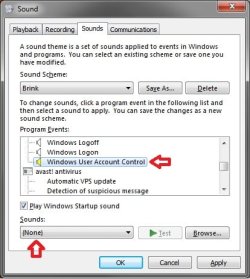
As a workaround, see if you can set the Windows User Account Control sound to none in the Sound settings and click OK. This way there will ne no sound assigned to UAC to play.
Sounds.jpg
Hope this helps,
Shawn
 

My Computer

Computer type
PC/Desktop
Computer Manufacturer/Model Number
Self built custom
OS
64-bit Windows 11 Pro for Workstations
CPU
Intel i7-8700K OC'd to 5 GHz
Motherboard
ASUS ROG Maximus XI Formula Z390
Memory
64 GB (4x16GB) G.SKILL TridentZ RGB DDR4 3600 MHz
Graphics Card(s)
ASUS ROG-STRIX-GTX1080TI-O11G-GAMING
Sound Card
Integrated
Monitor(s) Displays
2 x Samsung Odyssey G7 27"
Screen Resolution
2560x1440
Hard Drives
1TB Samsung 990 PRO M.2,
4TB Samsung 990 PRO PRO M.2,
TerraMaster F8 SSD Plus NAS
PSU
Seasonic Prime Titanium 850W
Case
Thermaltake Core P3
Cooling
Corsair Hydro H115i
Keyboard
Logitech wireless K800
Mouse
Logitech MX Master 4
Internet Speed
2 Gb/s Download and 100 Mb/s Upload
Antivirus
Malwarebyte Anti-Malware Premium
Browser
Google Chrome
Other Info
Logitech Z625 speaker system,
Logitech BRIO 4K Pro webcam,
HP Color LaserJet Pro MFP M477fdn,
APC SMART-UPS RT 1000 XL - SURT1000XLI,
Galaxy S23 Plus phone
Thanks, that worked. Strange problem..
 

My Computer

OS
Windows 7 Pro
CPU
Intel i5 750
Motherboard
EVGA P55 SLI
Memory
G.Skill 4GB DDR3 1600
Graphics Card(s)
GeForce 8500 GTS :(
Monitor(s) Displays
Dell 3007WFP, 2x Dell 2001FP
Screen Resolution
2560x1600
You're welcome Isura.

When you muted the volume icon on the taskbar, was it the speaker icon like below that you muted? Perhaps you may have muted a different one??

Speaker.jpg
 

My Computer

Computer type
PC/Desktop
Computer Manufacturer/Model Number
Self built custom
OS
64-bit Windows 11 Pro for Workstations
CPU
Intel i7-8700K OC'd to 5 GHz
Motherboard
ASUS ROG Maximus XI Formula Z390
Memory
64 GB (4x16GB) G.SKILL TridentZ RGB DDR4 3600 MHz
Graphics Card(s)
ASUS ROG-STRIX-GTX1080TI-O11G-GAMING
Sound Card
Integrated
Monitor(s) Displays
2 x Samsung Odyssey G7 27"
Screen Resolution
2560x1440
Hard Drives
1TB Samsung 990 PRO M.2,
4TB Samsung 990 PRO PRO M.2,
TerraMaster F8 SSD Plus NAS
PSU
Seasonic Prime Titanium 850W
Case
Thermaltake Core P3
Cooling
Corsair Hydro H115i
Keyboard
Logitech wireless K800
Mouse
Logitech MX Master 4
Internet Speed
2 Gb/s Download and 100 Mb/s Upload
Antivirus
Malwarebyte Anti-Malware Premium
Browser
Google Chrome
Other Info
Logitech Z625 speaker system,
Logitech BRIO 4K Pro webcam,
HP Color LaserJet Pro MFP M477fdn,
APC SMART-UPS RT 1000 XL - SURT1000XLI,
Galaxy S23 Plus phone
I muted Mixer->System sounds. I want volume for other apps.
 

My Computer

OS
Windows 7 Pro
CPU
Intel i5 750
Motherboard
EVGA P55 SLI
Memory
G.Skill 4GB DDR3 1600
Graphics Card(s)
GeForce 8500 GTS :(
Monitor(s) Displays
Dell 3007WFP, 2x Dell 2001FP
Screen Resolution
2560x1600
Strange, that should have muted UAC as well. It does for me. :confused:
 

My Computer

Computer type
PC/Desktop
Computer Manufacturer/Model Number
Self built custom
OS
64-bit Windows 11 Pro for Workstations
CPU
Intel i7-8700K OC'd to 5 GHz
Motherboard
ASUS ROG Maximus XI Formula Z390
Memory
64 GB (4x16GB) G.SKILL TridentZ RGB DDR4 3600 MHz
Graphics Card(s)
ASUS ROG-STRIX-GTX1080TI-O11G-GAMING
Sound Card
Integrated
Monitor(s) Displays
2 x Samsung Odyssey G7 27"
Screen Resolution
2560x1440
Hard Drives
1TB Samsung 990 PRO M.2,
4TB Samsung 990 PRO PRO M.2,
TerraMaster F8 SSD Plus NAS
PSU
Seasonic Prime Titanium 850W
Case
Thermaltake Core P3
Cooling
Corsair Hydro H115i
Keyboard
Logitech wireless K800
Mouse
Logitech MX Master 4
Internet Speed
2 Gb/s Download and 100 Mb/s Upload
Antivirus
Malwarebyte Anti-Malware Premium
Browser
Google Chrome
Other Info
Logitech Z625 speaker system,
Logitech BRIO 4K Pro webcam,
HP Color LaserJet Pro MFP M477fdn,
APC SMART-UPS RT 1000 XL - SURT1000XLI,
Galaxy S23 Plus phone
Found this thread while looking for a similar issue. I have a sort-of home theater setup, so when I'm connected to big speakers, I put system sounds down to like 2 or 3 ... but very often the UAC popup happens at full blast. Not fun to have cat claws in my lap and such. The only thing I've found to do is make a copy of the sound file, then reduce the volume / amplitude, then set UAC sound to that copy. I don't mind the sound, I want the sound, just not at max volume. This is the only way I've found to do it.
 

My Computer

Computer type
PC/Desktop
Computer Manufacturer/Model Number
HP
OS
Windows 7 Home Premium
CPU
i5
Motherboard
HP Laptop
Memory
8GB
Graphics Card(s)
Intel HD
Hard Drives
SSD + laptop hdd
Browser
Chrome
Found this thread while looking for a similar issue. I have a sort-of home theater setup, so when I'm connected to big speakers, I put system sounds down to like 2 or 3 ... but very often the UAC popup happens at full blast. Not fun to have cat claws in my lap and such. The only thing I've found to do is make a copy of the sound file, then reduce the volume / amplitude, then set UAC sound to that copy. I don't mind the sound, I want the sound, just not at max volume. This is the only way I've found to do it.

This problemo still persists in Windows 10 Pro as well. pretty disappointing. :cry::cry: anyway this problem occurs only if we try to use custom sounds I guess. So.. that's something. For custom WAVs your solution helps :)
 

My Computer

Computer type
PC/Desktop
OS
Windows 10 Pro , 64 Bit
Hmmm interesting. On Win7 it was happening with the built-in sounds. I've never bothered using my own sounds, so I don't know about custom. Well, except to make a reduced-volume version of "cityscape" and a couple others. It's been much more pleasant having windows as part of my living room with this sorted out.
 

My Computer

Computer type
PC/Desktop
Computer Manufacturer/Model Number
HP
OS
Windows 7 Home Premium
CPU
i5
Motherboard
HP Laptop
Memory
8GB
Graphics Card(s)
Intel HD
Hard Drives
SSD + laptop hdd
Browser
Chrome
Just disable User Account Control, it`s useless anyway, I always disable it and have never had an issue, that pop up is annoying in my opinion :)
 

My Computer

Computer type
PC/Desktop
Computer Manufacturer/Model Number
Skylake Special #666
OS
Windows 10 Pro x64
CPU
Intel Core i7 6700K
Motherboard
Asus Sabertooth Z170 Mark 1
Memory
GSkill TridentZ RGB 16GB 3600 16-16-16-36
Graphics Card(s)
EVGA GTX 980 Ti SC x2
Sound Card
Realtek High Definition
Monitor(s) Displays
AOC G2460PG
Screen Resolution
1920 x 1080 144Hz
Hard Drives
Samsung 860 Pro 256GB, Seagate Barracuda 4TB x2
PSU
EVGA 1000 P2, EVGA White Custom Braided Cables
Case
Corsair Vengeance C70 Gunmetal Black
Cooling
Corsair H100i v2, Corsair ML120 x2, Thermal Grizzly Kryonaut
Keyboard
Logitech G910 Orion Spectrum
Mouse
Logitech G700s
Internet Speed
Verizon Fios Quantum Gateway 75/75
Antivirus
Windows Defender, Malwarebytes Free 3.8.3
Browser
Chrome
Other Info
Corsair SP120 x4, LG Blu-ray Drive, Durabrand HT-395 100 Watt Dolby Digital Amp, Corsair H2100 Wireless 7.1 Headset
Back
Top