UAC question

Delphin

More than skilled
Power User
Local time
9:41 PM
Messages
118
Location
Chennai
Hi all,

I've installed a program in my computer and it's working well.. The problem is whenever i run the program by clicking its shortcut UAC prompts me to click on continue..

I don't want it to prompt me to proceed as that program doesn't require admin rights..

is there any way to suppress UAC prompts for a specific program without turning it off?...
 

My Computer

Computer Manufacturer/Model Number
wipro
OS
windows 7
CPU
wipro
Motherboard
intel
Memory
8 gb
Hard Drives
580 gb

My Computer

Computer type
PC/Desktop
Computer Manufacturer/Model Number
LENOVO K450 @3.0GHZ
OS
64-bit Windows 8.1 Pro
CPU
Core(TM) i5 CPU 4330 Haswell @ 3.20GHz
Motherboard
LENOVO
Memory
12.00 GB
Graphics Card(s)
Intel(R) HD Graphics
Sound Card
Intel HD integtrated
Monitor(s) Displays
HP 25' ISP Monitor
Screen Resolution
1900/1020
Hard Drives
(1) ST1000DM003-1CH162 (2) Generic STORAGE DEVICE USB Device (3) Generic STORAGE DEVICE USB Device
Internet Speed
100mb down/10mb up

My Computer

Computer Manufacturer/Model Number
wipro
OS
windows 7
CPU
wipro
Motherboard
intel
Memory
8 gb
Hard Drives
580 gb

My Computer

Computer Manufacturer/Model Number
wipro
OS
windows 7
CPU
wipro
Motherboard
intel
Memory
8 gb
Hard Drives
580 gb
Ahhh ... you didnt mention that in your original post ... If the problem is for a corporate environment, I wouldnt change the UAC settings at all... While you may know what you're doing, and may not need the protection that UAC affords, I gaurantee you the same can not be said of the other 3000 ... If you are in the IT dept, your job is to maintain the integrity of your corporate system, .... Just my opinion... ;)
 

My Computer

Computer type
PC/Desktop
Computer Manufacturer/Model Number
LENOVO K450 @3.0GHZ
OS
64-bit Windows 8.1 Pro
CPU
Core(TM) i5 CPU 4330 Haswell @ 3.20GHz
Motherboard
LENOVO
Memory
12.00 GB
Graphics Card(s)
Intel(R) HD Graphics
Sound Card
Intel HD integtrated
Monitor(s) Displays
HP 25' ISP Monitor
Screen Resolution
1900/1020
Hard Drives
(1) ST1000DM003-1CH162 (2) Generic STORAGE DEVICE USB Device (3) Generic STORAGE DEVICE USB Device
Internet Speed
100mb down/10mb up
Did you try installing that application as an admin. Right click the installer and choose run as admin.

You cant say the application doesnt require to run as an admin. The reason of the prompt is, some of the application file gets installed in the root directory. either into program files or into windows. For file to get saved inside any of these, windows does require only an admin to do it. This is for security reasons. Unfortunately you cant bypass this as of now.

I am not sure, if you can try installing the app in some other drive(other than c) and check if you still get the prompt.
 

My Computer

Computer Manufacturer/Model Number
MacBook Pro
OS
Lion
CPU
i5
Memory
4GB
Graphics Card(s)
Intel
Screen Resolution
1200x800
Hard Drives
Seagate FreeAgent GO 250GB Ext. HDD

My Computer

Computer Manufacturer/Model Number
Too many to describe...
OS
Windows 7 x64 pro/ Windows 7 x86 Pro/ XP SP3 x86
Ahhh ... you didnt mention that in your original post ... If the problem is for a corporate environment, I wouldnt change the UAC settings at all... While you may know what you're doing, and may not need the protection that UAC affords, I gaurantee you the same can not be said of the other 3000 ... If you are in the IT dept, your job is to maintain the integrity of your corporate system, .... Just my opinion... ;)
Tews, it seems that i did not explained my problem clearly....

In a profile with admin rights the program gives me prompt and when i say continue, it works fine..

But in a profile with user rights it is asking me admin credentials with UAC turned on... I'm unable to run the application with out providing admin credentials...

As a test i disabled the UAC and the program works fine in user profile as it supposed to be... But if the UAC is turned on the users are not able to run the application as they dont have admin rights.......

the thing is that the program asks for admin rights even though it doesn't require it..

Clear???? :confused:

@ bill2 .. no
 

My Computer

Computer Manufacturer/Model Number
wipro
OS
windows 7
CPU
wipro
Motherboard
intel
Memory
8 gb
Hard Drives
580 gb
I think I got your query.
How are you installing the application in your client computers with restricted user rights?
What I do in my company is, I login as my client who is a standard user. Right click on the installer and choose run as admin. I give my admin credentials and the install completes. Once done, if the standard user tries to open the application, it opens without any warnings.
I am working on a domain concept.
 

My Computer

Computer Manufacturer/Model Number
MacBook Pro
OS
Lion
CPU
i5
Memory
4GB
Graphics Card(s)
Intel
Screen Resolution
1200x800
Hard Drives
Seagate FreeAgent GO 250GB Ext. HDD
I guess I dont understand why you would want to allow someone with a standard user profile the option to run with lowered UAC settings to begin with other than convenience.. :confused:
 

My Computer

Computer type
PC/Desktop
Computer Manufacturer/Model Number
LENOVO K450 @3.0GHZ
OS
64-bit Windows 8.1 Pro
CPU
Core(TM) i5 CPU 4330 Haswell @ 3.20GHz
Motherboard
LENOVO
Memory
12.00 GB
Graphics Card(s)
Intel(R) HD Graphics
Sound Card
Intel HD integtrated
Monitor(s) Displays
HP 25' ISP Monitor
Screen Resolution
1900/1020
Hard Drives
(1) ST1000DM003-1CH162 (2) Generic STORAGE DEVICE USB Device (3) Generic STORAGE DEVICE USB Device
Internet Speed
100mb down/10mb up
I thing i still need to explain you abt my need....

The program was installed in a computer, and in admin login it opens after i say continue to UAC prompt. So i can use the program

The same program opens and works fine in a user login with UAC turned off.....

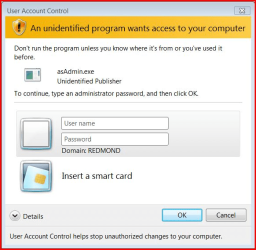
with the UAC turned on, When i try to open the program in user login it gives me the following screen
Untitled.png

Now I'm unable to use the application in user login with the UAC turned on..

Option available for me is turn off UAC
or promote the user as administrtor
:cry::(:shock::eek::zip:
 

My Computer

Computer Manufacturer/Model Number
wipro
OS
windows 7
CPU
wipro
Motherboard
intel
Memory
8 gb
Hard Drives
580 gb
Regarding solution #4, Microsoft has a free program Mt.exe that works with manifests.
 

My Computer

OS
Windows 7 x64
Back
Top