

- Local time
- 5:26 PM
- Messages
- 152
I posted this yesterday but it has disappeared - I am therefore posting it again.
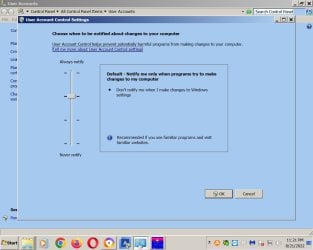
I'm running Acronis 2020 on my computers. On one computer the UAC symbol is now overlaying the Acronis shortcut icon. I don't recall it being that way until recently. The UAC setting is at the second bar. I'm attaching screenshots of both. Why did this happen and how do I correct it?
Oddly - on the second computer it is not overlaying the Acronis icon. The UAC setting on that computer is at lowest bar.
I'm running Acronis 2020 on my computers. On one computer the UAC symbol is now overlaying the Acronis shortcut icon. I don't recall it being that way until recently. The UAC setting is at the second bar. I'm attaching screenshots of both. Why did this happen and how do I correct it?
Oddly - on the second computer it is not overlaying the Acronis icon. The UAC setting on that computer is at lowest bar.
Attachments

My Computers
-
At a glance
W7 Pro 648G- Computer type
- PC/Desktop
- Computer Manufacturer/Model Number
- Dell XPS 8300
- OS
- W7 Pro 64
- Memory
- 8G
- Sound Card
- RealTek High Definition Audio
- Monitor(s) Displays
- Asus
- Hard Drives
- WD Elements, Samsung Story Station, Samsung EVO 860 / 870
- Mouse
- Logitech M310
- Antivirus
- Avast, Malwarebytes, SUPERAntiSpyware
- Browser
- Firefox, Avast Secure Browser
-
At a glance
Win10- Computer type
- Laptop
- System Manufacturer/Model Number
- HP
- OS
- Win10
- Keyboard
- external
- Mouse
- wireless
- Browser
- Firefox, Avast
- Antivirus
- Avast / Malwarebytes / Superantispyware
