Ubuntu and Windows7 boot options

bobr

New member
Local time
2:10 PM
Messages
11
Few months ago I installed Ubuntu to play with but not quite liked it and I've managed to erased it. I did it improperly though as now I've got two options at computer start up to choose from. obviously Ubuntu is not on my machine anymore but the computer keep asking me what system to start.
Is there any solution to get rid of this?

Thanks,

Bob R
 

My Computer

Computer Manufacturer/Model Number
Acer Aspire X1300
OS
Win 7 Professional 32 bit
I got some added advice. Make sure the Win7 partion is marked Active. You can use Method One.
http://www.sevenforums.com/tutorials/71432-partition-mark-active.html

I posted two methods below. If one works your done. If one doesn't then try the other.

Then go here.
http://www.sevenforums.com/tutorials/20864-mbr-restore-windows-7-master-boot-record.html

This tutorial should fix your problem. Removes the Grub.

You may need to run this up to three times to remove GRUB and restore/rewrite the Win7 MBR.
Information
If you have been dual booting with Linux, then you probably know one of the Linux boot managers like Grub or LILO has been installed in the MBR of your hard drive. What can you do when you no longer want Linux on that hard drive? This tutorial will show you how to use your 7 DVD and BOOTSECT.EXE to restore the "bootsector code" of the MBR and allow you to begin booting to Windows 7 again.

-or-
Also this will work I'm told.
This is for one not working. Yours is not working with the GRUB. The GRUB is working.
The end result is the same the Win 7 MBR is restored.
http://www.sevenforums.com/tutorials/104341-bootmgr-missing-fix.html?ltr=B
 
Last edited:

My Computer

Computer Manufacturer/Model Number
Hopalong/ Godzilla
OS
Windows7 Pro 64bit SP-1; Windows XP Pro 32bit
CPU
Intel Core i7-870 Lynnfield 2.93GHz LGA 1156 95W Quad-Core
Motherboard
ASUS P7P55D-E PRO
Memory
8GB@1400MHz Crucial Ballistix DDR3-1600 4x2GB
Graphics Card(s)
ASUS ENGTX460 DirectCU/2DI/1GD5 1GB 256-bit GDDR5
Sound Card
VIA Onboard
Monitor(s) Displays
Asus VS248H-P 24"; Samsung SyncMaster 941BW 19"ws
Screen Resolution
1920x1080; 1440x900
Hard Drives
Samsung 830 120GB SSD
Intel 320 120GB SSD
Western Digital Caviar Black WD7501AALS 750GB 7200 RPM SATA 3.0Gb/s
Western Digital Caviar Black WD6401AALS 640GB 7200 RPM SATA 3.0Gb/s
PSU
COOLER MASTER Silent Pro RS850-AMBAJ3-US 850W Modular
Case
COOLER MASTER HAF 932 RC-932-KKN5-GP Black
Cooling
Scythe "Mugen-2 Rev.B" (2 ScytheKaze-Jyuni PWM fans)
Keyboard
Logitech K-320
Mouse
Kensington
Antivirus
Avast Inernet Suite
Browser
IE 9 ; Chrome
Please forgive me for interfering, don't want to step to anyone's toes, but this simple and fast method has always worked for me, when removed a Linux distro from Windows dual boot. This fixes the boot records and removes grub.
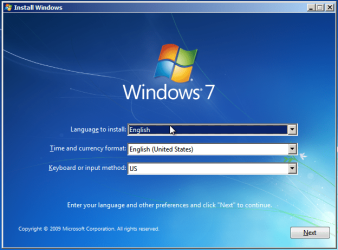
  • Boot from Windows install DVD
  • Click Next when language selection appears
    .
    FixBoot1.PNG
    .
  • Click Repair your computer to start Recovery Console
    .
    FixBoot2.PNG
    .
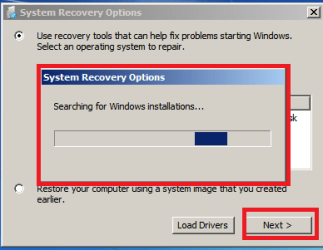
  • Wait until Recovery Console has found your installation, click then Next
    .
    FixBoot3.png
    .
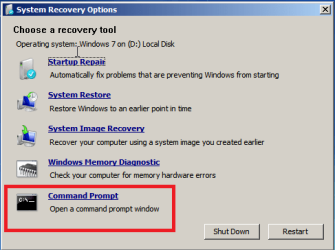
  • Click Command Prompt
    .
    FixBoot4.png
    .
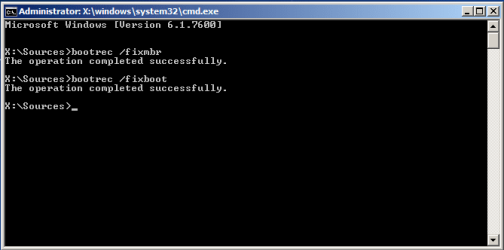
  • Type bootrec /fixmbr to command prompt, hit Enter
  • Type bootrec /fixboot to command prompt, hit Enter
    .
    FixBoot5.PNG
    .
  • Type exit to command prompt, hit Enter to close it
  • Click Shutdown or Reboot, according to what you want to do

Kari
 

My Computer

Computer type
Laptop
Computer Manufacturer/Model Number
HP ENVY 17-1150eg
OS
Windows 10 Pro x64 EN-GB
CPU
1.6 GHz Intel Core i7-720QM Processor
Memory
6 GB
Graphics Card(s)
ATI Mobility Radeon HD 5850 Graphics
Sound Card
Beats sound system with integrated subwoofer
Monitor(s) Displays
17" laptop display, 22" LED and 32" Full HD TV through HDMI
Screen Resolution
1600*900 (1), 1920*1080 (2&3)
Hard Drives
Internal: 2 x 500 GB SATA Hard Disk Drive 7200 rpm
External: 2TB for backups, 3TB USB3 network drive for media
Cooling
As Envy runs a bit warm, I have it on a Cooler Master pad
Keyboard
Logitech diNovo Media Desktop Laser (bluetooth)
Mouse
Logitech Performance Mouse MX
Internet Speed
50/10 Mbps VDSL
Antivirus
Windows Defender 4.3.9431.0
Browser
Maxthon 3.5.2., IE11

My Computer

Computer Manufacturer/Model Number
Hopalong/ Godzilla
OS
Windows7 Pro 64bit SP-1; Windows XP Pro 32bit
CPU
Intel Core i7-870 Lynnfield 2.93GHz LGA 1156 95W Quad-Core
Motherboard
ASUS P7P55D-E PRO
Memory
8GB@1400MHz Crucial Ballistix DDR3-1600 4x2GB
Graphics Card(s)
ASUS ENGTX460 DirectCU/2DI/1GD5 1GB 256-bit GDDR5
Sound Card
VIA Onboard
Monitor(s) Displays
Asus VS248H-P 24"; Samsung SyncMaster 941BW 19"ws
Screen Resolution
1920x1080; 1440x900
Hard Drives
Samsung 830 120GB SSD
Intel 320 120GB SSD
Western Digital Caviar Black WD7501AALS 750GB 7200 RPM SATA 3.0Gb/s
Western Digital Caviar Black WD6401AALS 640GB 7200 RPM SATA 3.0Gb/s
PSU
COOLER MASTER Silent Pro RS850-AMBAJ3-US 850W Modular
Case
COOLER MASTER HAF 932 RC-932-KKN5-GP Black
Cooling
Scythe "Mugen-2 Rev.B" (2 ScytheKaze-Jyuni PWM fans)
Keyboard
Logitech K-320
Mouse
Kensington
Antivirus
Avast Inernet Suite
Browser
IE 9 ; Chrome
Back
Top