ubuntu ???? no install !!!!

pacinitaly

HappyGuru Lovin 2Help
Guru
VIP
Local time
3:25 AM
Messages
1,093
Location
the worst state in america
HI all,

I had a disc that I used on my XP pro rig awhile back.
all I did was put the disc in the drive and reboot and was able to surf using ubuntu.
I can't find the disc or where to download said program. any ideas?

I'm not sure how to use it.
does it leave any reg changes
where does it store all the files from surfing
etc


thanks in advance,

Carmine
 

My Computer

Computer Manufacturer/Model Number
Gateway/NV7923u & NV79C52u Laptops
OS
windows 7 professional & ultimate 64bit laptops
CPU
2.27 boost to 2.53 & 2.53 boost to 2.80
Motherboard
Mobile Intel® HM55 Express Chipset ???
Memory
4GB
Graphics Card(s)
Intel® Graphics Media Accelerator HD
Sound Card
realtek High-definition audio support
Monitor(s) Displays
17.3 " HD 1600 x 900
Hard Drives
hatachi Travelstar 5400 500GB & west digital 500GB
Internet Speed
35MB fios

My Computer

Computer type
PC/Desktop
Computer Manufacturer/Model Number
Self Built
OS
Win 10 Pro x64
CPU
Intel I5-2500K @3.3GHz
Motherboard
Asrock P67 Extreme4
Memory
16GB G.Skill Ripjaws X (4x4GB)
Graphics Card(s)
EVGA GeForce 750 Ti SC 2GB
Sound Card
ASUS Xonar DG 5.1 Channels 24-bit 96KHz PCI Interface Sound
Monitor(s) Displays
auria eq2367
Screen Resolution
1920 x 1080
Hard Drives
250GB Samsung 850 EVO SSD
1TB WD Blue
1TB Hitachi
PSU
SeaSonic X 650W 80 Plus Gold
Case
Corsair Obsidian 750D
Cooling
Corsair H60, Three 140mm case fans
Keyboard
Logitech Wireless Keyboard K520
Mouse
Logitech Wireless Mouse M310
Internet Speed
Wave Broadband ~ 100 dn 5 up
Antivirus
Windows Defender, Malwarebytes Premium
Browser
Edge, IE11, Chrome
Other Info
Laptop specs: HP g7-1365dx /
CPU: AMD A6-3420M APU with Radeon(tm) HD Graphics /
RAM: Crucial 8Gb (2x4Gb) /
SSD: Crucial M4-CT128M4SSD2 ATA Device/ FW 000F /
GFX: AMD Radeon HD 6520G /
OS: Windows 10 Pro x64
Ubuntu homepage | Ubuntu

I hope that this is some help.
No it does not store annything on your computer.
You makle a cd out of the iso. It then can be booted
and used. They call it a live cd.

Jimmy
 

My Computer

Computer Manufacturer/Model Number
Power Spec- Micro Electronics,Inc.
OS
Windows 7 64-bit
CPU
Intel i7
Motherboard
Intel
Memory
12 gigs
Graphics Card(s)
AMD Radeon HD 6900 series
Sound Card
AMD High Definition Audio Device
Monitor(s) Displays
Gateway FHX2300
Screen Resolution
1920x1080
Hard Drives
Samsung HD204UI 2 terabytes used for storage
SSD G2 Series 64 GB System drive
Ubunutu Live!- Boot from Disc it will boot and ask if you just want to try and it won't install anything. It runs off RAM and your CDROM.

Download | Ubuntu

Try Ubuntu before you install it.


1. If you're using a CD: Put the Ubuntu CD into the CD/DVD-drive and restart the computer. You should see a welcome screen prompting you to choose your language and giving you the option to install Ubuntu or try it from the CD.
If you don't get this menu, read the booting From the CD guide for more information.

2. If you're using a USB drive: Most newer computers can boot from USB. You should see a welcome screen prompting you to choose your language and giving you the option to install Ubuntu or try it from the CD.

If your computer does not automatically do so, you might need to edit the BIOS settings. Restart your computer, and watch for a message telling you which key to press to enter the BIOS setup. It will usually be one of F1, F2, DEL, ESC or F10. Press this key while your computer is booting to edit your BIOS settings.

You need to edit the Boot Order. Depending on your computer, and how your USB key was formatted, you should see an entry for 'removable drive' or 'USB media'. Move this to the top of the list to force the computer to attempt to boot from USB before booting from the hard disk. Save your changes and continue.

3. Choose your preferred language and click on 'Try Ubuntu 10.04'

trial_01_medium.jpg


4. Your live CD desktop should appear. Have a look around!


trial_02_medium.jpg

5. When you are ready to install Ubuntu click on the icon on your desktop: 'Install Ubuntu 10.04'
 

My Computers

System One System Two

  • Computer type
    PC/Desktop
    Computer Manufacturer/Model Number
    PowerSpec G164
    OS
    WIN10
    CPU
    AMD Ryzen 5 3600 6-Core Processor 3.59 GHz
    Memory
    16.0 GB
    Internet Speed
    VERY FAST>>>!!!
  • Antivirus
    ESET Security Premium
you can also use ubuntu with virtualbox for a more permanent, but still unobtrusive setup.
 

My Computer

Computer Manufacturer/Model Number
HP dv6519tx
OS
Windows 7 Ultimate x64
CPU
1.80 GHz Intel Core 2 Duo processor T7100
Memory
3 gig ddr2
Graphics Card(s)
NVIDIA GeForce 8400M GS
Sound Card
Realtek High Definition Audio
Monitor(s) Displays
15.4” WXGA High Definition BrightView Widescreen
Screen Resolution
1280 x 800
Hard Drives
Hitachi 320 GB (5400 rpm)
PSU
90 W AC Power Adapter
Cooling
Kitchen plate under the lappy
Keyboard
101 key compatible
Mouse
Touch Pad with On/Off button and dedicated vertical Scroll
Internet Speed
Three Wireless internet prepaid using E160G USB dongle
you can also use ubuntu with virtualbox for a more permanent, but still unobtrusive setup.


Yes that VERY good ideal. It will huge improvement/perform factor versus running Ubuntu off disc, even flash drive.
 

My Computers

System One System Two

  • Computer type
    PC/Desktop
    Computer Manufacturer/Model Number
    PowerSpec G164
    OS
    WIN10
    CPU
    AMD Ryzen 5 3600 6-Core Processor 3.59 GHz
    Memory
    16.0 GB
    Internet Speed
    VERY FAST>>>!!!
  • Antivirus
    ESET Security Premium
thank you guys.

my infra recorder won't record the image.
rebooted and tried 3-4x just hangs then shows error as shown in pic attached


thanks anyway
 
Last edited:

My Computer

Computer Manufacturer/Model Number
Gateway/NV7923u & NV79C52u Laptops
OS
windows 7 professional & ultimate 64bit laptops
CPU
2.27 boost to 2.53 & 2.53 boost to 2.80
Motherboard
Mobile Intel® HM55 Express Chipset ???
Memory
4GB
Graphics Card(s)
Intel® Graphics Media Accelerator HD
Sound Card
realtek High-definition audio support
Monitor(s) Displays
17.3 " HD 1600 x 900
Hard Drives
hatachi Travelstar 5400 500GB & west digital 500GB
Internet Speed
35MB fios

My Computer

Computer type
PC/Desktop
Computer Manufacturer/Model Number
Self Built
OS
Win 10 Pro x64
CPU
Intel I5-2500K @3.3GHz
Motherboard
Asrock P67 Extreme4
Memory
16GB G.Skill Ripjaws X (4x4GB)
Graphics Card(s)
EVGA GeForce 750 Ti SC 2GB
Sound Card
ASUS Xonar DG 5.1 Channels 24-bit 96KHz PCI Interface Sound
Monitor(s) Displays
auria eq2367
Screen Resolution
1920 x 1080
Hard Drives
250GB Samsung 850 EVO SSD
1TB WD Blue
1TB Hitachi
PSU
SeaSonic X 650W 80 Plus Gold
Case
Corsair Obsidian 750D
Cooling
Corsair H60, Three 140mm case fans
Keyboard
Logitech Wireless Keyboard K520
Mouse
Logitech Wireless Mouse M310
Internet Speed
Wave Broadband ~ 100 dn 5 up
Antivirus
Windows Defender, Malwarebytes Premium
Browser
Edge, IE11, Chrome
Other Info
Laptop specs: HP g7-1365dx /
CPU: AMD A6-3420M APU with Radeon(tm) HD Graphics /
RAM: Crucial 8Gb (2x4Gb) /
SSD: Crucial M4-CT128M4SSD2 ATA Device/ FW 000F /
GFX: AMD Radeon HD 6520G /
OS: Windows 10 Pro x64
Last edited:

My Computer

Computer Manufacturer/Model Number
Gateway/NV7923u & NV79C52u Laptops
OS
windows 7 professional & ultimate 64bit laptops
CPU
2.27 boost to 2.53 & 2.53 boost to 2.80
Motherboard
Mobile Intel® HM55 Express Chipset ???
Memory
4GB
Graphics Card(s)
Intel® Graphics Media Accelerator HD
Sound Card
realtek High-definition audio support
Monitor(s) Displays
17.3 " HD 1600 x 900
Hard Drives
hatachi Travelstar 5400 500GB & west digital 500GB
Internet Speed
35MB fios

My Computer

Computer type
PC/Desktop
Computer Manufacturer/Model Number
Self Built
OS
Win 10 Pro x64
CPU
Intel I5-2500K @3.3GHz
Motherboard
Asrock P67 Extreme4
Memory
16GB G.Skill Ripjaws X (4x4GB)
Graphics Card(s)
EVGA GeForce 750 Ti SC 2GB
Sound Card
ASUS Xonar DG 5.1 Channels 24-bit 96KHz PCI Interface Sound
Monitor(s) Displays
auria eq2367
Screen Resolution
1920 x 1080
Hard Drives
250GB Samsung 850 EVO SSD
1TB WD Blue
1TB Hitachi
PSU
SeaSonic X 650W 80 Plus Gold
Case
Corsair Obsidian 750D
Cooling
Corsair H60, Three 140mm case fans
Keyboard
Logitech Wireless Keyboard K520
Mouse
Logitech Wireless Mouse M310
Internet Speed
Wave Broadband ~ 100 dn 5 up
Antivirus
Windows Defender, Malwarebytes Premium
Browser
Edge, IE11, Chrome
Other Info
Laptop specs: HP g7-1365dx /
CPU: AMD A6-3420M APU with Radeon(tm) HD Graphics /
RAM: Crucial 8Gb (2x4Gb) /
SSD: Crucial M4-CT128M4SSD2 ATA Device/ FW 000F /
GFX: AMD Radeon HD 6520G /
OS: Windows 10 Pro x64
and it's only a half moon outside
 

My Computer

Computer Manufacturer/Model Number
Gateway/NV7923u & NV79C52u Laptops
OS
windows 7 professional & ultimate 64bit laptops
CPU
2.27 boost to 2.53 & 2.53 boost to 2.80
Motherboard
Mobile Intel® HM55 Express Chipset ???
Memory
4GB
Graphics Card(s)
Intel® Graphics Media Accelerator HD
Sound Card
realtek High-definition audio support
Monitor(s) Displays
17.3 " HD 1600 x 900
Hard Drives
hatachi Travelstar 5400 500GB & west digital 500GB
Internet Speed
35MB fios
I'm up and running ubuntu via the loaded disc.
it takes 3mins to get to desktop. pages are slow to change.

is this due to the fact that I'm running from a disk?
 
Last edited:

My Computer

Computer Manufacturer/Model Number
Gateway/NV7923u & NV79C52u Laptops
OS
windows 7 professional & ultimate 64bit laptops
CPU
2.27 boost to 2.53 & 2.53 boost to 2.80
Motherboard
Mobile Intel® HM55 Express Chipset ???
Memory
4GB
Graphics Card(s)
Intel® Graphics Media Accelerator HD
Sound Card
realtek High-definition audio support
Monitor(s) Displays
17.3 " HD 1600 x 900
Hard Drives
hatachi Travelstar 5400 500GB & west digital 500GB
Internet Speed
35MB fios
I'm up and running ubuntu via the loaded disc.
it takes 3mins to get to desktop. pages are slow to change.

is this due to the fact that I'm running from a disk?

Yes, running an OS from the CD will be slow. Because everytime you run anything from the CD, it has to be loaded fully into memory and then executed. Installing as a dual boot or as a virtual OS will be quite fast.
 

My Computer

Computer type
Laptop
Computer Manufacturer/Model Number
HP EliteBook 8530w Mobile Workstation
OS
Windows 7 Ultimate x64 (XP, 98SE, 95, 3.11, DOS 7.10 on VM) + Ubuntu 10.04 LTS Lucid Lynx
CPU
Intel Core 2 Duo Processor P8600 (2.40 GHz, 3 MB L2 cache)
Motherboard
Mobile Intel PM45 Express Chipset ICH9M-Enhanced
Memory
4GB 800 MHz DDR2 SDRAM
Graphics Card(s)
ATI Mobility FireGL V5700 with 256 MB
Sound Card
SoundMAX Integrated Digital HD Audio
Monitor(s) Displays
15.4-inch WXGA anti-glare (1280 x 800 resolution)
Screen Resolution
1280 x 800
Hard Drives
500GB + 1TB
Mouse
Synaptics PS/2 Port Touchpad, USB Mouse
Internet Speed
4 Mbps
Antivirus
MSE
Browser
Firefox, Chrome, IE
Other Info
Authentec AES2810 Fingerprint Reader
from what I understand, I will get an option to choose what OS to boot into if I do indeed install ubuntu.

if I do install, will I be able to toggle between OS's ?

will it create another partition on the main drive?

I tried to view an .avi movie and it says no
 
Last edited:

My Computer

Computer Manufacturer/Model Number
Gateway/NV7923u & NV79C52u Laptops
OS
windows 7 professional & ultimate 64bit laptops
CPU
2.27 boost to 2.53 & 2.53 boost to 2.80
Motherboard
Mobile Intel® HM55 Express Chipset ???
Memory
4GB
Graphics Card(s)
Intel® Graphics Media Accelerator HD
Sound Card
realtek High-definition audio support
Monitor(s) Displays
17.3 " HD 1600 x 900
Hard Drives
hatachi Travelstar 5400 500GB & west digital 500GB
Internet Speed
35MB fios
If you want to try out Ubuntu, I would recommend using the wubi installer... This will install ubuntu on your drive within Windows.. It will install everything you need to run it in a dual boot configuration, but allows you to uninstall it like a regular program from the control program... To be able to watch .avi files you will need to install Ubuntu restricted extras.. These are codecs that are not installed by default. All you need to do is go to Ubuntu One Store, and select Ubuntu Restricted Extras, and the codecs/decoders you need will be installed.... Enjoy Ubuntu! ;)
 

My Computer

Computer type
PC/Desktop
Computer Manufacturer/Model Number
LENOVO K450 @3.0GHZ
OS
64-bit Windows 8.1 Pro
CPU
Core(TM) i5 CPU 4330 Haswell @ 3.20GHz
Motherboard
LENOVO
Memory
12.00 GB
Graphics Card(s)
Intel(R) HD Graphics
Sound Card
Intel HD integtrated
Monitor(s) Displays
HP 25' ISP Monitor
Screen Resolution
1900/1020
Hard Drives
(1) ST1000DM003-1CH162 (2) Generic STORAGE DEVICE USB Device (3) Generic STORAGE DEVICE USB Device
Internet Speed
100mb down/10mb up
If you want to try out Ubuntu, I would recommend using the wubi installer... This will install ubuntu on your drive within Windows.. It will install everything you need to run it in a dual boot configuration, but allows you to uninstall it like a regular program from the control program... To be able to watch .avi files you will need to install Ubuntu restricted extras.. These are codecs that are not installed by default. All you need to do is go to Ubuntu One Store, and select Ubuntu Restricted Extras, and the codecs/decoders you need will be installed.... Enjoy Ubuntu! ;)


so if I install wubi, I will have to reboot to get back to vista/win7 ?
 

My Computer

Computer Manufacturer/Model Number
Gateway/NV7923u & NV79C52u Laptops
OS
windows 7 professional & ultimate 64bit laptops
CPU
2.27 boost to 2.53 & 2.53 boost to 2.80
Motherboard
Mobile Intel® HM55 Express Chipset ???
Memory
4GB
Graphics Card(s)
Intel® Graphics Media Accelerator HD
Sound Card
realtek High-definition audio support
Monitor(s) Displays
17.3 " HD 1600 x 900
Hard Drives
hatachi Travelstar 5400 500GB & west digital 500GB
Internet Speed
35MB fios
from what I understand, I will get an option to choose what OS to boot into if I do indeed install ubuntu.

if I do install, will I be able to toggle between OS's ?

will it create another partition on the main drive?

I tried to view an .avi movie and it says no

1. If you install as a Dual Boot, you can use only one OS at a time. If you want to use the other OS, then you will have to restart the system and then boot into the other OS.
2. Yes, it will be installed in a separate partition.

It is better to install in a virtual environment or use the WUBI Installer to install Ubuntu as a single file inside Windows.
However, if you are installing Ubuntu in a virtual environment, you can have both OS' running at the same time.

EDIT: Oops, Tom is faster than me :)

If you install using WUBI, then you will have to reboot to switch to the other OS.
Is this running Ubuntu within a virtual environment or something similar?

No. This is a real installation, the only difference is that Ubuntu is installed within a file as opposed to being installed within its own partition. Thus we spare you the trouble of creating a free partition for Ubuntu. And we spare you the trouble to have of having to burn a CD-Rom.
 

My Computer

Computer type
Laptop
Computer Manufacturer/Model Number
HP EliteBook 8530w Mobile Workstation
OS
Windows 7 Ultimate x64 (XP, 98SE, 95, 3.11, DOS 7.10 on VM) + Ubuntu 10.04 LTS Lucid Lynx
CPU
Intel Core 2 Duo Processor P8600 (2.40 GHz, 3 MB L2 cache)
Motherboard
Mobile Intel PM45 Express Chipset ICH9M-Enhanced
Memory
4GB 800 MHz DDR2 SDRAM
Graphics Card(s)
ATI Mobility FireGL V5700 with 256 MB
Sound Card
SoundMAX Integrated Digital HD Audio
Monitor(s) Displays
15.4-inch WXGA anti-glare (1280 x 800 resolution)
Screen Resolution
1280 x 800
Hard Drives
500GB + 1TB
Mouse
Synaptics PS/2 Port Touchpad, USB Mouse
Internet Speed
4 Mbps
Antivirus
MSE
Browser
Firefox, Chrome, IE
Other Info
Authentec AES2810 Fingerprint Reader
from what I understand, I will get an option to choose what OS to boot into if I do indeed install ubuntu.

if I do install, will I be able to toggle between OS's ?

will it create another partition on the main drive?

I tried to view an .avi movie and it says no

1. If you install as a Dual Boot, you can use only one OS at a time. If you want to use the other OS, then you will have to restart the system and then boot into the other OS.
2. Yes, it will be installed in a separate partition.

It is better to install in a virtual environment or use the WUBI Installer to install Ubuntu as a single file inside Windows.
However, if you are installing Ubuntu in a virtual environment, you can have both OS' running at the same time.

EDIT: Oops, Tom is faster than me :)

If you install using WUBI, then you will have to reboot to switch to the other OS.
Is this running Ubuntu within a virtual environment or something similar?

No. This is a real installation, the only difference is that Ubuntu is installed within a file as opposed to being installed within its own partition. Thus we spare you the trouble of creating a free partition for Ubuntu. And we spare you the trouble to have of having to burn a CD-Rom.


do I have to d/l virtual pc, install it then install wubi installer?
http://www.microsoft.com/downloads/...02-3199-48A3-AFA2-2DC0B40A73B6&displaylang=en

I don't know how a virtual environment really works. I've read the tutorials but I just can't grasp it.....:osorry
 
Last edited:

My Computer

Computer Manufacturer/Model Number
Gateway/NV7923u & NV79C52u Laptops
OS
windows 7 professional & ultimate 64bit laptops
CPU
2.27 boost to 2.53 & 2.53 boost to 2.80
Motherboard
Mobile Intel® HM55 Express Chipset ???
Memory
4GB
Graphics Card(s)
Intel® Graphics Media Accelerator HD
Sound Card
realtek High-definition audio support
Monitor(s) Displays
17.3 " HD 1600 x 900
Hard Drives
hatachi Travelstar 5400 500GB & west digital 500GB
Internet Speed
35MB fios
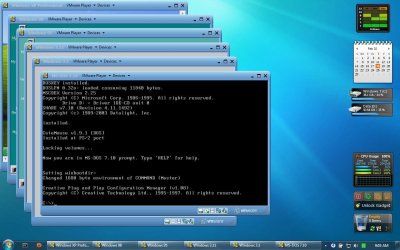
A Virtual Machine is basically an OS (Guest) installed inside another OS (Host). This can be accomplished by installing a virtualization software like VirtualBox or VMWare.

The Guest OS can be installed just like a normal OS inside the virtualization software.

Take a look at this screenshot with six OS' (XP, 98, 95, 3.11, 3.1 and DOS 7.10) running inside Windows 7.
59994d1268280685-post-your-virtual-machines-vmware-virtual.jpg

You don't need to install using the WUBI Installer if you are installing in a virtual environment. You can select the ISO file or CD during install and the sources will be taken from that.

Take a look at this tutorial for instructions
Installing Ubuntu inside Windows using VirtualBox
 

My Computer

Computer type
Laptop
Computer Manufacturer/Model Number
HP EliteBook 8530w Mobile Workstation
OS
Windows 7 Ultimate x64 (XP, 98SE, 95, 3.11, DOS 7.10 on VM) + Ubuntu 10.04 LTS Lucid Lynx
CPU
Intel Core 2 Duo Processor P8600 (2.40 GHz, 3 MB L2 cache)
Motherboard
Mobile Intel PM45 Express Chipset ICH9M-Enhanced
Memory
4GB 800 MHz DDR2 SDRAM
Graphics Card(s)
ATI Mobility FireGL V5700 with 256 MB
Sound Card
SoundMAX Integrated Digital HD Audio
Monitor(s) Displays
15.4-inch WXGA anti-glare (1280 x 800 resolution)
Screen Resolution
1280 x 800
Hard Drives
500GB + 1TB
Mouse
Synaptics PS/2 Port Touchpad, USB Mouse
Internet Speed
4 Mbps
Antivirus
MSE
Browser
Firefox, Chrome, IE
Other Info
Authentec AES2810 Fingerprint Reader
Thank you Prabhu !!!!!!!
 

My Computer

Computer Manufacturer/Model Number
Gateway/NV7923u & NV79C52u Laptops
OS
windows 7 professional & ultimate 64bit laptops
CPU
2.27 boost to 2.53 & 2.53 boost to 2.80
Motherboard
Mobile Intel® HM55 Express Chipset ???
Memory
4GB
Graphics Card(s)
Intel® Graphics Media Accelerator HD
Sound Card
realtek High-definition audio support
Monitor(s) Displays
17.3 " HD 1600 x 900
Hard Drives
hatachi Travelstar 5400 500GB & west digital 500GB
Internet Speed
35MB fios
Back
Top