Ubuntu won't install on internal HD, forces to external USB drive

Gene Poole

New member
Member
Local time
7:10 PM
Messages
60
When trying to install Ubuntu as an "alongside" Windows OS, it presents a target drive pop-down chooser widget, but the only drive it sees/allows is my external data storage USB. I have 3 internals: a C boot SSD, and 2 legacy HDs. All with plenty of room, all NTFS.

Yes I know this isn't a Linux forum, but in this case I'm wondering if there's something I need to do on the Win7 side to 'prepare' as space.
 

My Computer My Computer

At a glance

Windows 7 Professional SP1 64-bitIntel Core i5 3570K @ 3.40GHz8.00GB Dual-Channel DDR3 @ 802MHz1024MB ATI AMD Radeon HD 6670
Computer type
PC/Desktop
Computer Manufacturer/Model Number
home-made 2008
OS
Windows 7 Professional SP1 64-bit
CPU
Intel Core i5 3570K @ 3.40GHz
Motherboard
ASUSTeK COMPUTER INC. P8Z77-V LX
Memory
8.00GB Dual-Channel DDR3 @ 802MHz
Graphics Card(s)
1024MB ATI AMD Radeon HD 6670
Sound Card
N.A. - mobo sound
Monitor(s) Displays
HP V242h 24' + HITACHI 51F59 HDTV
Screen Resolution
1920x1080
Hard Drives
Transcend 480 GB TLC SATA III 2.5' Solid State Drive
313GB Seagate ST3320620AS ATA Device (SATA)
977GB Western Digital WDC WD1001FAES-22W7A0 ATA Device (SATA)
320GB Seagate FreeAgent GoFlex USB external
PSU
RAIDMAX 530W Modular
Case
CoolerMaster HAF912Plus
Cooling
built-in CPU and case + Coolermaster Megaflow
Keyboard
Logitech Illuminated Keyboard K740
Mouse
iOne Lynx S2 mouse
Antivirus
Panda, Malwarebytes
Browser
Firefox 54.01
Here's how I addressed this issue:


I have three hard drives in my computer:
  1. Linux
  2. Windows
  3. Data
Data is always on; I use a SATA power switch to turn on/off the Linux and Windows drives:

https://www.amazon.com/PW4101-Alumi...=1508440555&sr=8-5&keywords=sata+power+switch

When I want to switch to the other OS, I power down, switch drives with the SATA power switch, then power on. Like magic, I'm in the other OS; and my data is always available, no matter which OS I am using, because the data drive is always on.

I know you were asking about dual boot on a single drive. But this method works better, in my opinion, because Linux and Windows are totally separate from each other, being on different drives. Also, backups are simplified, because you back up the OS on occasion, and the data on a regular basis.
 

My Computer My Computer

At a glance

Linux Mint 18.2 xfce 64-bit (VMWare host) / W...Haswell4 GB
Computer type
PC/Desktop
Computer Manufacturer/Model Number
Dell
OS
Linux Mint 18.2 xfce 64-bit (VMWare host) / Windows 8.1 Pro 32-bit (VMWare guest)
CPU
Haswell
Memory
4 GB
Monitor(s) Displays
Acer 23"
Screen Resolution
1920 x 1080
Hard Drives
Two hard drives, 1TB each: One for Linux, one for my data.
Keyboard
IBM Model M
Antivirus
Sophos (Linux), Trend Micro (Windows)
Browser
Firefox, Opera
Other Info
I use Samba to share my data drive with the other computers at my house and with my guest session in VMWare Workstation Player.
You can run linux inside windows it normally gives you that as an option when installing. Does it say why it wont install ie lack of disk space or secure boot?
 

My Computer My Computer

At a glance

win 8 32 bit
Computer type
PC/Desktop
OS
win 8 32 bit
The SATA switch move is down the road for me, thanks though.

And no, the install process gives no clue as to why it only allows the external. Then too it also puts up a nice polite Go Back button, but that isn't working.
 

My Computer My Computer

At a glance

Windows 7 Professional SP1 64-bitIntel Core i5 3570K @ 3.40GHz8.00GB Dual-Channel DDR3 @ 802MHz1024MB ATI AMD Radeon HD 6670
Computer type
PC/Desktop
Computer Manufacturer/Model Number
home-made 2008
OS
Windows 7 Professional SP1 64-bit
CPU
Intel Core i5 3570K @ 3.40GHz
Motherboard
ASUSTeK COMPUTER INC. P8Z77-V LX
Memory
8.00GB Dual-Channel DDR3 @ 802MHz
Graphics Card(s)
1024MB ATI AMD Radeon HD 6670
Sound Card
N.A. - mobo sound
Monitor(s) Displays
HP V242h 24' + HITACHI 51F59 HDTV
Screen Resolution
1920x1080
Hard Drives
Transcend 480 GB TLC SATA III 2.5' Solid State Drive
313GB Seagate ST3320620AS ATA Device (SATA)
977GB Western Digital WDC WD1001FAES-22W7A0 ATA Device (SATA)
320GB Seagate FreeAgent GoFlex USB external
PSU
RAIDMAX 530W Modular
Case
CoolerMaster HAF912Plus
Cooling
built-in CPU and case + Coolermaster Megaflow
Keyboard
Logitech Illuminated Keyboard K740
Mouse
iOne Lynx S2 mouse
Antivirus
Panda, Malwarebytes
Browser
Firefox 54.01
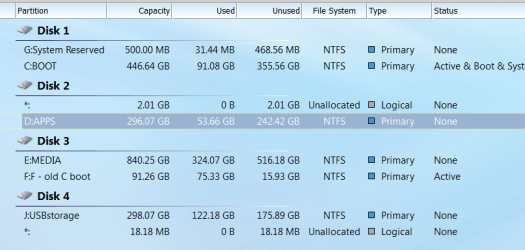
I do have a complex set of drives and partitions. Maybe that's it. I don't want to boot this linux off a slow USB 2 port, I want to install it onto and boot it off my Disk 2 D partition.
 

Attachments

  • Minitool partitions Oct 2017.png
    Minitool partitions Oct 2017.png
    66.6 KB · Views: 0

My Computer My Computer

At a glance

Windows 7 Professional SP1 64-bitIntel Core i5 3570K @ 3.40GHz8.00GB Dual-Channel DDR3 @ 802MHz1024MB ATI AMD Radeon HD 6670
Computer type
PC/Desktop
Computer Manufacturer/Model Number
home-made 2008
OS
Windows 7 Professional SP1 64-bit
CPU
Intel Core i5 3570K @ 3.40GHz
Motherboard
ASUSTeK COMPUTER INC. P8Z77-V LX
Memory
8.00GB Dual-Channel DDR3 @ 802MHz
Graphics Card(s)
1024MB ATI AMD Radeon HD 6670
Sound Card
N.A. - mobo sound
Monitor(s) Displays
HP V242h 24' + HITACHI 51F59 HDTV
Screen Resolution
1920x1080
Hard Drives
Transcend 480 GB TLC SATA III 2.5' Solid State Drive
313GB Seagate ST3320620AS ATA Device (SATA)
977GB Western Digital WDC WD1001FAES-22W7A0 ATA Device (SATA)
320GB Seagate FreeAgent GoFlex USB external
PSU
RAIDMAX 530W Modular
Case
CoolerMaster HAF912Plus
Cooling
built-in CPU and case + Coolermaster Megaflow
Keyboard
Logitech Illuminated Keyboard K740
Mouse
iOne Lynx S2 mouse
Antivirus
Panda, Malwarebytes
Browser
Firefox 54.01
You have lots of room on c you can shrink that and leave the space blank so Linux has enough space to create a partition check Linux space requirements. You could. Use free virtual box and r.un Linux as a virtual pc
 

My Computer My Computer

At a glance

win 8 32 bit
Computer type
PC/Desktop
OS
win 8 32 bit
Your MB probably has a UEFI BIOS.
Please take another snapshot of Disk manager with all columns expanded. I want to see what kind of disk you have (GPT or MBR).
If D: is a GPT disk you must create a UEFI Fat 32 partition (100M) to have the boot loader.
 

My Computers My Computers

  • At a glance

    Windows 7 HP 64i5 6600K - 800MHz to 4200MHz4+4G GSkill DDR4 3000IG - Intel 530
    Computer type
    PC/Desktop
    Computer Manufacturer/Model Number
    custom build
    OS
    Windows 7 HP 64
    CPU
    i5 6600K - 800MHz to 4200MHz
    Motherboard
    GA-Z170-HD3P
    Memory
    4+4G GSkill DDR4 3000
    Graphics Card(s)
    IG - Intel 530
    Monitor(s) Displays
    Samsung 226BW
    Screen Resolution
    1680x1050
    Hard Drives
    (1) -1 SM951 – 128GB M.2 AHCI PCIe SSD drive for Windows 7 and Lubuntu
    (2) -1 WD SATA 3 - 1T for Data
    (3) -1 WD SATA 3 - 1T for backup
    PSU
    Thermaltake 450W TR2 gold
    Keyboard
    Old and good Chicony mechanical keyboard
    Mouse
    Logitech mX performance - 9 buttons (had to disable some)
    Internet Speed
    500Mb/s
    Browser
    Firefox 64
    Other Info
    TinyWall firewall
  • At a glance

    Windows 7 Proi7-4500U 800MHz to 3.0GHz(4+4)G DDR3 1600IG intel 4400 + NVIDIA GeForce GT 745M
    Computer type
    Laptop
    System Manufacturer/Model Number
    Asus Q550LF
    OS
    Windows 7 Pro
    CPU
    i7-4500U 800MHz to 3.0GHz
    Motherboard
    Asus Q550LF
    Memory
    (4+4)G DDR3 1600
    Graphics Card(s)
    IG intel 4400 + NVIDIA GeForce GT 745M
    Sound Card
    Realtek
    Monitor(s) Displays
    LG Display LP156WF4-SPH1
    Screen Resolution
    1920 x 1080
    Hard Drives
    BX500 120G SSD for Windows and programs +
    1T HDD for data
    Internet Speed
    500 Mb/s
    Browser
    Firefox
    Other Info
    TinyWall firewall
You have lots of room on c you can shrink that and leave the space blank so Linux has enough space to create a partition check Linux space requirements. You could. Use free virtual box and r.un Linux as a virtual pc

Hi. Thanks. Maybe you didn't see me saying "the only drive it sees/allows is my external data storage USB"?
Also, I'm happy to devote almost all of my current D:Apps partition to this or another Linux. I'd prefer to avoid the slow USB or my C that I like to image/backup. But the installer won't let me put it anywhere but the J drive.
 

My Computer My Computer

At a glance

Windows 7 Professional SP1 64-bitIntel Core i5 3570K @ 3.40GHz8.00GB Dual-Channel DDR3 @ 802MHz1024MB ATI AMD Radeon HD 6670
Computer type
PC/Desktop
Computer Manufacturer/Model Number
home-made 2008
OS
Windows 7 Professional SP1 64-bit
CPU
Intel Core i5 3570K @ 3.40GHz
Motherboard
ASUSTeK COMPUTER INC. P8Z77-V LX
Memory
8.00GB Dual-Channel DDR3 @ 802MHz
Graphics Card(s)
1024MB ATI AMD Radeon HD 6670
Sound Card
N.A. - mobo sound
Monitor(s) Displays
HP V242h 24' + HITACHI 51F59 HDTV
Screen Resolution
1920x1080
Hard Drives
Transcend 480 GB TLC SATA III 2.5' Solid State Drive
313GB Seagate ST3320620AS ATA Device (SATA)
977GB Western Digital WDC WD1001FAES-22W7A0 ATA Device (SATA)
320GB Seagate FreeAgent GoFlex USB external
PSU
RAIDMAX 530W Modular
Case
CoolerMaster HAF912Plus
Cooling
built-in CPU and case + Coolermaster Megaflow
Keyboard
Logitech Illuminated Keyboard K740
Mouse
iOne Lynx S2 mouse
Antivirus
Panda, Malwarebytes
Browser
Firefox 54.01
You MB probably has a UEFI BIOS.
Please take another snapshot of Disk manager with all columns expanded. I want to see what kind of disk you have (GPT or MBR).
If D: is a GPT disk you must create a UEFI Fat 32 partition (100M) to have the boot loader.

Hmm, thanks, this is the sort of reply I was hoping for. But what is "Disk manager", a native part of Win7? The previous snap is from Minitool Partition Wizard. That program doesn't seem to have anything named Disk Manager to be able to see the GPT or MBR status. It does have a "Convert NTFS to FAT" option.
 

My Computer My Computer

At a glance

Windows 7 Professional SP1 64-bitIntel Core i5 3570K @ 3.40GHz8.00GB Dual-Channel DDR3 @ 802MHz1024MB ATI AMD Radeon HD 6670
Computer type
PC/Desktop
Computer Manufacturer/Model Number
home-made 2008
OS
Windows 7 Professional SP1 64-bit
CPU
Intel Core i5 3570K @ 3.40GHz
Motherboard
ASUSTeK COMPUTER INC. P8Z77-V LX
Memory
8.00GB Dual-Channel DDR3 @ 802MHz
Graphics Card(s)
1024MB ATI AMD Radeon HD 6670
Sound Card
N.A. - mobo sound
Monitor(s) Displays
HP V242h 24' + HITACHI 51F59 HDTV
Screen Resolution
1920x1080
Hard Drives
Transcend 480 GB TLC SATA III 2.5' Solid State Drive
313GB Seagate ST3320620AS ATA Device (SATA)
977GB Western Digital WDC WD1001FAES-22W7A0 ATA Device (SATA)
320GB Seagate FreeAgent GoFlex USB external
PSU
RAIDMAX 530W Modular
Case
CoolerMaster HAF912Plus
Cooling
built-in CPU and case + Coolermaster Megaflow
Keyboard
Logitech Illuminated Keyboard K740
Mouse
iOne Lynx S2 mouse
Antivirus
Panda, Malwarebytes
Browser
Firefox 54.01
You have windows "Disk manager" that does the same as Minitool Partition Wizard.
Please take another snapshot of Minitool Partition Wizard with all columns expanded. I want to see what kind of disk you have (GPT or MBR).
 

My Computers My Computers

  • At a glance

    Windows 7 HP 64i5 6600K - 800MHz to 4200MHz4+4G GSkill DDR4 3000IG - Intel 530
    Computer type
    PC/Desktop
    Computer Manufacturer/Model Number
    custom build
    OS
    Windows 7 HP 64
    CPU
    i5 6600K - 800MHz to 4200MHz
    Motherboard
    GA-Z170-HD3P
    Memory
    4+4G GSkill DDR4 3000
    Graphics Card(s)
    IG - Intel 530
    Monitor(s) Displays
    Samsung 226BW
    Screen Resolution
    1680x1050
    Hard Drives
    (1) -1 SM951 – 128GB M.2 AHCI PCIe SSD drive for Windows 7 and Lubuntu
    (2) -1 WD SATA 3 - 1T for Data
    (3) -1 WD SATA 3 - 1T for backup
    PSU
    Thermaltake 450W TR2 gold
    Keyboard
    Old and good Chicony mechanical keyboard
    Mouse
    Logitech mX performance - 9 buttons (had to disable some)
    Internet Speed
    500Mb/s
    Browser
    Firefox 64
    Other Info
    TinyWall firewall
  • At a glance

    Windows 7 Proi7-4500U 800MHz to 3.0GHz(4+4)G DDR3 1600IG intel 4400 + NVIDIA GeForce GT 745M
    Computer type
    Laptop
    System Manufacturer/Model Number
    Asus Q550LF
    OS
    Windows 7 Pro
    CPU
    i7-4500U 800MHz to 3.0GHz
    Motherboard
    Asus Q550LF
    Memory
    (4+4)G DDR3 1600
    Graphics Card(s)
    IG intel 4400 + NVIDIA GeForce GT 745M
    Sound Card
    Realtek
    Monitor(s) Displays
    LG Display LP156WF4-SPH1
    Screen Resolution
    1920 x 1080
    Hard Drives
    BX500 120G SSD for Windows and programs +
    1T HDD for data
    Internet Speed
    500 Mb/s
    Browser
    Firefox
    Other Info
    TinyWall firewall
OK, I didn't notice before but it says Basic MBR on all the drives.
 

Attachments

  • Minitool partitions Oct 2017.png
    Minitool partitions Oct 2017.png
    220.8 KB · Views: 5

My Computer My Computer

At a glance

Windows 7 Professional SP1 64-bitIntel Core i5 3570K @ 3.40GHz8.00GB Dual-Channel DDR3 @ 802MHz1024MB ATI AMD Radeon HD 6670
Computer type
PC/Desktop
Computer Manufacturer/Model Number
home-made 2008
OS
Windows 7 Professional SP1 64-bit
CPU
Intel Core i5 3570K @ 3.40GHz
Motherboard
ASUSTeK COMPUTER INC. P8Z77-V LX
Memory
8.00GB Dual-Channel DDR3 @ 802MHz
Graphics Card(s)
1024MB ATI AMD Radeon HD 6670
Sound Card
N.A. - mobo sound
Monitor(s) Displays
HP V242h 24' + HITACHI 51F59 HDTV
Screen Resolution
1920x1080
Hard Drives
Transcend 480 GB TLC SATA III 2.5' Solid State Drive
313GB Seagate ST3320620AS ATA Device (SATA)
977GB Western Digital WDC WD1001FAES-22W7A0 ATA Device (SATA)
320GB Seagate FreeAgent GoFlex USB external
PSU
RAIDMAX 530W Modular
Case
CoolerMaster HAF912Plus
Cooling
built-in CPU and case + Coolermaster Megaflow
Keyboard
Logitech Illuminated Keyboard K740
Mouse
iOne Lynx S2 mouse
Antivirus
Panda, Malwarebytes
Browser
Firefox 54.01
I don't see any reason why you can't install Ubuntu to disk 2.

- Under windows, defrag disk D:
- With Minitool Partition Wizard:
Shrink D: partition in 40 G
On the unallocated partition create a new (30G) and format it as ext4. On the remaining 10 G make it a swap file.

- Shutdown, detach all other drives (take out the power or SATA connector) leaving on only disk 2.
- Boot from the Ubuntu disk and install on the ext4 partition (30G).
- When finished, boot from the installed Ubuntu.
- Shutdown, attach all other drives.
- On BIOS choose your primary boot disk (Disk 1 - Windows; Disk 2 Ubuntu)
- To choose a different disk to boot from (Disk 1 - Windows; Disk 2 Ubuntu) during POST launch the boot menu.
 

My Computers My Computers

  • At a glance

    Windows 7 HP 64i5 6600K - 800MHz to 4200MHz4+4G GSkill DDR4 3000IG - Intel 530
    Computer type
    PC/Desktop
    Computer Manufacturer/Model Number
    custom build
    OS
    Windows 7 HP 64
    CPU
    i5 6600K - 800MHz to 4200MHz
    Motherboard
    GA-Z170-HD3P
    Memory
    4+4G GSkill DDR4 3000
    Graphics Card(s)
    IG - Intel 530
    Monitor(s) Displays
    Samsung 226BW
    Screen Resolution
    1680x1050
    Hard Drives
    (1) -1 SM951 – 128GB M.2 AHCI PCIe SSD drive for Windows 7 and Lubuntu
    (2) -1 WD SATA 3 - 1T for Data
    (3) -1 WD SATA 3 - 1T for backup
    PSU
    Thermaltake 450W TR2 gold
    Keyboard
    Old and good Chicony mechanical keyboard
    Mouse
    Logitech mX performance - 9 buttons (had to disable some)
    Internet Speed
    500Mb/s
    Browser
    Firefox 64
    Other Info
    TinyWall firewall
  • At a glance

    Windows 7 Proi7-4500U 800MHz to 3.0GHz(4+4)G DDR3 1600IG intel 4400 + NVIDIA GeForce GT 745M
    Computer type
    Laptop
    System Manufacturer/Model Number
    Asus Q550LF
    OS
    Windows 7 Pro
    CPU
    i7-4500U 800MHz to 3.0GHz
    Motherboard
    Asus Q550LF
    Memory
    (4+4)G DDR3 1600
    Graphics Card(s)
    IG intel 4400 + NVIDIA GeForce GT 745M
    Sound Card
    Realtek
    Monitor(s) Displays
    LG Display LP156WF4-SPH1
    Screen Resolution
    1920 x 1080
    Hard Drives
    BX500 120G SSD for Windows and programs +
    1T HDD for data
    Internet Speed
    500 Mb/s
    Browser
    Firefox
    Other Info
    TinyWall firewall
I don't see any reason why you can't install Ubuntu to disk 2.

- Under windows, defrag disk D:
- With Minitool Partition Wizard:
Shrink D: partition in 40 G
On the unallocated partition create a new (30G) and format it as ext4. On the remaining 10 G make it a swap file.

- Shutdown, detach all other drives (take out the power or SATA connector) leaving on only disk 2.
- Boot from the Ubuntu disk and install on the ext4 partition (30G).
- When finished, boot from the installed Ubuntu.
- Shutdown, attach all other drives.
- On BIOS choose your primary boot disk (Disk 1 - Windows; Disk 2 Ubuntu)
- To choose a different disk to boot from (Disk 1 - Windows; Disk 2 Ubuntu) during POST launch the boot menu.

Thanks. I know how to format, I know how to re-size partitions, BUT I don't know how you arrived at 40G and 30G with a 10G swap, since that D is currently 296G. Also, can Win7 do a Linux ext4 format? As for the rest, the position and weight of my tower along with my fractured spine precludes me doing these physical things just for Ubuntu. I also don't like tweaking the BIOS unless I have someone here more technical than me. So it will have to wait until I have more reasons to open the box.

I'd have guessed that the Ubuntu developers would make this all easier for people with multiple partitions. And none of this explains, to me, why the installer is happy to go with the external USB drive but not the others.

I've copied your process and of course have a bookmark here. Thanks again.
 

My Computer My Computer

At a glance

Windows 7 Professional SP1 64-bitIntel Core i5 3570K @ 3.40GHz8.00GB Dual-Channel DDR3 @ 802MHz1024MB ATI AMD Radeon HD 6670
Computer type
PC/Desktop
Computer Manufacturer/Model Number
home-made 2008
OS
Windows 7 Professional SP1 64-bit
CPU
Intel Core i5 3570K @ 3.40GHz
Motherboard
ASUSTeK COMPUTER INC. P8Z77-V LX
Memory
8.00GB Dual-Channel DDR3 @ 802MHz
Graphics Card(s)
1024MB ATI AMD Radeon HD 6670
Sound Card
N.A. - mobo sound
Monitor(s) Displays
HP V242h 24' + HITACHI 51F59 HDTV
Screen Resolution
1920x1080
Hard Drives
Transcend 480 GB TLC SATA III 2.5' Solid State Drive
313GB Seagate ST3320620AS ATA Device (SATA)
977GB Western Digital WDC WD1001FAES-22W7A0 ATA Device (SATA)
320GB Seagate FreeAgent GoFlex USB external
PSU
RAIDMAX 530W Modular
Case
CoolerMaster HAF912Plus
Cooling
built-in CPU and case + Coolermaster Megaflow
Keyboard
Logitech Illuminated Keyboard K740
Mouse
iOne Lynx S2 mouse
Antivirus
Panda, Malwarebytes
Browser
Firefox 54.01
Please read carefully:
- Under windows, defrag disk D:
- With Minitool Partition Wizard:
Shrink D: partition in 40 G (when you shrink D: you will have an unallocated partition at the end of the disk)
On the unallocated partition create a new partition (30G) and format it as ext4. On the remaining 10 G make it a swap file.

Minitool Partition Wizard can format a partition as ext4 and / or swap.
 

My Computers My Computers

  • At a glance

    Windows 7 HP 64i5 6600K - 800MHz to 4200MHz4+4G GSkill DDR4 3000IG - Intel 530
    Computer type
    PC/Desktop
    Computer Manufacturer/Model Number
    custom build
    OS
    Windows 7 HP 64
    CPU
    i5 6600K - 800MHz to 4200MHz
    Motherboard
    GA-Z170-HD3P
    Memory
    4+4G GSkill DDR4 3000
    Graphics Card(s)
    IG - Intel 530
    Monitor(s) Displays
    Samsung 226BW
    Screen Resolution
    1680x1050
    Hard Drives
    (1) -1 SM951 – 128GB M.2 AHCI PCIe SSD drive for Windows 7 and Lubuntu
    (2) -1 WD SATA 3 - 1T for Data
    (3) -1 WD SATA 3 - 1T for backup
    PSU
    Thermaltake 450W TR2 gold
    Keyboard
    Old and good Chicony mechanical keyboard
    Mouse
    Logitech mX performance - 9 buttons (had to disable some)
    Internet Speed
    500Mb/s
    Browser
    Firefox 64
    Other Info
    TinyWall firewall
  • At a glance

    Windows 7 Proi7-4500U 800MHz to 3.0GHz(4+4)G DDR3 1600IG intel 4400 + NVIDIA GeForce GT 745M
    Computer type
    Laptop
    System Manufacturer/Model Number
    Asus Q550LF
    OS
    Windows 7 Pro
    CPU
    i7-4500U 800MHz to 3.0GHz
    Motherboard
    Asus Q550LF
    Memory
    (4+4)G DDR3 1600
    Graphics Card(s)
    IG intel 4400 + NVIDIA GeForce GT 745M
    Sound Card
    Realtek
    Monitor(s) Displays
    LG Display LP156WF4-SPH1
    Screen Resolution
    1920 x 1080
    Hard Drives
    BX500 120G SSD for Windows and programs +
    1T HDD for data
    Internet Speed
    500 Mb/s
    Browser
    Firefox
    Other Info
    TinyWall firewall
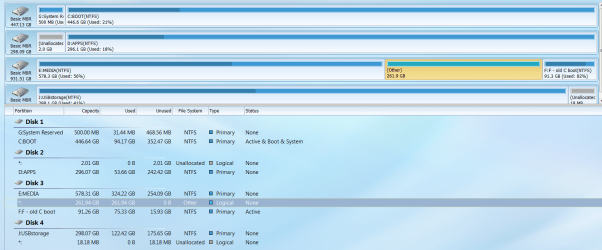
SUCCESS! To the few who have followed, tried to help, or who may be new to the thread, I got Ubuntu 17.10 installed onto my E drive. It was strange, after giving up on my own and your other untried methods, I decided to let the "Live CD" boot all the way, instead of the frustrating attempts to Install. Once fully Live, after playing a little, I decided to try the Install button on the Desktop. Oddly, it came up with my E drive as the only place to install. OK then, plenty of space there and not USB2 slow. I only then had to authorize to proceed, and it installed all the files. Then it suggested a restart and then, after throwing a relatively long DOS-like error screen, it went into a stall, not booting. Hmm, so I did a physical power cycle and it had created a new logon screen with choices, Windows or Ubuntu, as expected. I tried Ubuntu and all was as expected again. Yay! Now I've rebooted into Windows 7 and all is well on this end. Even though no one needs a new screenshot, I'll include one here for the curious.
 

Attachments

  • Minitool drives partitions with Ubuntu Oct 2017.png
    Minitool drives partitions with Ubuntu Oct 2017.png
    193.5 KB · Views: 6
Last edited:

My Computer My Computer

At a glance

Windows 7 Professional SP1 64-bitIntel Core i5 3570K @ 3.40GHz8.00GB Dual-Channel DDR3 @ 802MHz1024MB ATI AMD Radeon HD 6670
Computer type
PC/Desktop
Computer Manufacturer/Model Number
home-made 2008
OS
Windows 7 Professional SP1 64-bit
CPU
Intel Core i5 3570K @ 3.40GHz
Motherboard
ASUSTeK COMPUTER INC. P8Z77-V LX
Memory
8.00GB Dual-Channel DDR3 @ 802MHz
Graphics Card(s)
1024MB ATI AMD Radeon HD 6670
Sound Card
N.A. - mobo sound
Monitor(s) Displays
HP V242h 24' + HITACHI 51F59 HDTV
Screen Resolution
1920x1080
Hard Drives
Transcend 480 GB TLC SATA III 2.5' Solid State Drive
313GB Seagate ST3320620AS ATA Device (SATA)
977GB Western Digital WDC WD1001FAES-22W7A0 ATA Device (SATA)
320GB Seagate FreeAgent GoFlex USB external
PSU
RAIDMAX 530W Modular
Case
CoolerMaster HAF912Plus
Cooling
built-in CPU and case + Coolermaster Megaflow
Keyboard
Logitech Illuminated Keyboard K740
Mouse
iOne Lynx S2 mouse
Antivirus
Panda, Malwarebytes
Browser
Firefox 54.01
Hi,
Good luck :)
Looks like it installed on one of the only disks it could create 2 more partitions on since your disks are all mbr so 3 partitions is a max I believe.
 

My Computer My Computer

At a glance

Win-7-Pro64bit 7-H-Prem-64biti7-5930K 2nd i9-9940x both water blocked VRM'...Trident-z 3200C14 2nd Trident-z 3600C16EVGA 1080ti ftw3 2nd Titan Xp both water blocked
Computer type
PC/Desktop
Computer Manufacturer/Model Number
Custom assembled by me :}
OS
Win-7-Pro64bit 7-H-Prem-64bit
CPU
i7-5930K 2nd i9-9940x both water blocked VRM's too
Motherboard
ASUS SABERTOOTH X99 2nd ASUS x299 Apex
Memory
Trident-z 3200C14 2nd Trident-z 3600C16
Graphics Card(s)
EVGA 1080ti ftw3 2nd Titan Xp both water blocked
Sound Card
Built-in Realtek
Monitor(s) Displays
1-AOC G2460PG 24"G-Sync 144Hz/ 2nd 1-ASUS VG248QE 24" 144Hz
Screen Resolution
1920 x 1080 144Hz
Hard Drives
2-Samsung M.2 Evo & Evo Plus
2-Samsung 850 EVO 500GB SSD's/ 3-2.5 W.D. Black 1tb-&3-1tb/3-3.5 WD Black 1tb hdd's
PSU
EVGA SuperNOVA 1000-P2 2nd 1200-P2
Case
2-Corsair Obsidian Series 450D Black ATX Mid Tower
Cooling
Custom water loops
Keyboard
Logitech G710+/ 2nd Logitech G910
Mouse
2-RedDragon M901 Perdition 16400 dpi Gaming mouse = wired
Internet Speed
Comcast Ping 19ms 89.31mbps download speed 6.12mbps upload
Antivirus
Malwarebytes Pro/ Superantispyware Pro
Browser
FireFox & Pale moon
Other Info
2nd ASUS X299 Apex/Intel i9-9940x with Custom water loop/7H-Prem-x64/Corsair 450D case/Ram Trident-z 3600C16 4x8gb / Samsung970Evo plus 500gb SSD/Dual ssd EZ swap evo/PSU EVGA SuperNova 1200w-P2 80+Platinum/GPU Titan Xp /8-ML-140 on push-pull on 2-280GTX rads
start a new thread? uninstall Ubuntu. MBR

Now that I've got this Ubuntu dual-booting I've decided I don't like it. For one thing, the browser and email vertical scrollbars are too tiny, so are the OFF/MIN/MAX buttons. Maybe they designed the UX on 1080 instead of 1920. Then today's boot of it brought up Kodi I thought had failed to install last time. Kodi shouldn't auto-boot with the OS, plus it won't see my media folders on the Win partition, plus there's no exit from it besides rebooting. Also, Ubuntu seems childish like a Mac, not made for tinkerers like us.

I've found through the Live CD process that I much prefer PCLINUX OS. It's got some of the granular control I like without being all about the command terminal. So I searched on how to uninstall Ubuntu. First I found How To Safely Uninstall Ubuntu From A Windows Dual-Boot PC
which says to just delete the partition via Computer Management/Disk Management. But then it warns that the MBR will then need repair and one should boot Hiren's, but doesn't specify what's next. I do have Hiren's.

Then I found something at Tom's about fixing a non-booting MBR via the MS Windows install disc, which I do have also. How to Fix Windows 7 When It Fails to Boot

Finally, since I do have Minitool, this: How to Rebuild MBR | MiniTool Partition Wizard Tutorial

But before I go down any of these roads, I figured to ask the Gurus here for any advice.
 

My Computer My Computer

At a glance

Windows 7 Professional SP1 64-bitIntel Core i5 3570K @ 3.40GHz8.00GB Dual-Channel DDR3 @ 802MHz1024MB ATI AMD Radeon HD 6670
Computer type
PC/Desktop
Computer Manufacturer/Model Number
home-made 2008
OS
Windows 7 Professional SP1 64-bit
CPU
Intel Core i5 3570K @ 3.40GHz
Motherboard
ASUSTeK COMPUTER INC. P8Z77-V LX
Memory
8.00GB Dual-Channel DDR3 @ 802MHz
Graphics Card(s)
1024MB ATI AMD Radeon HD 6670
Sound Card
N.A. - mobo sound
Monitor(s) Displays
HP V242h 24' + HITACHI 51F59 HDTV
Screen Resolution
1920x1080
Hard Drives
Transcend 480 GB TLC SATA III 2.5' Solid State Drive
313GB Seagate ST3320620AS ATA Device (SATA)
977GB Western Digital WDC WD1001FAES-22W7A0 ATA Device (SATA)
320GB Seagate FreeAgent GoFlex USB external
PSU
RAIDMAX 530W Modular
Case
CoolerMaster HAF912Plus
Cooling
built-in CPU and case + Coolermaster Megaflow
Keyboard
Logitech Illuminated Keyboard K740
Mouse
iOne Lynx S2 mouse
Antivirus
Panda, Malwarebytes
Browser
Firefox 54.01
That is why I said to detach all other disks leaving on only the target disk (post #12).
What happened is that Ubuntu has changed the MBR from disk 1 to point to Grub on disk 3 where Ubuntu is installed.

Boot Windows and with Minitool Partition Wizard delete the the Ubuntu partition. As you will also delete the Grub boot loader, Windows won't boot.
Shutdown, detach all other disks leaving on only disk 1.
Boot with Win 7 installation disk and do a boot repair to restore the MBR on disk 1.

Remember: To install a second OS on another HDD, detach ALL other drives.

Many of us in this forum like Zorin. Looks like Windows
Zorin OS - Your Computer. Better.

I like Lubuntu that is light and also looks like Windows.
lubuntu | lightweight, fast, easier
uninstall - How to change Ubuntu into Lubuntu? - Ask Ubuntu
 

My Computers My Computers

  • At a glance

    Windows 7 HP 64i5 6600K - 800MHz to 4200MHz4+4G GSkill DDR4 3000IG - Intel 530
    Computer type
    PC/Desktop
    Computer Manufacturer/Model Number
    custom build
    OS
    Windows 7 HP 64
    CPU
    i5 6600K - 800MHz to 4200MHz
    Motherboard
    GA-Z170-HD3P
    Memory
    4+4G GSkill DDR4 3000
    Graphics Card(s)
    IG - Intel 530
    Monitor(s) Displays
    Samsung 226BW
    Screen Resolution
    1680x1050
    Hard Drives
    (1) -1 SM951 – 128GB M.2 AHCI PCIe SSD drive for Windows 7 and Lubuntu
    (2) -1 WD SATA 3 - 1T for Data
    (3) -1 WD SATA 3 - 1T for backup
    PSU
    Thermaltake 450W TR2 gold
    Keyboard
    Old and good Chicony mechanical keyboard
    Mouse
    Logitech mX performance - 9 buttons (had to disable some)
    Internet Speed
    500Mb/s
    Browser
    Firefox 64
    Other Info
    TinyWall firewall
  • At a glance

    Windows 7 Proi7-4500U 800MHz to 3.0GHz(4+4)G DDR3 1600IG intel 4400 + NVIDIA GeForce GT 745M
    Computer type
    Laptop
    System Manufacturer/Model Number
    Asus Q550LF
    OS
    Windows 7 Pro
    CPU
    i7-4500U 800MHz to 3.0GHz
    Motherboard
    Asus Q550LF
    Memory
    (4+4)G DDR3 1600
    Graphics Card(s)
    IG intel 4400 + NVIDIA GeForce GT 745M
    Sound Card
    Realtek
    Monitor(s) Displays
    LG Display LP156WF4-SPH1
    Screen Resolution
    1920 x 1080
    Hard Drives
    BX500 120G SSD for Windows and programs +
    1T HDD for data
    Internet Speed
    500 Mb/s
    Browser
    Firefox
    Other Info
    TinyWall firewall
Thanks again Mega.
 

My Computer My Computer

At a glance

Windows 7 Professional SP1 64-bitIntel Core i5 3570K @ 3.40GHz8.00GB Dual-Channel DDR3 @ 802MHz1024MB ATI AMD Radeon HD 6670
Computer type
PC/Desktop
Computer Manufacturer/Model Number
home-made 2008
OS
Windows 7 Professional SP1 64-bit
CPU
Intel Core i5 3570K @ 3.40GHz
Motherboard
ASUSTeK COMPUTER INC. P8Z77-V LX
Memory
8.00GB Dual-Channel DDR3 @ 802MHz
Graphics Card(s)
1024MB ATI AMD Radeon HD 6670
Sound Card
N.A. - mobo sound
Monitor(s) Displays
HP V242h 24' + HITACHI 51F59 HDTV
Screen Resolution
1920x1080
Hard Drives
Transcend 480 GB TLC SATA III 2.5' Solid State Drive
313GB Seagate ST3320620AS ATA Device (SATA)
977GB Western Digital WDC WD1001FAES-22W7A0 ATA Device (SATA)
320GB Seagate FreeAgent GoFlex USB external
PSU
RAIDMAX 530W Modular
Case
CoolerMaster HAF912Plus
Cooling
built-in CPU and case + Coolermaster Megaflow
Keyboard
Logitech Illuminated Keyboard K740
Mouse
iOne Lynx S2 mouse
Antivirus
Panda, Malwarebytes
Browser
Firefox 54.01
You're welcome.
Give us a feedback on what you did.
 

My Computers My Computers

  • At a glance

    Windows 7 HP 64i5 6600K - 800MHz to 4200MHz4+4G GSkill DDR4 3000IG - Intel 530
    Computer type
    PC/Desktop
    Computer Manufacturer/Model Number
    custom build
    OS
    Windows 7 HP 64
    CPU
    i5 6600K - 800MHz to 4200MHz
    Motherboard
    GA-Z170-HD3P
    Memory
    4+4G GSkill DDR4 3000
    Graphics Card(s)
    IG - Intel 530
    Monitor(s) Displays
    Samsung 226BW
    Screen Resolution
    1680x1050
    Hard Drives
    (1) -1 SM951 – 128GB M.2 AHCI PCIe SSD drive for Windows 7 and Lubuntu
    (2) -1 WD SATA 3 - 1T for Data
    (3) -1 WD SATA 3 - 1T for backup
    PSU
    Thermaltake 450W TR2 gold
    Keyboard
    Old and good Chicony mechanical keyboard
    Mouse
    Logitech mX performance - 9 buttons (had to disable some)
    Internet Speed
    500Mb/s
    Browser
    Firefox 64
    Other Info
    TinyWall firewall
  • At a glance

    Windows 7 Proi7-4500U 800MHz to 3.0GHz(4+4)G DDR3 1600IG intel 4400 + NVIDIA GeForce GT 745M
    Computer type
    Laptop
    System Manufacturer/Model Number
    Asus Q550LF
    OS
    Windows 7 Pro
    CPU
    i7-4500U 800MHz to 3.0GHz
    Motherboard
    Asus Q550LF
    Memory
    (4+4)G DDR3 1600
    Graphics Card(s)
    IG intel 4400 + NVIDIA GeForce GT 745M
    Sound Card
    Realtek
    Monitor(s) Displays
    LG Display LP156WF4-SPH1
    Screen Resolution
    1920 x 1080
    Hard Drives
    BX500 120G SSD for Windows and programs +
    1T HDD for data
    Internet Speed
    500 Mb/s
    Browser
    Firefox
    Other Info
    TinyWall firewall
Back
Top