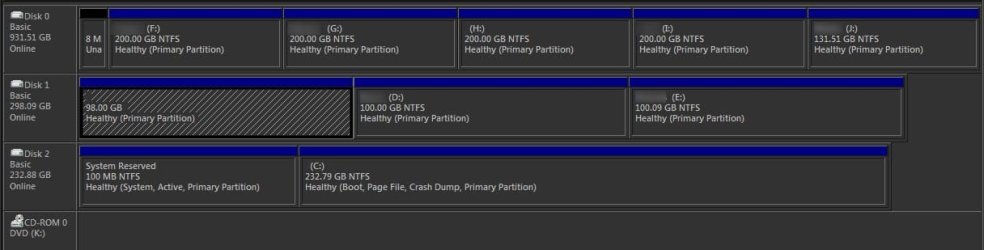
So probably Storage drives are not faulty? It seems that the issue is somehow similar to "Boot failed" error when you start a UEFI-enabled computer from a 64-bit version of Windows 7 or Windows Server 2008 R2 installation DVD (Package 1) and "Boot failed" error message when you start a UEFI-enabled computer from the installation DVD of a 64-bit version of Windows 7 or Windows Server 2008 R2 (Package 2) .
From Both Microsoft Hotfix.
Microsoft said:SYMPTOMS
Consider the following scenario:•You attach a storage device that has more than four partitions to a computer that has the Unified Extensible Firmware Interface (UEFI) mode enabled.
•You insert a Windows 7 or a Windows Server 2008 R2 installation DVD into a drive of the device, and then you start the computer from the DVD.
•You receive the following message during the startup process, and then you press a key:
Press any key to boot from CD/DVD
In this scenario, you receive an error message that resembles the following:
Boot failed.
To have more than four Partition, you would need to have one or more Logical partitions or Linux partitions.
Do you have any Logical partitions or Linux partitions?
Arc said:Ray, I have logical partitions. Is it the reason behind that issue?
The way I read Microsoft's statement, I would YES, as Windows 8 UEFI is NOT HAPPY booting with Logical Partitions.
My Computer
At a glance
ME/XP/Vista/Win7
- OS
- ME/XP/Vista/Win7