Solved UEFI and Windows 7 64bit

sam997

New member
Local time
11:14 AM
Messages
7
Hi all,
I have ASROCK h77 pro4/MVP motherboard with 2500k processor.
I also have 2 hdds.
1) 500 GB seagate sata2 internal on which windows 7 is installed with UEFI(GPT).
2) 2TB goflex
When I boot with my 2tb goflex attached, every time windows boot manager goes into recovery mode and gives "insert proper boot media error".But when I remove the usb connection to goflex I can boot.Ones the windows boot there is no problem attaching the usb drive.
Now I have to remove the usb connection every time I boot.
 

My Computer

OS
Windows 7 Professional x64
CPU
Intel Core i5 2500k
Motherboard
ASROCK H77 Pro4/MVP
Memory
Corsair 4GBx2
Monitor(s) Displays
Samsung 22" LED
Hard Drives
Seagate 500GB
Seagate GoFlex 2TB
PSU
Cooler Master Extreme 600w
Case
NZXT Lexa S
The problem sounds like your bios is listing your USB device in its order of preferred bootable devices before your hard drive, solution go into bios (with USB device attached) and change the order! Regards
 

My Computer

OS
Windows 7 ult x64
The problem sounds like your bios is listing your USB device in its order of preferred bootable devices before your hard drive, solution go into bios (with USB device attached) and change the order! Regards

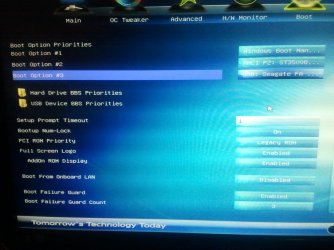
My boot priorities are shown in image.
It says windows boot manager as first.
And I tried disabling everything else but still it doesn't work.
 

Attachments

  • 2012-05-28 09.39.34.jpg
    2012-05-28 09.39.34.jpg
    204 KB · Views: 193

My Computer

OS
Windows 7 Professional x64
CPU
Intel Core i5 2500k
Motherboard
ASROCK H77 Pro4/MVP
Memory
Corsair 4GBx2
Monitor(s) Displays
Samsung 22" LED
Hard Drives
Seagate 500GB
Seagate GoFlex 2TB
PSU
Cooler Master Extreme 600w
Case
NZXT Lexa S
Is the 2tb showing up as a bootable device in USB BBS priorities?

Try also triggering the one-time BIOS Boot Menu key at boot to see if the USB shows up. It may have nt60 bootsecting or other boot sector code on it which is interfering and which requires wiping.
 
Is the 2tb showing up as a bootable device in USB BBS priorities?

Try also triggering the one-time BIOS Boot Menu key at boot to see if the USB shows up. It may have nt60 bootsecting or other boot sector code on it which is interfering and which requires wiping.
Yes it shows up in BBS usb priorities.
So how to wipe the Boot sector code without formatting the drive?
 

My Computer

OS
Windows 7 Professional x64
CPU
Intel Core i5 2500k
Motherboard
ASROCK H77 Pro4/MVP
Memory
Corsair 4GBx2
Monitor(s) Displays
Samsung 22" LED
Hard Drives
Seagate 500GB
Seagate GoFlex 2TB
PSU
Cooler Master Extreme 600w
Case
NZXT Lexa S
Before going through all that, have you tried just setting the "boot option 3" to nothing instead of listing the USB drive?

P.S. One real nice thing about UEFI bios, you can actually take screen shots from it (F12 according to the manual for your board). All you need is a USB key to save the image to, then copy it over once back in Windows.
 

My Computer

Computer type
PC/Desktop
Computer Manufacturer/Model Number
Me
OS
Win 7 Ultimate x64
CPU
FX-8350 @ 4.6 GHz so far
Motherboard
Asus M5A97 EVO
Memory
ADATA XPG V1 Series Black 8GB DDR3 1600
Graphics Card(s)
Sapphire R9 270x Dual-X
Sound Card
Xonar DGX w/ Corsair Vengence 1300
Monitor(s) Displays
Acer S232HL Abid
Screen Resolution
1920x1080
Hard Drives
120 GB OCZ Vertex 3
500 GB Seagate 7200.12
PSU
Antec Earthwatts 650W Green
Case
Antec Three Hundred
Cooling
Cooler Master 212 EVO
Keyboard
Logitech G510
Mouse
Logitech G500s
Internet Speed
35000/3000
Before going through all that, have you tried just setting the "boot option 3" to nothing instead of listing the USB drive?
I did that but still the same.
I re-installed the windows with keeping the usb attached still it does not work.
 

My Computer

OS
Windows 7 Professional x64
CPU
Intel Core i5 2500k
Motherboard
ASROCK H77 Pro4/MVP
Memory
Corsair 4GBx2
Monitor(s) Displays
Samsung 22" LED
Hard Drives
Seagate 500GB
Seagate GoFlex 2TB
PSU
Cooler Master Extreme 600w
Case
NZXT Lexa S
Why did you keep the USB attached when reinstalling Win7?

One should always unplug all other HD's during install to insure the boot files are correctly installed to Win7 partition or it's 100mb System Reserved partition.
 
Why did you keep the USB attached when reinstalling Win7?

One should always unplug all other HD's during install to insure the boot files are correctly installed to Win7 partition or it's 100mb System Reserved partition.
I installed it ones without usb attached.
USB DISK IS OF MBR TYPE.
2 partitions related to gpt are on the windows installation drive only.
 

My Computer

OS
Windows 7 Professional x64
CPU
Intel Core i5 2500k
Motherboard
ASROCK H77 Pro4/MVP
Memory
Corsair 4GBx2
Monitor(s) Displays
Samsung 22" LED
Hard Drives
Seagate 500GB
Seagate GoFlex 2TB
PSU
Cooler Master Extreme 600w
Case
NZXT Lexa S
It may be boot code on the USB drive which is interfering with boot. The only way to know for sure is to move the data off temporarily to wipe the USB drive with Diskpart Clean Command then repartition in Disk Mgmt, move the data back.
 
It may be boot code on the USB drive which is interfering with boot. The only way to know for sure is to move the data off temporarily to wipe the USB drive with Diskpart Clean Command then repartition in Disk Mgmt, move the data back.
I ll try that today and post what is the result.
 

My Computer

OS
Windows 7 Professional x64
CPU
Intel Core i5 2500k
Motherboard
ASROCK H77 Pro4/MVP
Memory
Corsair 4GBx2
Monitor(s) Displays
Samsung 22" LED
Hard Drives
Seagate 500GB
Seagate GoFlex 2TB
PSU
Cooler Master Extreme 600w
Case
NZXT Lexa S
Clean Command Worked
Now I don't have to remove usb to turn on computer.

Thanks For Help
 

My Computer

OS
Windows 7 Professional x64
CPU
Intel Core i5 2500k
Motherboard
ASROCK H77 Pro4/MVP
Memory
Corsair 4GBx2
Monitor(s) Displays
Samsung 22" LED
Hard Drives
Seagate 500GB
Seagate GoFlex 2TB
PSU
Cooler Master Extreme 600w
Case
NZXT Lexa S
Back
Top