Solved UEFI boot keeps changing; UEFI/Win7 handshaking confusion

dianedebuda

New member
Member
Local time
8:56 PM
Messages
73
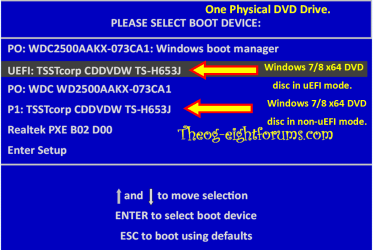
Trying to understand handshaking between UEFI & Win 7. Have Win7 Pro sp1 64 installed on SSD, mb=Asus F2A85-V Pro. Example: boot to flashdrive to do Acronis backup of SSD; remove SDD, insert spinner; boot again to flashdrive to do Acronis restore to spinner (to test backup); remove flashdrive, boot to UEFI, set UEFI spinner as default, save & reset; spinner starts boot (#1), Win logo shows briefly, reboots (#2) and shows Win repair/normal screen; choose normal; Windows desktop shows; new driver is loaded for spinner and asks for reboot (that part I understand); reboot (#3) starts and again briefly shows Win logo before yet again rebooting (#4) to the Win repair/normal screen; again choose normal & all is happy. But then I remove the spinner, insert the SSD, and have to go through the whole deal again. Why so many reboots?

Similarly, if I change any hd/flashdrive configuration, my UEFI boot selection is lost & I have to reset it again - sometimes with the multiple reboot scenerio, sometimes not. Sure wish I could force that the UEFI selection stay there as long as the selected drive is installed.
 

My Computer My Computer

At a glance

Windows 7 Pro 64bit
Computer type
PC/Desktop
OS
Windows 7 Pro 64bit
Hello and welcome diana look I am having a little difficulty in following the train of the thread.

Now do you mean you just backed up the SSD to a USB stick ? then tried to transfer that USB stick back up to the spinner? If it was just a back up then I don't think it is going to work because it is only a backup.

To make the spinner the boot device I would be cloning the SSD to the spinner. I wouldn't mucking around with sticks as I cannot see why that is necessary.
 

My Computer My Computer

At a glance

Desk1 7 Home Prem / Desk2 10 Pro / Main lap A...Desk1 i5 3750K / Laptop i7 GTX 860M / Desk2 i...Desk1 8GB (1866) / Desk2 16GB (1333) / Laptop...Desk 1& 2NVidia GTX 650 & Laptops on board Intel
Computer type
PC/Desktop
Computer Manufacturer/Model Number
Own build (new) Desk1 / Asus ROG Win 7 / Desk2 1st build
OS
Desk1 7 Home Prem / Desk2 10 Pro / Main lap Asus ROG 10 Pro 2 laptop Toshiba 7 Pro Asus P2520 7 & 10
CPU
Desk1 i5 3750K / Laptop i7 GTX 860M / Desk2 i5 2500
Motherboard
Desk1 Asus P877-V / Desk2 Gigabyte H67 UD3H / Laptop ?
Memory
Desk1 8GB (1866) / Desk2 16GB (1333) / Laptop 8Gb DDR3
Graphics Card(s)
Desk 1& 2NVidia GTX 650 & Laptops on board Intel
Sound Card
Desk 1 & 2 -XONAR DG Realtek High Def audio Laptop
Monitor(s) Displays
Desk 1 Benq HD 2450 / Desk2 Philips 24" / Laptop 17.5"
Screen Resolution
1920x1080 D1 & D2 & Laptop 1
Hard Drives
Desk1 Samsung 120GB 830 SSD
Asus ROG 256GB 850 Pro SSD
Desk2 Samsung 840 256 SSD
Toshiba 120GB EVO
PSU
Desk 1 Corsair HX 1050/ Laptop ? / Desk 2 Corsair HX 650
Case
Desk 1 Cooler HAF XM ? Toshiba laptop / Desk2 Coolermaster
Cooling
Fans on all Desk1 -2 Desk2 - all Coolermasters 5 Laptop ?
Keyboard
Desk 1 MS Sidewinder X6 Desk 2 MS Sidewinder X 4
Mouse
Desk 1&2 - Gigabyte MS 900 gamer - laptop - Logitec wireless
Internet Speed
ADSL2+
Other Info
One other Desktop (tester) and spare Toshba laptop both with SSD's
Running Kaspersky 2016 ISS on all machines config'd identically
Logitec audio stereo systems on each machine (x3)
Canon MG5250MFC
Router/modem TP-Link running WPA2SK
Good luck!
 

My Computer My Computer

At a glance

Desk1 7 Home Prem / Desk2 10 Pro / Main lap A...Desk1 i5 3750K / Laptop i7 GTX 860M / Desk2 i...Desk1 8GB (1866) / Desk2 16GB (1333) / Laptop...Desk 1& 2NVidia GTX 650 & Laptops on board Intel
Computer type
PC/Desktop
Computer Manufacturer/Model Number
Own build (new) Desk1 / Asus ROG Win 7 / Desk2 1st build
OS
Desk1 7 Home Prem / Desk2 10 Pro / Main lap Asus ROG 10 Pro 2 laptop Toshiba 7 Pro Asus P2520 7 & 10
CPU
Desk1 i5 3750K / Laptop i7 GTX 860M / Desk2 i5 2500
Motherboard
Desk1 Asus P877-V / Desk2 Gigabyte H67 UD3H / Laptop ?
Memory
Desk1 8GB (1866) / Desk2 16GB (1333) / Laptop 8Gb DDR3
Graphics Card(s)
Desk 1& 2NVidia GTX 650 & Laptops on board Intel
Sound Card
Desk 1 & 2 -XONAR DG Realtek High Def audio Laptop
Monitor(s) Displays
Desk 1 Benq HD 2450 / Desk2 Philips 24" / Laptop 17.5"
Screen Resolution
1920x1080 D1 & D2 & Laptop 1
Hard Drives
Desk1 Samsung 120GB 830 SSD
Asus ROG 256GB 850 Pro SSD
Desk2 Samsung 840 256 SSD
Toshiba 120GB EVO
PSU
Desk 1 Corsair HX 1050/ Laptop ? / Desk 2 Corsair HX 650
Case
Desk 1 Cooler HAF XM ? Toshiba laptop / Desk2 Coolermaster
Cooling
Fans on all Desk1 -2 Desk2 - all Coolermasters 5 Laptop ?
Keyboard
Desk 1 MS Sidewinder X6 Desk 2 MS Sidewinder X 4
Mouse
Desk 1&2 - Gigabyte MS 900 gamer - laptop - Logitec wireless
Internet Speed
ADSL2+
Other Info
One other Desktop (tester) and spare Toshba laptop both with SSD's
Running Kaspersky 2016 ISS on all machines config'd identically
Logitec audio stereo systems on each machine (x3)
Canon MG5250MFC
Router/modem TP-Link running WPA2SK
ICit2lol, the flashdrive is just a bootable with the Acronis software. Don't like doing system backups from a live system. Scenerio is: boot to the flashdrive to back up the SSD to a "backup" HD, remove the SSD, add the "test" HD, boot from the flashdrive to restore the backup image from the "backup" HD to the "test" HD, remove the "backup" HD & flashdrive, reboot with only the "test" HD to verify. Sorry I didn't make it clearer in the orig post; was trying too hard to show the multi-boots.

gregrocker, I do realize that there are a lot of pains with UEFI and that it is much easier to work with the tried-and-true BIOS/MBR. But the new preloaded systems are coming out UEFI-style, so I need to learn how to deal with it. Case in point, I've got a new laptop that I want to explore before deciding if there's too much crapware and I want to rebuild from scratch or to just remove the unwanted software.

I've found a fair amount of info on UEFI itself, but not much on the UEFI-o/s interaction. Don't know right now if the symptoms I'm seeing are "standard" or ASUS/Win7 specific.
 

My Computer My Computer

At a glance

Windows 7 Pro 64bit
Computer type
PC/Desktop
OS
Windows 7 Pro 64bit
Last edited:

My Computer My Computer

At a glance

ME/XP/Vista/Win7
OS
ME/XP/Vista/Win7
theog, think I've read/viewed all of your listed links earlier except the "UEFI and Windows" which I will check out when I go to a Win7 box (on XP with Office97 now & it doesn't read that format). What I haven't seen anywhere (at least in a form that I understood) is that
As Windows Boot Manager is always first boot device, very time you change HDD/SSD, the UEFI/BIOS firmware will reset.
I'm assuming typo "very" meaning "every". That explains the symptoms. What a pain. But the UEFI boot is fast when you're in a static drive situation. Thanks.

Edit: Can't believe this is my first post. Been lurking here for years & didn't realize I hadn't registered. Thanks to so many for all the tips I've used.
 

My Computer My Computer

At a glance

Windows 7 Pro 64bit
Computer type
PC/Desktop
OS
Windows 7 Pro 64bit
Back
Top