
UEFI-compatible Win7 installation

IIllytch321

gadfly at a feast
Power User
Local time
4:33 AM
Messages
199
Location
In the other room
(A large portion of my issue and what led up to it resides here)

I know barely anything about boot managers and whatnot. This is a part of a long series regarding other problems I've had that I posted previously here a while ago, but no one seemed to know anything about it (although the above link is to another forum).

Well I had gotten past that original problem by forcing the "UEFI DVD drive" to be booted instead of the "BIOS DVD drive" version, as I have the option to pick either type (as to utilize a GPT format instead of an MBR format, I do have a UEFI motherboard by the way). As I try to install Win7 x64, it creates the GPT disk and MSR and EFI partitions correctly, but when the setup restarts for the first time, inbetween the "Installing Updates" phase and "Completing Installation" phase, it gives me this error:

Windows could not finish configuring the system. To attempt to resume configuration, restart the computer.

I tried to manually create the GPT disk and EFI, MSR and primary partitions but no change. I tried different permutations of boot orders and nothing changed. Now, I can successfully install Win7 via the "BIOS DVD drive" and use a MBR style disk instead, and it installs fine. The only caveat is I can only boot up Windows in MBR format if I have the installation disc in the DVD drive, which is silly, and refuse to settle for.

Any more information you need please ask, I've been trying to fix my computer for days now and I need help, psychological and otherwise. Thanks ahead of time.
 

My Computer

Computer Manufacturer/Model Number
Mine
OS
Windows 7 Home Premium x64
CPU
AMD FX-8150
Motherboard
ASUS Sabertooth 990FX
Memory
Corsair Vengeance Dual-Channel 1866MHz 8GB (2x4GB)
Graphics Card(s)
x2 Galaxy GeForce GTX 560 2GB in SLI
Sound Card
(Onboard) Realtek ALC892
Monitor(s) Displays
Dynex 42 inch HDTV
Screen Resolution
1920x1080
Hard Drives
Seagate Barracuda 2TB (SATA);
My Book 300GB (USB);
My Book 3TB (USB)
PSU
Kingwin KX-1000
Case
Corsair Carbide 500R
Cooling
Corsair H100
Keyboard
Logitech Wireless Solar K750
Mouse
Logitech Wireless M305
Internet Speed
DSL (unsure of details)
Other Info
LiteOn iHBS212 Blu-Ray Writer (SATA)
There are special steps to install using the EFI BIOS: UEFI (Unified Extensible Firmware Interface) - Install Windows 7 with - Windows 7 Forums

When installing to an MBR HD if it requires having the disk in the drive in the drive to boot it, post back a screenshot of your maximized Disk Management drive map with listings. You may still need to write the System boot files to the 100mb System Reserved or Win7 partition by marking it Active, running Startup Repair up to 3 separate times with reboots until Win7 starts on its own.
 
Screenshot you asked for should be attached if I did that right. . .

You may still need to write the System boot files to the 100mb System Reserved or Windows 7 partition by marking it Active, running Startup Repair up to 3 separate times with reboots
Could I do it on both or would that possibly ruin something?

Also, why is the issue occuring with the GPT installation though; I'd prefer to utilize the GPT instead of MBR, due to my UEFI board.

I mean, if you want to really screw your head up, read the thread that I linked to at the beginning of this thread. That's what started all this, and might possibly have something still to do with it, given the NVRAM has data stored on there regarding the boot information, assuming I retained any information that I've read in the past few days.

Thank you for the reply.
 

Attachments

  • Untitled.jpg
    Untitled.jpg
    103.1 KB · Views: 479

My Computer

Computer Manufacturer/Model Number
Mine
OS
Windows 7 Home Premium x64
CPU
AMD FX-8150
Motherboard
ASUS Sabertooth 990FX
Memory
Corsair Vengeance Dual-Channel 1866MHz 8GB (2x4GB)
Graphics Card(s)
x2 Galaxy GeForce GTX 560 2GB in SLI
Sound Card
(Onboard) Realtek ALC892
Monitor(s) Displays
Dynex 42 inch HDTV
Screen Resolution
1920x1080
Hard Drives
Seagate Barracuda 2TB (SATA);
My Book 300GB (USB);
My Book 3TB (USB)
PSU
Kingwin KX-1000
Case
Corsair Carbide 500R
Cooling
Corsair H100
Keyboard
Logitech Wireless Solar K750
Mouse
Logitech Wireless M305
Internet Speed
DSL (unsure of details)
Other Info
LiteOn iHBS212 Blu-Ray Writer (SATA)
Yes, it is in MBR format right now.

I did install using GPT at first, then it gave me that error I mentioned. Given I couldn't get on this site without a working installation of Windows, I just switched to MBR so I can at least use my computer.

Generic recap: With MBR I can only boot with the installation disc in the DVD drive, and with GPT that error won't let me install Windows.

Sorry if I wasn't expliciit enough in my descriptions and whatnot.:geek:
 

My Computer

Computer Manufacturer/Model Number
Mine
OS
Windows 7 Home Premium x64
CPU
AMD FX-8150
Motherboard
ASUS Sabertooth 990FX
Memory
Corsair Vengeance Dual-Channel 1866MHz 8GB (2x4GB)
Graphics Card(s)
x2 Galaxy GeForce GTX 560 2GB in SLI
Sound Card
(Onboard) Realtek ALC892
Monitor(s) Displays
Dynex 42 inch HDTV
Screen Resolution
1920x1080
Hard Drives
Seagate Barracuda 2TB (SATA);
My Book 300GB (USB);
My Book 3TB (USB)
PSU
Kingwin KX-1000
Case
Corsair Carbide 500R
Cooling
Corsair H100
Keyboard
Logitech Wireless Solar K750
Mouse
Logitech Wireless M305
Internet Speed
DSL (unsure of details)
Other Info
LiteOn iHBS212 Blu-Ray Writer (SATA)
If you want to try to fix the MBR disk then first I would mark G Inactive as only the OS or it's boot partition should be marked Active: Partition - Mark as Inactive - Windows 7 Forums

Next I would unplug all other HD's except Win7, boot your WIn7 DVD to run Startup Repair - Run 3 Separate Times with reboots until Win7 starts on its own.

If this fails then I would next check my BIOS settings to see if there are other EFI settings that need adjusting. Normally it chooses EFI by setting EFI boot disk to boot first in BIOS Setup. There may be other settings on your mobo. I would read the Manual on the maker's Support Downloads webpage for your model.

There could be other problems with your HD as the two RAW partitions mean the data (if any) has been lost and must be reformatted. See if they will reformat now - if not you may need to wipe or reinitialize the HD.
SSD - HDD Optimize for Windows Reinstallation
 
Last edited:
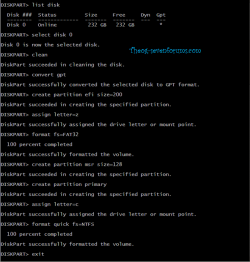
convert MBR disk to uEFI GPT disk in Diskpart.

Select disk 0
Clean
Convert gpt
Create partition efi size=200
Assign letter=z
Format quick fs=FAT32
Create partition msr size=128
Create partition primary
Assign letter=c
Format quick fs=NTFS
Exit

uEFI 010-1.PNG
uEFI 011-1.PNG
 
Last edited:

My Computer

OS
ME/XP/Vista/Win7
-G: is an external and can be unplugged easily, so I will try that.
-I've ran the repair installation from the DVD on numerous occasions and it never noticed anything wrong, but will try again.
-I'm pretty sure I'm not running it from UEFI, but I'll take another look when I run the repair.
-The two RAW partitions were done on purpose; they shouldn't be an issue.
-When I attempted the GPT installation, I tried manually (similar to how you're showing above, just didn't assign a letter to the EFI partition) and tried automatically (letting the Windows installer choose for me after I booted from UEFI), but, as stated above, an error halted my progress.

Ultimately, I see the GPT as being the preferred method of formatting and installation, but that error message is occuring, so I cannot continue and must install the MBR as to get Windows running (this is my only computer by the way). Everything else to my knowledge is being done correctly. If you think modifying boot information with EasyBCD 2.1.2 (as it doesn't really have UEFI support) could ruin the information stored in NVRAM, read my thread that begins my first post, it's quite tricky. But I have gotten at least to the point where if I install Windows using the GPT method, I get the "Windows Boot Manager" to show up in the boot order, which is how it was when I first installed Windows and everything worked fine, which makes me desire the GPT method. I hate that after each failed attempt at a GPT install, I have to reinstall the MBR and Windows all over again, it's dreary, heh.

Will post back with any updates. Thanks.
 

My Computer

Computer Manufacturer/Model Number
Mine
OS
Windows 7 Home Premium x64
CPU
AMD FX-8150
Motherboard
ASUS Sabertooth 990FX
Memory
Corsair Vengeance Dual-Channel 1866MHz 8GB (2x4GB)
Graphics Card(s)
x2 Galaxy GeForce GTX 560 2GB in SLI
Sound Card
(Onboard) Realtek ALC892
Monitor(s) Displays
Dynex 42 inch HDTV
Screen Resolution
1920x1080
Hard Drives
Seagate Barracuda 2TB (SATA);
My Book 300GB (USB);
My Book 3TB (USB)
PSU
Kingwin KX-1000
Case
Corsair Carbide 500R
Cooling
Corsair H100
Keyboard
Logitech Wireless Solar K750
Mouse
Logitech Wireless M305
Internet Speed
DSL (unsure of details)
Other Info
LiteOn iHBS212 Blu-Ray Writer (SATA)

I really feel like a dummy.:o

I guess the problem has been fixed, but I found out that (at least with an MBR) all I need to have in the boot order is "Windows Boot Manager" then "HDD 0" instead of "HDD 0" being the only option. I thought that because I thought "Windows Boot Manager" only dealt with GPT disks. Oh well, now it's all back to the way it was once upon a time.

But. . .I still wonder why the error was occuring when I installed Windows on the GPT instead? And how much better (or what are the practical differences) in GPT vs. MBR when it comes to Windows on a UEFI friendly board?

Thanks again for the effort.:geek:
 

My Computer

Computer Manufacturer/Model Number
Mine
OS
Windows 7 Home Premium x64
CPU
AMD FX-8150
Motherboard
ASUS Sabertooth 990FX
Memory
Corsair Vengeance Dual-Channel 1866MHz 8GB (2x4GB)
Graphics Card(s)
x2 Galaxy GeForce GTX 560 2GB in SLI
Sound Card
(Onboard) Realtek ALC892
Monitor(s) Displays
Dynex 42 inch HDTV
Screen Resolution
1920x1080
Hard Drives
Seagate Barracuda 2TB (SATA);
My Book 300GB (USB);
My Book 3TB (USB)
PSU
Kingwin KX-1000
Case
Corsair Carbide 500R
Cooling
Corsair H100
Keyboard
Logitech Wireless Solar K750
Mouse
Logitech Wireless M305
Internet Speed
DSL (unsure of details)
Other Info
LiteOn iHBS212 Blu-Ray Writer (SATA)
Back
Top