UEFI-install from USB don't work

Burgurne

Danish Viking
Member
VIP
Local time
4:19 PM
Messages
134
Location
Denmark
Greetings.
I have made a bootable USB-key after this guide
http://www.sevenforums.com/tutorials/2432-usb-windows-7-installation-key-drive-create.html

When in post, I can select to boot from the USB-key "normal" or as a UEFI-boot
If I choose "normal" it boot right away, but if I choose UEFI, then it just boots the UEFI-shell from my mobo.

Using the Windows 7-dvd to boot from I galso get to boot "normal" or "UEFI", and booting this way, UEFI works fine, and Windows 7 installs with UEFI.

Is it normal, that boot from USB can't start an UEFI windows install? Or do I have to do something different to make it to work?
 

My Computer

Computer type
PC/Desktop
Computer Manufacturer/Model Number
homebrewed
OS
Windows 7 Ultimate x64 retail
CPU
Core i5 3570K @ 4,4Ghz
Motherboard
MSI Z77A GD65
Memory
16Gbyte Corsair C9 1866mhz
Graphics Card(s)
MSI Lightning GTX 770
Sound Card
Auzentech
Monitor(s) Displays
BenQ 24"
Screen Resolution
1920x1200
Hard Drives
Samsung 840 EVO SSD, Samsung SSD 830 256Gbyte, Seagate 3Tbyte HDD, WD 4 Tbyte HDD.
PSU
Zahlmann 850HP
Case
Corsair Carbide 500R
Keyboard
G15 logitech
Mouse
Logitech Laser MX1000
Internet Speed
60/60
Antivirus
Bitdefender
Browser
Chrome
Is it normal, that boot from USB can't start an UEFI windows install? Or do I have to do something different to make it to work?

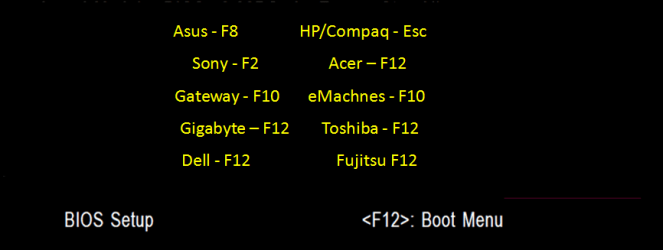
Use are your Boot menu key, to boot the USB Pendrive.

GA BIOS-12.PNG
 

My Computer

OS
ME/XP/Vista/Win7
Greetings.
I have made a bootable USB-key after this guide
http://www.sevenforums.com/tutorials/2432-usb-windows-7-installation-key-drive-create.html

When in post, I can select to boot from the USB-key "normal" or as a UEFI-boot
If I choose "normal" it boot right away, but if I choose UEFI, then it just boots the UEFI-shell from my mobo.

Using the Windows 7-dvd to boot from I galso get to boot "normal" or "UEFI", and booting this way, UEFI works fine, and Windows 7 installs with UEFI.

Is it normal, that boot from USB can't start an UEFI windows install? Or do I have to do something different to make it to work?

Are you formating the USB Pendrive in fat32?

USB tutorial.PNG
 

My Computer

OS
ME/XP/Vista/Win7
I am using the exact same settings as for my bootable Windows 7 USB-key for installing on a MBR. It is only when I want to boot to mahe an UEFI-install it is a problem.
 

My Computer

Computer type
PC/Desktop
Computer Manufacturer/Model Number
homebrewed
OS
Windows 7 Ultimate x64 retail
CPU
Core i5 3570K @ 4,4Ghz
Motherboard
MSI Z77A GD65
Memory
16Gbyte Corsair C9 1866mhz
Graphics Card(s)
MSI Lightning GTX 770
Sound Card
Auzentech
Monitor(s) Displays
BenQ 24"
Screen Resolution
1920x1200
Hard Drives
Samsung 840 EVO SSD, Samsung SSD 830 256Gbyte, Seagate 3Tbyte HDD, WD 4 Tbyte HDD.
PSU
Zahlmann 850HP
Case
Corsair Carbide 500R
Keyboard
G15 logitech
Mouse
Logitech Laser MX1000
Internet Speed
60/60
Antivirus
Bitdefender
Browser
Chrome
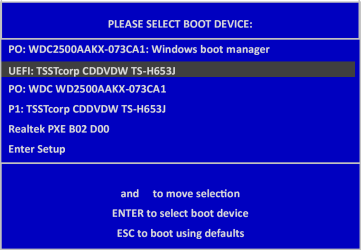
Are you booting the uEFI drive. This screenshot is showing the uEFI DVD boot drive.

untitled0001-1.PNG
 

My Computer

OS
ME/XP/Vista/Win7
With my Asus motherboard, a bootable USB drive appears in the one-time boot device selector as two options: one as UEFI, the other as not. (Both boot options contain the type of the USB flash drive.)

The drive must be formatted as FAT32, though. If the USB drive as formatted NTFS, it won't boot under UEFI. It can still be used to do the traditional MBR installation, though. That means that the Microsoft tool:

Microsoft Store Online

cannot be used to prepare a USB key drive if you want to do a UEFI install.

I've seen instructions for doing that in a number of places. Here's the short version:

Launch a command window with admin privileges. (Search on cmd. Right click on cmd.exe, and select "run as administrator".)
  1. DiskPart
  2. List Disk
  3. Select Disk # (the drive number for the flash drive, from step 2)
  4. Clean
  5. Create Partition Primary
  6. Active
  7. Format fs=FAT32 quick
  8. Assign
The copy the contents of a WIndows 7 installation DVD onto the flash drive. (Or extract the .iso with 7Zip. Or mount the .iso with a utility, and copy all of its contents.)
 

My Computer

Computer Manufacturer/Model Number
homegrown
OS
Windows 7 Pro X64 SP1
CPU
Intel Core I7-3930k
Motherboard
Asus P9X79 Pro
Memory
16 GB Gskill DDR3-2133
Graphics Card(s)
eVGA GTX680
Sound Card
Creative X-Fi Titanium
Monitor(s) Displays
As PA246Q
Screen Resolution
1920 X 1200
Hard Drives
Corsair Force GT, 120 GB
WDC 1.5TB Caviar Black
PSU
PCP&C Silencer 750 Crossfire
Case
Silverstone FT02
Cooling
Noctua NH-D14
Keyboard
cheap Logitech USB
Mouse
Microsoft Intellimouse Explorer (old optical) USB
Internet Speed
6Mb cable
Other Info
Pioneer BDR-205
Samsung SH-203B
Monsoon 5.1 speakers
I Can't copy win7 installation on USB-drive when it is fat32. The Install.wim file is way to big for this.
But yes, my USB was formatted with NTFS, so it might be this that stops me.

I am aware of the bootmenu from BIOS where there are 2 versions of booting my USB-drive, one "normal" and one UEFI. But I don't know how to put windows install-files on a fat32-formatted USB-key. Is there a solution to this also?
 

My Computer

Computer type
PC/Desktop
Computer Manufacturer/Model Number
homebrewed
OS
Windows 7 Ultimate x64 retail
CPU
Core i5 3570K @ 4,4Ghz
Motherboard
MSI Z77A GD65
Memory
16Gbyte Corsair C9 1866mhz
Graphics Card(s)
MSI Lightning GTX 770
Sound Card
Auzentech
Monitor(s) Displays
BenQ 24"
Screen Resolution
1920x1200
Hard Drives
Samsung 840 EVO SSD, Samsung SSD 830 256Gbyte, Seagate 3Tbyte HDD, WD 4 Tbyte HDD.
PSU
Zahlmann 850HP
Case
Corsair Carbide 500R
Keyboard
G15 logitech
Mouse
Logitech Laser MX1000
Internet Speed
60/60
Antivirus
Bitdefender
Browser
Chrome
I Can't copy win7 installation on USB-drive when it is fat32. The Install.wim file is way to big for this.
But yes, my USB was formatted with NTFS, so it might be this that stops me.

I am aware of the bootmenu from BIOS where there are 2 versions of booting my USB-drive, one "normal" and one UEFI. But I don't know how to put windows install-files on a fat32-formatted USB-key. Is there a solution to this also?

That's unexpected. Copying the contents of the .iso to the FAT32 key drive is exactly what I did.

Fat32 is supposed to support single files up to 4GB in size.
 

My Computer

Computer Manufacturer/Model Number
homegrown
OS
Windows 7 Pro X64 SP1
CPU
Intel Core I7-3930k
Motherboard
Asus P9X79 Pro
Memory
16 GB Gskill DDR3-2133
Graphics Card(s)
eVGA GTX680
Sound Card
Creative X-Fi Titanium
Monitor(s) Displays
As PA246Q
Screen Resolution
1920 X 1200
Hard Drives
Corsair Force GT, 120 GB
WDC 1.5TB Caviar Black
PSU
PCP&C Silencer 750 Crossfire
Case
Silverstone FT02
Cooling
Noctua NH-D14
Keyboard
cheap Logitech USB
Mouse
Microsoft Intellimouse Explorer (old optical) USB
Internet Speed
6Mb cable
Other Info
Pioneer BDR-205
Samsung SH-203B
Monsoon 5.1 speakers
Tried Installing Windows 8.1 Heavier Edition and this worked. It would also work for any Windows 7 or 8- 8.1 Operating Systems.
>First create a new folder called wim on the C drive.
>Extract everything from the .Iso file to a folder anywhere on your computer such as Desktop.
>Copy the install.wim to the wim folder you made on c drive. c:\wim
>Use this command to split your install.wim
in an elevated Command Prompt.

Dism /Split-Image /ImageFile:c:\wim\install.wim /SWMFile:c:\wim\install.swm /FileSize:2500

>Then put the new install.wim files back into your folder that you extracted your iso from, and delete the original.
>Lastly,Format your USB and insert all of your files into it.
Boot : D

I have no idea if it is due to Fat32 not allowing files up to more than 4 gigs, but I do know this.You can boot from a USB if you just copy the All of the files from the CD or image to the USB and boot from it.
Good Luck.

Also it does say that you can not split Windows 8 or 8.1 install.wim files in it, but I guess Microsoft was lying lol
 

My Computer

Computer type
PC/Desktop
OS
Windows 8.1 Pro 64bit
Back
Top