- Local time
- 4:06 PM
- Messages
- 318
Hello everyone, where do I start, well I plan on putting my Computer parts into a new case corsair 200 R
Which had better airflow than my current case the fans are already installed and waiting for the MB / SSD HD Ect to be put in,
In March of 2013 I added a SSD to the system and cloned my 1T SATA Hitachi Drive to the SSD
Previous thread related to SSD
http://www.sevenforums.com/hardware-devices/282981-looking-upgrade-new-ssd.html
page 5 post number 44 on
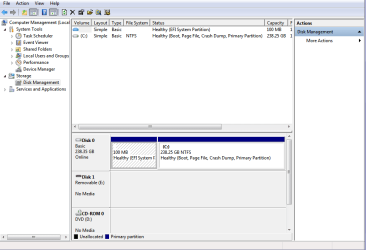
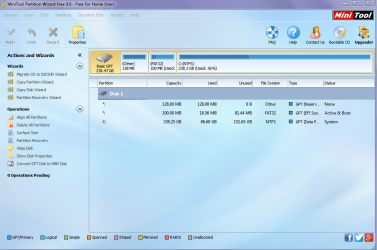
I am not sure that I am booting the OS from my SSD (since I cloned it from the 1T HD) but the systems seem to load like it is booting from the SSD.
I have looked at the UEFI BIOS and I cannot see the SSD in the boot priority Windows but I see it every Where Else and since I am putting the system I a new case I would like to make sure everything is set up correctly for UEFI.
Another question is, if I was to re arrange the SSD and HD SATA Cables would the current System boot to the OS ?
And If I was to Disconnect the HD and just leave the SSD connected will that tell me if the OS is on the SSD ?
Thanks in advance ..........Confused in UEFI
Which had better airflow than my current case the fans are already installed and waiting for the MB / SSD HD Ect to be put in,
In March of 2013 I added a SSD to the system and cloned my 1T SATA Hitachi Drive to the SSD
Previous thread related to SSD
http://www.sevenforums.com/hardware-devices/282981-looking-upgrade-new-ssd.html
page 5 post number 44 on
I am not sure that I am booting the OS from my SSD (since I cloned it from the 1T HD) but the systems seem to load like it is booting from the SSD.
I have looked at the UEFI BIOS and I cannot see the SSD in the boot priority Windows but I see it every Where Else and since I am putting the system I a new case I would like to make sure everything is set up correctly for UEFI.
Another question is, if I was to re arrange the SSD and HD SATA Cables would the current System boot to the OS ?
And If I was to Disconnect the HD and just leave the SSD connected will that tell me if the OS is on the SSD ?
Thanks in advance ..........Confused in UEFI
Attachments
My Computer
- Computer type
- PC/Desktop
- Computer Manufacturer/Model Number
- Personal build
- OS
- Genuine windows 7X64
- CPU
- AMD 8320 FX Processor
- Motherboard
- Asus Sabertoothe 990 FX R2.0 AM2+/AM2 AMD MB
- Memory
- 8 Gigs Corsair Vengance DDR3 1886 MHZ
- Graphics Card(s)
- EVGA GTX 750 Ti FTW
- Sound Card
- On board
- Monitor(s) Displays
- ASUS VE247H 24 inch
- Screen Resolution
- HDMI
- Hard Drives
- Samsung 120GB 2.5-inch SSD 840 SATA III
- PSU
- Corsair 750 Watts
- Case
- Gigabyte case
- Cooling
- Zellman CNPS 10 Extreme
- Internet Speed
- 50megs
- Antivirus
- AVG Free