ughhh more problems........

64met

New member
Member
Local time
10:37 AM
Messages
66
Now, I have an error message popping up every time I access the internet: It reads; program on your computer has corrupted your default search provider setting. IE has -re-set your search provider: BING
IE will now open where you can change setting... I do this, change it back to google- and next time I go online same error- it has defaulted to bing again???

Can anyone help with this/offer suggestions? Thxs
 

My Computer

Computer Manufacturer/Model Number
Asus GC5275
OS
Windows 7 Ultimate x64
Now, I have an error message popping up every time I access the internet: It reads; program on your computer has corrupted your default search provider setting. IE has -re-set your search provider: BING
IE will now open where you can change setting... I do this, change it back to google- and next time I go online same error- it has defaulted to bing again???

Can anyone help with this/offer suggestions? Thxs

Yes, run a virus scan quick. If it passes then restore from a backup, or do a repair install.


Ken
 

My Computer

Computer Manufacturer/Model Number
HP Pavillion dv-7 1005 Tx
OS
Win 8 Release candidate 8400
CPU
[email protected]
Memory
4 gigs
Graphics Card(s)
Nvidia 9600M
Sound Card
HD built-in
Monitor(s) Displays
17" Wxga
Screen Resolution
1440x900
Cooling
none
Internet Speed
45Mb down 5Mb up
Now, I have an error message popping up every time I access the internet: It reads; program on your computer has corrupted your default search provider setting. IE has -re-set your search provider: BING
IE will now open where you can change setting... I do this, change it back to google- and next time I go online same error- it has defaulted to bing again???

Can anyone help with this/offer suggestions? Thxs

Yes, run a virus scan quick. If it passes then restore from a backup, or do a repair install.


Ken

Thxs, Ken! I am a noob- could u please explain restore from backup or a repair-install??? Not sure where to start. BTW: I ran virus scan (Microsoft essentials) all is good. Thank you!
 

My Computer

Computer Manufacturer/Model Number
Asus GC5275
OS
Windows 7 Ultimate x64
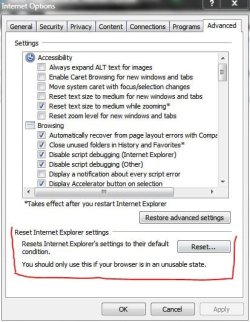
1) IE - Tools - Internet Options - Advanced Tab - click Restore then click Reset - Apply / OK

IE - Tools - Internet Options - Security Tab - click reset all zones to default - Apply / OK

Close and restart IE.

1) In IE, go to Tools - Manage Add-ons - Search Providers - Select the Search Provider you want by clicking on one. Then on LOWER LEFT check -> Prevent programs from suggesting changes to my default search provider.

3) Could be a BHO. Download BHOremover (Free, needs no install), download and run.
SpyBHORemover : Advanced Spy BHO Explorer & Eliminator - www.SecurityXploded.com
 

My Computer

Computer Manufacturer/Model Number
Too many to describe...
OS
Windows 7 x64 pro/ Windows 7 x86 Pro/ XP SP3 x86
1) IE - Tools - Internet Options - Advanced Tab - click Restore then click Reset - Apply / OK

IE - Tools - Internet Options - Security Tab - click reset all zones to default - Apply / OK

Close and restart IE.

1) In IE, go to Tools - Manage Add-ons - Search Providers - Select the Search Provider you want by clicking on one. Then on LOWER LEFT check -> Prevent programs from suggesting changes to my default search provider.

3) Could be a BHO. Download BHOremover (Free, needs no install), download and run.
SpyBHORemover : Advanced Spy BHO Explorer & Eliminator - www.SecurityXploded.com

Thxs for reply/help! Unfortunately nothing worked.... I did all of the above and even restarted my pc.... still getting the error message? Is there anything else I can try? Thanks again

the software found a potential threat called ASK tool bar, it was deleted with the scan. But still receiving error.
 

My Computer

Computer Manufacturer/Model Number
Asus GC5275
OS
Windows 7 Ultimate x64
Try running IE8 with add-ons disabled.

Go to Start > Programs > Accessories > System Tools > Internet Explorer (No Add-ons) to start IE8 without any add-ons. Try using the browser and see if the same problem arises.

If the problem does not occur again, start IE8 normally, go to Tools, Manage Add-ons.Disable all the add-ons under 'Toolbars and Extensions'. Enable each add-on one at each time and see if the problem occurs again. Once it occurs again after enabling an add-on, you have nailed the culprit.
 

My Computer

Computer Manufacturer/Model Number
Too many to describe...
OS
Windows 7 x64 pro/ Windows 7 x86 Pro/ XP SP3 x86
Try running IE8 with add-ons disabled.

Go to Start > Programs > Accessories > System Tools > Internet Explorer (No Add-ons) to start IE8 without any add-ons. Try using the browser and see if the same problem arises.

If the problem does not occur again, start IE8 normally, go to Tools, Manage Add-ons.Disable all the add-ons under 'Toolbars and Extensions'. Enable each add-on one at each time and see if the problem occurs again. Once it occurs again after enabling an add-on, you have nailed the culprit.


Ok, just want to be sure... first, run IE w/out add ons; then go to step two and enable add ons? Thxs
 

My Computer

Computer Manufacturer/Model Number
Asus GC5275
OS
Windows 7 Ultimate x64
Yep, enable addons ONE BY ONE. Just trying to see which one of them may be causing the problem, if any.
 

My Computer

Computer Manufacturer/Model Number
Too many to describe...
OS
Windows 7 x64 pro/ Windows 7 x86 Pro/ XP SP3 x86
Yep, enable addons ONE BY ONE. Just trying to see which one of them may be causing the problem, if any.


ok, did that. The one still causing me problems is ask toolbar? But under IE search providers its coming up as bing? I have forced it to google, close IE/ open back up again to the error message. I also did a system restore thinking that might help- still no luck. Any ideas on what to do next? Thxs
 

My Computer

Computer Manufacturer/Model Number
Asus GC5275
OS
Windows 7 Ultimate x64
1) Try uninstalling the ask toolbar from Control Panel-Program Features-Add/Remove. You can also try uninstalling via CCleaner. Then do a registry cleanup.


2) After step 1) uninstall and reinstall IE.
  1. Click Start and then click Control Panel.
  2. Under Programs, click Uninstall a program.
  3. In the tasks pane, click Turn Windows features on or off.
  4. In the list of windows features, clear the check box next to Internet Explorer 8.
  5. You receive a warning message in a pop-up window. Click Yes
 

My Computer

Computer Manufacturer/Model Number
Too many to describe...
OS
Windows 7 x64 pro/ Windows 7 x86 Pro/ XP SP3 x86
Do you have Windows Live Toolbar or Bing Toolbar installed on your system?
 

My Computer

Computer Manufacturer/Model Number
Asus N73SV
OS
Windows 7 x64 Ultimate SP1
CPU
Core i7-2630QM
Motherboard
Intel HM 65
Memory
6 GB DDR3
Graphics Card(s)
Nvidia GT 540M / Intel HD 3000 - Optimus switching
Sound Card
HD Audio (Intel Azalia/Realtek) ALC269
Monitor(s) Displays
LED flat panel
Screen Resolution
1920 x 1080
Hard Drives
2x Seagate Momentus 640 GB - 1,28 TB in total
Internet Speed
4 MB/256 kbps
Other Info
External HDs

WD Elements 1,5 TB
WD MyBook 500 GB
Do you have Windows Live Toolbar or Bing Toolbar installed on your system?

Windows live, yes. Bing, no

Should I uninstall windows live? Thxs
 

My Computer

Computer Manufacturer/Model Number
Asus GC5275
OS
Windows 7 Ultimate x64
Do you have Windows Live Toolbar or Bing Toolbar installed on your system?

Windows live, yes. Bing, no

Should I uninstall windows live? Thxs

No, just look into the toolbar options (right click on Live toolbar)

Second section from the top contains an option to set and keep Live Search (i.e. Bing) as the default search engine for IE. There's actually a service that runs to reset this whenever it gets changed. Uncheck that and see if that resolves your issue.

Of course, if you don't need Windows Live, uninstalling it is a simple fix. Stay clear of the ASK toolbar, of course, too.
 

My Computer

Computer Manufacturer/Model Number
Asus N73SV
OS
Windows 7 x64 Ultimate SP1
CPU
Core i7-2630QM
Motherboard
Intel HM 65
Memory
6 GB DDR3
Graphics Card(s)
Nvidia GT 540M / Intel HD 3000 - Optimus switching
Sound Card
HD Audio (Intel Azalia/Realtek) ALC269
Monitor(s) Displays
LED flat panel
Screen Resolution
1920 x 1080
Hard Drives
2x Seagate Momentus 640 GB - 1,28 TB in total
Internet Speed
4 MB/256 kbps
Other Info
External HDs

WD Elements 1,5 TB
WD MyBook 500 GB
Do you have Windows Live Toolbar or Bing Toolbar installed on your system?

Windows live, yes. Bing, no

Should I uninstall windows live? Thxs

No, just look into the toolbar options (right click on Live toolbar)

Second section from the top contains an option to set and keep Live Search (i.e. Bing) as the default search engine for IE. There's actually a service that runs to reset this whenever it gets changed. Uncheck that and see if that resolves your issue.

Of course, if you don't need Windows Live, uninstalling it is a simple fix. Stay clear of the ASK toolbar, of course, too.

Ok, Went through this and it was already not checked.... I am uninstalling windows live.... hopefully that works
Thxs
 

My Computer

Computer Manufacturer/Model Number
Asus GC5275
OS
Windows 7 Ultimate x64
1) Try uninstalling the ask toolbar from Control Panel-Program Features-Add/Remove. You can also try uninstalling via CCleaner. Then do a registry cleanup.


2) After step 1) uninstall and reinstall IE.
  1. Click Start and then click Control Panel.
  2. Under Programs, click Uninstall a program.
  3. In the tasks pane, click Turn Windows features on or off.
  4. In the list of windows features, clear the check box next to Internet Explorer 8.
  5. You receive a warning message in a pop-up window. Click Yes


Man, this is crazy- nothing seems to work. I did the above and that error message still pops up.
 

My Computer

Computer Manufacturer/Model Number
Asus GC5275
OS
Windows 7 Ultimate x64
4got to mention- Ask toolbar is not loaded in my programs under add/remove???
 

My Computer

Computer Manufacturer/Model Number
Asus GC5275
OS
Windows 7 Ultimate x64

My Computer

Computer Manufacturer/Model Number
Asus N73SV
OS
Windows 7 x64 Ultimate SP1
CPU
Core i7-2630QM
Motherboard
Intel HM 65
Memory
6 GB DDR3
Graphics Card(s)
Nvidia GT 540M / Intel HD 3000 - Optimus switching
Sound Card
HD Audio (Intel Azalia/Realtek) ALC269
Monitor(s) Displays
LED flat panel
Screen Resolution
1920 x 1080
Hard Drives
2x Seagate Momentus 640 GB - 1,28 TB in total
Internet Speed
4 MB/256 kbps
Other Info
External HDs

WD Elements 1,5 TB
WD MyBook 500 GB
If no suggestion from those topics works, or they sound to complicated, you have the nuclear option. :D

reset.JPG
 

My Computer

Computer Manufacturer/Model Number
Asus N73SV
OS
Windows 7 x64 Ultimate SP1
CPU
Core i7-2630QM
Motherboard
Intel HM 65
Memory
6 GB DDR3
Graphics Card(s)
Nvidia GT 540M / Intel HD 3000 - Optimus switching
Sound Card
HD Audio (Intel Azalia/Realtek) ALC269
Monitor(s) Displays
LED flat panel
Screen Resolution
1920 x 1080
Hard Drives
2x Seagate Momentus 640 GB - 1,28 TB in total
Internet Speed
4 MB/256 kbps
Other Info
External HDs

WD Elements 1,5 TB
WD MyBook 500 GB
Look in C:\Program Files\ ... for Ask or askbardis folder ...open the folder and use the "uninstall".
 

My Computer

Computer type
PC/Desktop
Computer Manufacturer/Model Number
Bruce ... somewhere in his 40's
OS
Windows 7 Ultimate 32bit SP1
CPU
Intel(R) Core(TM)2 Quad CPU @ 2.40GHz, 2400 MHz
Motherboard
INTEL/D975XBX2
Memory
4 GB
Graphics Card(s)
ATI Radeon HD 2600 Pro
Monitor(s) Displays
Samsung SyncMaster 914v
Screen Resolution
1280 x 1024
Hard Drives
2/500GB each ... ST3500630AS ATA Device.
One is not connected
PSU
Rocketfish 700 W
Case
G.Skill Gigabyte Chassis
Keyboard
Standard PS/2 Keyboard
Mouse
Microsoft PS/2 Mouse
Internet Speed
DSL
Antivirus
Avira Internet Security
Browser
IE 11
Other Info
ATI HDMI Audio
Look in C:\Program Files\ ... for Ask or askbardis folder ...open the folder and use the "uninstall".


Thxs, everyone for the suggestions- I have tried all of them and I still get the error message: program on your pc has corrupted your default search provider setting for IE. IE has reset your search provider to bing: IE will now open where u can change setting. I try to change- no joy! Any other suggestions.

What's strange is I can't find ask askbardia anywhere on my pc? Thank U
 

My Computer

Computer Manufacturer/Model Number
Asus GC5275
OS
Windows 7 Ultimate x64
Back
Top