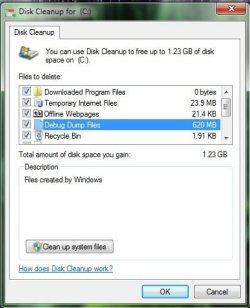
Every time I run the Disk Cleanup tool I always shows "Debug Dump Files" as being 620MB, even if I run Disk Cleanup twice in a row it always shows up. It didn't used to do that why would it now?
Attachments
wtf.jpg
28.9 KB
· Views: 40
My Computer
Computer Manufacturer/Model Number
CyberPowerPC
OS
Windows 7 Home Premium 64-Bit
CPU
Intel Core i7-960 3.2GHz
Motherboard
Asus P6T DELUXE V2
Memory
12GB Triple Channel 1800Mhz
Graphics Card(s)
EVGA GeForce GTX 580 3GB
Sound Card
SoundBlaster X-Fi Titanium Fatal1ty Champion Series
Monitor(s) Displays
LG Flatron W2361VG-PF
Screen Resolution
1980x1020
Hard Drives
300GB Gaming Western Digital VelociRaptor
1TB Western Digital Caviar Black
In Control Panel, click on System > Advanced system settings > Advanced and under Startup and Recovery, click on Settings.
Then, in the Write debugging information drop down menu, select (none), then "OK" your way back out. Then try Clean up again. Note you may have to reboot to unlock the dmp file so it can be deleted. If that works, I would enable it again, in case it is needed in the future.
Also note that CCleaner - Slim Version is able to purge the system of .dmp files too. Before first use, go to Options > Settings > Advanced and ensure Only delete files in Windows Temp folders older than 24 hours is unchecked.