
Solved UI elements gone big and zoom problem

OhPinchy

New member
Local time
7:34 PM
Messages
4
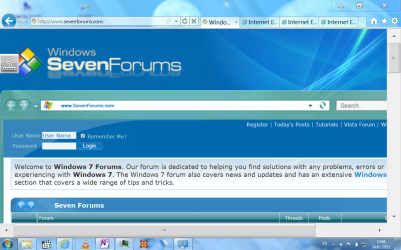
I'm not sure how it happened, but it looks like something has changed my user profile in Windows 7 to show really big dumb looking UI elements (e.g. scroll bars) and to zoom in too close to text.

Every time I load a page in Internet Explorer, it is zoomed in too close. I zoom out again but it still zooms in on the next page load.

I'm using a HP Touchstmart Tmt2 tablet with touch screen and though the scroll bars are handy for touch interaction, I rarely use the touch and am really put off by how big they are.

I've included 2 screenshots to show the problem, hopefully someone can point out some setting that got changed accidentally?
 

Attachments
  • IE.PNG
    IE.PNG
    169.9 KB · Views: 25
  • Capture.PNG
    Capture.PNG
    73.9 KB · Views: 27

My Computer

OS
Windows 7
what version of Internet explorer are ya using? are you using "ctr +" to zoom???

try this anyway, look for "page" in your tool bar at the top, it should be beside "tools" and "safety".

then click the drop down arrow and pick zoom from the list! then set it to 100%.

you might find that it is set higher. might be whats causing the problem!

(check step 5)
http://www.sevenforums.com/tutorials/79746-internet-explorer-zoom-level.html
 
Last edited by a moderator:

My Computer

Computer Manufacturer/Model Number
Acer Aspire x33000
OS
Windows 7 Home Premium 64bit
CPU
AMD Athlon x2
Motherboard
Acer wmcp78m
Memory
3g Ram and 10g Virtual
Graphics Card(s)
Nivida Gforce 9
Screen Resolution
1920 x 1080
Thanks for that. It solved the zoom problem in Internet Explorer but I still have the oversized scroll bars all throughout Windows 7.

I was using the pinch gesture on the touch screen to undo the zooming in on every page in IE 9 (zoom turned out to be set to 155% but I don't think an IE setting could affect Windows overall).
 

My Computer

OS
Windows 7
Hello OhPinchy,

You might check in the Advanced Appearance Settings window to see if the Scrollbar item is set to a higher Size number than the default 17. If it is, changing it back and clicking on OK will restore the default size.

Scrollbar.jpg

Hope this helps,
Shawn
 

My Computer

Computer type
PC/Desktop
Computer Manufacturer/Model Number
Self built custom
OS
64-bit Windows 11 Pro for Workstations
CPU
Intel i7-8700K OC'd to 5 GHz
Motherboard
ASUS ROG Maximus XI Formula Z390
Memory
64 GB (4x16GB) G.SKILL TridentZ RGB DDR4 3600 MHz
Graphics Card(s)
ASUS ROG-STRIX-GTX1080TI-O11G-GAMING
Sound Card
Integrated
Monitor(s) Displays
2 x Samsung Odyssey G7 27"
Screen Resolution
2560x1440
Hard Drives
1TB Samsung 990 PRO M.2,
4TB Samsung 990 PRO PRO M.2,
TerraMaster F8 SSD Plus NAS
PSU
Seasonic Prime Titanium 850W
Case
Thermaltake Core P3
Cooling
Corsair Hydro H115i
Keyboard
Logitech wireless K800
Mouse
Logitech MX Master 4
Internet Speed
2 Gb/s Download and 100 Mb/s Upload
Antivirus
Malwarebyte Anti-Malware Premium
Browser
Google Chrome
Other Info
Logitech Z625 speaker system,
Logitech BRIO 4K Pro webcam,
HP Color LaserJet Pro MFP M477fdn,
APC SMART-UPS RT 1000 XL - SURT1000XLI,
Galaxy S23 Plus phone
System Restore to before it happened?
 

My Computer

Computer Manufacturer/Model Number
Custom
OS
Windows 7 Ultimate RTM (Technet)
CPU
3.00 gigahertz Intel Core2 Duo E8400
Motherboard
ASUSTeK Computer INC. P5K/EPU Rev 1.xx
Memory
4GB
Graphics Card(s)
ATI Radeon X1950 Pro
Sound Card
Built in HD Audio
Monitor(s) Displays
22" Gateway LCD
Screen Resolution
1920 x 1200
Hard Drives
ST3160023A [Hard drive] (160.04 GB) -- drive 0, rev 8.01, ST3500630AS [Hard drive] (500.11 GB) -- drive 2, rev 3.AAK
ST3500630AS [Hard drive] (500.11 GB) -- drive 1, rev 3.AAK
Keyboard
Logitech G11
Mouse
Microsoft Wireless Laser Mouse 5000
Internet Speed
13.44 Mbps
no problem! :D

if you follow brinks suggestion it should sort out the rest of your zoom problems.

im not sure why it changed everything across the board tho or even what might have caused it.
 

My Computer

Computer Manufacturer/Model Number
Acer Aspire x33000
OS
Windows 7 Home Premium 64bit
CPU
AMD Athlon x2
Motherboard
Acer wmcp78m
Memory
3g Ram and 10g Virtual
Graphics Card(s)
Nivida Gforce 9
Screen Resolution
1920 x 1080
Sorry I forgot to reply till now. That tip from Brink worked a charm - Scrollbar size was 44. Wasn't the only thing wrong, seemed text size was also high. I had a custom Windows background installed, maybe the problem was to do with that - just choose an Aero theme and now it's fine. I had previously tried a System Restore and it didn't solve it.

Much appreciated!
 

My Computer

OS
Windows 7
You're most welcome Pinchy. I'm happy to hear that you got it sorted. :)
 

My Computer

Computer type
PC/Desktop
Computer Manufacturer/Model Number
Self built custom
OS
64-bit Windows 11 Pro for Workstations
CPU
Intel i7-8700K OC'd to 5 GHz
Motherboard
ASUS ROG Maximus XI Formula Z390
Memory
64 GB (4x16GB) G.SKILL TridentZ RGB DDR4 3600 MHz
Graphics Card(s)
ASUS ROG-STRIX-GTX1080TI-O11G-GAMING
Sound Card
Integrated
Monitor(s) Displays
2 x Samsung Odyssey G7 27"
Screen Resolution
2560x1440
Hard Drives
1TB Samsung 990 PRO M.2,
4TB Samsung 990 PRO PRO M.2,
TerraMaster F8 SSD Plus NAS
PSU
Seasonic Prime Titanium 850W
Case
Thermaltake Core P3
Cooling
Corsair Hydro H115i
Keyboard
Logitech wireless K800
Mouse
Logitech MX Master 4
Internet Speed
2 Gb/s Download and 100 Mb/s Upload
Antivirus
Malwarebyte Anti-Malware Premium
Browser
Google Chrome
Other Info
Logitech Z625 speaker system,
Logitech BRIO 4K Pro webcam,
HP Color LaserJet Pro MFP M477fdn,
APC SMART-UPS RT 1000 XL - SURT1000XLI,
Galaxy S23 Plus phone
Back
Top