
CoolDefender
New member
- Local time
- 3:16 AM
- Messages
- 8
Own HP ENVY 4-1046tx Ultrabook
Mine plan was to restore laptop to its original factory condition so i began to try thing out...
From the starting the "System Recovery" and "Minimized Image Recovery" option was not work
(as shown in the click)
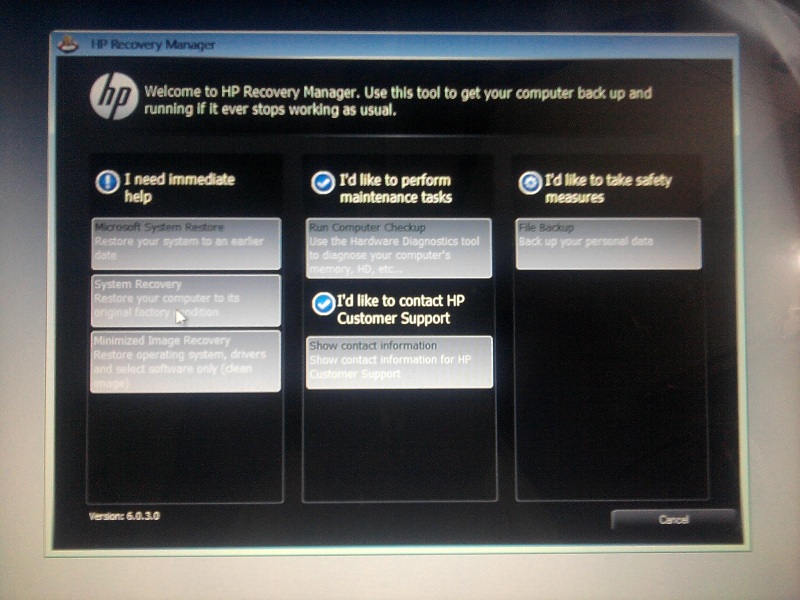
so what it did to make it activate was that i whent to "disk managment"
marked the D drive (Recovery drive)
as active
and now the ultrabook always start with this screen only...!
Untill now i have tried:
1. "Microsoft system restore" - Even after the sucessfull restoration same screen appears
2. "Run computer checkup" - No result... after the completion of test it show the same
3. Tried to entre the boot menu by "F12" but it doent even entre in it!!
but the hope i get from these things
4. can entre the "bios menu" by F10
5. and when pressed "enter" at initial startup was able to get window boot manager
(shown in click)

From here the problem seem to clear
"Windows setup [Ems enabled]"
5. Went in the advance menu by "F8"
Also tried "Last known good configration" but no result.
Tried Safe mode- was sucessfull in loading but the same the same screen
6. Can access cmd from Hp recovery manager itself in Computer checkup>> open cmd
pls provide me Solution so that i can at least run my laptop....!!!
Mine plan was to restore laptop to its original factory condition so i began to try thing out...
From the starting the "System Recovery" and "Minimized Image Recovery" option was not work
(as shown in the click)
so what it did to make it activate was that i whent to "disk managment"
marked the D drive (Recovery drive)
as active
and now the ultrabook always start with this screen only...!
Untill now i have tried:
1. "Microsoft system restore" - Even after the sucessfull restoration same screen appears
2. "Run computer checkup" - No result... after the completion of test it show the same
3. Tried to entre the boot menu by "F12" but it doent even entre in it!!
but the hope i get from these things
4. can entre the "bios menu" by F10
5. and when pressed "enter" at initial startup was able to get window boot manager
(shown in click)
From here the problem seem to clear
"Windows setup [Ems enabled]"
5. Went in the advance menu by "F8"
Also tried "Last known good configration" but no result.
Tried Safe mode- was sucessfull in loading but the same the same screen
6. Can access cmd from Hp recovery manager itself in Computer checkup>> open cmd
pls provide me Solution so that i can at least run my laptop....!!!
My Computer
At a glance
Window 7 Home basic
- OS
- Window 7 Home basic


