Hi there,
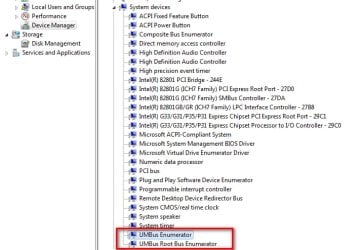
I tried to install a wireless Logitech keyboard/mouse combination. The keyboard works fine, the mouse doesn't. The device manager shows the "UMBus Root Bus Enumerator" as unknown device. I researched in some forums and found this: "sc config umbus start= demand". But it doesn't work.
In this forum I found an older threat with this post:
Go to Device Manager > Action > Add legacy hardware > Next > Install the hardware that I manually select from a list > Next > click on "System Devices" > Next > then under "Manufacturer" click on "Microsoft" then under "Model" click on "UMBus Root Bus Enumerator" > Next > Next
But when I want to install legacy hardware, the software asks for a storage device with the drivers. The installation DVD doesn't work. What to do?
Any help is appreciated.
Natikabu
I tried to install a wireless Logitech keyboard/mouse combination. The keyboard works fine, the mouse doesn't. The device manager shows the "UMBus Root Bus Enumerator" as unknown device. I researched in some forums and found this: "sc config umbus start= demand". But it doesn't work.
In this forum I found an older threat with this post:
Go to Device Manager > Action > Add legacy hardware > Next > Install the hardware that I manually select from a list > Next > click on "System Devices" > Next > then under "Manufacturer" click on "Microsoft" then under "Model" click on "UMBus Root Bus Enumerator" > Next > Next
But when I want to install legacy hardware, the software asks for a storage device with the drivers. The installation DVD doesn't work. What to do?
Any help is appreciated.
Natikabu
My Computer
At a glance
Windows 7 Professional 64bitIntel Core i5-3320M8 GBIntel HD 4000
- Computer type
- Laptop
- Computer Manufacturer/Model Number
- HP
- OS
- Windows 7 Professional 64bit
- CPU
- Intel Core i5-3320M
- Motherboard
- HP 179B
- Memory
- 8 GB
- Graphics Card(s)
- Intel HD 4000
- Hard Drives
- Seagate ST59005620AS
- Antivirus
- ESet
- Browser
- Firefox, Chrome