Un-explainable networking issues.

pauldawson21

New member
Local time
5:13 PM
Messages
9
I am posting this message in the hope that a member on the site with qualifications in CNN Networking, will be kind enougth to help myself in obtaining an explanation to the following issues.
These ssues which I am encountering are with my homes broadband routers LAN setup. The routers has been configured to use its in-built dhcp function with-in the address range begining 192.168.1.1. and ending at 192.168.1.255.

Generally upon my devices establish a connection to the network there are assigned an appropriate I.P address with-in the configured range automaticaklly, as one would expect having carried out this router LAN configuration. However on occassion ( and occourring mainly upon my Iphones connection via Wi-Fi) the ip address being assigned to the device is showing as 169.254.80.242. Equally confusing is that the subnet mask associated to this issued I.P address does not correspond to those of my routers configurations. Changing from my configured subnet mask of 255.255.255.0 to the su7bnet mask of 255.255.0.0.

Similar un-explainable IP issues are also often occourring with-in my other devices setting when I am proceeding to connect them to my homes network. It would appear however that it is indeed the associated SSID of my homes router that is being connected to.
How and why thou therefore is the considerably different IP address of 169.254.80.242 being assisned to my connecting devices, as this is on a totally different network range than that configured to be used in my routers set-up.

ANY LIGHT which someone with knol;edge in this arae can shed to myself will be greatly appreciated.
 

My Computer

Computer type
Laptop
Computer Manufacturer/Model Number
HP
OS
Windows 7 Home Premium
Memory
8 gb
169.254.x.x (mask 255.255.0.0) is an address that is automatically generated by a device when it has no network configuration and cannot get an answer from a DHCP service to get a configuration.

As to why it's happening here... not sure. Is the issue intermittent? (it sounds like it from your post)

I do know your DHCP range is not quite right, but whether your router compensates for that and does it right I can't say.

What IP address does the router itself have? That should not be included in the DHCP range, neither should 192.168.1.255 on mask 255.255.255.0 because that is the network's broadcast address. However I would be surprised if that is the cause of the issue in itself; the router should know not to give those addresses out anyway, and there are mechanisms in DHCP to detect duplicate IP addresses and prevent them.

Do you have any statically (manually) configured IP addresses on your network?


P.s. What's CNN Networking?
 

My Computer

Computer type
PC/Desktop
Computer Manufacturer/Model Number
Custom
OS
Windows 7 Ultimate x64
CPU
i7-2600K @ 3.4GHz
Motherboard
Gigabyte GA-Z68X-UD5-B3
Memory
16GB
Graphics Card(s)
MSI GTX970
Hard Drives
Crucial CT512MX100 System Drive
3x Seagate 4TB Data
Antivirus
Microsoft
Browser
Firefox+IE
Hi Foxyrick,
I begin by thanking yourself for taking the timein responding to my issue being encountered. The information which you have provided helps some-what already...

This issue is some-what intermittent, in the sense that a short resoulution to the issues is temporaily achievable after re-booting the router back to its factory default status, then re-configuring the settings afterwards once again. But obviously this causes myself some inconvience and all then works fine for a couple of days afterwards at most. Then the same encountered issue begins to re-occour once again.
This I feel I should also mentions occurs on numerous different connecting devices. Whats even more confusing is that on occassion one device will establish a connection to the router without what would seem to be, any problems being encountered what so ever. Whilst a second different will then try to establish a connection, but its attempts will result in the issues previously stated being encountered.
But then if I then again try at a later tinme with the same device, it at that time may well establish connectivity successfully to the router, without any of its relavant networking setting modified by myself what so ever. Being honest with yourself Rick, its an on going nightmare.

My ISP, sky has provided to date 4 replacement routing devices in attempts to resolve this issue long term. All however to soon after there reciept, to begin encountering this same problem once again.


The Routers access ip is 192.168.1.1. So I would assume this is its own ip address which you requested.
I've decided to include the following relavant network specific information which I have obtained from the router also, In hope that it may further aid yourself in reaching a conclusion to the cause of these matters:

The routers IP Address (Broadband Port) is: 94.5.227.247.
Subnet Mask: 255.255.255.255.
Gateway IP: 2.127.238.184.
DNS1: 90.207.238.97.
DNS 2: 90.207.238.99.

Also as you requested there are no devices configured to use proxy what so ever connecting to the router as far as I am aware.

Some thing is certainly not right however I am certain of, relating to these matters. I have a neighbour of a despicable nature, truely horrid, who hates myself. But is however highly qualified in the area of Networking.
In your opinion, could it be an indivitual remotely gaining access to this network and interfearing with its set-up, which is the under-lying cause to these issue's re-occourring.

Once again Rick, Thank You for your time given relating to this matter. It really is of sincerest appreciations.


P.S. I thought that CNN were the name used for gained credentials aquired in the area of networking. Maybe not then, lol....
 

My Computer

Computer type
Laptop
Computer Manufacturer/Model Number
HP
OS
Windows 7 Home Premium
Memory
8 gb
Hi Paul,

First off, I advise editing and removing your "routers IP Address (Broadband Port)" from your post. It might tempt someone to try and connect to you. Maybe I'm paranoid... well, I am when it comes to security.

I am not familiar with Sky's router, but they all work pretty much the same. While there are settings you could do which could cause problems similar to what you describe, you would have to try very hard to do so and it's certainly beyond the basic settings. Provided that you are not deliberately setting things like MAC-address security or time-limited access rules (and you probably would not even know how to I guess), it should just work.

If someone else here wants to join in with more help specific to the router, please do... It might be possible to view (failed) connection attempts from your devices or other such things that might be diagnostic.

One thing I would try is setting your devices (iPhone etc) manually to a static IP address in the range. Use something in the middle-ish (e.g. 192.168.1.100, .101, etc) to avoid DHCP interference. Set the DNS from your post and the gateway on the devices is your router's 192.168.1.1 address. See if they connect to the router and work reliably (internet browsing etc) like that. If they do, then it's DHCP that;s the problem for some reason. If not...

The problem might be 'environmental', whether by deliberate interference or not. The intermittent nature suggests that it might be, although not exclusively. It is possible (even trivial to an 'expert') for your neighbour to deliberately interfere with your network without having to actually connect to it. I have an old piece of kit that has the specific ability to cause symptoms just like this for self-defence against unwanted access points in the area. It might not even be deliberate as much as just careless and/or selfish if, for instance, your neighbour runs a large number of access points and devices and basically floods the area with traffic.

I think it would be difficult to talk through the trouble-shooting process I would use for that. Much easier, if it's possible, would be for you to configure the router as normal at home, then take it to a friend's house somewhere else and try it there (best to unplug their wifi if they have it) . Your router should not need a phone line or internet connection to let your devices connect and get an IP address. If things work properly away from home (or not) then we have narrowed the problem down and can take it from there.

If you do want to check out the local wifi environment, there are network scanners for iPhones (e.g. Network Analyzer Lite) and Windows (e.g. Acrylic Wifi Free) etc. I don't use those, but such things are generally quite easy to at least get a display of the local devices. It can be quite surprising to see in some places!
 

My Computer

Computer type
PC/Desktop
Computer Manufacturer/Model Number
Custom
OS
Windows 7 Ultimate x64
CPU
i7-2600K @ 3.4GHz
Motherboard
Gigabyte GA-Z68X-UD5-B3
Memory
16GB
Graphics Card(s)
MSI GTX970
Hard Drives
Crucial CT512MX100 System Drive
3x Seagate 4TB Data
Antivirus
Microsoft
Browser
Firefox+IE
sky

Hi Paul,
When you rebooted/reset your >>Router<< did you go in and change its password, from Admin which is the standard default.??
Even if you rebooted then you should not have to reconfigure anything else, ie tower/laptop/printer,
Unless you changed its SSID(sky123456) and its associated password. YES you can change both.

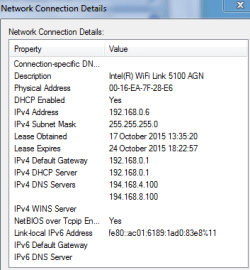
On your mobile do you use the sky mobile App, or have you just left it as is, if so then thats why its picking up a different subnet for vodaphone/BT/Virgin etc.?

Basically when you first connect to a wifi network
The first device is given a IPV4 coding of 192 168 0 1, and everytime you add a device this goes up.
Anything other than theese mean someone has changed it.
see screenshot the laptop im using is the sixth device connected

Gateway and the DNS address's are the sky servers.

I would suggest that you make sure all drivers on your devices are upto date.

Roy
 

Attachments

  • ipv4.PNG
    ipv4.PNG
    9.4 KB · Views: 31

My Computer

Computer type
PC/Desktop
Computer Manufacturer/Model Number
medionl/Aspire 6930G/acer x55a
OS
W7 home premium 32bit/W7HP 64bit/w10 tp insider ring
CPU
E5300 dual core
Motherboard
medion MS7366
Memory
3gb
Graphics Card(s)
Nvidia Geforce 7100 Nforce 630i
Monitor(s) Displays
avixc
Internet Speed
n (isp resticted to 72)
Antivirus
mse/pands
Browser
palemoon
Other Info
Belkin Fd7050 n USB using Railink RT2870 drivers, more upto date
Subnet Mask: 255.255.255.255

Is this wrong or what? Is it some configuration I am unaware of?

Also, any other DHCP server in the network? Perhaps an old router/Access Point etc?
 

My Computer

Computer type
PC/Desktop
Computer Manufacturer/Model Number
Custom Build
OS
Windows 7 Ultimate x64 SP1
CPU
AMD Phenom 2 1090T
Motherboard
Gigabyte GA-890FXA-UD5
Memory
2x8GB Kingston HyperX Fury Black 1600Mhz Unganged
Graphics Card(s)
MSI GTX 970 Gaming 4G
Sound Card
Realtek On-Board HD 7.1 Audio / Logitech G35
Monitor(s) Displays
3xAcer GD245HQ
Screen Resolution
1920x1080
Hard Drives
Samsung 850 Pro 512GB SSD - OS /
WD Caviar Black SATA 3 - 1 TBx2 - Dynamic RAID 0 /
WD Caviar Green SATA 2 - 640GBx2 - Dynamic RAID 0 /
WD Caviar Green SATA 2 - 640GB - Internal Backup /
Seagate Barracude SATA 3 - 3TB - External Backup/ Sync
PSU
HighPower 1000W
Case
Cooler Master HAF 932
Cooling
Noctua NH-D14
Keyboard
Logitech G19
Mouse
Logitech G500
Internet Speed
100/4 Mbit Cable (100GB quota)
Antivirus
ZoneAlarm Extreme Security / MBAM Pro / MBAE Free / SAS Free
Browser
IE 11 - Firefox - Chrome
Other Info
Logitech F710/ G27/ G940/ Z5500 // TrackIR 5 // Nvidia 3D Surround Vision
Subnet Mask: 255.255.255.255
Is this wrong or what? Is it some configuration I am unaware of?

That is normal for the ends of the point-to-point interfaces on the ATM connection. It's not an ethernet network there; it's PPP.
 

My Computer

Computer type
PC/Desktop
Computer Manufacturer/Model Number
Custom
OS
Windows 7 Ultimate x64
CPU
i7-2600K @ 3.4GHz
Motherboard
Gigabyte GA-Z68X-UD5-B3
Memory
16GB
Graphics Card(s)
MSI GTX970
Hard Drives
Crucial CT512MX100 System Drive
3x Seagate 4TB Data
Antivirus
Microsoft
Browser
Firefox+IE
Thank you Rick, been a while since I used PPP (DSL is like this also?).
 

My Computer

Computer type
PC/Desktop
Computer Manufacturer/Model Number
Custom Build
OS
Windows 7 Ultimate x64 SP1
CPU
AMD Phenom 2 1090T
Motherboard
Gigabyte GA-890FXA-UD5
Memory
2x8GB Kingston HyperX Fury Black 1600Mhz Unganged
Graphics Card(s)
MSI GTX 970 Gaming 4G
Sound Card
Realtek On-Board HD 7.1 Audio / Logitech G35
Monitor(s) Displays
3xAcer GD245HQ
Screen Resolution
1920x1080
Hard Drives
Samsung 850 Pro 512GB SSD - OS /
WD Caviar Black SATA 3 - 1 TBx2 - Dynamic RAID 0 /
WD Caviar Green SATA 2 - 640GBx2 - Dynamic RAID 0 /
WD Caviar Green SATA 2 - 640GB - Internal Backup /
Seagate Barracude SATA 3 - 3TB - External Backup/ Sync
PSU
HighPower 1000W
Case
Cooler Master HAF 932
Cooling
Noctua NH-D14
Keyboard
Logitech G19
Mouse
Logitech G500
Internet Speed
100/4 Mbit Cable (100GB quota)
Antivirus
ZoneAlarm Extreme Security / MBAM Pro / MBAE Free / SAS Free
Browser
IE 11 - Firefox - Chrome
Other Info
Logitech F710/ G27/ G940/ Z5500 // TrackIR 5 // Nvidia 3D Surround Vision
Yes, almost all DSL implementations will work like this. There actually are other ways DSL can work but this is by far the predominant method. Possibly it is the only one in use now.
 

My Computer

Computer type
PC/Desktop
Computer Manufacturer/Model Number
Custom
OS
Windows 7 Ultimate x64
CPU
i7-2600K @ 3.4GHz
Motherboard
Gigabyte GA-Z68X-UD5-B3
Memory
16GB
Graphics Card(s)
MSI GTX970
Hard Drives
Crucial CT512MX100 System Drive
3x Seagate 4TB Data
Antivirus
Microsoft
Browser
Firefox+IE
:thumbsup:
 

My Computer

Computer type
PC/Desktop
Computer Manufacturer/Model Number
Custom Build
OS
Windows 7 Ultimate x64 SP1
CPU
AMD Phenom 2 1090T
Motherboard
Gigabyte GA-890FXA-UD5
Memory
2x8GB Kingston HyperX Fury Black 1600Mhz Unganged
Graphics Card(s)
MSI GTX 970 Gaming 4G
Sound Card
Realtek On-Board HD 7.1 Audio / Logitech G35
Monitor(s) Displays
3xAcer GD245HQ
Screen Resolution
1920x1080
Hard Drives
Samsung 850 Pro 512GB SSD - OS /
WD Caviar Black SATA 3 - 1 TBx2 - Dynamic RAID 0 /
WD Caviar Green SATA 2 - 640GBx2 - Dynamic RAID 0 /
WD Caviar Green SATA 2 - 640GB - Internal Backup /
Seagate Barracude SATA 3 - 3TB - External Backup/ Sync
PSU
HighPower 1000W
Case
Cooler Master HAF 932
Cooling
Noctua NH-D14
Keyboard
Logitech G19
Mouse
Logitech G500
Internet Speed
100/4 Mbit Cable (100GB quota)
Antivirus
ZoneAlarm Extreme Security / MBAM Pro / MBAE Free / SAS Free
Browser
IE 11 - Firefox - Chrome
Other Info
Logitech F710/ G27/ G940/ Z5500 // TrackIR 5 // Nvidia 3D Surround Vision
Hi Rick, my apologies for the delay in responding to your last reply. It has took me a while to manage to find the time in carrying out the elimination step of taking the router to an alternitive residence to check for the issue occourring there.
I did manage to do so however yesterday evening, following your instructions provided. Where is successfully connected, then un-connected, then re-connected every few mins for aproximately an hour. No issues were encountered upon any connection attempts what so ever for the full duration which I spent carrying out the procedure. So this in my view further confirms the possibility of envioremental causes being associated to the issue.

Would yourself agree with that conclusion???

I have also proceeding in applying the static ip manually to each device, which I at first thought had resolved the issue. This was short lived however as soon afterward the connection dropped and I was un-able to successfully re-establish a connection. So the nightmare still goes on.

I will also be following your advice and removing the ip that could possibly be a security issue, thanks for letting me know that. I had no idea.

Once again you have been really kind in offerring myself the assistance which you have already provided regarding these encountered issues. It generally is sincerely appreciated.


p.s. pls veiw the follwing reply I will be submitting to the forum member sky, as his responce may prove benificial in figuring matters out further.
 

My Computer

Computer type
Laptop
Computer Manufacturer/Model Number
HP
OS
Windows 7 Home Premium
Memory
8 gb
Back
Top