Unable to access 1 internal HDD over wired network.

mykwin

New member
Local time
2:02 AM
Messages
9
Hi there.
Here's my problem. I have a small home network consisting of just 2 PC's hard wired through a network hub.
Lets call them PC1 and PC2. I have shared all the drives on both PC's successfully with each other except for 1 HDD.
PC2 has an internal HDD that I want to access from PC1 but can't. I have tried all the usual sharing options which worked fine with all the other drives, but this one refuses to allow access. The drive has 5 directories on it, so today I tried sharing each individual directory. This worked insofar as I can now see these 5 directories from PC1, but I still cannot access the subdirectories contained within these 5 main directories.
Also when I was sharing these 5 directories, when I right clicked on them, 2 of them offered "homegroup" sharing and 3 of them offered "Advanced" sharing.
Can anybody offer any advice on what to try next.

Thanks
 

My Computer My Computer

Computer type
PC/Desktop
Computer Manufacturer/Model Number
Custom build
OS
W7 Ultimate 64
Welcome to the forum. First all drives by default are shared as admin only share and hidden like c$ d$ etc if you add another share it can confuse the issue. If you share with everyone and hacker or virus can have full acess.


When you share you only give perrmisions on the share in order to access files if they are owned by someone else you have to set NTFS perrmision or you wont be able to access the files which is whats happeniing with the drive. Simple way is to have and admin account same name and password as the pc your connecting from then you have rights
 

My Computer My Computer

Computer type
PC/Desktop
OS
win 8 32 bit
Hi Samuria.


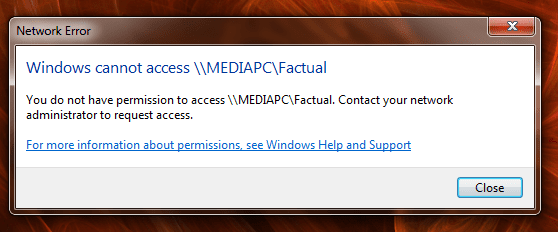
Both PCs already have the same user name and password. When I try to access the drive I immediately get a "Network Error" I don't get asked for a user name and password.
 

My Computer My Computer

Computer type
PC/Desktop
Computer Manufacturer/Model Number
Custom build
OS
W7 Ultimate 64
There should be a number after the error who has NTFS rights on the folder?
 

My Computer My Computer

Computer type
PC/Desktop
OS
win 8 32 bit
No error number just this message.
 

Attachments

  • Untitled.png
    Untitled.png
    20.8 KB · Views: 14

My Computer My Computer

Computer type
PC/Desktop
Computer Manufacturer/Model Number
Custom build
OS
W7 Ultimate 64
I assume I do as Admin user. There are no other users on either PC
 

My Computer My Computer

Computer type
PC/Desktop
Computer Manufacturer/Model Number
Custom build
OS
W7 Ultimate 64
It is a permission error so you need to check everyone has rights on the share and also NTFS permissions on the folder and sub folders
 

My Computer My Computer

Computer type
PC/Desktop
OS
win 8 32 bit
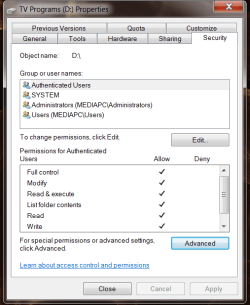
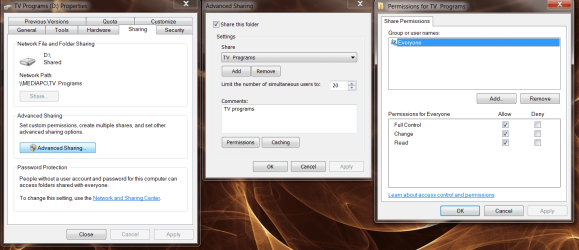
As far as I can see I have got full access permission to everything.
All users listed have full control
 

Attachments

  • security.png
    security.png
    21.9 KB · Views: 11
  • sharing.png
    sharing.png
    100.4 KB · Views: 1

My Computer My Computer

Computer type
PC/Desktop
Computer Manufacturer/Model Number
Custom build
OS
W7 Ultimate 64
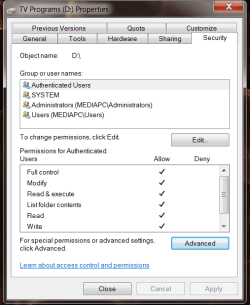
..and here too.
 

Attachments

  • security.png
    security.png
    21.9 KB · Views: 8

My Computer My Computer

Computer type
PC/Desktop
Computer Manufacturer/Model Number
Custom build
OS
W7 Ultimate 64
For ntfs permissions you have to highlight user to see what rights they have. You sharing a drive that allready has a admin share as d$ and you have spaces in the share name this often wont work it doesnt like spaces in the name . Follow this guide and map a drive but dont use tv program enter d$ when asked for user enter a admin on the pc your connecting to with their password How to Map a Network Drive in Windows 10 | Password Recovery
 

My Computer My Computer

Computer type
PC/Desktop
OS
win 8 32 bit
Tried that, as soon as I click "finish" I get the message "Unable to access location"
 

My Computer My Computer

Computer type
PC/Desktop
Computer Manufacturer/Model Number
Custom build
OS
W7 Ultimate 64
Just noticed it has in fact mapped it as a network drive, but when I click on it I get "Access denied"
 

My Computer My Computer

Computer type
PC/Desktop
Computer Manufacturer/Model Number
Custom build
OS
W7 Ultimate 64
Is d just data or something else on it? Going back to ntfs highlght everyone what does that show as rights. Did you enter and admin username and password when you mapped as per instructions. remove your share then share as tv so there is no spaces
 

My Computer My Computer

Computer type
PC/Desktop
OS
win 8 32 bit
D: is just data. Didn't asked for log in details when I mapped it and doesn't ask for them when I try to access it, just says I can't.
Also removed spaces, no difference.
 

My Computer My Computer

Computer type
PC/Desktop
Computer Manufacturer/Model Number
Custom build
OS
W7 Ultimate 64
Back
Top