Unable to Access Any Other Computer in Workgroup or Homegroup

BillyAsh

New member
Local time
4:58 PM
Messages
8
Hi I have a home network of 4 computers. I have recently installed Windows 7 on 3 of them - the other is XP Professional. Since then I have not been able to see/share/ping with any of the computers, which are all in the same workgroup. Also If i try to set up a Homegroup on the 3 Windows 7 pcs after creating a homegroup then trying to join it on a 2nd pc the message There is currently no homegroup on the network is displayed. My knowledge of networking is small. The networking Trouble Shooter gives a 'Your computer appears to be correctly configured but the DNS Server is not responding'. The Homegroup troubleshooter cannot find a problem on either machine. I have no problems connecting to the Internet from any machine. Any help would be greatfully appreciated.
 

My Computer My Computer

At a glance

Windows 7 Home Premium 64 Bit
OS
Windows 7 Home Premium 64 Bit
Hi BillyAsh, have you tried 'Network' method ?
 

My Computer My Computer

At a glance

Win7 H.Prem. 32bit+SP1
Computer Manufacturer/Model Number
Look in my Signature.
OS
Win7 H.Prem. 32bit+SP1
Hey ash,
if you have internet then use TEAM VIEWER. I have'nt tried it yet but I think you have to install it in all 3 PCs
Check here :
TeamViewer Download
 

My Computer My Computer

At a glance

Windows 7 Ultimate 64bit OS (6.1,build 7601)Intel(R) Core(TM) i33 GBATI Mobolity Radeon HD 4500 Series
Computer Manufacturer/Model Number
Sony Vaio VPCEA23EN
OS
Windows 7 Ultimate 64bit OS (6.1,build 7601)
CPU
Intel(R) Core(TM) i3
Motherboard
350 @ 2.27GHz(4 CPUs), ~2.3GHz
Memory
3 GB
Graphics Card(s)
ATI Mobolity Radeon HD 4500 Series
Sound Card
HD AUDIO
Screen Resolution
1366 X 768
Hard Drives
320 GB
Mouse
Microsoft Wireless Mobile Mouse 1000
Internet Speed
1 Mbps
Antivirus
ESET Smart Security 6
Browser
Mozilla Firefox, Google Chrome

My Computer My Computer

At a glance

Win7 H.Prem. 32bit+SP1
Computer Manufacturer/Model Number
Look in my Signature.
OS
Win7 H.Prem. 32bit+SP1
lolzZZ.:D. haha thank you for informing me....... so , ill not try it.:eek:
 

My Computer My Computer

At a glance

Windows 7 Ultimate 64bit OS (6.1,build 7601)Intel(R) Core(TM) i33 GBATI Mobolity Radeon HD 4500 Series
Computer Manufacturer/Model Number
Sony Vaio VPCEA23EN
OS
Windows 7 Ultimate 64bit OS (6.1,build 7601)
CPU
Intel(R) Core(TM) i3
Motherboard
350 @ 2.27GHz(4 CPUs), ~2.3GHz
Memory
3 GB
Graphics Card(s)
ATI Mobolity Radeon HD 4500 Series
Sound Card
HD AUDIO
Screen Resolution
1366 X 768
Hard Drives
320 GB
Mouse
Microsoft Wireless Mobile Mouse 1000
Internet Speed
1 Mbps
Antivirus
ESET Smart Security 6
Browser
Mozilla Firefox, Google Chrome
Hi Roderunner, Thanks for the prompt response. Not sure what you mean by 'Network' Method. The network set up where I am having the problems is wireless (WAG 160N Router).

I have also connected 2 pcs via a LAN connection with not much more luck as follows:

Windows 7 pc and Windows 7 pc.
Could see and explore both PCs
Could not join homegroup on second machine. Trouble shooter on both machines failed to find a problem!

Windows 7 pc and XP pc.
Could not see or ping either machine!
 

My Computer My Computer

At a glance

Windows 7 Home Premium 64 Bit
OS
Windows 7 Home Premium 64 Bit
Hi Roderunner, Thanks for the prompt response. Not sure what you mean by 'Network' Method. The network set up where I am having the problems is wireless (WAG 160N Router).

I have also connected 2 pcs via a LAN connection with not much more luck as follows:

Windows 7 pc and Windows 7 pc.
Could see and explore both PCs
Could not join homegroup on second machine. Trouble shooter on both machines failed to find a problem!

Windows 7 pc and XP pc.
Could not see or ping either machine!

Hi BillyAsh, I would like you to do 2 things. The second is do NOTHING. The first is
Read this Article. I had same problem and fixed it easily.
 

My Computer My Computer

At a glance

Win7 H.Prem. 32bit+SP1
Computer Manufacturer/Model Number
Look in my Signature.
OS
Win7 H.Prem. 32bit+SP1
Hi BillyAsh,

If you have any Firewall or Security Software installed on those machines, pls. disable them for now.
If you're using the Windows built-in Firewall, make sure that Files and Printer sharing is Excluded.

Create Identical UserNames and Passwords on both computers.

Please compare your current configuration on how to share files and printer.
Share Files and Printers between Windows 7 and XP - How-To Geek

Disable Password Protected Sharing in Windows 7:
Disable Password Protected Sharing — MAXIMUMpcguides – Windows 7 tips, tricks, help, and how-to guides

Verify that you are sharing the folder to Everyone, give full access for now. Were you trying to share the entire C Drive or subfolders in the C Drive? Please share the entire C drive for now, call it C.
Click on Start, type the \\ComputerName\C or \\IPAddress\C - The Computer Name or IP Address of the computer that you're trying to access in your home network.

Please post an update and let us know the outcome.
 

My Computer My Computer

At a glance

Win7 & Win8 64bitIntel i5
Computer Manufacturer/Model Number
Lenovo Desktop/Samsung Laptop
OS
Win7 & Win8 64bit
CPU
Intel i5
Internet Speed
Charter-20 Mbps
Antivirus
Avast
Browser
FF, IE9 and Chrome
Hi Roderunner,
Tried changes in link you sent - no change to anything reportes above! But thanks for trying.
 

My Computer My Computer

At a glance

Windows 7 Home Premium 64 Bit
OS
Windows 7 Home Premium 64 Bit
Hey 2xg,

Thanks for offering some advice. I went through steps you pointed out and in the links you sent. Exactly the same results except can now joing homegroup. So to recap:

Wireless:
No machine can see any other machine.

LAN

Windows 7 cannot see XP and vice versa.
Windows 7 machines can see and explore each.
Windows 7 machines can homegroup.

It's a start, thanks
 

My Computer My Computer

At a glance

Windows 7 Home Premium 64 Bit
OS
Windows 7 Home Premium 64 Bit
Hi Roderunner,
Tried changes in link you sent - no change to anything reportes above! But thanks for trying.

Hi Billy, all I wanted you to do was read the link not change anything. R.S.V.P.
 

My Computer My Computer

At a glance

Win7 H.Prem. 32bit+SP1
Computer Manufacturer/Model Number
Look in my Signature.
OS
Win7 H.Prem. 32bit+SP1
No probs Roderunner. I did read it but also changed the encryption to speed things up when I eventually get up and running.
 

My Computer My Computer

At a glance

Windows 7 Home Premium 64 Bit
OS
Windows 7 Home Premium 64 Bit
No probs Roderunner. I did read it but also changed the encryption to speed things up when I eventually get up and running.
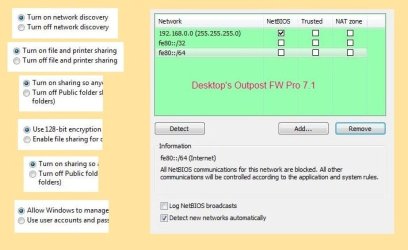
Hi Billy, now you've read the link I can be more specific. I also changed the settings as described BUT, for some reason they re set them selfs to what is in the image below.
The settings are the same on both my PC's.
In the image, it shows my desktop firewall LAN settings, if yours does not have Net Bios setting, set it if you can to Trusted. My laptop uses Windows 7 firewall.
If you right click computer, properties, it shows Workgroup as WORKGROUP, this is the default setting, all yours must be set to the same name.
Both my PC's have a password, but I type netplwiz in the start menu search box, hit enter, then uncheck the only box, and follow instructions after hitting apply.
Tell me when you have done all above.

RR.jpg
 

My Computer My Computer

At a glance

Win7 H.Prem. 32bit+SP1
Computer Manufacturer/Model Number
Look in my Signature.
OS
Win7 H.Prem. 32bit+SP1
Hi Roderunner,
Thanks for your suggestions. I have a problem in that I do not know how to do this:

'if yours does not have Net Bios setting, set it if you can to Trusted'

Could you give me a few pointers please?
 

My Computer My Computer

At a glance

Windows 7 Home Premium 64 Bit
OS
Windows 7 Home Premium 64 Bit
Hi Wilywombat,
Thanks for the advice but as one of my PCs is XP I don't think I want to set up a Homegroup. As I understand that can only be used by Windows 7 machines.
 

My Computer My Computer

At a glance

Windows 7 Home Premium 64 Bit
OS
Windows 7 Home Premium 64 Bit
Great progress it is...you did great on following the directions too.

Are all of the computer's mentioned the ones on wireless network also? Meaning you have wired/wireless configured on all machines? Are the LAN/Wireless all in 1 Subnet? For ex - 192.168.1.X and you don't have a 192.168.0.X configured.
 

My Computer My Computer

At a glance

Win7 & Win8 64bitIntel i5
Computer Manufacturer/Model Number
Lenovo Desktop/Samsung Laptop
OS
Win7 & Win8 64bit
CPU
Intel i5
Internet Speed
Charter-20 Mbps
Antivirus
Avast
Browser
FF, IE9 and Chrome
Hi Roderunner,
Thanks for your suggestions. I have a problem in that I do not know how to do this:

'if yours does not have Net Bios setting, set it if you can to Trusted'

Could you give me a few pointers please?
Billy, I showed you my Outpost FW as their is no need to look for settings in Windows FW. As I dont know what FW's your using all I can suggest is open it and look through the settings. If possible post an image.
 

My Computer My Computer

At a glance

Win7 H.Prem. 32bit+SP1
Computer Manufacturer/Model Number
Look in my Signature.
OS
Win7 H.Prem. 32bit+SP1
[SOLVED]
I went round a neighbours, connected 2 machines to their Wireless and could see/access both. Sounds like a Router Problem?
Came home did a Router Reset - Still the same!

Changed the security from WPA-2 to WPA Network now works like a dream.

Many thanks to all who gave up their time to offer advice.
 

My Computer My Computer

At a glance

Windows 7 Home Premium 64 Bit
OS
Windows 7 Home Premium 64 Bit
BillyAsh - Great to hear that LAN and Wireless connections are both working.

You're Welcome.
 

My Computer My Computer

At a glance

Win7 & Win8 64bitIntel i5
Computer Manufacturer/Model Number
Lenovo Desktop/Samsung Laptop
OS
Win7 & Win8 64bit
CPU
Intel i5
Internet Speed
Charter-20 Mbps
Antivirus
Avast
Browser
FF, IE9 and Chrome
Back
Top