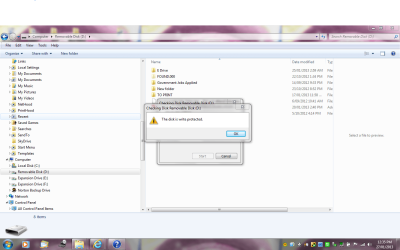
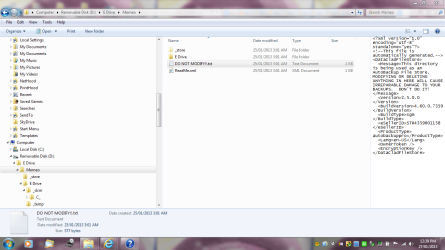
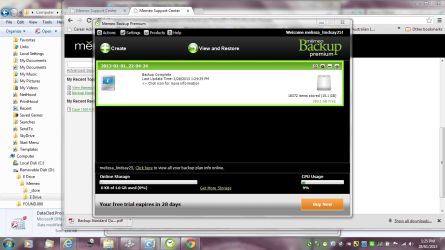
Unable to access folder - used as a backup - not too sure

Melissa

New member
Power User
Local time
8:31 AM
Messages
394
I am using a thumb zip disk - external - USB external.

I used it as a back up for my external drive that I am having issues with.

I used it on another computer and went to use it today and noted that it would not transfer the files to my computer.

I have no idea how to check the properties.

I have included a screen shot as I am not too great with computers and words.

I just wish to delete the documents from some of the USB.
 

Attachments

  • unable to share.PNG
    unable to share.PNG
    77 KB · Views: 8

My Computer My Computer

At a glance

Windows 7 Home Premium 64bitWindows 7 Service Pack 1 x86 NTFS4 GB
Computer type
Laptop
Computer Manufacturer/Model Number
Sony VAIO / E Series VPCEB46FG
OS
Windows 7 Home Premium 64bit
CPU
Windows 7 Service Pack 1 x86 NTFS
Motherboard
AMD E-350 Processor
Memory
4 GB
Hard Drives
500GB
Other Info
1.6GHz
What do you mean by "would not transfer the files to my computer"?

How did you try to do this? What steps did you take?
What windows ere open?
 

My Computer My Computer

At a glance

Windows 10 Pro X64Intel Quad Core i7-4770 @ 3.4Ghz16.0GB PC3-12800 DDR3 SDRAM 1600 MHzIntel Integrated HD Graphics
Computer type
PC/Desktop
Computer Manufacturer/Model Number
Lenovo IdeaCenter 450
OS
Windows 10 Pro X64
CPU
Intel Quad Core i7-4770 @ 3.4Ghz
Memory
16.0GB PC3-12800 DDR3 SDRAM 1600 MHz
Graphics Card(s)
Intel Integrated HD Graphics
Sound Card
Realtek HD Audio
Monitor(s) Displays
HP 22" LCD
Screen Resolution
1680 x 1050
Hard Drives
250GB Samsung EVO SATA-3 SSD
2TB Seagate ST2000DM001 SATA-2
1.5TB Seagate ST3150041AS SATA
Keyboard
Dell USB
Mouse
Lenovo USB
Internet Speed
Cable via Road Runner 3MB Upload, 30MB Download
Antivirus
Windows Defender, MBAM Pro, MBAE
Browser
Seamonkey
Other Info
UEFI/GPT
PLDS DVD-RW DH16AERSH
Back up with software - now write protected

I am sorry for being not very descriptive with my issue.

I have a USB disk - and I have now realised that it is the back up to my desktop.

It is only trial software - for back up.

I have gone to use the USB disk to then go on another computer upload some documents to transfer to my desktop.

It then comes up that there are issues with the disk - do you wish to scan and fix.

Am I now stuck with the information on the disk or can you delete the properties
 

Attachments

  • disk.PNG
    disk.PNG
    80.4 KB · Views: 7
  • write.PNG
    write.PNG
    64.9 KB · Views: 5
  • write1.PNG
    write1.PNG
    79.7 KB · Views: 5

My Computer My Computer

At a glance

Windows 7 Home Premium 64bitWindows 7 Service Pack 1 x86 NTFS4 GB
Computer type
Laptop
Computer Manufacturer/Model Number
Sony VAIO / E Series VPCEB46FG
OS
Windows 7 Home Premium 64bit
CPU
Windows 7 Service Pack 1 x86 NTFS
Motherboard
AMD E-350 Processor
Memory
4 GB
Hard Drives
500GB
Other Info
1.6GHz
??? Delete the properties ???

Sorry, but again I don't understand what you mean.

You said this is a backup disk for your desktop. Do you want to keep the backup data on the disk or do you want to delete it then use the disk for other purposes.
 

My Computer My Computer

At a glance

Windows 10 Pro X64Intel Quad Core i7-4770 @ 3.4Ghz16.0GB PC3-12800 DDR3 SDRAM 1600 MHzIntel Integrated HD Graphics
Computer type
PC/Desktop
Computer Manufacturer/Model Number
Lenovo IdeaCenter 450
OS
Windows 10 Pro X64
CPU
Intel Quad Core i7-4770 @ 3.4Ghz
Memory
16.0GB PC3-12800 DDR3 SDRAM 1600 MHz
Graphics Card(s)
Intel Integrated HD Graphics
Sound Card
Realtek HD Audio
Monitor(s) Displays
HP 22" LCD
Screen Resolution
1680 x 1050
Hard Drives
250GB Samsung EVO SATA-3 SSD
2TB Seagate ST2000DM001 SATA-2
1.5TB Seagate ST3150041AS SATA
Keyboard
Dell USB
Mouse
Lenovo USB
Internet Speed
Cable via Road Runner 3MB Upload, 30MB Download
Antivirus
Windows Defender, MBAM Pro, MBAE
Browser
Seamonkey
Other Info
UEFI/GPT
PLDS DVD-RW DH16AERSH
I believe that the backups were generated by a third-party program that has placed the XML file there and has also write-protected the drive.
What programs did you use to backup the files?
 

My Computer My Computer

At a glance

N/A
OS
N/A
I used a program called Memeo which is powered by Seagate - I thought that I would use the suggested program which I did not know existed for the hard drive.

I looked at what is on the write protected - which I do not know what it means. It has all the back up items from E: as I have named it. As the USB 500GB is currently asking me to format it - I have used this to do a back up.

I did not know that all the other properties - once inserted the USB 8GB asks for a scan and fix - then it comes up that it is write protected.

I am not computer savvy. I just thought I would use the software that came with the product.

I have another forum going for the screen shots of my corrupt Seagate 500GB that keeps on asking me to format it.
Thank you for trying to assist.

I am not that good at explaining - epic fail for me.
 

Attachments

My Computer My Computer

At a glance

Windows 7 Home Premium 64bitWindows 7 Service Pack 1 x86 NTFS4 GB
Computer type
Laptop
Computer Manufacturer/Model Number
Sony VAIO / E Series VPCEB46FG
OS
Windows 7 Home Premium 64bit
CPU
Windows 7 Service Pack 1 x86 NTFS
Motherboard
AMD E-350 Processor
Memory
4 GB
Hard Drives
500GB
Other Info
1.6GHz
Back
Top