Unable to backup hard drive with Backup Program

rhZK

New member
Local time
4:41 AM
Messages
13
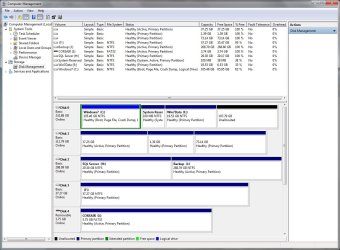
I keep getting an error when I try to use the Backup Program. As far as I can tell there are no hidden partitions. Using the Administrator tools -> Computer Management -> Disk Management tool, I deleted all the partitions on my external ESATA drive which is larger than my boot drive. Then I recreated two partitions, one a 30G partition and the other uses the rest of the 320G drive. After formatting them, I tried to do a backup and received the same error. I have done this twice now. Anyone know why this is happening and how to fix this?

I used the external drive dock in USB mode and got the same errors. I tried two different external enclosures and still the same errors.

:confused:

Error:
Windows Backup Error:
A shadow copy could not be created. Please check "VSS" and "SPP" application event logs for more information. (0x81000019)


19000081990500003F0900005B090000420ED1665C2BEE174B64529CB14610EA71000000

VSS Warning:

ASR writer Error 0x80042416


0x00000000, The operation completed successfully.


Operation: PrepareForBackup event Context: Execution Context: ASR Writer Execution Context: Writer Writer Class Id: {be000cbe-11fe-4426-9c58-531aa6355fc4} Writer Name: ASR Writer Writer Instance ID: {628b20aa-214f-4935-9b7a-722e0bf2200b} Error-specific details: ASR Writer: System partition (partition marked "active") is hidden or contains an unrecognized file system. Backup does not support this configuration. (0x80042416)


2D20436F64653A20575254415352574330303030303530372D2043616C6C3A20575254415352574330303030303632372D205049443A202030303030353130382D205449443A202030303030343432342D20434D443A2020433A5C57696E646F77735C73797374656D33325C76737376632E6578652020202D20557365723A204E616D653A204E5420415554484F524954595C53595354454D2C205349443A532D312D352D313820
VSS Error:
IVssAsrWriterBackup::GetAsrMetadata


0x80042416, System partition (partition marked "active") is hidden or contains an unrecognized file system. Backup does not support this configuration.


Operation: PrepareForBackup event Context: Execution Context: ASR Writer Execution Context: Writer Writer Class Id: {be000cbe-11fe-4426-9c58-531aa6355fc4} Writer Name: ASR Writer Writer Instance ID: {628b20aa-214f-4935-9b7a-722e0bf2200b} Error-specific details: ASR Writer: System partition (partition marked "active") is hidden or contains an unrecognized file system. Backup does not support this configuration. (0x80042416)


2D20436F64653A20575254415352574330303030303439312D2043616C6C3A20575254415352574330303030303336362D205049443A202030303030353130382D205449443A202030303030343432342D20434D443A2020433A5C57696E646F77735C73797374656D33325C76737376632E6578652020202D20557365723A204E616D653A204E5420415554484F524954595C53595354454D2C205349443A532D312D352D313820

SPP Error:
ASR Writer


System partition (partition marked "active") is hidden or contains an unrecognized file system. Backup does not support this configuration. (0x80042416)


01000000150F0000040F00000000000042BEB7C511CAC619E59C92030000000000000000
 

My Computer

OS
Windows 7
That error seems to be referring to your system partition, not your backup destination. Make sure you're logged in as an admin.

Now run an elevated (admiinstrative) command prompt
Start > Cmd > Right Click Cmd.exe > Run as Admin
Type in: sfc / scannow

If you get errors, run that three times.

If that doesn't help you could try a System Repair or Repair Install.
 

My Computer

Computer Manufacturer/Model Number
Apple Macbook Pro (April 2009)
OS
W7 Ult. x64 | OS X
CPU
Intel Mobile Core 2 Duo 2.93Ghz [T9800 Penryn]
Motherboard
NVIDIA nForce 730i Rev. B1 [Mac-F2268EC8 (U2E1)]
Memory
4096MB Samsung DDR3 Dual Channel [PC3-8500F 1066Mhz]
Graphics Card(s)
NVIDIA GeForce 9600M GT 512MB [G96M Rev. C1]
Sound Card
SB X-Fi Surround 5.1 USB | Onboard Realtek (Disabled)
Monitor(s) Displays
Acer x223wbd 22" | Apple Anti-Glare 17" (Disabled)
Screen Resolution
{Current} 1440x900 {Acer} 1680x1050 {Apple} 1920x1200
Hard Drives
{Internal}
Seagate Momentus 320GB 2.5" 7200RPM [ST9320421AS]

{Externals}
LaCie 320GB USB 2.0 HDD [301284UR]
LaCie 750GB USB 2.0 FW400 eSATA HDD [301314U]
LaCie 1TB USB 2.0 HDD [301304UR]
PSU
Magsafe
Case
Aluminum/Unibody (MBP52)
Cooling
2 x 6000 RPM Fans
Keyboard
Logitech G-15v2 [PN 920-000379]
Mouse
Logitech G-9 [PN 910-000338]
Internet Speed
12Mbps/2.5Mbps w/ 24Mbps Speed Boost [Comcast]
Other Info
Logitech X-540 Speakers [PN 970223-0122]
Sennheiser PC-151 Headset

My Computers

System One System Two

  • Computer type
    PC/Desktop
    OS
    7 X64
    CPU
    i5 8400
    Motherboard
    gigabyte b365m ds3h
    Memory
    2x8gb 3200mhz
    Hard Drives
    various
    PSU
    pure power 11 400w cm
    Case
    Coolermaster
    Cooling
    cryorig m9i
  • Computer type
    PC/Desktop
    OS
    7x64
    CPU
    g5400
    Motherboard
    ga b365m ds3h
    Memory
    8gb ddr4 2400
    PSU
    xfx pro 450w
That error seems to be referring to your system partition, not your backup destination. Make sure you're logged in as an admin.

Now run an elevated (admiinstrative) command prompt
Start > Cmd > Right Click Cmd.exe > Run as Admin
Type in: sfc / scannow

If you get errors, run that three times.

If that doesn't help you could try a System Repair or Repair Install.

I ran the sfc /scannow and received no errors. I am kind of surprised actually as when I tried the back up it would lock the machine up and I had to shut it down with the power switch.
 

My Computer

OS
Windows 7
windows 7 needs at least 40gb for backup destination drive (free space) i think.
enlarge the 30gb you made.
also may be having trouble with a hidden partition ?:confused: edit: missed where you mentioned that:o

cheers:)
 

My Computer

Computer Manufacturer/Model Number
Self
OS
W7, Xp Pro
CPU
AMD Sempron 2600+
Motherboard
K8V-MX
Memory
1GB
Graphics Card(s)
Radeon HD3650
Sound Card
Soundmax
Monitor(s) Displays
17" HP CRT
Screen Resolution
1024x768
Hard Drives
1x WDC WD800BB
1x HDS728080
PSU
? 460W
Case
Coolermaster
Cooling
enough
Keyboard
M$S
Mouse
Optical
Internet Speed
1500kbs
Other Info
OLD!!! does the job i need.
The system partition doesn't look hidden to me.

Disk 1 is hidden ( is there any reason for that ? ) - there is an active partition on Disk 1 - which partitions are you trying to back up?
 

My Computers

System One System Two

  • Computer type
    PC/Desktop
    OS
    7 X64
    CPU
    i5 8400
    Motherboard
    gigabyte b365m ds3h
    Memory
    2x8gb 3200mhz
    Hard Drives
    various
    PSU
    pure power 11 400w cm
    Case
    Coolermaster
    Cooling
    cryorig m9i
  • Computer type
    PC/Desktop
    OS
    7x64
    CPU
    g5400
    Motherboard
    ga b365m ds3h
    Memory
    8gb ddr4 2400
    PSU
    xfx pro 450w
windows 7 needs at least 40gb for backup destination drive (free space) i think.
enlarge the 30gb you made.
also may be having trouble with a hidden partition ?:confused: edit: missed where you mentioned that:o

cheers:)

I think you are mistaken. :huh:

I think you are talking about the hidden System Reserve partition on the C: drive which is by default 100MB. It was only 37MB and I did some research that says it should be at least 40MB. As for my 30GB partition on my target drive, I do not believe that is an issue. I could be wrong though. I extended the System Reserve partition to 490MB which should be plenty and still received the same errors. I have heard that in order to get the backup to work I need to make the hidden system partition visible by assigning it a drive letter. I might try that next. No, that did not work either.

It seems that strange that Microsoft would not have foreseen these problems and fixed them. I am not too impressed with their testing techniques. I would have thought this would have been a major issue or they rushed Windows 7 into production too quickly.

:(
 

My Computer

OS
Windows 7
The system partition doesn't look hidden to me.

Disk 1 is hidden ( is there any reason for that ? ) - there is an active partition on Disk 1 - which partitions are you trying to back up?

Disk 1 is not a concern, it is a Linux drive. All I am trying to do is backup the C: drive partition on disk 0 to the J: drive partition on disk 2.
 

My Computer

OS
Windows 7
Okay, I got it to work finally! :party:

I had to put the Windows drive as the boot drive in the BIOS boot priority. I find it a bit bizarre that I have to do that, but it is working now though not finished yet. In any case, thanks for all the nice suggestions.

I may need to find a way to boot my Linux drive from the windows drive rather than the other way around.

:D
 

My Computer

OS
Windows 7
The hidden active partition on Disk 1 was the problem, it appears.
 

My Computers

System One System Two

  • Computer type
    PC/Desktop
    OS
    7 X64
    CPU
    i5 8400
    Motherboard
    gigabyte b365m ds3h
    Memory
    2x8gb 3200mhz
    Hard Drives
    various
    PSU
    pure power 11 400w cm
    Case
    Coolermaster
    Cooling
    cryorig m9i
  • Computer type
    PC/Desktop
    OS
    7x64
    CPU
    g5400
    Motherboard
    ga b365m ds3h
    Memory
    8gb ddr4 2400
    PSU
    xfx pro 450w

My Computer

Computer Manufacturer/Model Number
Self
OS
W7, Xp Pro
CPU
AMD Sempron 2600+
Motherboard
K8V-MX
Memory
1GB
Graphics Card(s)
Radeon HD3650
Sound Card
Soundmax
Monitor(s) Displays
17" HP CRT
Screen Resolution
1024x768
Hard Drives
1x WDC WD800BB
1x HDS728080
PSU
? 460W
Case
Coolermaster
Cooling
enough
Keyboard
M$S
Mouse
Optical
Internet Speed
1500kbs
Other Info
OLD!!! does the job i need.
If you want to boot Linux from the Windows Boot Environment, you should download a program called EasyBCD (Do a google search). With a bit of tinkering you should be able to add your Linux system to the windows boot sequence.
 

My Computer

Computer Manufacturer/Model Number
Apple Macbook Pro (April 2009)
OS
W7 Ult. x64 | OS X
CPU
Intel Mobile Core 2 Duo 2.93Ghz [T9800 Penryn]
Motherboard
NVIDIA nForce 730i Rev. B1 [Mac-F2268EC8 (U2E1)]
Memory
4096MB Samsung DDR3 Dual Channel [PC3-8500F 1066Mhz]
Graphics Card(s)
NVIDIA GeForce 9600M GT 512MB [G96M Rev. C1]
Sound Card
SB X-Fi Surround 5.1 USB | Onboard Realtek (Disabled)
Monitor(s) Displays
Acer x223wbd 22" | Apple Anti-Glare 17" (Disabled)
Screen Resolution
{Current} 1440x900 {Acer} 1680x1050 {Apple} 1920x1200
Hard Drives
{Internal}
Seagate Momentus 320GB 2.5" 7200RPM [ST9320421AS]

{Externals}
LaCie 320GB USB 2.0 HDD [301284UR]
LaCie 750GB USB 2.0 FW400 eSATA HDD [301314U]
LaCie 1TB USB 2.0 HDD [301304UR]
PSU
Magsafe
Case
Aluminum/Unibody (MBP52)
Cooling
2 x 6000 RPM Fans
Keyboard
Logitech G-15v2 [PN 920-000379]
Mouse
Logitech G-9 [PN 910-000338]
Internet Speed
12Mbps/2.5Mbps w/ 24Mbps Speed Boost [Comcast]
Other Info
Logitech X-540 Speakers [PN 970223-0122]
Sennheiser PC-151 Headset
I may have been a little premature. Though I did get it to work, it still failed about half way through with blue, red, white, or gray BSOD screens. The problem also seems to be with the ESATA port on my motherboard. Though the internal one works just fine, the ESATA port seems to have sporadic problems when writing to the disk. Even just copying a several folders all at once gave me some problems until I copied them one at a time.

So, I decided to go back to accessing the drive through a USB cable and the backup program worked just fine now that the hidden partition is visible and large enough.
 

My Computer

OS
Windows 7
back up

yep i did a back up put it on my mom computer via net work on moms it shows 15 gig from my computer it shows empty i have tried using the windows back to make an image a few different ways I can see windows still cant get thing right. I went and got a free program called paragon back up its free and it's rated # 2. You can back up to dvd's spanned over how ever many dvd's you need, or back up to another drive. You can also scan the backup to make sure its right. Be honest the last thing you need is to do a back up and find out its worthless and have to start from scratch.

How this helps
 

My Computer

OS
windows 7
Back
Top