Unable to boot into Windows after installing Ubuntu on usb drive

art11s

New member
Local time
3:35 PM
Messages
2
Getting "Operating system not found" message right after I press the power button. This happened right after I did a full install of Ubuntu to a usb drive. Have a Sony Vaio S Series laptop. The Assist button that is supposed to boot from a recovery partition on the internal drive produces the same error. Tried resetting the BIOS to default settings but didn't help (the default is UEFI). There are no hardware issues as I can run Ubuntu and see all the drives. Ran an Ubuntu Boot Repair utility. Here is a summary report output: Ubuntu Pastebin. Any suggestions?
 

My Computer My Computer

At a glance

Windows 7 x64 Pro
Computer type
PC/Desktop
OS
Windows 7 x64 Pro
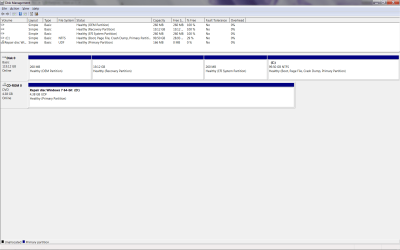
Booted in using Recovery disk. Which partition should I mark as active (see attachment)? Not allowing me to mark any from the disk management gui.
 

Attachments

  • diskmngm.png
    diskmngm.png
    34.5 KB · Views: 3

My Computer My Computer

At a glance

Windows 7 x64 Pro
Computer type
PC/Desktop
OS
Windows 7 x64 Pro
You have an EFI System partition so as it says in Troubleshooting Windows 7 Failure to Start there is no Active partition. Run a few Startup Repairs and report back what it finds.

Boot into BIOS setup to make sure Windows Boot Manager is set first to boot, any choice for UEFI First to boot also needs to be set correctly.

Report back any BIOS settings choices for CSM, UEFI, EFI, Legacy BIOS and BIOS Boot order.

There are not a lot of repair options for EFI installs, so if Startup Repair cannot fix it you can skip to Step 11 to rescue any files and run Recovery or do a Clean Reinstall.

For all repairs using Win7 disk or System Repair Disk these disks must be booted as UEFI devices. Use the BIOS Boot menu key to boot these.
http://www.sevenforums.com/tutorials/219487-clean-reinstall-factory-oem-windows-7-a.html#post1839164
 
Back
Top