Unable to boot into Windows

JerryOnion

New member
Local time
5:00 PM
Messages
13
Hi guys, I need some help here.

When I start up my PC, the "Windows Error Recovery" message appears on the screen prompting me to Launch Startup Repair or Start Windows Normally.

When I choose "Start Windows Normally", I am unable to progress beyond the windows loading screen (The windows boot animation doesn't even appear, just the words Starting Windows). Then this error message appears -

IMAG0167.jpg

I tried to restart windows and launch startup repair from my installation disc, but it fails -
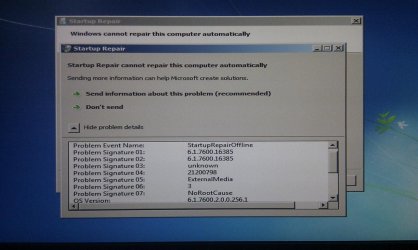
IMAG0160.jpg

For the past few days prior to yesterday, my PC was working just fine. Then all of a sudden, this problem popped up.

I haven't replaced or removed any hardware.
All my BIOS settings are at default.
I've tried changed AHCI to IDE.
I've tried booting with one memory stick on different slots.
I've run Windows Memory Diagnostic but no errors were returned.
I've tried connecting nothing but my Super Talent Boot Disk in.

So I am at a loss here. Naturally formatting and reinstalling Windows would be a last resort, so I've turned to you guys for help b4 I do anything else.

Anyone free to help a poor bloke like me ? :(
 

My Computer

OS
Windows 7 Ultimate x64
CPU
AMD Athlon II X4 640 @ Default
Motherboard
Biostar a880g+
Memory
2 x 2GB Team Elite 1333MHz DDR3 RAM
Graphics Card(s)
XFX 9800GT
Sound Card
None
Monitor(s) Displays
Dell U2311
Screen Resolution
1920 x 1080
Hard Drives
Super Talent Masterdrive FTM64GX25H 64GB SSD
Samsung Spinpoint F3 HD103SJ 1TB HDD
PSU
Some OEM Delta 450W PSU
Case
None
Cooling
AMD Stock Cooler
Keyboard
Generic USB Wired Keyboard
Mouse
Generic USB Wired Mouse

My Computer

OS
ME/XP/Vista/Win7

My Computer

OS
Windows 7 Ultimate x64
CPU
AMD Athlon II X4 640 @ Default
Motherboard
Biostar a880g+
Memory
2 x 2GB Team Elite 1333MHz DDR3 RAM
Graphics Card(s)
XFX 9800GT
Sound Card
None
Monitor(s) Displays
Dell U2311
Screen Resolution
1920 x 1080
Hard Drives
Super Talent Masterdrive FTM64GX25H 64GB SSD
Samsung Spinpoint F3 HD103SJ 1TB HDD
PSU
Some OEM Delta 450W PSU
Case
None
Cooling
AMD Stock Cooler
Keyboard
Generic USB Wired Keyboard
Mouse
Generic USB Wired Mouse
   Information
Boot up using the Startup Repair CD or Windows 7 DVD. (not the OEM manufacturer's Recovery Disk) If you have a Netbook, you will need a CD/DVD drive.
NOTE: Make sure no USB drives are plugged in.
Do not use a USB Pendrive for Startup Repair.​

Do a Strartup Repair:
http://www.sevenforums.com/tutorials/681-startup-repair.html?ltr=S
Note: You may need to do startup repair 3 to 4 times.
http://www.sevenforums.com/tutorials/105541-startup-repair-run-3-separate-times.html

I must have done it like 10 times now :(
 

My Computer

OS
Windows 7 Ultimate x64
CPU
AMD Athlon II X4 640 @ Default
Motherboard
Biostar a880g+
Memory
2 x 2GB Team Elite 1333MHz DDR3 RAM
Graphics Card(s)
XFX 9800GT
Sound Card
None
Monitor(s) Displays
Dell U2311
Screen Resolution
1920 x 1080
Hard Drives
Super Talent Masterdrive FTM64GX25H 64GB SSD
Samsung Spinpoint F3 HD103SJ 1TB HDD
PSU
Some OEM Delta 450W PSU
Case
None
Cooling
AMD Stock Cooler
Keyboard
Generic USB Wired Keyboard
Mouse
Generic USB Wired Mouse
Try running system restore from the recovery options.
 

My Computer

Computer Manufacturer/Model Number
Too many to describe...
OS
Windows 7 x64 pro/ Windows 7 x86 Pro/ XP SP3 x86

My Computer

OS
Windows 7 Ultimate x64
CPU
AMD Athlon II X4 640 @ Default
Motherboard
Biostar a880g+
Memory
2 x 2GB Team Elite 1333MHz DDR3 RAM
Graphics Card(s)
XFX 9800GT
Sound Card
None
Monitor(s) Displays
Dell U2311
Screen Resolution
1920 x 1080
Hard Drives
Super Talent Masterdrive FTM64GX25H 64GB SSD
Samsung Spinpoint F3 HD103SJ 1TB HDD
PSU
Some OEM Delta 450W PSU
Case
None
Cooling
AMD Stock Cooler
Keyboard
Generic USB Wired Keyboard
Mouse
Generic USB Wired Mouse
OK. Lets try different things. To rule out a problem with the disk, download a repair disk from this site and use it to run startup repair and sfc scan.

Create a Windows 7 System Repair Disc — MAXIMUMpcguides – Windows 7 tips, tricks, help, and how-to guides

To run sfc scan from the disk, use the offline method.

http://www.sevenforums.com/tutorials/139810-sfc-scannow-run-command-prompt-boot.html

If above 2 dont help, try restoring a pristine copy of the registry this way (skip the startup repair steps).

http://www.sevenforums.com/tutorials/139576-startup-repair-infinite-loop-recovery.html
 

My Computer

Computer Manufacturer/Model Number
Too many to describe...
OS
Windows 7 x64 pro/ Windows 7 x86 Pro/ XP SP3 x86
OK. Lets try different things. To rule out a problem with the disk, download a repair disk from this site and use it to run startup repair and sfc scan.

Create a Windows 7 System Repair Disc — MAXIMUMpcguides – Windows 7 tips, tricks, help, and how-to guides

To run sfc scan from the disk, use the offline method.

http://www.sevenforums.com/tutorials/139810-sfc-scannow-run-command-prompt-boot.html

If above 2 dont help, try restoring a pristine copy of the registry this way (skip the startup repair steps).

http://www.sevenforums.com/tutorials/139576-startup-repair-infinite-loop-recovery.html

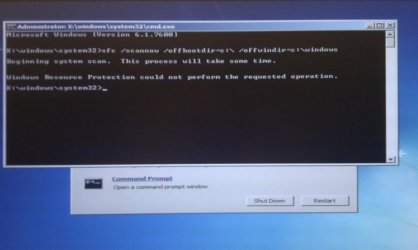
Tried to run sfc scan -

IMAG0168.jpg

Tried to restore pristine copy by following instructions. Windows Boot Manager still gave me the same error :(
 

My Computer

OS
Windows 7 Ultimate x64
CPU
AMD Athlon II X4 640 @ Default
Motherboard
Biostar a880g+
Memory
2 x 2GB Team Elite 1333MHz DDR3 RAM
Graphics Card(s)
XFX 9800GT
Sound Card
None
Monitor(s) Displays
Dell U2311
Screen Resolution
1920 x 1080
Hard Drives
Super Talent Masterdrive FTM64GX25H 64GB SSD
Samsung Spinpoint F3 HD103SJ 1TB HDD
PSU
Some OEM Delta 450W PSU
Case
None
Cooling
AMD Stock Cooler
Keyboard
Generic USB Wired Keyboard
Mouse
Generic USB Wired Mouse
If you installed W7 in AHCI mode, be sure the BIOS setting is back on AHCI mode. You don't need 2 problems to deal with.

A couple of other things to try:

  • Borrow and use a wired keyboard and mouse to test.
  • Go into the BIOS settings and see if you can run the graphics in standard VGA mode - this disables the normal graphics drivers.
  • Disable the Sound and LAN devices in BIOS and test.

The possibility that the SSD is faulty is great. Read this post to see one way to test the SSD without the OS: http://www.sevenforums.com/1001830-post119.html
 

My Computer

Computer type
PC/Desktop
Computer Manufacturer/Model Number
Home Built - Jan 2013
OS
Windows 7 64 Bit Home Premium SP1
CPU
i7-3820
Motherboard
Asus P9X79-PRO - Bios 4608
Memory
GSkill F3-14900CL9Q - 16GB
Graphics Card(s)
EVGA GeForce GTX660 - Driver 352.86
Sound Card
On board Realtek ALC898
Monitor(s) Displays
Acer S271HL
Screen Resolution
1920 x 1080
Hard Drives
#1- Samsung 840 Pro Series
#2- Western Digital WD1002FAEX Sata3 Black
#3- Western Digital WD1002FAEX Sata3 Black
PSU
Corsair CMPSU-850TX-V2 - 850 watt (by Seasonic)
Case
Corsair Obsidian 550D
Cooling
Standard 3 120mm case fans, Cooler Master Hyper 212 EVO
Keyboard
MS KC-0405
Mouse
Intellimouse 5-button
Internet Speed
56 Mbits/Sec (on a good day)
Antivirus
Avast & Malwarebytes
Browser
Firefox
Other Info
Asus DVD - DRW-24B1ST 24X
Scan HD for infection by burning to CD or writing to flash stick Microsoft Standalone System Sweeper

If you haven't run Startup Repair from the DVD Repair console or Repair CD then it has not been run. You cannot count on Startup Repair run from the HD as the OS System Files or HD may be corrupted.

Test your SSD with maker's diagnostics/repair extended CD scan.

See if you can copy out your files or see them using this method: Copy & Paste - in Windows Recovery Console

Then boot the Win7 DVd to clean reinstall adapting these tips to get a perfect reinstall:
Reinstalling Windows 7
 
OK. Lets try different things. To rule out a problem with the disk, download a repair disk from this site and use it to run startup repair and sfc scan.

Create a Windows 7 System Repair Disc — MAXIMUMpcguides – Windows 7 tips, tricks, help, and how-to guides

To run sfc scan from the disk, use the offline method.

http://www.sevenforums.com/tutorials/139810-sfc-scannow-run-command-prompt-boot.html

If above 2 dont help, try restoring a pristine copy of the registry this way (skip the startup repair steps).

http://www.sevenforums.com/tutorials/139576-startup-repair-infinite-loop-recovery.html

Tried to run sfc scan -

View attachment 172718

Tried to restore pristine copy by following instructions. Windows Boot Manager still gave me the same error :(

Which drive path is your OS installed C: or X:? Try doing the sfc /scannow again on the C: drive. The screen shot looks like you only scanned the X: drive.
 

My Computer

Computer type
PC/Desktop
Computer Manufacturer/Model Number
Custom Build
OS
Windows 7 Pro 64bit build 7601 SP1
CPU
Intel Core I5 3570K 3.4Ghz w/ Zalman CNPS9900NT RT
Motherboard
MSI Z77A-G45 Gaming
Memory
G.Skill F3-12800CL9D-8GbXL ; 4Gx2
Graphics Card(s)
EVGA Geforce GTX 770 Superclocked
Sound Card
Creative Sound Blaster Z
Monitor(s) Displays
Dual ViewSonic VX2770Smh-LED Black 27"IPS-Panel
Screen Resolution
1920x1080
Hard Drives
Kingston Hyper X 240GB SSD Win8 Pro 64bit 6GB/s Sata III
Intel 335 Series SSD 240GB Win8 Storage 6GB/s Sata III
Intel 320 Series SSD 600GB Storage 3GB/s Sata II
Western Digital Scorpio Black 1TB - Docked via Esata
PSU
Coolermaster GX 750W
Case
Corsair Vengence C70
Cooling
Coolermaster 120mm and Enermax 140mm
Keyboard
Corsair Vengence K70
Mouse
Logitech G500
Internet Speed
22mbps+
Browser
Firefox, Chrome, IE
Other Info
Swan M50W 2.1 speakers
APC UPS
Thermaltake BlacX HDD Dock
Samsung BD Optical Drive
Netgear WNDR4500
OK. Lets try different things. To rule out a problem with the disk, download a repair disk from this site and use it to run startup repair and sfc scan.

Create a Windows 7 System Repair Disc — MAXIMUMpcguides – Windows 7 tips, tricks, help, and how-to guides

To run sfc scan from the disk, use the offline method.

http://www.sevenforums.com/tutorials/139810-sfc-scannow-run-command-prompt-boot.html

If above 2 dont help, try restoring a pristine copy of the registry this way (skip the startup repair steps).

http://www.sevenforums.com/tutorials/139576-startup-repair-infinite-loop-recovery.html

Tried to run sfc scan -

View attachment 172718

Tried to restore pristine copy by following instructions. Windows Boot Manager still gave me the same error :(

Which drive path is your OS installed C: or X:? Try doing the sfc /scannow again on the C: drive. The screen shot looks like you only scanned the X: drive.

I tried running sfc scan both from c: and x: drive. Neither works.
 

My Computer

OS
Windows 7 Ultimate x64
CPU
AMD Athlon II X4 640 @ Default
Motherboard
Biostar a880g+
Memory
2 x 2GB Team Elite 1333MHz DDR3 RAM
Graphics Card(s)
XFX 9800GT
Sound Card
None
Monitor(s) Displays
Dell U2311
Screen Resolution
1920 x 1080
Hard Drives
Super Talent Masterdrive FTM64GX25H 64GB SSD
Samsung Spinpoint F3 HD103SJ 1TB HDD
PSU
Some OEM Delta 450W PSU
Case
None
Cooling
AMD Stock Cooler
Keyboard
Generic USB Wired Keyboard
Mouse
Generic USB Wired Mouse
If you installed W7 in AHCI mode, be sure the BIOS setting is back on AHCI mode. You don't need 2 problems to deal with.

A couple of other things to try:

  • Borrow and use a wired keyboard and mouse to test.
  • Go into the BIOS settings and see if you can run the graphics in standard VGA mode - this disables the normal graphics drivers.
  • Disable the Sound and LAN devices in BIOS and test.

The possibility that the SSD is faulty is great. Read this post to see one way to test the SSD without the OS: http://www.sevenforums.com/1001830-post119.html

I've got no GFX (using onboard as enabled in the BIOS). I disabled sound, lan, usb3 devices. Still don't work :(

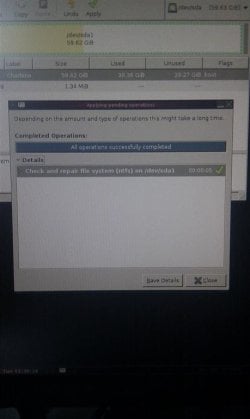
And Gparted detected on problems with my SSD -

IMAG0169.jpg

IMAG0170.jpg
 

My Computer

OS
Windows 7 Ultimate x64
CPU
AMD Athlon II X4 640 @ Default
Motherboard
Biostar a880g+
Memory
2 x 2GB Team Elite 1333MHz DDR3 RAM
Graphics Card(s)
XFX 9800GT
Sound Card
None
Monitor(s) Displays
Dell U2311
Screen Resolution
1920 x 1080
Hard Drives
Super Talent Masterdrive FTM64GX25H 64GB SSD
Samsung Spinpoint F3 HD103SJ 1TB HDD
PSU
Some OEM Delta 450W PSU
Case
None
Cooling
AMD Stock Cooler
Keyboard
Generic USB Wired Keyboard
Mouse
Generic USB Wired Mouse
Your issue could be hardware related (failed hardware) or software related (corrupted drivers or OS). What I am doing here is trying to eliminated obvious hardware failures. If we can find none then you can focus on repairing the OS. It doesn't make sense (to me) to work on software before checking the hardware.

Can you borrow a wired keyboard and mouse?

Can you get to the Windows "Advanced Boot Options" menu? You do this by pressing the F8 key just before Windows starts to load (just after the BIOS finishes and hands off to the OS).

If you can, try the "Enable Low Resolution Video" option. Let us know the results.

You could also try the "Last Known Good Configuration" option afterward. But check the video first.
 

My Computer

Computer type
PC/Desktop
Computer Manufacturer/Model Number
Home Built - Jan 2013
OS
Windows 7 64 Bit Home Premium SP1
CPU
i7-3820
Motherboard
Asus P9X79-PRO - Bios 4608
Memory
GSkill F3-14900CL9Q - 16GB
Graphics Card(s)
EVGA GeForce GTX660 - Driver 352.86
Sound Card
On board Realtek ALC898
Monitor(s) Displays
Acer S271HL
Screen Resolution
1920 x 1080
Hard Drives
#1- Samsung 840 Pro Series
#2- Western Digital WD1002FAEX Sata3 Black
#3- Western Digital WD1002FAEX Sata3 Black
PSU
Corsair CMPSU-850TX-V2 - 850 watt (by Seasonic)
Case
Corsair Obsidian 550D
Cooling
Standard 3 120mm case fans, Cooler Master Hyper 212 EVO
Keyboard
MS KC-0405
Mouse
Intellimouse 5-button
Internet Speed
56 Mbits/Sec (on a good day)
Antivirus
Avast & Malwarebytes
Browser
Firefox
Other Info
Asus DVD - DRW-24B1ST 24X
Your issue could be hardware related (failed hardware) or software related (corrupted drivers or OS). What I am doing here is trying to eliminated obvious hardware failures. If we can find none then you can focus on repairing the OS. It doesn't make sense (to me) to work on software before checking the hardware.

Can you borrow a wired keyboard and mouse?

Can you get to the Windows "Advanced Boot Options" menu? You do this by pressing the F8 key just before Windows starts to load (just after the BIOS finishes and hands off to the OS).

If you can, try the "Enable Low Resolution Video" option. Let us know the results.

You could also try the "Last Known Good Configuration" option afterward. But check the video first.


I tried booting up with a wired keyboard and mouse.

I tried enabling low resolution Video under advanced boot options and last known good configuration.

Didn't work. :(
 

My Computer

OS
Windows 7 Ultimate x64
CPU
AMD Athlon II X4 640 @ Default
Motherboard
Biostar a880g+
Memory
2 x 2GB Team Elite 1333MHz DDR3 RAM
Graphics Card(s)
XFX 9800GT
Sound Card
None
Monitor(s) Displays
Dell U2311
Screen Resolution
1920 x 1080
Hard Drives
Super Talent Masterdrive FTM64GX25H 64GB SSD
Samsung Spinpoint F3 HD103SJ 1TB HDD
PSU
Some OEM Delta 450W PSU
Case
None
Cooling
AMD Stock Cooler
Keyboard
Generic USB Wired Keyboard
Mouse
Generic USB Wired Mouse
Bummer.
Then you should start working on some of the suggestions made by Gregrocker in post #12 above to start.

If you can copy your files out it will further show that the Hard drive is OK.

EDIT: And don't forget the repair disk method mentioned by Bill2 in Post # 9 too.
 

My Computer

Computer type
PC/Desktop
Computer Manufacturer/Model Number
Home Built - Jan 2013
OS
Windows 7 64 Bit Home Premium SP1
CPU
i7-3820
Motherboard
Asus P9X79-PRO - Bios 4608
Memory
GSkill F3-14900CL9Q - 16GB
Graphics Card(s)
EVGA GeForce GTX660 - Driver 352.86
Sound Card
On board Realtek ALC898
Monitor(s) Displays
Acer S271HL
Screen Resolution
1920 x 1080
Hard Drives
#1- Samsung 840 Pro Series
#2- Western Digital WD1002FAEX Sata3 Black
#3- Western Digital WD1002FAEX Sata3 Black
PSU
Corsair CMPSU-850TX-V2 - 850 watt (by Seasonic)
Case
Corsair Obsidian 550D
Cooling
Standard 3 120mm case fans, Cooler Master Hyper 212 EVO
Keyboard
MS KC-0405
Mouse
Intellimouse 5-button
Internet Speed
56 Mbits/Sec (on a good day)
Antivirus
Avast & Malwarebytes
Browser
Firefox
Other Info
Asus DVD - DRW-24B1ST 24X
Scan HD for infection by burning to CD or writing to flash stick Microsoft Standalone System Sweeper

If you haven't run Startup Repair from the DVD Repair console or Repair CD then it has not been run. You cannot count on Startup Repair run from the HD as the OS System Files or HD may be corrupted.

Test your SSD with maker's diagnostics/repair extended CD scan.

See if you can copy out your files or see them using this method: Copy & Paste - in Windows Recovery Console

Then boot the Win7 DVd to clean reinstall adapting these tips to get a perfect reinstall:
Reinstalling Windows 7


Aye, MS Standalone system sweeper yielded nothing.

From the looks of it I may have to reinstall Windows :(
 

My Computer

OS
Windows 7 Ultimate x64
CPU
AMD Athlon II X4 640 @ Default
Motherboard
Biostar a880g+
Memory
2 x 2GB Team Elite 1333MHz DDR3 RAM
Graphics Card(s)
XFX 9800GT
Sound Card
None
Monitor(s) Displays
Dell U2311
Screen Resolution
1920 x 1080
Hard Drives
Super Talent Masterdrive FTM64GX25H 64GB SSD
Samsung Spinpoint F3 HD103SJ 1TB HDD
PSU
Some OEM Delta 450W PSU
Case
None
Cooling
AMD Stock Cooler
Keyboard
Generic USB Wired Keyboard
Mouse
Generic USB Wired Mouse
Back
Top