Unable to change network type

CableDolt

New member
Hey there,

A few times a year I go away from my home station and take my tower and laptop with me. As my tower doesn't have a wireless adapter I connect to the the internet by plugging it into my laptop and sharing it's wireless connection. It's all been fine up until now. I've just plugged the ethernet cable between laptop and PC but the network has come up as Unidentified and has made it Public and as such I can't access the internet from my PC (surfing fine here on my laptop though, it's the LAN connection that's giving me issues).

I've no idea why it's doing this as in the past it has worked fine. I can't seem to change the network type as clicking on it only allows me to change the name and icon, not the type. It might be interesting to note that viewing the network from my PC it is a Home network but my laptop seems to think it's Unidentified.

Can anyone clue me on on how to fix this please as this issue has never cropped up before.

- CableDolt

Ninja-edit: Both machines are running Windows 7 Home Premium 64-bit.
 

My Computer

OS
Windows 7 Home Premium

My Computer

Computer type
Laptop
Computer Manufacturer/Model Number
Employer provided Dell Latitude
OS
W7 Pro SP1 64bit
CPU
i7
Memory
8GB
Graphics Card(s)
Intel HD Graphics
Hard Drives
crappy SSD
Antivirus
Employer mandated Symantec Endpoint Protection
Browser
Pale Moon 64bit, IE11 64bit & Chrome 64bit
Hi,

Thanks for the link. I tried to use the MicrosoftFixIt tool but unfortunately when I tried to set the unidentified network as a Home one it said it couldn't do it, which is a little annoying. Thanks anyway though.

- CableDolt
 

My Computer

OS
Windows 7 Home Premium
Hi CableDolt, welcome to the Seven Forums.

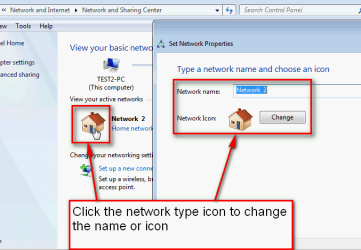
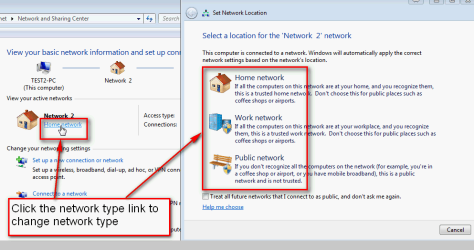
See the attached images.

1. To change network icon or name:

NetworkType_12.png

2. To change network type (location):

NetworkType_13.png

Kari
 

My Computer

Computer type
Laptop
Computer Manufacturer/Model Number
HP ENVY 17-1150eg
OS
Windows 10 Pro x64 EN-GB
CPU
1.6 GHz Intel Core i7-720QM Processor
Memory
6 GB
Graphics Card(s)
ATI Mobility Radeon HD 5850 Graphics
Sound Card
Beats sound system with integrated subwoofer
Monitor(s) Displays
17" laptop display, 22" LED and 32" Full HD TV through HDMI
Screen Resolution
1600*900 (1), 1920*1080 (2&3)
Hard Drives
Internal: 2 x 500 GB SATA Hard Disk Drive 7200 rpm
External: 2TB for backups, 3TB USB3 network drive for media
Cooling
As Envy runs a bit warm, I have it on a Cooler Master pad
Keyboard
Logitech diNovo Media Desktop Laser (bluetooth)
Mouse
Logitech Performance Mouse MX
Internet Speed
50/10 Mbps VDSL
Antivirus
Windows Defender 4.3.9431.0
Browser
Maxthon 3.5.2., IE11
Kari,

Thanks but it's not possible to do this. The text that says Public Network is non-clickable so I can't change its network type.
 

My Computer

OS
Windows 7 Home Premium

My Computer

Computer type
Laptop
Computer Manufacturer/Model Number
Employer provided Dell Latitude
OS
W7 Pro SP1 64bit
CPU
i7
Memory
8GB
Graphics Card(s)
Intel HD Graphics
Hard Drives
crappy SSD
Antivirus
Employer mandated Symantec Endpoint Protection
Browser
Pale Moon 64bit, IE11 64bit & Chrome 64bit
Err R.E. setting IPs I have no idea; my tech know-how doesn't extend that far I'm afraid.

I checked your link but it would seem that I can't access the Local Security Policy editor, nor the Local Group Policy editor as a quick Google reveals they're Ultimate-only perks and I'm running Home Premium. I tried the second option (the .reg file) but that appears to have had no effect on my ability to change the network type.
 

My Computer

OS
Windows 7 Home Premium

My Computer

Computer type
Laptop
Computer Manufacturer/Model Number
Employer provided Dell Latitude
OS
W7 Pro SP1 64bit
CPU
i7
Memory
8GB
Graphics Card(s)
Intel HD Graphics
Hard Drives
crappy SSD
Antivirus
Employer mandated Symantec Endpoint Protection
Browser
Pale Moon 64bit, IE11 64bit & Chrome 64bit
Could be worth trying that.

As an aside note, I just ran the Diagnose function on the LAN connection itself and it found a problem "Local Area Connection doesn't have a valid IP configuration". Could this be where my issues are lying?
 

My Computer

OS
Windows 7 Home Premium
Apologies for the double post but a quick update on the situation:

Did a reboot on my laptop and ran the .reg file again. My LAN network has now changed from Public to a Work location but is still Unidentified so as such I can't access the internet through my PC still.

Does this mean there's some sort of IP problem going on, from what I found in my previous post?
 

My Computer

OS
Windows 7 Home Premium
Like you said - this used to work for you - obviously something has changed in the software or hardware. All I can think to ask about the hardware is: Are you using a cross-over cable? (Of course, you might not need one with newer networks adapters.)

In the software realm - there are lots of things that can change.
Maybe something in this tutorial will help you spot the issue:
http://www.sevenforums.com/tutorials/49569-internet-sharing-using-cross-over-cable.html

Can you look to see what IP the network adapters have? The ones tied together with the cable.
 

My Computer

Computer type
Laptop
Computer Manufacturer/Model Number
Employer provided Dell Latitude
OS
W7 Pro SP1 64bit
CPU
i7
Memory
8GB
Graphics Card(s)
Intel HD Graphics
Hard Drives
crappy SSD
Antivirus
Employer mandated Symantec Endpoint Protection
Browser
Pale Moon 64bit, IE11 64bit & Chrome 64bit
Back
Top