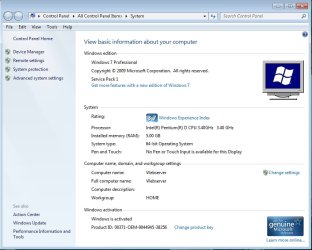
i'm trying to do a repair install of windows7 OEM, but for some reason the process is telling me i'm running win XP and cant upgrade to win7.
windows explorer keeps stopping and restarting also.
i cant have 3 or 4 programs open at the same time as i used to, i lose the task bar and when i try to run the Task Manager nothing happens, so i'm forced to hit the reset button to get back to basics, very frustrating.
sincere apologize if this is in the wrong forums
this is the contents of my windows comparability report......
The following issues are preventing Windows from upgrading. Cancel the upgrade, complete each task, and then restart the upgrade to continue.
Your current version of Windows is more recent than the version you are trying to upgrade to. Windows cannot complete the upgrade.
Upgrading Windows will affect the following devices and/or programs:
These programs might not work properly after the upgrade. We recommend uninstalling these programs before upgrading. Cancel the upgrade, open Control Panel, and search for "uninstall a program". (Note: Programs marked as * can be safely reinstalled after the upgrade.)
PhotoStudio
iTunes (Please deauthorize computer prior to upgrade)
My Computer
At a glance
Windows 7 Professional x64 (6.1, Build 7601)Core i5-4460 3.2GHz4 x 8GB 1333 DDR3nVidia GeForce GTX760 4GB
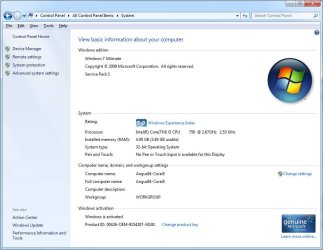
Your screenshot shows you have Windows 7 Ultimate Service Pack 1, which according to the error message you receive is more recent than the install media you are using for repair install. If this is the case the repair install can naturally not work; a repair install is an in-place upgrade install to the same, not older version.
To put this short: looks like your install media is for Windows 7 Ultimate without SP1, in other words older than the OS you are trying to repair, Windows 7 Ultimate with SP1.
Get 7 Ultimate SP1 ISO file and burn it to a DVD or flash drive and try again using it. See this tutorial, step 1, for how to download Windows 7 Ultimate SP1 ISO image file.
Kari
My Computer
At a glance
Windows 10 Pro x64 EN-GB1.6 GHz Intel Core i7-720QM Processor6 GBATI Mobility Radeon HD 5850 Graphics
Computer type
Laptop
Computer Manufacturer/Model Number
HP ENVY 17-1150eg
OS
Windows 10 Pro x64 EN-GB
CPU
1.6 GHz Intel Core i7-720QM Processor
Memory
6 GB
Graphics Card(s)
ATI Mobility Radeon HD 5850 Graphics
Sound Card
Beats sound system with integrated subwoofer
Monitor(s) Displays
17" laptop display, 22" LED and 32" Full HD TV through HDMI
Screen Resolution
1600*900 (1), 1920*1080 (2&3)
Hard Drives
Internal: 2 x 500 GB SATA Hard Disk Drive 7200 rpm
External: 2TB for backups, 3TB USB3 network drive for media
Cooling
As Envy runs a bit warm, I have it on a Cooler Master pad
now that you have explained it like that it makes sense, i am trying to install from my OEM disc which of course is older than what i have installed now, given all the updates since
i have just finished downloading.......
X17-59463.iso
i think it was the correct one
My Computer
At a glance
Windows 7 Professional x64 (6.1, Build 7601)Core i5-4460 3.2GHz4 x 8GB 1333 DDR3nVidia GeForce GTX760 4GB
Burn it to a DVD or if you have a 4 GB or bigger flash drive use it (see tutorial), launch the setup from your current Windows 7 desktop. To be sure you get it right check the tutorial first to see how to prepare for repair install and how to do it correctly: http://www.sevenforums.com/tutorials/3413-repair-install.html.
My Computer
At a glance
Windows 10 Pro x64 EN-GB1.6 GHz Intel Core i7-720QM Processor6 GBATI Mobility Radeon HD 5850 Graphics
Computer type
Laptop
Computer Manufacturer/Model Number
HP ENVY 17-1150eg
OS
Windows 10 Pro x64 EN-GB
CPU
1.6 GHz Intel Core i7-720QM Processor
Memory
6 GB
Graphics Card(s)
ATI Mobility Radeon HD 5850 Graphics
Sound Card
Beats sound system with integrated subwoofer
Monitor(s) Displays
17" laptop display, 22" LED and 32" Full HD TV through HDMI
Screen Resolution
1600*900 (1), 1920*1080 (2&3)
Hard Drives
Internal: 2 x 500 GB SATA Hard Disk Drive 7200 rpm
External: 2TB for backups, 3TB USB3 network drive for media
Cooling
As Envy runs a bit warm, I have it on a Cooler Master pad


 Upgrading Windows will affect the following devices and/or programs: