
Unable to connect through wifi

Ddawg747

New member
Local time
6:19 AM
Messages
6
I am having trouble connecting to any websites through wifi. I have connected to the wifi and used CMD to ping google.com and i get no errors but when i open my browser and try it it says "• Make sure the web address Google is correct • look for the page with your search engine • Refresh the page in a few minutes. " all of which i have done i then proceeded to click the Fix connection problems button and i get an alert saying nothing could be found. How do i fix it?
 

Attachments
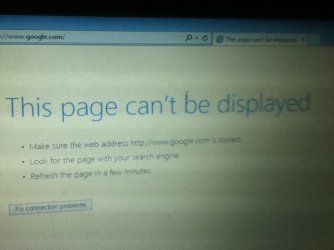
  • ImageUploadedBySeven Forums1450902742.703324.jpg
    ImageUploadedBySeven Forums1450902742.703324.jpg
    54.7 KB · Views: 2

My Computer My Computer

Computer type
Laptop
Computer Manufacturer/Model Number
HP Mini 110-1000
OS
Windows 7 Starter 32 bit (6.1, Build 7601)
CPU
Intel(R) Atom(TM) CPU N270 @ 1.60GHz 1.60GHz
Memory
1024MB RAM
Graphics Card(s)
Intel(R) GMA 950
Antivirus
Microsoft Security Essentials
Browser
Chrome and IE
Which web browser are you using? If you are using internet explorer, do a reset by going to tools, internet options, advanced, reset, ok, then start browser again. Make sure there are no proxies set that would interfere.

Also check any security software or antivirus, they can cause this problem many times.
 

My Computer My Computer

Computer type
PC/Desktop
OS
Windows 7 Pro 64 bit SP1
CPU
Intel Core i7 950 Quad OC'ed to 3.2 GHZ
Motherboard
ASRock X58
Memory
12GB DDR 3
Graphics Card(s)
Radeon HD 5870 1GB
Sound Card
Onboard
Monitor(s) Displays
23" Acer HD
Screen Resolution
1920x1080
Hard Drives
128GB SSD
PSU
700W
Case
Coolermaster
Antivirus
Avast Free
Browser
Firefox
I use Chrome mostly but ill try IE
 

My Computer My Computer

Computer type
Laptop
Computer Manufacturer/Model Number
HP Mini 110-1000
OS
Windows 7 Starter 32 bit (6.1, Build 7601)
CPU
Intel(R) Atom(TM) CPU N270 @ 1.60GHz 1.60GHz
Memory
1024MB RAM
Graphics Card(s)
Intel(R) GMA 950
Antivirus
Microsoft Security Essentials
Browser
Chrome and IE
resetting the browser might help. checking the proxy setting also in the internet option , select automatically detect proxy settings.
 

My Computer My Computer

Computer type
Laptop
Computer Manufacturer/Model Number
HP
OS
windows 7 enterprise 64bit
CPU
Intel
Motherboard
Intel
Memory
8GB
Graphics Card(s)
128MB
Hard Drives
500GB
Antivirus
Mcafee
Browser
IE , Mozilla firefox
Back
Top