Unable to connect to one PC, but can the other way

DanielPlumb

New member
Local time
9:25 PM
Messages
23
Good Afternoon all, I hope you're enjoying this beautiful weather!! Well, you won't be able to for another few minutes. :cool:

I'm here because the web is useless and despite me searching through pages of forum threads and Google searches, I have found nothing that relates to my problem exactly.

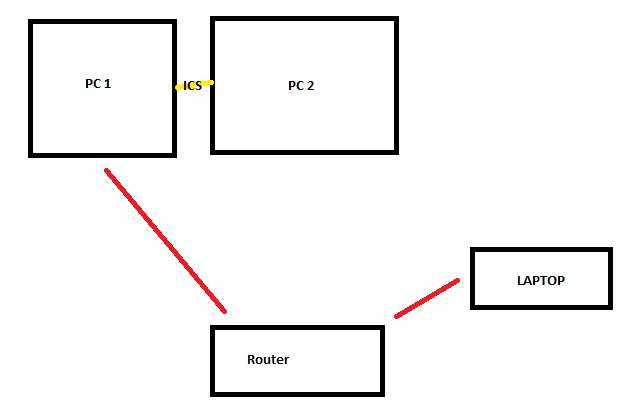
Here is a (very aesthetically-pleasing, if I do say so myself!) diagram of my setup of computers around my home:
Lk60Faz.png


PC 2 is getting its internet through ICS from PC 1. This is done in the diagram through a yellow line (an ethernet / CAT5 cable) - works fine. The red lines in the diagram represent any wireless connections amongst the (can I call it a network yet? :shock:)

Now, my whole intention here is for the computers to happilly share their files over the network, without any of this homegroup hassle - as it's not really needed afaik?

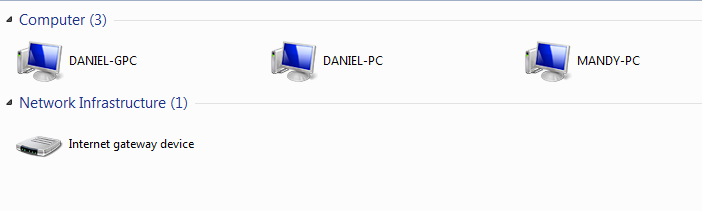
All of the computers are visible on eachother's 'Network' page in W7.
r1l3CDj.png


Now, here is what can access what:

When choosing another PC from PC-1:
  • I can access PC-2 (Daniel-PC) and its files fine.
  • I can access laptop (MANDY-PC) and its files fine.

When choosing another PC from PC-2:
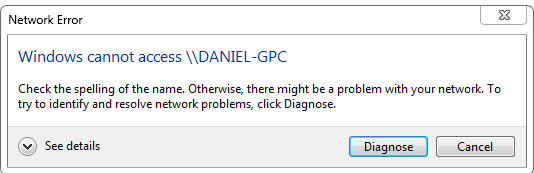
  • I cannot access PC-1 (Daniel-GPC). I receive the inevitable message of:

    D5k7QkX.png

  • I can access laptop (MANDY-PC) and its files fine.

When choosing another PC from LAPTOP (MANDY-PC):
  • I can access PC-1 (Daniel-GPC) and its files fine.
  • I can access PC-2 (Daniel-PC) and its files fine.

The part in red that I've highlighted above is the problem here. The fact that I can access PC1 -> PC2, but I cannot vice versa PC2 -> PC1. Yet internet connection sharing among both PCs works fine... I'm bewildered.

Here is another pretty diagram to put the above into a visual concept:
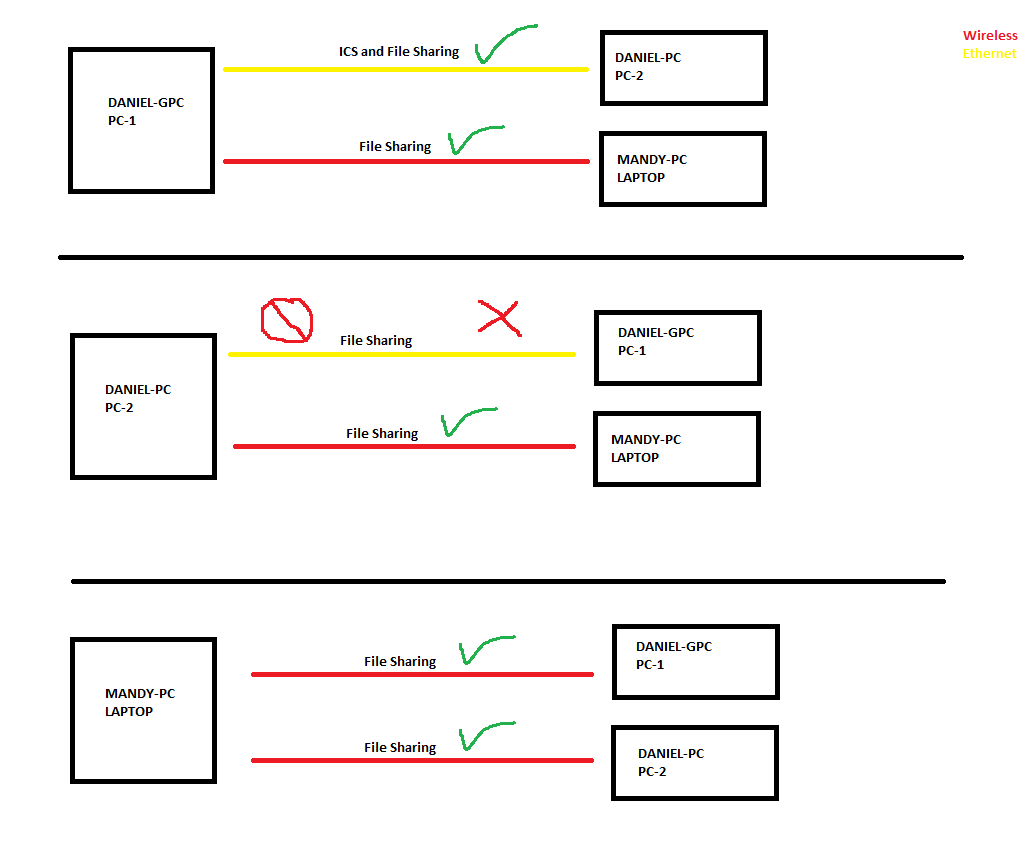
BnmFVSr.png


All 3 computers have the same settings in advanced network settings (i.e. network discovery is on, password file protecting is off, file sharing on etc...) They're also all connected to the same workgroup of 'WORKGROUP'.

PC-1: Windows 7 Ultimate x64
PC-2: Windows 7 Home x64
LAPTOP: Windows 7 Home x64

Ultimately there is nothing wrong with the LAPTOP's connections, I was merely adding it in to show that I can access PC-1 from somewhere.

I've used the 'diagnose' function, gone through and changed permissions, tried a different workgroup name, but nothing at all works.

You are a legend if you can help me with anything to get this working.

Thank you very much. :)

Daniel
 

My Computer My Computer

At a glance

Windows 7 Ultimate x64Intel i5 4670k8GB DDR3GTX 770 2GB
Computer type
PC/Desktop
Computer Manufacturer/Model Number
Custom Build
OS
Windows 7 Ultimate x64
CPU
Intel i5 4670k
Motherboard
Asus Z87-A
Memory
8GB DDR3
Graphics Card(s)
GTX 770 2GB
Hard Drives
1TB
Antivirus
Microsoft Security Essentials
Browser
Google Chrome
Ideally you would place a switch before PC-1 then plug both PC-1 and PC-2 into that switch rather than messing with ICS because ICS appears to be the problem in this case although that is hard to say for certain.

Homegroups would be an easier way to go, it's the opposite of a hassle which you are having now.

Besides that you could try adding the credentials from PC-1 to PC-2, via the control panel>credential manager>Windows credentials.

Also be sure and check that the time/date settings are in sync on all machines. :)
 

My Computer My Computer

At a glance

Windows 7 Ult, Windows 8.1 Pro,Q9650-4.275GHz, E8600 4.5GHz, E6750-3.8GHzG.Skill PC2 9600 1200Mhz 5 5 5 15 2TGTX480
Computer type
PC/Desktop
Computer Manufacturer/Model Number
Home built
OS
Windows 7 Ult, Windows 8.1 Pro,
CPU
Q9650-4.275GHz, E8600 4.5GHz, E6750-3.8GHz
Motherboard
Evga 780i FTW
Memory
G.Skill PC2 9600 1200Mhz 5 5 5 15 2T
Graphics Card(s)
GTX480
Sound Card
Asus Xonar D2
Monitor(s) Displays
HannsG
Screen Resolution
1680X1050
Hard Drives
GSkill Phoenix Pro 120GB SSD
PSU
ThermalTake Toughpower 1000Watt modular
Case
ThermalTake XaserV
Cooling
Xigmatek S1283
Keyboard
Logitech G15
Mouse
Logitech G9
Internet Speed
T1
Hey, thanks for your reply. :)

Ideally you would place a switch before PC-1 then plug both PC-1 and PC-2 into that switch rather than messing with ICS because ICS appears to be the problem in this case although that is hard to say for certain.

By a "switch", do you mean something like this?

Homegroups would be an easier way to go, it's the opposite of a hassle which you are having now.

I can access files as shown in the OP around the network, which leads me to think that a homegroup is not required here.

Besides that you could try adding the credentials from PC-1 to PC-2, via the control panel>credential manager>Windows credentials.

Just tried this, though to no avail.

Also be sure and check that the time/date settings are in sync on all machines. :)

There were 2 minutes different between the PC (not sure if that's something crucial enough to have an effect?) though I did sync them both to Window's time servers and nothing worked. :(
 

My Computer My Computer

At a glance

Windows 7 Ultimate x64Intel i5 4670k8GB DDR3GTX 770 2GB
Computer type
PC/Desktop
Computer Manufacturer/Model Number
Custom Build
OS
Windows 7 Ultimate x64
CPU
Intel i5 4670k
Motherboard
Asus Z87-A
Memory
8GB DDR3
Graphics Card(s)
GTX 770 2GB
Hard Drives
1TB
Antivirus
Microsoft Security Essentials
Browser
Google Chrome
The switch link didn't open up for me but I'm talking about a bog standard network switch, ICS is a pseudo science at best and not known for it's reliability.

You could possibly get around this problem by setting up a Homegroup and seeing if the problem persists but with ICS in the mix it still may not work.
 

My Computer My Computer

At a glance

Windows 7 Ult, Windows 8.1 Pro,Q9650-4.275GHz, E8600 4.5GHz, E6750-3.8GHzG.Skill PC2 9600 1200Mhz 5 5 5 15 2TGTX480
Computer type
PC/Desktop
Computer Manufacturer/Model Number
Home built
OS
Windows 7 Ult, Windows 8.1 Pro,
CPU
Q9650-4.275GHz, E8600 4.5GHz, E6750-3.8GHz
Motherboard
Evga 780i FTW
Memory
G.Skill PC2 9600 1200Mhz 5 5 5 15 2T
Graphics Card(s)
GTX480
Sound Card
Asus Xonar D2
Monitor(s) Displays
HannsG
Screen Resolution
1680X1050
Hard Drives
GSkill Phoenix Pro 120GB SSD
PSU
ThermalTake Toughpower 1000Watt modular
Case
ThermalTake XaserV
Cooling
Xigmatek S1283
Keyboard
Logitech G15
Mouse
Logitech G9
Internet Speed
T1
Yes, it seems as if Misco's website has gone down momentarily. It was this.

What benefits would a switch give me, if I were to implement one?
 

My Computer My Computer

At a glance

Windows 7 Ultimate x64Intel i5 4670k8GB DDR3GTX 770 2GB
Computer type
PC/Desktop
Computer Manufacturer/Model Number
Custom Build
OS
Windows 7 Ultimate x64
CPU
Intel i5 4670k
Motherboard
Asus Z87-A
Memory
8GB DDR3
Graphics Card(s)
GTX 770 2GB
Hard Drives
1TB
Antivirus
Microsoft Security Essentials
Browser
Google Chrome
Yes, it seems as if Misco's website has gone down momentarily. It was this.

What benefits would a switch give me, if I were to implement one?

In this case it would eliminate the need to have ICS which appears to be the cause of the problem.

That switch in the link is a bit outdated, most systems can use 10/100/1000 or Gb connection speeds, this switch can only handle 10/100 speeds, so it's best to find one that can do that.
 

My Computer My Computer

At a glance

Windows 7 Ult, Windows 8.1 Pro,Q9650-4.275GHz, E8600 4.5GHz, E6750-3.8GHzG.Skill PC2 9600 1200Mhz 5 5 5 15 2TGTX480
Computer type
PC/Desktop
Computer Manufacturer/Model Number
Home built
OS
Windows 7 Ult, Windows 8.1 Pro,
CPU
Q9650-4.275GHz, E8600 4.5GHz, E6750-3.8GHz
Motherboard
Evga 780i FTW
Memory
G.Skill PC2 9600 1200Mhz 5 5 5 15 2T
Graphics Card(s)
GTX480
Sound Card
Asus Xonar D2
Monitor(s) Displays
HannsG
Screen Resolution
1680X1050
Hard Drives
GSkill Phoenix Pro 120GB SSD
PSU
ThermalTake Toughpower 1000Watt modular
Case
ThermalTake XaserV
Cooling
Xigmatek S1283
Keyboard
Logitech G15
Mouse
Logitech G9
Internet Speed
T1
Yes, it seems as if Misco's website has gone down momentarily. It was this.

What benefits would a switch give me, if I were to implement one?

In this case it would eliminate the need to have ICS which appears to be the cause of the problem.

That switch in the link is a bit outdated, most systems can use 10/100/1000 or Gb connection speeds, this switch can only handle 10/100 speeds, so it's best to find one that can do that.

So I would get internet on PC-2 through what? Wireless connection? Because I can't plug my router into the switch, as that is downstairs.

And thanks for the heads up, it was the first result tbh. I will try it now without ICS and if it works, then we know what that's down to.
 

My Computer My Computer

At a glance

Windows 7 Ultimate x64Intel i5 4670k8GB DDR3GTX 770 2GB
Computer type
PC/Desktop
Computer Manufacturer/Model Number
Custom Build
OS
Windows 7 Ultimate x64
CPU
Intel i5 4670k
Motherboard
Asus Z87-A
Memory
8GB DDR3
Graphics Card(s)
GTX 770 2GB
Hard Drives
1TB
Antivirus
Microsoft Security Essentials
Browser
Google Chrome
Yes, it seems as if Misco's website has gone down momentarily. It was this.

What benefits would a switch give me, if I were to implement one?

In this case it would eliminate the need to have ICS which appears to be the cause of the problem.

That switch in the link is a bit outdated, most systems can use 10/100/1000 or Gb connection speeds, this switch can only handle 10/100 speeds, so it's best to find one that can do that.

So I would get internet on PC-2 through what? Wireless connection? Because I can't plug my router into the switch, as that is downstairs.

And thanks for the heads up, it was the first result tbh. I will try it now without ICS and if it works, then we know what that's down to.

I figured that would be the case where it's not so easy to run the cable.

You can test by moving the machine then plugging directly into the router and see if ICS really is the problem or not.
 

My Computer My Computer

At a glance

Windows 7 Ult, Windows 8.1 Pro,Q9650-4.275GHz, E8600 4.5GHz, E6750-3.8GHzG.Skill PC2 9600 1200Mhz 5 5 5 15 2TGTX480
Computer type
PC/Desktop
Computer Manufacturer/Model Number
Home built
OS
Windows 7 Ult, Windows 8.1 Pro,
CPU
Q9650-4.275GHz, E8600 4.5GHz, E6750-3.8GHz
Motherboard
Evga 780i FTW
Memory
G.Skill PC2 9600 1200Mhz 5 5 5 15 2T
Graphics Card(s)
GTX480
Sound Card
Asus Xonar D2
Monitor(s) Displays
HannsG
Screen Resolution
1680X1050
Hard Drives
GSkill Phoenix Pro 120GB SSD
PSU
ThermalTake Toughpower 1000Watt modular
Case
ThermalTake XaserV
Cooling
Xigmatek S1283
Keyboard
Logitech G15
Mouse
Logitech G9
Internet Speed
T1
It appears that disabling ICS has had no effect. I still receive the "Windows cannot access" when trying to get onto PC-1 from PC-2.
 

My Computer My Computer

At a glance

Windows 7 Ultimate x64Intel i5 4670k8GB DDR3GTX 770 2GB
Computer type
PC/Desktop
Computer Manufacturer/Model Number
Custom Build
OS
Windows 7 Ultimate x64
CPU
Intel i5 4670k
Motherboard
Asus Z87-A
Memory
8GB DDR3
Graphics Card(s)
GTX 770 2GB
Hard Drives
1TB
Antivirus
Microsoft Security Essentials
Browser
Google Chrome
Strange problem for sure, normally this type of problem just doesn't occur.

So as to cut the Workgroup out of the picture you should set up a Homegroup and join that Homegroup from all the other PC's using the Homegroup password that you will see when you set it up the first time.
 

My Computer My Computer

At a glance

Windows 7 Ult, Windows 8.1 Pro,Q9650-4.275GHz, E8600 4.5GHz, E6750-3.8GHzG.Skill PC2 9600 1200Mhz 5 5 5 15 2TGTX480
Computer type
PC/Desktop
Computer Manufacturer/Model Number
Home built
OS
Windows 7 Ult, Windows 8.1 Pro,
CPU
Q9650-4.275GHz, E8600 4.5GHz, E6750-3.8GHz
Motherboard
Evga 780i FTW
Memory
G.Skill PC2 9600 1200Mhz 5 5 5 15 2T
Graphics Card(s)
GTX480
Sound Card
Asus Xonar D2
Monitor(s) Displays
HannsG
Screen Resolution
1680X1050
Hard Drives
GSkill Phoenix Pro 120GB SSD
PSU
ThermalTake Toughpower 1000Watt modular
Case
ThermalTake XaserV
Cooling
Xigmatek S1283
Keyboard
Logitech G15
Mouse
Logitech G9
Internet Speed
T1
Alright, well I've just gone down the homegroup method. Created one on PC-1 and connected to it with PC-2 with the allocated password - fine. The issue still lies in that I can't access the PC-1 from PC-2 through both the 'Network' section of Windows, or going to the user under the 'Homegroup' section... :huh:
 

My Computer My Computer

At a glance

Windows 7 Ultimate x64Intel i5 4670k8GB DDR3GTX 770 2GB
Computer type
PC/Desktop
Computer Manufacturer/Model Number
Custom Build
OS
Windows 7 Ultimate x64
CPU
Intel i5 4670k
Motherboard
Asus Z87-A
Memory
8GB DDR3
Graphics Card(s)
GTX 770 2GB
Hard Drives
1TB
Antivirus
Microsoft Security Essentials
Browser
Google Chrome
Alright, well I've just gone down the homegroup method. Created one on PC-1 and connected to it with PC-2 with the allocated password - fine. The issue still lies in that I can't access the PC-1 from PC-2 through both the 'Network' section of Windows, or going to the user under the 'Homegroup' section... :huh:

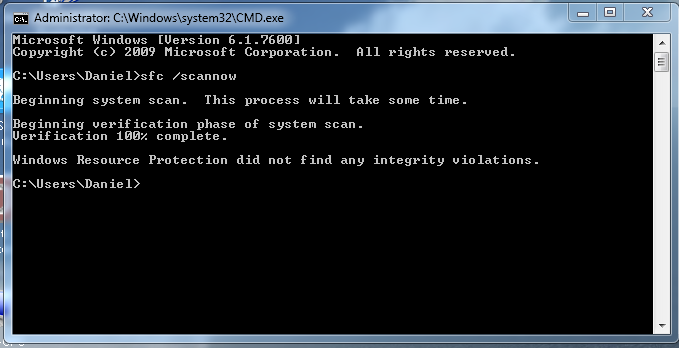
In that case try running a system file scan on the PC with the problem.

Run the following command in an elevated command prompt. Let me know if it passes the scan or not.

Code:
sfc /scannow
 

My Computer My Computer

At a glance

Windows 7 Ult, Windows 8.1 Pro,Q9650-4.275GHz, E8600 4.5GHz, E6750-3.8GHzG.Skill PC2 9600 1200Mhz 5 5 5 15 2TGTX480
Computer type
PC/Desktop
Computer Manufacturer/Model Number
Home built
OS
Windows 7 Ult, Windows 8.1 Pro,
CPU
Q9650-4.275GHz, E8600 4.5GHz, E6750-3.8GHz
Motherboard
Evga 780i FTW
Memory
G.Skill PC2 9600 1200Mhz 5 5 5 15 2T
Graphics Card(s)
GTX480
Sound Card
Asus Xonar D2
Monitor(s) Displays
HannsG
Screen Resolution
1680X1050
Hard Drives
GSkill Phoenix Pro 120GB SSD
PSU
ThermalTake Toughpower 1000Watt modular
Case
ThermalTake XaserV
Cooling
Xigmatek S1283
Keyboard
Logitech G15
Mouse
Logitech G9
Internet Speed
T1
Hi, here are the results for that:

cl8l66e.png
 

My Computer My Computer

At a glance

Windows 7 Ultimate x64Intel i5 4670k8GB DDR3GTX 770 2GB
Computer type
PC/Desktop
Computer Manufacturer/Model Number
Custom Build
OS
Windows 7 Ultimate x64
CPU
Intel i5 4670k
Motherboard
Asus Z87-A
Memory
8GB DDR3
Graphics Card(s)
GTX 770 2GB
Hard Drives
1TB
Antivirus
Microsoft Security Essentials
Browser
Google Chrome
Man we have really opened a can of worms on this one but I'm sure that I can't possible help with this problem because quite frankly none of it makes any sense at all. I'm pretty certain that if I could actually see this network the problem would be painfully obvious.
 

My Computer My Computer

At a glance

Windows 7 Ult, Windows 8.1 Pro,Q9650-4.275GHz, E8600 4.5GHz, E6750-3.8GHzG.Skill PC2 9600 1200Mhz 5 5 5 15 2TGTX480
Computer type
PC/Desktop
Computer Manufacturer/Model Number
Home built
OS
Windows 7 Ult, Windows 8.1 Pro,
CPU
Q9650-4.275GHz, E8600 4.5GHz, E6750-3.8GHz
Motherboard
Evga 780i FTW
Memory
G.Skill PC2 9600 1200Mhz 5 5 5 15 2T
Graphics Card(s)
GTX480
Sound Card
Asus Xonar D2
Monitor(s) Displays
HannsG
Screen Resolution
1680X1050
Hard Drives
GSkill Phoenix Pro 120GB SSD
PSU
ThermalTake Toughpower 1000Watt modular
Case
ThermalTake XaserV
Cooling
Xigmatek S1283
Keyboard
Logitech G15
Mouse
Logitech G9
Internet Speed
T1
I know, it is extremely weird and a shame quite frankly. By saying you want to "see [the] network" do you mean physically? Or over TeamViewer or something?

Daniel
 

My Computer My Computer

At a glance

Windows 7 Ultimate x64Intel i5 4670k8GB DDR3GTX 770 2GB
Computer type
PC/Desktop
Computer Manufacturer/Model Number
Custom Build
OS
Windows 7 Ultimate x64
CPU
Intel i5 4670k
Motherboard
Asus Z87-A
Memory
8GB DDR3
Graphics Card(s)
GTX 770 2GB
Hard Drives
1TB
Antivirus
Microsoft Security Essentials
Browser
Google Chrome
I know, it is extremely weird and a shame quite frankly. By saying you want to "see [the] network" do you mean physically? Or over TeamViewer or something?

Daniel


Well basically if I was the guy setting it up physically, I would have found a way to run the Ethernet and take the ICS out of the equation and then check that IP's are in the same subnet. ICS is not good in the middle of a network.

Perhaps if you can post the ipconfig/all from each machine then it might tell me something.

The problem with ICS is that it sets up it's own little subnet that won't be in the same subnet as the router. That would explain some of the problems. Usually it's something in the 192.168.137.1 or something like that by default.

So setting up a static IP on the ICS machine in the same subnet as the router is using would fix that type of problem. Or configure the machine handing out the ICS to use IP's that are in the same subnet as the router.

In either case the use of ICS is inherently the cause of the problem as I first suspected.
 

My Computer My Computer

At a glance

Windows 7 Ult, Windows 8.1 Pro,Q9650-4.275GHz, E8600 4.5GHz, E6750-3.8GHzG.Skill PC2 9600 1200Mhz 5 5 5 15 2TGTX480
Computer type
PC/Desktop
Computer Manufacturer/Model Number
Home built
OS
Windows 7 Ult, Windows 8.1 Pro,
CPU
Q9650-4.275GHz, E8600 4.5GHz, E6750-3.8GHz
Motherboard
Evga 780i FTW
Memory
G.Skill PC2 9600 1200Mhz 5 5 5 15 2T
Graphics Card(s)
GTX480
Sound Card
Asus Xonar D2
Monitor(s) Displays
HannsG
Screen Resolution
1680X1050
Hard Drives
GSkill Phoenix Pro 120GB SSD
PSU
ThermalTake Toughpower 1000Watt modular
Case
ThermalTake XaserV
Cooling
Xigmatek S1283
Keyboard
Logitech G15
Mouse
Logitech G9
Internet Speed
T1
I see what you mean. I'm going to research further into networking later on tonight, because I want to learn about all this subnet business, haha. Here are the three ipconfig /all returns.

PC-1 Private Paste - Pastie
PC-2 I run the line and it returned me with 348 "Tunnel adapter local Area Connection" lines, so I doubt this contains any crucial information: Private Paste - Pastie
LAPTOP Private Paste - Pastie

Daniel
 

My Computer My Computer

At a glance

Windows 7 Ultimate x64Intel i5 4670k8GB DDR3GTX 770 2GB
Computer type
PC/Desktop
Computer Manufacturer/Model Number
Custom Build
OS
Windows 7 Ultimate x64
CPU
Intel i5 4670k
Motherboard
Asus Z87-A
Memory
8GB DDR3
Graphics Card(s)
GTX 770 2GB
Hard Drives
1TB
Antivirus
Microsoft Security Essentials
Browser
Google Chrome
Ok wow, what a mess, it's no wonder the ipconfig is the first thing I want to see.

As I originally expected, ICS and it's byproducts are the cause of all problems, this is why I tell people to not use it without having to explain the entire reason why which is something most people won't understand...

First off there are two different subnets here starting with PC-1, the wireless is using 192.168.0.1 where the Ethernet is using 192.168.1.1 and for some reason the subnet ending in 1.1 is using a static IP? Is this the machine sharing the connection?

Second machine with all the tunnel adaptor problems which in itself can create the problem described. I'll assume this is the machine borrowing the connection "ICS" from the first machine? ...I have a special file to remove those tunnel adaptors which is a big problem.

The third PC is in the correct subnet ending in .0.1

You need to unzip and run the tunnel adaptor removal file on PC-2, after that reboot the machine and check the ipconfig/all to make sure they are removed except for just one which is normal. If they aren't all gone run the removal file again and reboot. If you can post the ipconfig/all again that would be helpful.
 

Attachments

My Computer My Computer

At a glance

Windows 7 Ult, Windows 8.1 Pro,Q9650-4.275GHz, E8600 4.5GHz, E6750-3.8GHzG.Skill PC2 9600 1200Mhz 5 5 5 15 2TGTX480
Computer type
PC/Desktop
Computer Manufacturer/Model Number
Home built
OS
Windows 7 Ult, Windows 8.1 Pro,
CPU
Q9650-4.275GHz, E8600 4.5GHz, E6750-3.8GHz
Motherboard
Evga 780i FTW
Memory
G.Skill PC2 9600 1200Mhz 5 5 5 15 2T
Graphics Card(s)
GTX480
Sound Card
Asus Xonar D2
Monitor(s) Displays
HannsG
Screen Resolution
1680X1050
Hard Drives
GSkill Phoenix Pro 120GB SSD
PSU
ThermalTake Toughpower 1000Watt modular
Case
ThermalTake XaserV
Cooling
Xigmatek S1283
Keyboard
Logitech G15
Mouse
Logitech G9
Internet Speed
T1
Ok wow, what a mess, it's no wonder the ipconfig is the first thing I want to see.

As I originally expected, ICS and it's byproducts are the cause of all problems, this is why I tell people to not use it without having to explain the entire reason why which is something most people won't understand...

Hahaha, they do look pretty messy.

First off there are two different subnets here starting with PC-1, the wireless is using 192.168.0.1 where the Ethernet is using 192.168.1.1 and for some reason the subnet ending in 1.1 is using a static IP? Is this the machine sharing the connection?

Er, no idea really. I followed a small YouTube tutorial earlier which told me to put these default gateways and IP adddresses in on both of the computers, so I did that...

Second machine with all the tunnel adaptor problems which in itself can create the problem described. I'll assume this is the machine borrowing the connection "ICS" from the first machine? ...I have a special file to remove those tunnel adaptors which is a big problem.

Yes it is the machine "borrowing" the connection as you quite rightly said.

The third PC is in the correct subnet ending in .0.1

Yeah, I thought that one would be OK - I haven't touched anything on there, it's all nice and tidy. :)

You need to unzip and run the tunnel adaptor removal file on PC-2, after that reboot the machine and check the ipconfig/all to make sure they are removed except for just one which is normal. If they aren't all gone run the removal file again and reboot. If you can post the ipconfig/all again that would be helpful.

I'm going to do that now and get back to you. Thank you very very much for your help so far. I'll go through and rep you after this (will [I have faith in you! :D]) be fixed.

Daniel
 

My Computer My Computer

At a glance

Windows 7 Ultimate x64Intel i5 4670k8GB DDR3GTX 770 2GB
Computer type
PC/Desktop
Computer Manufacturer/Model Number
Custom Build
OS
Windows 7 Ultimate x64
CPU
Intel i5 4670k
Motherboard
Asus Z87-A
Memory
8GB DDR3
Graphics Card(s)
GTX 770 2GB
Hard Drives
1TB
Antivirus
Microsoft Security Essentials
Browser
Google Chrome
Ah, that looks much more tidier. Neat little tool that, thanks a lot.

I disabled my Wireless Connection on this PC because as you know, I'm using my internet through ICS. And here are the new results...

Private Paste - Pastie

Daniel
 

My Computer My Computer

At a glance

Windows 7 Ultimate x64Intel i5 4670k8GB DDR3GTX 770 2GB
Computer type
PC/Desktop
Computer Manufacturer/Model Number
Custom Build
OS
Windows 7 Ultimate x64
CPU
Intel i5 4670k
Motherboard
Asus Z87-A
Memory
8GB DDR3
Graphics Card(s)
GTX 770 2GB
Hard Drives
1TB
Antivirus
Microsoft Security Essentials
Browser
Google Chrome
Back
Top