Unable to delete Greyed out para and break marks at end of document

Patti2

New member
Local time
11:05 PM
Messages
20
Location
Cornwall
I have been writing on this family history for years. Lots of cut and paste. Now I am almost done but I find I have some odd para marks I cannot get rid of. I have cut the document up reassembled, studied Help, etc. for hours, no luck. I don't know what do do.

enclosed attachments
 

Attachments

  • 1.JPG
    1.JPG
    78.4 KB · Views: 3
  • 2 .jpg
    2 .jpg
    50.7 KB · Views: 2
  • 3.JPG
    3.JPG
    26.8 KB · Views: 0

My Computer My Computer

At a glance

Microsoft Windows 7 Ultimate 32-bitAMD Athlon(tm) II X3 435 Processor4.00 GB 2.75 GBNVIDIA GeForce GT 220
Computer type
PC/Desktop
Computer Manufacturer/Model Number
unknown
OS
Microsoft Windows 7 Ultimate 32-bit
CPU
AMD Athlon(tm) II X3 435 Processor
Motherboard
Gigabyte Technology Co., Ltd. GA-MA78LM-S2H
Memory
4.00 GB 2.75 GB
Graphics Card(s)
NVIDIA GeForce GT 220
Sound Card
(1) High Definition Audio Device (2) High Definition Audio
Hard Drives
External 931.51 GB
Fixed hard disk media, 3, 465.76 GB
Internet Speed
slow
Antivirus
avg free
Browser
internet explorer
Hi and welcome to the Forum. I will stab a guess and say that you are using Microsoft Word? If so in the toolbar you will see a box giving the percentage size of the document. To the left of that is a Paragraph sign. Just click that and your unwanted signs will be hidden. If that doesn't work then adise us what program and version you are using.
 

My Computer My Computer

At a glance

Microsoft Windows 7 Home Premium 64-bit 7601 ...Intel(R) Core(TM) i7-3770 CPU @ 3.40GHz8.00 GBIntel(R) HD Graphics 4000
Computer type
PC/Desktop
OS
Microsoft Windows 7 Home Premium 64-bit 7601 Multiprocessor Free Service Pack 1
CPU
Intel(R) Core(TM) i7-3770 CPU @ 3.40GHz
Motherboard
ASUSTeK COMPUTER INC. P8H77-M
Memory
8.00 GB
Graphics Card(s)
Intel(R) HD Graphics 4000
Sound Card
On Board
Monitor(s) Displays
Dell 24"
Screen Resolution
1920 x 1080
Hard Drives
(1) INTEL SSDSC2CT180A3 ATA Device (2) ST500DM002-1BD142 ATA Device (3) WDC WD3200AAKS-75L9A0 ATA Device (4) Generic- Compact Flash USB Device (5) Generic- MS/MS-Pro USB Device (6) Generic- SD/MMC USB Device (7) Generic- SM/xD-Picture USB
PSU
500w Corsair
Case
Cooler Master
Cooling
3 Fans
Keyboard
Logitech MK300
Mouse
Logitech WOM
Internet Speed
75Mb
Antivirus
Norton 360
Browser
Firefox, Opera, IE
Hi, thanks for response. I apologize for not telling you I am using Word 203, IE, W7 Ultima

I know about the show hide button but that is not the problem. When you click print preview you can see the extra sections, & pages, etc. are still there.

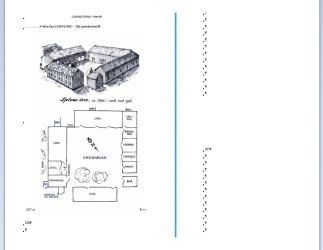
On my attachment #1 you can see the pg 205 where the page no is in the middle of the page. I cannot delete this page or the para marks to change the location of the section.

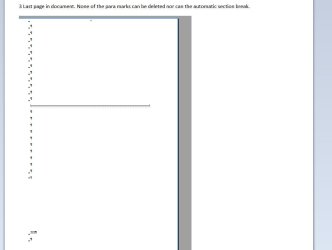
Attachment #2 shows in print preview a line which does not print.
I tried removing page numbers on 205 and 206 but that removed all the page numbers.

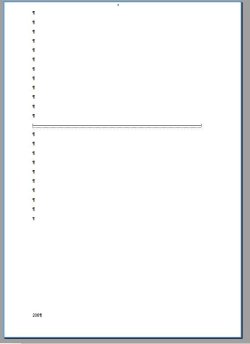
I think I have a badly corrupted instruction somewhere here. I wanted to remove the page numbers showing up at the end so when it is printed I don't have two blank numbered pages.:banghead:
 

My Computer My Computer

At a glance

Microsoft Windows 7 Ultimate 32-bitAMD Athlon(tm) II X3 435 Processor4.00 GB 2.75 GBNVIDIA GeForce GT 220
Computer type
PC/Desktop
Computer Manufacturer/Model Number
unknown
OS
Microsoft Windows 7 Ultimate 32-bit
CPU
AMD Athlon(tm) II X3 435 Processor
Motherboard
Gigabyte Technology Co., Ltd. GA-MA78LM-S2H
Memory
4.00 GB 2.75 GB
Graphics Card(s)
NVIDIA GeForce GT 220
Sound Card
(1) High Definition Audio Device (2) High Definition Audio
Hard Drives
External 931.51 GB
Fixed hard disk media, 3, 465.76 GB
Internet Speed
slow
Antivirus
avg free
Browser
internet explorer
Well Unless I'm going daft which is highly likely I cannot see any page numbers in any of your images?
Have to tried opening the page where you want to delete the page number then go to "View" "Headers and Footers" and just manually delete the page numbers?
Not sure what you mean by "change the position of the section." But perhaps if you created a text box, copied and pasted the "section" into the box then move it where you will
 

My Computer My Computer

At a glance

Microsoft Windows 7 Home Premium 64-bit 7601 ...Intel(R) Core(TM) i7-3770 CPU @ 3.40GHz8.00 GBIntel(R) HD Graphics 4000
Computer type
PC/Desktop
OS
Microsoft Windows 7 Home Premium 64-bit 7601 Multiprocessor Free Service Pack 1
CPU
Intel(R) Core(TM) i7-3770 CPU @ 3.40GHz
Motherboard
ASUSTeK COMPUTER INC. P8H77-M
Memory
8.00 GB
Graphics Card(s)
Intel(R) HD Graphics 4000
Sound Card
On Board
Monitor(s) Displays
Dell 24"
Screen Resolution
1920 x 1080
Hard Drives
(1) INTEL SSDSC2CT180A3 ATA Device (2) ST500DM002-1BD142 ATA Device (3) WDC WD3200AAKS-75L9A0 ATA Device (4) Generic- Compact Flash USB Device (5) Generic- MS/MS-Pro USB Device (6) Generic- SD/MMC USB Device (7) Generic- SM/xD-Picture USB
PSU
500w Corsair
Case
Cooler Master
Cooling
3 Fans
Keyboard
Logitech MK300
Mouse
Logitech WOM
Internet Speed
75Mb
Antivirus
Norton 360
Browser
Firefox, Opera, IE
Hi, thanks for response. I apologize for not telling you I am using Word 203, IE, W7 Ultima

I know about the show hide button but that is not the problem. When you click print preview you can see the extra sections, & pages, etc. are still there.

On my attachment #1 you can see the pg 205 where the page no is in the middle of the page. I cannot delete this page or the para marks to change the location of the section.

Attachment #2 shows in print preview a line which does not print.
I tried removing page numbers on 205 and 206 but that removed all the page numbers.

I think I have a badly corrupted instruction somewhere here. I wanted to remove the page numbers showing up at the end so when it is printed I don't have two blank numbered pages.:banghead:

I doubt you are really using MS Word 203; I don't even use it anymore.:) With that said, you may have better luck using the following link and posting there;

Microsoft Office Forums - Word, Excel, Outlook, PowerPoint, Project

HTH
 

My Computer My Computer

At a glance

Windows 7 Professional x64Intel i5 quad processor16 GBRadeon HD 5770
Computer type
PC/Desktop
Computer Manufacturer/Model Number
Custom Built
OS
Windows 7 Professional x64
CPU
Intel i5 quad processor
Motherboard
DP67BG
Memory
16 GB
Graphics Card(s)
Radeon HD 5770
Sound Card
Realtek High Definition Audio
Monitor(s) Displays
Samsung SyncMaster
Screen Resolution
1920X1080
Hard Drives
WD 2TB (SATA Internal)
WD 1TB (USB External)
PSU
Corsair GS800
Case
Tower (Generic)
Cooling
3 Internal Fans
Keyboard
MS Wireless
Mouse
MS Optical Wired
Internet Speed
54 mbps
Antivirus
Emsisoft
Browser
IE-Version 9, Palemoon-Version 24.2.0

My Computer My Computer

At a glance

Microsoft Windows 7 Home Premium 64-bit 7601 ...Intel(R) Core(TM) i7-3770 CPU @ 3.40GHz8.00 GBIntel(R) HD Graphics 4000
Computer type
PC/Desktop
OS
Microsoft Windows 7 Home Premium 64-bit 7601 Multiprocessor Free Service Pack 1
CPU
Intel(R) Core(TM) i7-3770 CPU @ 3.40GHz
Motherboard
ASUSTeK COMPUTER INC. P8H77-M
Memory
8.00 GB
Graphics Card(s)
Intel(R) HD Graphics 4000
Sound Card
On Board
Monitor(s) Displays
Dell 24"
Screen Resolution
1920 x 1080
Hard Drives
(1) INTEL SSDSC2CT180A3 ATA Device (2) ST500DM002-1BD142 ATA Device (3) WDC WD3200AAKS-75L9A0 ATA Device (4) Generic- Compact Flash USB Device (5) Generic- MS/MS-Pro USB Device (6) Generic- SD/MMC USB Device (7) Generic- SM/xD-Picture USB
PSU
500w Corsair
Case
Cooler Master
Cooling
3 Fans
Keyboard
Logitech MK300
Mouse
Logitech WOM
Internet Speed
75Mb
Antivirus
Norton 360
Browser
Firefox, Opera, IE
I doubt you are really using MS Word 203; I don't even use it anymore.:) With that said, you may have better luck using the following link and posting there;

Microsoft Office Forums - Word, Excel, Outlook, PowerPoint, Project

HTH
No reason at all why the OP is not using MS Word 2003, millions still do including me!

Try reading my post again! The OP isn't using 2003, they state it is 203...thus my attempt at humor and the reason I added the smiley face.
 

My Computer My Computer

At a glance

Windows 7 Professional x64Intel i5 quad processor16 GBRadeon HD 5770
Computer type
PC/Desktop
Computer Manufacturer/Model Number
Custom Built
OS
Windows 7 Professional x64
CPU
Intel i5 quad processor
Motherboard
DP67BG
Memory
16 GB
Graphics Card(s)
Radeon HD 5770
Sound Card
Realtek High Definition Audio
Monitor(s) Displays
Samsung SyncMaster
Screen Resolution
1920X1080
Hard Drives
WD 2TB (SATA Internal)
WD 1TB (USB External)
PSU
Corsair GS800
Case
Tower (Generic)
Cooling
3 Internal Fans
Keyboard
MS Wireless
Mouse
MS Optical Wired
Internet Speed
54 mbps
Antivirus
Emsisoft
Browser
IE-Version 9, Palemoon-Version 24.2.0
Too early in the morning to catch your hint (2003) Sir George, a good one:o Thanks for the site. I have been keeping Word 2003 until I finish my book.
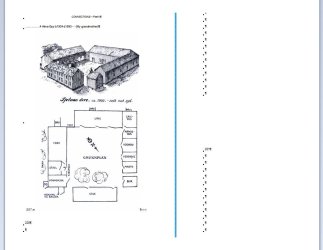
I haven't caught on to how to see the attachments I sent with my last post so I am not sure I posted a second pair so I will try again and maybe it will help mitchell65:o

As I have said, I am unable to select the greyed out paragraph marks to delete them.
thanks all.
(sorry uploaded a repeated image)
 

Attachments

  • 1 pg204  - 204.JPG
    1 pg204 - 204.JPG
    57.2 KB · Views: 0
  • 2 .jpg
    2 .jpg
    50.7 KB · Views: 1
  • 2 pg 206.JPG
    2 pg 206.JPG
    18.7 KB · Views: 0

My Computer My Computer

At a glance

Microsoft Windows 7 Ultimate 32-bitAMD Athlon(tm) II X3 435 Processor4.00 GB 2.75 GBNVIDIA GeForce GT 220
Computer type
PC/Desktop
Computer Manufacturer/Model Number
unknown
OS
Microsoft Windows 7 Ultimate 32-bit
CPU
AMD Athlon(tm) II X3 435 Processor
Motherboard
Gigabyte Technology Co., Ltd. GA-MA78LM-S2H
Memory
4.00 GB 2.75 GB
Graphics Card(s)
NVIDIA GeForce GT 220
Sound Card
(1) High Definition Audio Device (2) High Definition Audio
Hard Drives
External 931.51 GB
Fixed hard disk media, 3, 465.76 GB
Internet Speed
slow
Antivirus
avg free
Browser
internet explorer
Can you post a screenshot of your toolbar and also create a new test page with just a few words typed in it and post a screenshot of that as well?
 

My Computer My Computer

At a glance

Win 7 x64Core I5
Computer type
PC/Desktop
Computer Manufacturer/Model Number
Dell
OS
Win 7 x64
CPU
Core I5
How about saving one page as a separate .doc file attaching it here and I will open in my Word 2003 to see what I can do with it?
BTW I'm a bit confused. You show your country flag as UK but your time zone is the USA. Is that correct?
 

My Computer My Computer

At a glance

Microsoft Windows 7 Home Premium 64-bit 7601 ...Intel(R) Core(TM) i7-3770 CPU @ 3.40GHz8.00 GBIntel(R) HD Graphics 4000
Computer type
PC/Desktop
OS
Microsoft Windows 7 Home Premium 64-bit 7601 Multiprocessor Free Service Pack 1
CPU
Intel(R) Core(TM) i7-3770 CPU @ 3.40GHz
Motherboard
ASUSTeK COMPUTER INC. P8H77-M
Memory
8.00 GB
Graphics Card(s)
Intel(R) HD Graphics 4000
Sound Card
On Board
Monitor(s) Displays
Dell 24"
Screen Resolution
1920 x 1080
Hard Drives
(1) INTEL SSDSC2CT180A3 ATA Device (2) ST500DM002-1BD142 ATA Device (3) WDC WD3200AAKS-75L9A0 ATA Device (4) Generic- Compact Flash USB Device (5) Generic- MS/MS-Pro USB Device (6) Generic- SD/MMC USB Device (7) Generic- SM/xD-Picture USB
PSU
500w Corsair
Case
Cooler Master
Cooling
3 Fans
Keyboard
Logitech MK300
Mouse
Logitech WOM
Internet Speed
75Mb
Antivirus
Norton 360
Browser
Firefox, Opera, IE
Hi Xunile
"Can you post a screenshot of your toolbar and also create a new test page with just a few words typed in it and post a screenshot of that as well? "
Do you mean Words toolbar? It works just fine on any other Word Doc. No trouble to create a new page. The problem has something to do with the copying and pasting I have done for end notes.

Hi Mitchell65
""How about saving one page as a separate .doc file attaching it here and I will open in my Word 2003 to see what I can do with it?
BTW I'm a bit confused. You show your country flag as UK but your time zone is the USA. Is that correct? "
On this document 240 pages, I can print all right up to the screen shot pg of the floor plan I sent. The following pages do not show up except in print preview. I cannot highlight them or delete them. I am a fellow Cornwallian so I don't know why it shows a USA time zone or flag. I probably clicked some wrong button which is what I spend my time doing.
I really have spent weeks and weeks trying to cure this problem and I must move on so thanks everyone for you help but I am going to somehow make a new document.:)
 

My Computer My Computer

At a glance

Microsoft Windows 7 Ultimate 32-bitAMD Athlon(tm) II X3 435 Processor4.00 GB 2.75 GBNVIDIA GeForce GT 220
Computer type
PC/Desktop
Computer Manufacturer/Model Number
unknown
OS
Microsoft Windows 7 Ultimate 32-bit
CPU
AMD Athlon(tm) II X3 435 Processor
Motherboard
Gigabyte Technology Co., Ltd. GA-MA78LM-S2H
Memory
4.00 GB 2.75 GB
Graphics Card(s)
NVIDIA GeForce GT 220
Sound Card
(1) High Definition Audio Device (2) High Definition Audio
Hard Drives
External 931.51 GB
Fixed hard disk media, 3, 465.76 GB
Internet Speed
slow
Antivirus
avg free
Browser
internet explorer
Shame to give up now. On the time zone issue. Go to User CP at the top of this forum then under "Settings and Options" in the right hand panel, click "Edit options" then click "Date and Time options" In the Time Zone part click the little black arrow head and choose the GMT Western Europe London etc and click "Save Changes" at the bottom. Job Done.
 

My Computer My Computer

At a glance

Microsoft Windows 7 Home Premium 64-bit 7601 ...Intel(R) Core(TM) i7-3770 CPU @ 3.40GHz8.00 GBIntel(R) HD Graphics 4000
Computer type
PC/Desktop
OS
Microsoft Windows 7 Home Premium 64-bit 7601 Multiprocessor Free Service Pack 1
CPU
Intel(R) Core(TM) i7-3770 CPU @ 3.40GHz
Motherboard
ASUSTeK COMPUTER INC. P8H77-M
Memory
8.00 GB
Graphics Card(s)
Intel(R) HD Graphics 4000
Sound Card
On Board
Monitor(s) Displays
Dell 24"
Screen Resolution
1920 x 1080
Hard Drives
(1) INTEL SSDSC2CT180A3 ATA Device (2) ST500DM002-1BD142 ATA Device (3) WDC WD3200AAKS-75L9A0 ATA Device (4) Generic- Compact Flash USB Device (5) Generic- MS/MS-Pro USB Device (6) Generic- SD/MMC USB Device (7) Generic- SM/xD-Picture USB
PSU
500w Corsair
Case
Cooler Master
Cooling
3 Fans
Keyboard
Logitech MK300
Mouse
Logitech WOM
Internet Speed
75Mb
Antivirus
Norton 360
Browser
Firefox, Opera, IE
Hi again, thanks for help on time zone.
I know you say shame to give up now but I need to get this book done this winter. Still lots to do. Thank you so much for trying to help me. This forum has been so helpful in the past. Have good holiday:)
 

My Computer My Computer

At a glance

Microsoft Windows 7 Ultimate 32-bitAMD Athlon(tm) II X3 435 Processor4.00 GB 2.75 GBNVIDIA GeForce GT 220
Computer type
PC/Desktop
Computer Manufacturer/Model Number
unknown
OS
Microsoft Windows 7 Ultimate 32-bit
CPU
AMD Athlon(tm) II X3 435 Processor
Motherboard
Gigabyte Technology Co., Ltd. GA-MA78LM-S2H
Memory
4.00 GB 2.75 GB
Graphics Card(s)
NVIDIA GeForce GT 220
Sound Card
(1) High Definition Audio Device (2) High Definition Audio
Hard Drives
External 931.51 GB
Fixed hard disk media, 3, 465.76 GB
Internet Speed
slow
Antivirus
avg free
Browser
internet explorer
Back
Top