Unable to delete old partition

Broken32

New member
Local time
2:41 AM
Messages
10
Hi,
To install windows 7 I used unallocated space at the beginning of my hard disk (it was previously used for an installation of Ubuntu Linux which i stopped using). Now I wish to delete the old Vista partition. The delete volume... option in Disk Management was grayed out so I trued using DiskPart. Here is the commands I used.

=====#=====

C:\Users\Jake>diskpart

Microsoft DiskPart version 6.1.7100
Copyright <C> 1999-2008 Microsoft Corporation
On computer: ######

DISKPART> select disk 0

Disk 0 is now the selected disk.

DISKPART> select partition 2

Partition 2 is now the selected partition.

DISKPART> delete partition override

Virtual Disk Service error:
Delete is not allowed on the current boot, system, pagefile,
crashdump or hibernation volume.

=====#=====

What did I do wrong? That partition is not in the MBR (I have checked using bcdedit and the GUI under setup and recovery options. The pagefile is on C: (The Vista volume was labeled as D and then I unmounted it). Crashdump is %SystemRoot%\MEMORY.DMP. Not sure what the hibernation volume is but...

Is using GParted Live safe (I know that you generally can't modify NTFS without getting a stop error for the NTFS.sys file). But can you simply DELETE one without the .sys becoming corrupt?

Any input would be great.
Thanks
Jake
 

My Computer

OS
Windows 7 RC x64 EN
CPU
Q6600
Solve it by making the Windows partition "active" and make sure the boot manager, pagefile, hibernation file, etc. resides on that same partition. Then you can format the old partition all you want.

It's handy to have some extra tools in your arsenal. I often use something like Acronis Disk Director (on a bootable thumb drive) and VistaBootPro. Keep in mind that the Windows 7 DVD itself also has some startup (boot manager) repair tools.
 

My Computer

Computer Manufacturer/Model Number
Too many to list.
OS
XP, Seven, 2008R2
CPU
AMD, Intel, VIA
Motherboard
Various
Memory
Corsair, Kingston, etc.
Graphics Card(s)
ATI, NVIDIA
Monitor(s) Displays
Samsung
Hard Drives
Maxtor, Western Digital
Keyboard
qwerty
Internet Speed
22 Mb/s @ home, 1 Gb/s @ server
Other Info
All of my systems still run fastest on XP 32-bit for the most part. Win7 is fun to play with, but I still prefer XP for raw speed, security, and functionality.
OK It's marked as Active but the Old partition still has the "System" Flag. How do I change this?

Thanks
 

My Computer

OS
Windows 7 RC x64 EN
CPU
Q6600

My Computer

Computer Manufacturer/Model Number
Too many to list.
OS
XP, Seven, 2008R2
CPU
AMD, Intel, VIA
Motherboard
Various
Memory
Corsair, Kingston, etc.
Graphics Card(s)
ATI, NVIDIA
Monitor(s) Displays
Samsung
Hard Drives
Maxtor, Western Digital
Keyboard
qwerty
Internet Speed
22 Mb/s @ home, 1 Gb/s @ server
Other Info
All of my systems still run fastest on XP 32-bit for the most part. Win7 is fun to play with, but I still prefer XP for raw speed, security, and functionality.
Hi Broken 32,

Just to expand on sup3rsprt post.

It is not to do with the MBR.

The problem is that the Vista partition is the "System " partition - it contains files needed to boot into 7.

If you want to delete the Vista partition , you can Make the 7 partition the system one like this:

1. Go to folder options and make sure hidden files and Protected operating sytem files are showing.

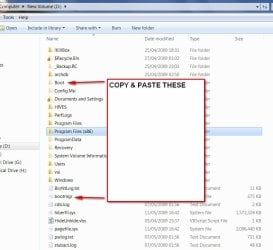
2. Copy and paste bootmgr and the pale yellow Boot folder from Vista partition to 7 partition. ( You will get a message bcd is in use and can't be copied - skip it and copy the rest)

BOOTMGR2009-05-11_182540.jpg
3. Open an elevated command prompt ( type cmd in start search - when it pops up, rt click and run as admin. )

At the prompt >, type:

bcdedit /export C:\Boot\bcd

It will look like this:

Microsoft Windows [Version 6.1.7100]
Copyright (c) 2009 Microsoft Corporation. All rights reserved.

C:\Windows\System32>bcdedit /export C:\Boot\bcd

press enter , close cmd prompt.

4. Go to Disk Management and rt click 7 partition - select Mark as Active.

5. Restart.

7 is now the "System" partition - don't worry about the auxiliary o/s files - they were created on restart.

Hope it helps.
 

My Computers

System One System Two

  • Computer type
    PC/Desktop
    OS
    7 X64
    CPU
    i5 8400
    Motherboard
    gigabyte b365m ds3h
    Memory
    2x8gb 3200mhz
    Hard Drives
    various
    PSU
    pure power 11 400w cm
    Case
    Coolermaster
    Cooling
    cryorig m9i
  • Computer type
    PC/Desktop
    OS
    7x64
    CPU
    g5400
    Motherboard
    ga b365m ds3h
    Memory
    8gb ddr4 2400
    PSU
    xfx pro 450w
Hi,

Thanks both for the help

All that was needed was to change the "Active" flag over to the Win7 Part. Then I ran a recovery, which resulted back in a dual boot, then deleted the Vista partition. Now it works.
 

My Computer

OS
Windows 7 RC x64 EN
CPU
Q6600
Nice job. Glad to help :)
 

My Computer

Computer Manufacturer/Model Number
Too many to list.
OS
XP, Seven, 2008R2
CPU
AMD, Intel, VIA
Motherboard
Various
Memory
Corsair, Kingston, etc.
Graphics Card(s)
ATI, NVIDIA
Monitor(s) Displays
Samsung
Hard Drives
Maxtor, Western Digital
Keyboard
qwerty
Internet Speed
22 Mb/s @ home, 1 Gb/s @ server
Other Info
All of my systems still run fastest on XP 32-bit for the most part. Win7 is fun to play with, but I still prefer XP for raw speed, security, and functionality.
Interesting, I am going to try that.

I will delete bootmgr and Boot folder from 7 partition and see if startup repair can replace them.
 

My Computers

System One System Two

  • Computer type
    PC/Desktop
    OS
    7 X64
    CPU
    i5 8400
    Motherboard
    gigabyte b365m ds3h
    Memory
    2x8gb 3200mhz
    Hard Drives
    various
    PSU
    pure power 11 400w cm
    Case
    Coolermaster
    Cooling
    cryorig m9i
  • Computer type
    PC/Desktop
    OS
    7x64
    CPU
    g5400
    Motherboard
    ga b365m ds3h
    Memory
    8gb ddr4 2400
    PSU
    xfx pro 450w
Hi Broken,

Thank you for reminding me to try that.

I had looked in the .wim for the 7 WINRE and found it contains bootsect.exe.

This is significant because it is not on the Vista recovery disc - tho. it is on the Vista dvd and bootsect commands can be performed from that in Winre.

I had meant to try the recovery options to see if they would be automated in 7 Winre - but had not got round to it.

I just tried it and indeed they are.

It took two runs - it seems the first creates the Boot folder on the Active partition, and the second creates bootmgr.

It also works on Vista.:D
 

My Computers

System One System Two

  • Computer type
    PC/Desktop
    OS
    7 X64
    CPU
    i5 8400
    Motherboard
    gigabyte b365m ds3h
    Memory
    2x8gb 3200mhz
    Hard Drives
    various
    PSU
    pure power 11 400w cm
    Case
    Coolermaster
    Cooling
    cryorig m9i
  • Computer type
    PC/Desktop
    OS
    7x64
    CPU
    g5400
    Motherboard
    ga b365m ds3h
    Memory
    8gb ddr4 2400
    PSU
    xfx pro 450w
I am pretty much in the same boat, but did some dumb things before reading this post. Here is a conversation I had with my tech friend.

i'm getting punished right now, you ever have a dual boot and once your new o/s was good to go you then wanted to get rid (format) of the old os but couldn't. I imagine if both weren't on the same disk i wouldn't be having this problem. found a pretty good page on the subject though
Lude says
ya not sure how that works
Jigady Jenx says
its devasting
pretty sure i just frakked his comp to, i just restarted it and it won't come back online
Lude says
whos
Jigady Jenx says
grandfather's
Jigady Jenx says
8 minutes down
hes gonna be soo pissed lol
Lude says
u have both on logmein?
Jigady Jenx says
yah but that vista is in no shape to actually boot up again
i did a retard move while i was there and just tried to delete everything off it to see if whatever was stopping disk management from formating it would disappear
after i deleted all i could it didn't help but it would still reset fine
apparently dual boot the 2nd o/s uses shiz off the first one to boot, which makes no sense to me.
so when i set vista to unactive that probably stopped it both from booting
Lude says
prolly
Jigady Jenx says
lol
Lude says
dual boot is gz
Jigady Jenx says
its kind of like a car and starter, active booting or w/e is the starter once the car/comp is running you can remove the starter/boot and it will still run, but one you turn engine/comp off it won't start up again
kinda neat

Lude says
ur a big neat guyyyyyyyyyy
Jigady Jenx says
Yah I'm assuming next step will be to pop in win7 disk boot off it and repair 7 which will then add the boot stuff needed and i will be able to format the vista partition. I'm sure it won't go that way.

Whats my next move?
 

My Computer

OS
Windows 7 Ultimate x64
cannot find file

Ive done everything here(used the bcdedit command line) and I still get "the store export operation has failed. the system cannot find the path specified" im trying to get ultimate to boot and ive been working for 3 days on it now. please help me.

Hi Broken 32,

Just to expand on sup3rsprt post.

It is not to do with the MBR.

The problem is that the Vista partition is the "System " partition - it contains files needed to boot into 7.

If you want to delete the Vista partition , you can Make the 7 partition the system one like this:

1. Go to folder options and make sure hidden files and Protected operating sytem files are showing.

2. Copy and paste bootmgr and the pale yellow Boot folder from Vista partition to 7 partition. ( You will get a message bcd is in use and can't be copied - skip it and copy the rest)

View attachment 15488
3. Open an elevated command prompt ( type cmd in start search - when it pops up, rt click and run as admin. )

At the prompt >, type:

bcdedit /export C:\Boot\bcd

It will look like this:

Microsoft Windows [Version 6.1.7100]
Copyright (c) 2009 Microsoft Corporation. All rights reserved.

C:\Windows\System32>bcdedit /export C:\Boot\bcd

press enter , close cmd prompt.

4. Go to Disk Management and rt click 7 partition - select Mark as Active.

5. Restart.

7 is now the "System" partition - don't worry about the auxiliary o/s files - they were created on restart.


Hope it helps.
 

My Computer

Computer type
PC/Desktop
OS
Windows 7 Ultimate x64
Back
Top